CapsLock for macOS: Vim-style control through Karabiner-Elements
Make Capslock Great Again!
At a glance
- What is it?
- Vonng/Capslock is a Karabiner-Elements configuration that turns CapsLock into an Escape key and Hyper modifier on macOS. It suits keyboard-focused developers who want navigation, deletion, mouse control, terminal commands, clipboard slots, and application shortcuts on ANSI keyboards.
- Who is it for?
- Adopt CapsLock if you use Karabiner-Elements on a supported ANSI-style macOS keyboard and regularly perform navigation, editing, terminal, or window-control actions from the keyboard. Do not choose it for a Windows workflow or a keyboard layout that does not match its remapping model.
- Can I use it commercially?
- Yes. Apache-2.0 is a permissive licence: you can use, modify and sell software built on it, as long as you keep its copyright and licence notices.
- Is it still maintained?
- Yes. The repository last received commits 99 days ago.
- What is it written in?
- Mainly HTML, according to GitHub's language statistics.
Answers come from the project's GitHub data, last synced on November 7, 2026, and from our analysis. They are not legal advice.
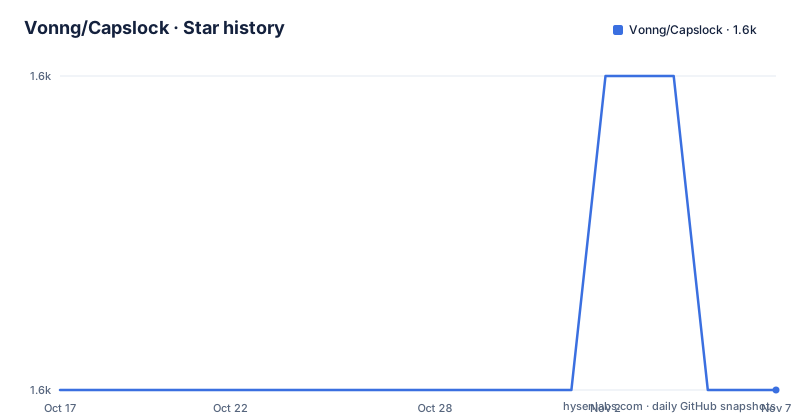
Star history
- Vonng/Capslock1,572 ★ · +0
| Repository | 2026-10-17 | 2026-11-07 |
|---|---|---|
| Vonng/Capslock | 1.6k | 1.6k |
0 Stars in the last 21 days, measured from the daily GitHub snapshot. Compare with other projects
Editorial analysis
Why Vonng/Capslock remaps CapsLock on macOS
Vonng/Capslock addresses a specific keyboard workflow problem: CapsLock occupies a useful physical position but normally emits only a lock-state command. The configuration assigns it two behaviors. A press emits Escape, while holding the key enables a Hyper modifier represented in the documentation as a star symbol. That turns the keyboard into a compact control surface for actions that normally require reaching for keys, a mouse, or several modifier combinations.
The project is aimed at developers and other keyboard-focused macOS users. Its documented categories cover Vim-style cursor movement and selection, deletion, mouse control, window and application operations, terminal and IDE commands, clipboard slots, symbolic input, screenshots, function keys, brightness, keyboard lighting, and volume. This is a broad remapping profile rather than a small CapsLock toggle utility.
The implementation targets ANSI keyboards and similar layouts. It explicitly remaps keys across several categories, so its usefulness depends on whether the physical keyboard and the user's habits fit the layout. The macOS configuration also assumes Karabiner-Elements and its Complex Modifications mechanism. It is not a self-contained keyboard daemon and does not appear to include a separate runtime application.
How the CapsLock Hyper control planes work
The central mechanism is a combination of CapsLock, Hyper, and four existing left modifiers. The README describes Hyper as working with Command, Option, Control, and Shift to create 16 control planes. The pictured page shows control plane 0, and the repository's Mac v3 configuration is imported as a JSON complex modification.
The same key chord can therefore mean different things depending on the additional modifiers held at the time. The documentation says combinations of four extra left modifiers define the control planes, while the v3 profile organizes functions into categories. This design gives the configuration depth without requiring a separate application interface for every shortcut.
Basic behavior is deliberately hybrid. Tapping CapsLock emits Escape, which preserves a familiar one-keystroke action. Holding it exposes the Hyper role used by the other mappings. The README's first exercise is cursor movement with CapsLock plus H, J, K, L, using Vim-style directional keys. Navigation extends beyond cursor movement to text selection, desktops, windows, tabs, mouse movement, and scrolling.
Other categories occupy adjacent or familiar key positions. The deletion section assigns `BNM,` to deletion operations. The keypad mapping acts as a mouse. Number keys 6 through 0 represent five clipboard slots, with Hyper plus Command and a number used for copying and Hyper plus a number used for pasting. Terminal mappings can send commands, launch Codex or Claude, and provide Vim or Tmux prefixes. The terminal mapping is a good reason to inspect the JSON before enabling every rule, because application assumptions may not match an existing setup.
Installing the Mac v3 Karabiner import
The README directs users to install Karabiner-Elements first. Its installation instructions identify Karabiner-Elements 16.1.0 as the version used to verify the guide in August 2026, and state that the current release supports macOS 13 through 27 on Intel and Apple silicon. This is a statement in the project documentation, not an independent compatibility test.
After installing `Karabiner-Elements.pkg`, open Karabiner-Elements Settings and grant the permissions requested by the application. The listed permissions include privileged and non-privileged background services, Accessibility, Input Monitoring, and the Driver Extension. In Virtual Keyboard, select the layout matching the physical keyboard. This selection matters because CapsLock is not a standalone mapping in a conventional text editor, it changes the interpretation of many subsequent keys.
Open the documented import URL in a browser:
karabiner://karabiner/assets/complex_modifications/import?url=https://raw.githubusercontent.com/Vonng/Capslock/main/mac_v3/capslock.jsonIn Karabiner-Elements Settings, select Complex Modifications, then Add predefined rule, then Import more rules from the internet. Choose Import in the browser, allow Karabiner to open, and enable the rules needed for the workflow. The README also provides a manual path: place `capslock.json` in `~/.config/karabiner/assets/complex_modifications/`, then use Add predefined rule.
For a first check, press CapsLock and move the cursor with H, J, K, and L. The README says this should exercise the navigation mapping. Use Karabiner-EventViewer to confirm that the imported rules are being recognized.
A practical first session with navigation and clipboard actions
The first useful test should be small. Open a text editor that supports Vim-style selection and cursor movement, then press CapsLock plus H, J, K, or L. The README presents this as the introductory movement test. After that, test the documented selection and deletion actions, but avoid changing terminal or IDE shortcuts until the basic modifier behavior is understood.
The clipboard category gives another concrete starting point. The README states that number keys 6 through 0 represent five text clipboards. Hyper plus Command followed by a number copies into a slot, while Hyper followed by a number pastes from it. The exact meaning of each number is not fully reproduced in the README, so the configuration file should be consulted before assuming which slot contains which content.
MouseKey is another substantial part of the profile. The README describes the keypad as a fully functional mouse, including cursor and wheel actions. This may be useful for keeping hand movement near the home row, but it also increases the number of keys whose normal function is replaced. Window-control rules can close applications, windows, or tabs and can target desktops or applications, while application shortcuts can launch or switch to frequently used applications.
The project therefore expects gradual adoption. A user who needs a conventional CapsLock lock, relies on unmodified number keys, or uses a layout that does not match the documented ANSI-oriented design should compare the imported rules with their existing Karabiner setup before enabling the full set.
Windows support and platform-specific limits
The repository contains `mac_v3/`, `mac_v2/`, `mac_v1/`, and `win/` directories, but the README identifies the current macOS focus and describes the historical Windows version as archived. The Windows history is useful context, not evidence that the current profile works on Windows. The installation guide is specifically for Karabiner-Elements on macOS, with System Settings permissions and Karabiner-EventViewer verification.
This boundary is important for adoption. CapsLock is a cross-platform name, but the documented v3 configuration depends on macOS Karabiner-Elements behavior, including its Complex Modifications import flow. A Windows user would need separate evidence and instructions for `win/`, which the README does not provide. There is also no Windows first-use tutorial in the README, so claiming parity would be misleading.
The primary-language label is HTML, but the functional artifact is the `mac_v3/capslock.json` configuration consumed by Karabiner-Elements. The `go.mod` and Hugo-related repository files indicate that the repository also includes a documentation site, not that users need to build a Go application to run the keyboard profile. The README does not document rollback, so users should preserve their previous Karabiner configuration state before enabling a large set of imported rules.
Comparing CapsLock with ordinary CapsLock behavior
The real alternative is a standard CapsLock key that only changes the lock state, with no Hyper layer and no project-provided navigation, mouse, clipboard, or terminal mappings. That alternative keeps the original meaning of CapsLock and introduces fewer remapped keys. It is the safer fit when CapsLock's lock function is important or when a physical key is assigned elsewhere in the operating system.
Vonng/Capslock takes a different approach. It makes CapsLock emit Escape when tapped and become a modifier when held, then delegates the resulting combinations to Karabiner-Elements. The alternative does not require importing a complex modification or reviewing a large JSON rule set. Vonng/Capslock offers a larger local control surface for users who accept that trade-off.
Another practical comparison is with maintaining every shortcut manually in Karabiner-Elements. The repository packages the mappings into named categories and imports them from one URL. The manual route, placing `capslock.json` in the complex-modifications directory, still requires understanding Karabiner's rule model. The project reduces setup repetition, but it does not remove the need to inspect conflicts with existing rules or to verify behavior in Karabiner-EventViewer.
Maintenance, versioning, and the Apache-2.0 boundary
The repository is not archived, and its last push was on 2026-08-01. The listed recent release is `v3`, identified as the CapsLock Enhancement Mac V3 Release and dated 2021-03-09. The README badge reports `v3.1.0`, so the release label and displayed version are not identical and should be checked against the actual files before relying on a specific version.
The README says the V3 configuration is the actively maintained target for macOS, while the Windows version is historical. Repository activity alone does not establish compatibility with every future macOS release or Karabiner-Elements change. Users upgrading Karabiner-Elements should review its official support matrix and re-check the imported rule behavior.
The repository is licensed under `Apache-2.0`. That license permits use and modification under its stated terms, including preservation of applicable notices and the license text. This review does not provide legal advice, and the license does not by itself guarantee compatibility with a particular Karabiner-Elements configuration or operating-system permission policy.
Editorial conclusion
Adopt CapsLock if you use Karabiner-Elements on a supported ANSI-style macOS keyboard and regularly perform navigation, editing, terminal, or window-control actions from the keyboard. Do not choose it for a Windows workflow or a keyboard layout that does not match its remapping model. Verify the imported Karabiner rules, your physical layout, accessibility permissions, and the expected CapsLock plus H, J, K, L behavior before migrating daily shortcuts.
Frequently asked questions
What does CapsLock by Vonng do on macOS?
The v3 configuration makes a CapsLock press emit Escape and makes holding CapsLock enable a Hyper modifier. Hyper is then used for navigation, deletion, mouse control, clipboard, window, application, terminal, and other documented shortcuts.
How do I install Vonng/Capslock?
Install Karabiner-Elements, grant its requested macOS permissions, and import `mac_v3/capslock.json` through Complex Modifications. The README also documents placing the JSON file in `~/.config/karabiner/assets/complex_modifications/` and adding it from Add predefined rule.
Which keyboards does Vonng/Capslock support?
The README states that CapsLock works on ANSI keyboards and similar layouts. It also asks users to select the Virtual Keyboard layout matching their physical keyboard, so unsupported or substantially different layouts may require configuration changes.
Does Vonng/Capslock work on Windows?
The repository contains a `win/` directory, but the README describes the current V3 profile as targeting macOS and calls the historical Windows version archived. The README does not document how to install or verify the Windows configuration.
What version of Vonng/Capslock is current?
The README badge displays `v3.1.0`, while the listed recent release is `v3`, dated 2021-03-09. Because those version indicators differ, users should verify the actual `mac_v3/capslock.json` file before assuming a release number.
Official sources
Add this badge to your README
If you maintain this project, the badge below links readers to this analysis and shows its maintenance status from the daily GitHub snapshot. Paste the markdown into your README; add ?metric=license or ?metric=stars to the image URL for a different field.

[](https://hysenlabs.com/projects/vonng-capslock)Star history chart for your README
[](https://hysenlabs.com/projects/vonng-capslock)Was this useful?