openflowkit gives every AI provider key a VITE_ prefix and a build-time home
100% Free, Open-source local-first AI diagramming for architecture diagrams and flowcharts with animated exports.
At a glance
- What is it?
- A browser diagramming studio that syncs a canvas with a diagram-as-code DSL, auto-matches icons from 1,600 catalog entries, and exports H.264 through WebCodecs, with an MCP server for driving it from an agent. The interesting parts are in the configuration: provider keys are VITE_ variables, the package is private at 0.1.1, and the root carries an npm workspaces field, a pnpm workspace file, a patch file, and a TypeScript build artifact.
- Who is it for?
- Openflowkit is worth trying if you want one canvas that both reads and writes a DSL, and you are willing to run a browser tool rather than a desktop one. Three things to check before you wire up AI generation.
- Can I use it commercially?
- Yes. MIT is a permissive licence: you can use, modify and sell software built on it, as long as you keep its copyright and licence notices.
- Is it still maintained?
- Yes. The repository last received commits 18 days ago.
- What is it written in?
- Mainly TypeScript, according to GitHub's language statistics.
Answers come from the project's GitHub data, last synced on November 25, 2026, and from our analysis. They are not legal advice.
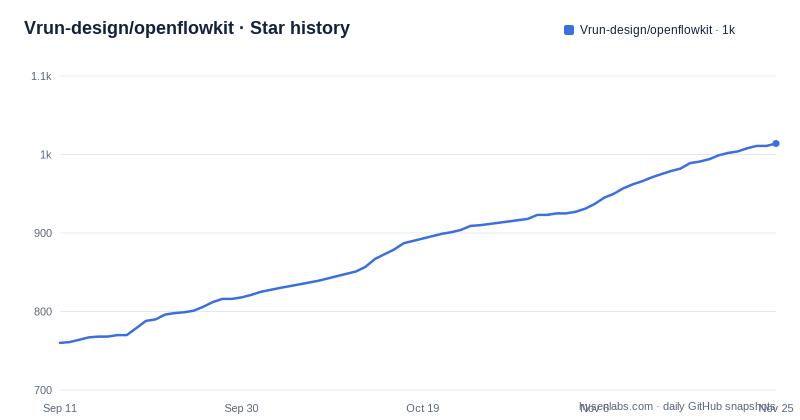
Star history
- Vrun-design/openflowkit1,014 ★ · +254
| Repository | 2026-09-11 | 2026-11-25 |
|---|---|---|
| Vrun-design/openflowkit | 760 | 1k |
254 Stars in the last 75 days, measured from the daily GitHub snapshot. Compare with other projects
Editorial analysis
Every AI provider key is a VITE_ variable, which is where bundlers put secrets
The example environment file is where the provider list becomes concrete, and every key in it is prefixed `VITE_`. The names run from Google Gemini to OpenAI, Anthropic Claude, Groq, NVIDIA NIM, Cerebras, and Mistral AI, each with a comment carrying that vendor's console URL. Three more follow for a custom or self-hosted OpenAI-compatible endpoint: a base URL, an API key, and a model, with Ollama at `http://localhost:11434/v1` given as the worked example. The `VITE_` prefix is Vite's convention for variables that get inlined into the client bundle at build time, and this project builds with Vite, so a value placed in the file whose header says to copy it to `.env.local` ends up inside the JavaScript that reaches the browser. The header says two other things that matter: all AI keys are optional because you can paste them into Settings instead, and you should never commit the real `.env.local` to git. Read together, those two lines point at the safer route.
Seven vendor consoles and one custom slot against a count of ten providers
The front page counts ten AI providers and separately names local Ollama as one of them. The environment template accounts for seven named vendor consoles plus a single custom OpenAI-compatible slot that Ollama occupies. The two numbers do not line up on their own, so three providers are accounted for by neither. That is not necessarily a mistake: providers can be chosen in Settings without an environment variable at all, and the header of that file says as much. But it does mean the count of ten is not something you can verify from the repository. It also means the configuration surface is split in two. A deployment that wants a provider available to everyone has to put a key in the environment file, and a user has to paste one into the interface, and there is no single place in the project where the full provider list is written down as configuration.
npm workspaces, a pnpm workspace file, and an npm lockfile at one root
Three package management artifacts sit at the top of the repository and they do not agree with each other. The manifest declares a `workspaces` array naming `web`, `docs-site`, and `mcp-server`, which is the npm form. A `pnpm-workspace.yaml` sits beside it, which is the pnpm form. And the lockfile is `package-lock.json`, not the pnpm lockfile. The Dockerfile settles the argument by copying the manifest, the npm lockfile, and the pnpm workspace file into the build stage and then running `npm ci` with audit and fund reporting switched off. So the build is an npm build that still carries a pnpm workspace file, and the pnpm file is in the image without being used to install anything. Git hooks are wired through `.husky/`, and the Dockerfile sets `CI=1` explicitly with a comment saying CI avoids running the husky prepare hook. The build script itself is three commands in sequence: a sitemap generator, a TypeScript project build, and a Vite build.
A patch file and a build artifact are committed at the repository root
Two files at the root are not source. `diff.patch` is a patch file sitting next to the code it would apply to, and `tsconfig.tsbuildinfo` is the incremental build artifact TypeScript writes when project references are enabled. Neither is mentioned anywhere on the front page, and the `.gitignore` next to them is not described either. Alongside them sit `_headers`, a headers file of the kind used by Cloudflare Pages and Workers deployments, and `wrangler.toml` for Workers itself, plus `skills-lock.json` and `.mcp.json` for the agent integration. So the root carries several deployment and integration targets rather than one, and it also includes a `signaling-server/` directory that no described feature accounts for. The feature list is a single user canvas with an export button, a DSL panel, and an icon matcher, with nothing described as collaborative or multi-user, which makes the presence of a signaling server the least explained part of the tree.
The container image is nginx and one dist directory, nothing else
The image is two stages and the runtime one contains no application. The builder is `node:20-alpine`, with a cache mount on the npm cache, an install, and then the build. The runtime stage is `nginx:1.27-alpine`, and it copies `nginx/nginx.conf` over the default configuration path plus the builder's `dist` directory into the nginx html root. Port 3045 is exposed, and the health check runs every thirty seconds with a five second timeout and three retries against `127.0.0.1:3045` using wget. The default command is nginx with daemon off. So a container built from this file gives you a static file server and nothing else: no application process, no database, and nothing in the runtime stage that could persist anything a user drew. That is the strongest form of the local-first claim in the project, since it is enforced by what the image omits rather than by a setting.
The icon matcher tries exact match, then alias, then substring
The Mermaid path is the part of the front page with a worked example in it:
flowchart TD
  API[Express API] --> DB[(PostgreSQL)]
  DB --> Cache[Redis Cache]
  Cache --> Queue[RabbitMQ]
Four lines of DSL, and the page says pasting that gives you the Express wordmark, the PostgreSQL elephant, the Redis logo, and the RabbitMQ icon. The mechanism behind it is five steps. You paste the Mermaid source on the canvas or in the code panel. A semantic classifier reads the node labels and detects technology names. An icon matcher then searches 1,600 plus icons across the developer, AWS, Azure, CNCF, and GCP catalogs, in a stated order: exact match first, then alias, then substring. An enricher assigns colours, icons, and provider SVGs to every node, and ELK layout arranges the result. Eight Mermaid families are accepted, named as flowchart, architecture, state, class, ER, sequence, mindmap, and journey. A separate card in the feature grid covers the other half of the layout problem, describing anchored layout where you pin nodes and auto-layout rearranges around them.
The Mermaid gate is three npm scripts over a named test corpus
Three scripts on the front page check how Mermaid input is handled: `npm run test:mermaid` for the parser, plugin, and round-trip gate, `npm run test:mermaid:layout` for the layout, import-state, and recovery corpus, and `npm run test:mermaid:gold` which runs the two together. The manifest spells out what each one selects. The broad gate globs the mermaid service tests, every diagram-type directory, and the round-trip suites. The layout gate names three files individually: `mermaidLayoutCorpus`, `compatFixtureCorpus`, and `editablePartialCorpus`. All three begin with a TypeScript project build before running the tests, so a type error fails the gate instead of passing it. Other gates in the manifest are named for stages rather than for features, with `test:s0` and `test:s10-state` among them, and those list individual test files by path instead of globbing. A build-time bundle budget exists too, with `bundle:check` running a budget script and `build:ci` running the build and then that check.
One table gives Mermaid a checkmark the table above denies
The front page carries two comparison tables and they disagree. The first is a list of what is missing from five tools, and its Mermaid.js row reads code-only with no visual canvas, no AI, and no interactive editor. The second is a feature grid, and its bidirectional diagram-as-code row gives Mermaid a checkmark. Those two cannot both describe the same property, since bidirectional editing means a visual canvas that writes the code back, which the first row says Mermaid does not have. The first table also covers five tools while the grid covers four of them: tldraw, Miro, and PlantUML appear in the prose table and not in the grid. And the closing claim, that this is the only MIT-licensed tool combining all of those properties, is a superlative the two tables do not establish, since the grid's own rows for several of those properties are marked absent in every other column by the same sheet that makes the claim.
Editorial conclusion
Openflowkit is worth trying if you want one canvas that both reads and writes a DSL, and you are willing to run a browser tool rather than a desktop one. Three things to check before you wire up AI generation. Every provider key in the example environment file carries a VITE_ prefix, which is the convention for values a bundler inlines into client JavaScript, so a key placed in the file the header tells you to copy into .env.local is a key that ends up in the shipped bundle. The same header says every key is optional because you can paste one into Settings instead, and that is the route to take if the deployment is not yours alone. Second, the container image contains only nginx and a dist directory, so the self-hosted path has no application process and nothing that persists a diagram; keeping diagrams in the browser is the local-first claim made structural. Third, the two comparison tables on the front page disagree with each other about Mermaid, so treat the feature grid as a claim rather than as a measurement.
Frequently asked questions
How do I configure an AI provider in openflowkit?
There are two routes. The example environment file holds one variable per vendor, all prefixed VITE_, covering Google Gemini, OpenAI, Anthropic Claude, Groq, NVIDIA NIM, Cerebras, and Mistral AI, plus a custom OpenAI-compatible base URL, key, and model for Ollama or similar. The file's header says every key is optional because you can paste one into Settings instead, and that the real .env.local must never be committed.
Does openflowkit run anything on the server?
The container image does not. The Dockerfile has a node build stage and an nginx:1.27-alpine runtime stage that copies only the nginx configuration and the built dist directory into the html root, exposes port 3045, and health checks against 127.0.0.1:3045. The runtime stage contains no application process and no database.
How does openflowkit match icons to diagram nodes?
Five steps: paste the Mermaid source, a semantic classifier detects technology names in the node labels, an icon matcher searches 1,600 plus icons across the developer, AWS, Azure, CNCF, and GCP catalogs trying exact match, then alias, then substring, an enricher assigns colors, icons, and provider SVGs, and ELK layout arranges the result. A separate card notes ELK runs off the main thread so the interface stays responsive.
Which Mermaid diagram types does openflowkit import?
Eight families: flowchart, architecture, state, class, ER, sequence, mindmap, and journey. The front page's feature grid names the same count as Mermaid import across 8 types, and three npm scripts gate the behaviour, test:mermaid, test:mermaid:layout, and test:mermaid:gold, each beginning with a TypeScript build before running its tests.
Is openflowkit available as a published npm package?
No. The manifest sets private to true at version 0.1.1, and the repository publishes no GitHub releases. The three workspaces declared are web, docs-site, and mcp-server, and the lockfile present is package-lock.json even though a pnpm-workspace.yaml also sits at the root.
Official sources
Add this badge to your README
If you maintain this project, the badge below links readers to this analysis and shows its maintenance status from the daily GitHub snapshot. Paste the markdown into your README; add ?metric=license or ?metric=stars to the image URL for a different field.

[](https://hysenlabs.com/projects/vrun-design-openflowkit)Star history chart for your README
[](https://hysenlabs.com/projects/vrun-design-openflowkit)Was this useful?