eslint-plugin-vue: the Vue linter that admits a minor release can add errors
Official ESLint plugin for Vue.js
At a glance
- What is it?
- eslint-plugin-vue lints Vue single file components by replacing the JavaScript parser with vue-eslint-parser, and its versioning policy says plainly that a minor update may report more problems than the one before it.
- Who is it for?
- eslint-plugin-vue suits a Vue team that wants the official rule set, understands the parser swap its rules depend on, and pins the plugin with a tilde instead of a caret so an update cannot turn a green build red overnight. It is a poor fit for a codebase that treats plugin updates as non-breaking by default.
- Can I use it commercially?
- Yes. MIT is a permissive licence: you can use, modify and sell software built on it, as long as you keep its copyright and licence notices.
- Is it still maintained?
- Yes. The repository last received commits 2 days ago.
- What is it written in?
- Mainly TypeScript, according to GitHub's language statistics.
Answers come from the project's GitHub data, last synced on November 15, 2026, and from our analysis. They are not legal advice.
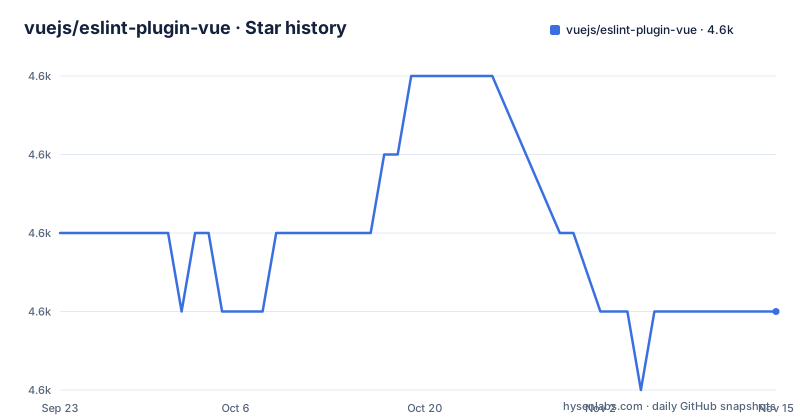
Star history
- vuejs/eslint-plugin-vue4,588 ★ · -1
| Repository | 2026-09-23 | 2026-11-15 |
|---|---|---|
| vuejs/eslint-plugin-vue | 4.6k | 4.6k |
-1 Stars in the last 53 days, measured from the daily GitHub snapshot. Compare with other projects
Editorial analysis
Minor releases may report more errors, which is why the tilde is recommended
The versioning section is the most important paragraph in this repository, and it starts with an admission: the plugin follows Semantic Versioning, but explicitly does not follow ESLint's own semantic versioning policy.
The reason given is speed. In a minor release the project may change the sharable configs it provides, or the default behaviour of its rules, in order to add features, and the stated aim is that users can take advantage of new Vue and Nuxt features easily. The consequence is spelled out too: any minor update may report more linting errors than the previous release did.
So the recommended install range is a tilde in package.json rather than a caret, because a caret lets a minor float in and a tilde does not. If your team uses `^10.11.1`, an update inside the major range can add errors to a build that was green, with no code change on your side.
The release cadence behind that advice is steady: v10.11.0 on 2026-09-06, v10.11.1 on 2026-09-24 and v10.12.0 on 2026-10-26, with the last push on 2026-10-31 and releases published through GitHub Releases alongside a CHANGELOG.md.
A .vue file is a custom format, so the default JavaScript parser has to go
The contribution guide states the reason a Vue rule cannot be written like an ordinary ESLint rule: single file components are not plain JavaScript but a custom file format, so the default parser has to be replaced.
The replacement is `vue-eslint-parser`, and what it produces is an enhanced AST containing nodes that represent the parts of the template syntax as well as the contents of the `<script>` tag. That single change is what makes template rules possible at all: there are now nodes for the template, and a rule can walk them.
For inspecting that AST, the guide points at AST Explorer with `Vue` selected as the syntax and `vue-eslint-parser` as the parser, which is the fastest way to see the node names your rule will receive. Two references sit behind that: the ESTree project page for the general shape of a JavaScript AST, and the vue-eslint-parser AST documentation for the Vue specific nodes.
If your rule assumes a plain program node and stops there, it will silently see nothing in the template half of a component.
Two parser services are how a rule reaches the template at all
Once the enhanced AST exists, the guide names the services a rule uses to traverse it:
context.parserServices.defineTemplateBodyVisitor(visitor, scriptVisitor)
context.parserServices.getTemplateBodyTokenStore()
The first registers a visitor for template body nodes with an optional companion visitor for script nodes, which is how one rule covers markup and JavaScript in the same pass. The second hands back a token store for the template, so a rule can report at a precise location inside markup rather than at the component root. The mustache-interpolation-spacing rule is given as the worked example of both.
Tests need one extra piece of care. Because the AST shape depends on the parser, the `RuleTester` parser property has to be set to match the code samples in the file, and the guide notes this can be decided test by test, pointing at attribute-hyphenation.test.ts as an example.
The fallback advice is practical rather than technical: many existing rules are available for reference, and the issue tracker is the place to ask when a rule seems impossible.
The published package is dist, generated by typegen then tsdown
The manifest is small about what ships and precise about how it is built:
"main": "dist/index.js",
"types": "dist/index.d.ts",
"build": "npm run typegen && tsdown",
"typegen": "node ./tools/generate-typegen.mjs"
Only `dist` is in the files array, so everything a consumer imports is generated output. The typegen step runs first and tsdown second.
Documentation has its own pipeline and its own generation step. `npm run docs:build` runs vitepress over the docs directory, and a predocs hook runs `node ./tools/update.js` first, with a separate `update-resources` script beside it. `netlify.toml` and `tsconfig.json` sit at the root with the rest of the build configuration.
Version bumps are a script chain, and it rewrites committed files
Publishing here is a sequence rather than a single command, and two of the steps modify the working tree on purpose:
"preversion": "npm test && git add .",
"version": "npm run generate:version && git add .",
"generate:version": "env-cmd --environments version -- npm run update && npm run lint:fix"
Before a version is cut, the test suite runs. When the version is set, `generate:version` runs under env-cmd so the update tool sees the new version value, regenerates the derived files, then runs lint:fix, and the result is staged. Release work then goes through changesets: `changeset:version` applies them and regenerates the version-derived files, while `changeset:publish` builds before publishing. The `.changeset/` directory at the root holds those changeset entries.
The practical thing to know is that a version bump is not a one-line edit: the scripts run the update tool and lint:fix, then stage everything with git add.
One lint pass covers the JavaScript and the Markdown, and the repo lints itself
The lint script is a pair of commands rather than one, running eslint across the project and markdownlint across all markdown files, with a fix variant for each. The configuration behind them is checked in at the root: `.markdownlint.yml`, `.markdownlintignore`, `.prettierrc`, `.prettierignore` and `.editorconfig`.
ESLint itself is configured through `eslint.config.mjs`, which is the flat config entry point, and there is a directory called `eslint-internal-rules/` holding rules the project uses on its own source.
What is not visible here is the configuration a consumer ships. The versioning section warns that those configs can change inside a minor release, so a project that extends a generated config should pin the plugin version rather than track it.
Tests split into unit and integration, and the debug mode turns off parallelism
Three test scripts exist, and their differences are informative. `test:base` runs the unit suite under `tests/lib` with the dot reporter, `test:integrations` runs a separate `tests/integrations` directory, and the plain `test` script runs everything through vitest.
The debug script is the one to copy when a rule misbehaves:
"debug": "vitest run --inspect --no-file-parallelism --reporter=dot tests/lib",
"new": "node tools/new-rule.js"
`--inspect` opens a debugger on the test run, and `--no-file-parallelism` serialises the files. The second flag is the informative one: a rule test that only fails inside the full suite, and passes alone, is usually depending on state another test file set up, and the serial mode is how you find which one.
Adding a rule is also a script rather than a manual copy, since `npm run new` calls tools/new-rule.js. Coverage has its own pair of scripts, with the report script doing nothing but print where the HTML report landed.
Editorial conclusion
eslint-plugin-vue suits a Vue team that wants the official rule set, understands the parser swap its rules depend on, and pins the plugin with a tilde instead of a caret so an update cannot turn a green build red overnight. It is a poor fit for a codebase that treats plugin updates as non-breaking by default. Before upgrading, read the rules added between your current version and the target, and confirm your flat config still resolves with the new version.
Frequently asked questions
Why does eslint-plugin-vue recommend a tilde range in package.json?
Because it follows Semantic Versioning but not ESLint's policy: a minor release may change the sharable configs or the default behaviour of rules, so any minor update can report more linting errors than the release before it.
Which parser does eslint-plugin-vue need for single file components?
vue-eslint-parser, because a .vue file is a custom file format rather than plain JavaScript. It produces an enhanced AST with nodes for template syntax as well as the contents of the script tag.
How do I write a new rule for eslint-plugin-vue?
Run npm run new, which calls tools/new-rule.js, and read the ESLint rule developer guide first. To inspect the AST, AST Explorer works with Vue selected as the syntax and vue-eslint-parser as the parser.
How is eslint-plugin-vue built and published?
The build script runs typegen and then tsdown, and only dist is published. Version bumps run tools/update.js and lint:fix through env-cmd, and releases go through changesets with a build step before publish.
Official sources
Add this badge to your README
If you maintain this project, the badge below links readers to this analysis and shows its maintenance status from the daily GitHub snapshot. Paste the markdown into your README; add ?metric=license or ?metric=stars to the image URL for a different field.

[](https://hysenlabs.com/projects/vuejs-eslint-plugin-vue)Star history chart for your README
[](https://hysenlabs.com/projects/vuejs-eslint-plugin-vue)Was this useful?