VueQuill for Vue 3: installation and editor integration
Rich Text Editor Component for Vue 3.
At a glance
- What is it?
- VueQuill wraps Quill 2 in a TypeScript component for Vue 3, with model binding, themes, toolbar configuration, SSR support, and access to the underlying editor instance. It suits Vue applications that want a WYSIWYG editor without managing Quill lifecycle integration by hand.
- Who is it for?
- VueQuill is a practical choice for Vue 3 applications that accept Quill as the editing engine and need a component-level binding layer. It is less suitable for projects requiring a non-Quill document model, server-side editing, or a fully custom editor architecture.
- Can I use it commercially?
- Yes. MIT is a permissive licence: you can use, modify and sell software built on it, as long as you keep its copyright and licence notices.
- Is it still maintained?
- Yes. The repository last received commits 6 days ago.
- What is it written in?
- Mainly TypeScript, according to GitHub's language statistics.
Answers come from the project's GitHub data, last synced on November 7, 2026, and from our analysis. They are not legal advice.
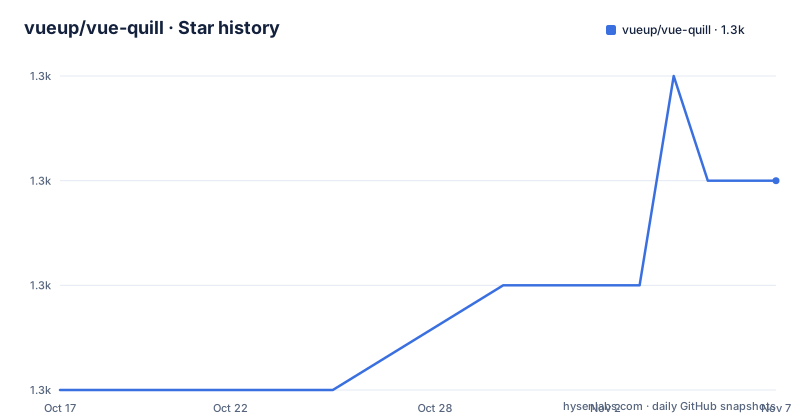
Star history
- vueup/vue-quill1,348 ★ · +2
| Repository | 2026-10-17 | 2026-11-07 |
|---|---|---|
| vueup/vue-quill | 1.3k | 1.3k |
2 Stars in the last 21 days, measured from the daily GitHub snapshot. Compare with other projects
Editorial analysis
Why VueQuill wraps Quill for Vue 3
VueQuill addresses a specific integration problem: placing Quill inside a Vue 3 application without manually coordinating the editor with Vue state. It is intended for developers building forms, content management screens, documentation tools, and other interfaces that need rich text input. The underlying editing model remains Quill's, rather than a separate editor implementation created by VueQuill.
The wrapper is written entirely in TypeScript and exposes `QuillEditor` as a Vue component. Its main documented interface uses `v-model:content` to bind editor content to a Vue ref or reactive value. HTML or plain text handling is selected through `content-type`, while `snow` and `bubble` presentation choices come from imported Quill theme stylesheets. Toolbar behavior is controlled through the `toolbar` prop, with the README using the `minimal` value in its first example.
This makes the package more specific than a generic Vue wrapper. It is built around Quill 2, which is included as a dependency, and it exposes the underlying Quill instance when an application needs lower-level access. The practical division of responsibility is clear: Quill supplies the editor, while VueQuill handles its use as a Vue 3 component. Teams that want a different document format or editing engine should not assume that this package abstracts those choices away.
VueQuill content binding and Quill instance access
The documented data path starts with a Vue ref, passes its current value through `v-model:content`, and lets the component receive edited content back into that ref. The README initializes this state with an HTML paragraph and explicitly sets `content-type="html"`. That distinction matters because editor content is not an untyped string shared across every use case. Applications binding HTML or plain text must select the corresponding content handling rather than rely on an undocumented default.
Theme styling is external to the component markup. A Vue application imports `@vueup/vue-quill/dist/vue-quill.snow.css` when using the `snow` theme. The guide also names `bubble` as another available theme, so choosing a theme requires both the prop value and the matching stylesheet. Omitting the stylesheet would leave the application without the presentation that the theme package is intended to provide.
For lower-level operations, the README states that VueQuill exposes the underlying Quill instance. That is useful when an editor feature cannot be expressed through the wrapper's basic API. It also means that application code may need to understand Quill as well as VueQuill. The README excerpt does not provide the exact instance-access syntax or enumerate supported Quill methods, so those details need to come from the linked API documentation rather than be inferred from the package name.
For server-rendered applications, the stated design is that VueQuill can be imported during Vue server-side rendering and initializes Quill in the browser. This addresses the common mismatch between server output and a browser-only editor. It does not mean that the editor becomes available during server rendering.
Installing VueQuill and creating the first editor
The README documents installation through npm, Yarn, or pnpm. For a new Vue 3 single-file component, install the published package first:
npm install @vueup/vue-quill@latestThe component and theme stylesheet are imported in the component script. The example below follows the README Quick Start configuration, with `v-model:content`, HTML content, the `snow` theme, and a minimal toolbar:
<script setup>
import { ref } from 'vue'
import { QuillEditor } from '@vueup/vue-quill'
import '@vueup/vue-quill/dist/vue-quill.snow.css'

const content = ref('<p>Hello VueQuill!</p>')
</script>
The template mounts the component and binds its content state:
<template>
  <QuillEditor
    v-model:content="content"
    content-type="html"
    theme="snow"
    toolbar="minimal"
  />
</template>
At this point the editor should display the initial HTML content and write changes back to `content`. The stylesheet import is part of the working example, not optional decoration. The same tutorial can be adapted to `pnpm` or Yarn by using the corresponding command from the README. The repository's root `package.json` declares `node >=22.22.1` for the private development package, but that declaration does not by itself establish the runtime requirement for every consumer of the published component.
Toolbar, themes, and API surface decisions
VueQuill separates presentation and editing controls from the content binding. The documented `theme` prop selects the Quill theme, and the README requires the corresponding theme stylesheet. The `toolbar` prop accepts a toolbar configuration; the Quick Start uses `minimal`, which keeps the first example small. Projects that need a different set of controls must consult the linked toolbar guide because the README does not enumerate every accepted value or explain how custom toolbar groups are declared.
The API is broader than the basic props shown in the Quick Start. The documentation navigation lists separate pages for props, events, methods, slots, and exports. That structure identifies several extension points, but it does not provide enough detail here to state what each method or event guarantees. A review of the target application's requirements should therefore distinguish between editor state, user actions, and direct Quill access before selecting an API surface.
The value of the wrapper is greatest when these configuration points remain conventional Vue component bindings. Its cost is an additional abstraction layer between application code and Quill. Code that relies on Quill-specific behavior must still use Quill concepts even when it is entered through a Vue event or prop. Teams should compare those needs with direct Quill integration instead of assuming that a Vue wrapper removes every dependency on the underlying editor.
TypeScript and server-rendering boundaries
The README identifies TypeScript as the implementation language for VueQuill, and the repository layout includes package sources, API extraction configuration, examples, and documentation. The package-level public API is intended for typed Vue development, although the Quick Start uses a `<script setup>` example. Teams using TypeScript may want to inspect the generated declarations and their editor-specific types before deciding how to wrap VueQuill in their own application abstractions.
Server-side rendering support has a precise boundary. The component can be imported in a Vue SSR application, but Quill initialization occurs in the browser. The README does not describe placeholder markup, hydration mismatch handling, or server-side editing, so those cases should not be inferred from the phrase "SSR friendly." A Nuxt example exists under `examples/nuxt-app/`, but the README excerpt does not document its behavior or setup commands.
This design is suitable when the server needs to render the surrounding page while the browser owns the interactive editor. It is not evidence that Quill can process document content on a server without a browser environment.
Direct Quill integration as an alternative
The clearest alternative is to integrate Quill directly in the Vue 3 application rather than install `@vueup/vue-quill`. Both approaches use Quill 2, but the ownership boundary differs. Direct integration requires the application to create and manage the Quill instance, editor state, theme assets, toolbar configuration, and synchronization with Vue reactivity. VueQuill supplies the Vue-facing component and binding layer, while still leaving the Quill instance available for lower-level work.
That difference is significant for applications with unusual editor requirements. A direct integration can avoid the VueQuill component layer when the project already has a carefully designed editor service. VueQuill is more convenient when the desired behavior fits its documented props, model binding, themes, and methods. The README does not indicate that VueQuill changes Quill's document format, toolbar semantics, or output beyond the content-type and binding configuration it exposes.
The alternative should therefore be chosen based on architecture, not on assumptions that one package produces different rich text output. The project documentation does not provide a direct Quill comparison, so the practical test is whether the Vue wrapper matches the existing Vue state model without forcing custom integration code.
Maintenance, releases, and MIT adoption cost
The repository is not archived, and the last push was on 2026-10-11. Recent releases include v1.5.5 and v1.5.4 on 2026-06-19, followed by v1.5.3 on 2026-06-03. This indicates recent repository activity, but it does not establish compatibility with every Vue 3 or Quill configuration. The default branch is `master`, and the repository publishes its documentation and examples through the project homepage.
Upgrade work is not fully specified in the README. Since VueQuill depends on Quill 2, an upgrade can involve both the Vue component package and Quill's behavior, theme assets, and toolbar configuration. The repository includes a `CHANGELOG.md`, but its contents are not included here, so the release history cannot be used to claim that upgrades are automatic or free of breaking changes. Applications should compare the target release's props, content handling, and CSS asset path before changing package versions.
The repository identifies the project as MIT licensed. The practical license check is to preserve the copyright and permission notice included with the distributed source or package, subject to the applicable license terms. That is a compliance point to verify in the package distribution and application release process, not a prediction about how a particular organization interprets the license.
Editorial conclusion
VueQuill is a practical choice for Vue 3 applications that accept Quill as the editing engine and need a component-level binding layer. It is less suitable for projects requiring a non-Quill document model, server-side editing, or a fully custom editor architecture. Before adoption, verify toolbar options, content serialization behavior, required theme CSS, and access to the underlying Quill instance in the target application.
Frequently asked questions
How do I install VueQuill in a Vue 3 project?
Run `npm install @vueup/vue-quill@latest`, then import `QuillEditor` and the theme stylesheet in the Vue component. The README also documents equivalent Yarn and pnpm installation commands.
How do I bind HTML content with VueQuill?
Create a Vue ref, pass it with `v-model:content`, and set `content-type="html"`. The README also tells users to select and import either the `snow` or `bubble` theme stylesheet.
Can I access the Quill editor instance from VueQuill?
Yes. The README states that VueQuill exposes the underlying Quill instance, although the excerpt does not show the exact access syntax or list the available methods.
Does VueQuill work with Vue server-side rendering?
The README describes VueQuill as SSR friendly and says it can be imported in Vue SSR applications while Quill initializes in the browser. It does not document server-side editing or server-side Quill initialization.
Official sources
Add this badge to your README
If you maintain this project, the badge below links readers to this analysis and shows its maintenance status from the daily GitHub snapshot. Paste the markdown into your README; add ?metric=license or ?metric=stars to the image URL for a different field.

[](https://hysenlabs.com/projects/vueup-vue-quill)Star history chart for your README
[](https://hysenlabs.com/projects/vueup-vue-quill)Was this useful?