VueUse 15 requires Vue 3.5, and the add-ons stay separate packages
Collection of essential Vue Composition Utilities for Vue 3
At a glance
- What is it?
- VueUse is a TypeScript collection of Composition API utilities published as @vueuse/core, with a CDN path, optional add-ons and a strict link between its version and your Vue version. The constraints that decide whether it fits are the Vue floor, what the add-ons leave out of core, and the fact that its own size and test claims are self-measured.
- Who is it for?
- Reach for VueUse when you want a handful of Composition API utilities without writing them yourself, and when your Vue version already satisfies the floor you need. Two checks come first.
- Can I use it commercially?
- Yes. MIT is a permissive licence: you can use, modify and sell software built on it, as long as you keep its copyright and licence notices.
- Is it still maintained?
- Yes. The repository last received commits 4 days ago.
- What is it written in?
- Mainly TypeScript, according to GitHub's language statistics.
Answers come from the project's GitHub data, last synced on November 14, 2026, and from our analysis. They are not legal advice.
Star history
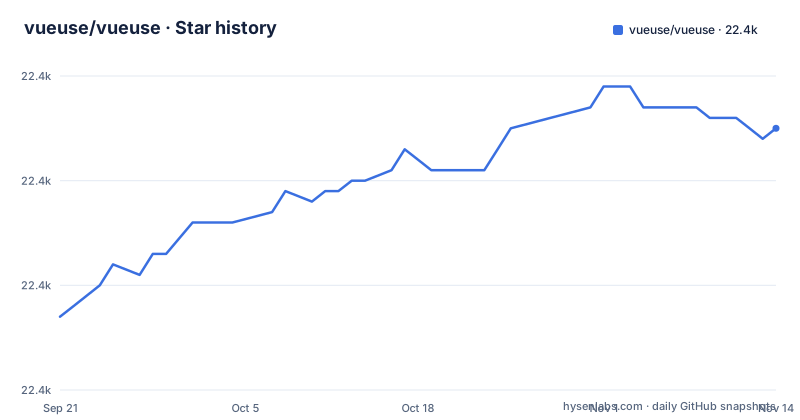
- vueuse/vueuse22,395 ★ · +18
| Repository | 2026-09-21 | 2026-11-14 |
|---|---|---|
| vueuse/vueuse | 22.4k | 22.4k |
18 Stars in the last 54 days, measured from the daily GitHub snapshot. Compare with other projects
Editorial analysis
VueUse 12 ended Vue 2 support and v14 moved the floor to Vue 3.5
Three version rules sit in the install notes, and each one closes a door. From v14.0, VueUse requires Vue v3.5 or newer. From v13.0 it required Vue v3.3 or newer. From v12.0 it dropped Vue 2 entirely, and the instruction for Vue 2 codebases is to stay on v11.x. The consequence for a reader is that the installable package is a function of your Vue version, not only of your appetite for new code. An application on Vue 3.4 cannot take v14 or v15 without upgrading Vue first, so a routine dependency bump becomes a framework bump. A Vue 2 project is not waiting out a slow release; that line closed. The latest release recorded is v15.0.0 on 2026-09-16, preceded by v14.4.0 in July 2026 and v14.3.0 in May 2026, so v14 and v15 sit close together in time and a team delaying a major bump is not falling far behind the current line.
The CDN path loads @vueuse/shared first and lands on window.VueUse
The no-bundler route is two script tags, and the order is not arbitrary:
<script src="https://unpkg.com/@vueuse/shared"></script>

<script src="https://unpkg.com/@vueuse/core"></script>
Everything is then exposed on a single global, window.VueUse, so a page with no build step can still reach the utilities. What this route costs is the module boundary. With no import list there is nothing to trim, so nothing on this path is tree shaken and the whole library lands in the page. The tags also point at unpinned unpkg URLs, so what runs is whatever that host serves at request time rather than a version your project declared. And the global is spelled window.VueUse with a capital U, a detail that costs you nothing in a TypeScript project and costs you a failed line in a plain script.
useLocalStorage takes a key and a default object, and the example stops there
The usage snippet is short enough to take in whole, and it shows the calling shape:
import { useLocalStorage, useMouse, usePreferredDark } from '@vueuse/core'

const { x, y } = useMouse()

// if user prefers dark theme
const isDark = usePreferredDark()

// persist state in localStorage
const store = useLocalStorage(
  'my-storage',
  {
    name: 'Apple',
    color: 'red',
  },
)
Three utilities are imported by name in one statement. useMouse is destructured into x and y. usePreferredDark is called with no arguments and returns something you name yourself, here isDark. useLocalStorage receives a string key and a default value, and that default is an object with two fields. What the snippet does not tell you is what happens when the stored value no longer matches the shape of that default, or how often writes reach localStorage. Those answers live on the function pages, not here.
Tree shakeable is a claim your bundler has to confirm
Fully tree shakeable is the feature claim that swings most install decisions, and it is also the one the project tries to keep measurable. The feature list links a bundle size page, and the repository ships its own measurement script behind the size npm script:
tsx scripts/export-size.tsPackaging runs across the workspace through turbo, and the documentation build needs its heap ceiling raised, with NODE_OPTIONS set to --max-old-space-size=5120 on the vitepress build step. Those details matter for reading the claim honestly, because they show the project measures sizes itself, against its own build of its own packages. No byte figure for @vueuse/core appears in the README, and shaking depends on your bundler and on the import being statically analysable. Consequence for a reader: the published size page and the size script are where to start, and a measurement taken inside your own build is the only number that settles the question for your app.
npm test runs one vitest project and never touches a browser
The test scripts show that confidence comes from several environments, and the default command is not the widest of them. The test script resolves to a single invocation:
nr test:unit --project=serverEverything else is a separate vitest project you have to name yourself: unit, server, browser on chromium, browser on firefox, browser on webkit, and an exports project listed on its own. The coverage script combines three of them in one run. The consequence for a contributor is concrete, since the command you reach for first excludes the browser projects entirely, and anything that only misbehaves in a real browser stays invisible until you run the browser script by hand. The exports project is likewise its own command rather than folded into the unit run, so a change to a public entry point has a dedicated check. The up script chains taze with the size measurement.
A release regenerates skills, rebuilds everything and re-measures size
Releases run through one script, and its shape says how the workspace is managed. The release script delegates to bumpp with a prepare step, applied across all packages and opening a pull request, and that prepare step runs three things in order: update:skills, a full build, and the size measurement. The repository has a skills/ directory, so its contents are refreshed as part of shipping a version rather than by hand. Fixes reach older lines through a separate script:
tsx scripts/backport.tsPublishing is its own script, tsx scripts/publish.ts, and redirect building is another, tsx scripts/redirects.ts. The root package is private, named @vueuse/monorepo and versioned 15.0.0, so that number tracks the whole workspace rather than one published package. Working on the repository needs Node 22 or newer, and pnpm 11.25.0 is the pinned package manager. None of that constrains consumers of the package, only contributors.
Router, Firebase and RxJS live in add-ons, not in core
A good deal of the functionality people expect from a utility library is deliberately outside @vueuse/core. The feature list points at add-ons covering Router, Firebase and RxJS, and the install section links a Nuxt module next to them. Consequence for a reader: the core package will not satisfy a plan that depends on those integrations, and the README neither enumerates the full add-on catalogue nor states which Vue version each add-on targets. For those details, the releases page, the add-ons page and the Nuxt module page are the places to check.
Editorial conclusion
Reach for VueUse when you want a handful of Composition API utilities without writing them yourself, and when your Vue version already satisfies the floor you need. Two checks come first. If you are on Vue 3.4 or Vue 2, the choice of package is made for you, so verify the version note before anything else. Second, treat the self-reported size and tree shaking figures as claims to reproduce, since the project measures its own builds with scripts/export-size.ts and gives no byte count for @vueuse/core in the README. If your plan depends on a router, Firebase or RxJS integration, budget for the add-on packages as separate version decisions rather than assuming they ship inside core.
Frequently asked questions
what is vueuse
VueUse is a collection of essential Vue Composition Utilities for Vue 3, written in TypeScript and released under the MIT license. It ships as @vueuse/core, with optional add-ons for Router, Firebase and RxJS, and it can also be loaded from a CDN without a bundler.
how to install vueuse
The install command is npm i @vueuse/core. Which version you can take depends on your Vue version: v14.0 and above require Vue 3.5+, v13.0 required Vue 3.3+, and Vue 2 projects are directed to v11.x because support ended at v12.0.
how to install vueuse core
@vueuse/core is the package installed from npm. Without a bundler you can load it from a CDN instead, loading @vueuse/shared first and then @vueuse/core, which exposes everything on window.VueUse. The add-ons and the Nuxt module are documented separately from the core package.
is vueuse good
The project states that VueUse is fully tree shakeable, type strong, SSR friendly, usable via CDN with no bundler, and configurable through event filters and targets. It publishes a bundle size page and measures sizes with scripts/export-size.ts, so those claims can be checked against its own tooling rather than taken on trust.
vueuse alternative
For Vue 2 there is no forward path: support ended at v12.0 and the install notes point Vue 2 users to v11.x. The project credits react-use, u3u/vue-hooks, logaretm/vue-use-web and kripod/react-hooks as the projects that inspired it.
Official sources
Add this badge to your README
If you maintain this project, the badge below links readers to this analysis and shows its maintenance status from the daily GitHub snapshot. Paste the markdown into your README; add ?metric=license or ?metric=stars to the image URL for a different field.

[](https://hysenlabs.com/projects/vueuse-vueuse)Star history chart for your README
[](https://hysenlabs.com/projects/vueuse-vueuse)Was this useful?