FullCalendar v7: A Plugin-Based Drag and Drop Calendar for JavaScript
Full-sized drag & drop event calendar in JavaScript
At a glance
- What is it?
- FullCalendar is an MIT-licensed, TypeScript calendar library whose v7 line splits themes, views and interaction into separate plugins. This review covers how the plugin model works, how to install it from npm, and where the framework connectors and the MIT licence stop.
- Who is it for?
- Adopt FullCalendar if you need a month, week or day grid with drag and drop events in vanilla JavaScript or through the React, Angular, Vue or other connectors, and if you can pin the exact v7.1.3 packages your build resolves. Do not assume it covers a scheduling or resource-timeline view: the README does not describe one, and the homepage is where premium products are described.
- Can I use it commercially?
- Yes. MIT is a permissive licence: you can use, modify and sell software built on it, as long as you keep its copyright and licence notices.
- Is it still maintained?
- Yes. The repository last received commits 2 days ago.
- What is it written in?
- Mainly TypeScript, according to GitHub's language statistics.
Answers come from the project's GitHub data, last synced on November 14, 2026, and from our analysis. They are not legal advice.
Star history
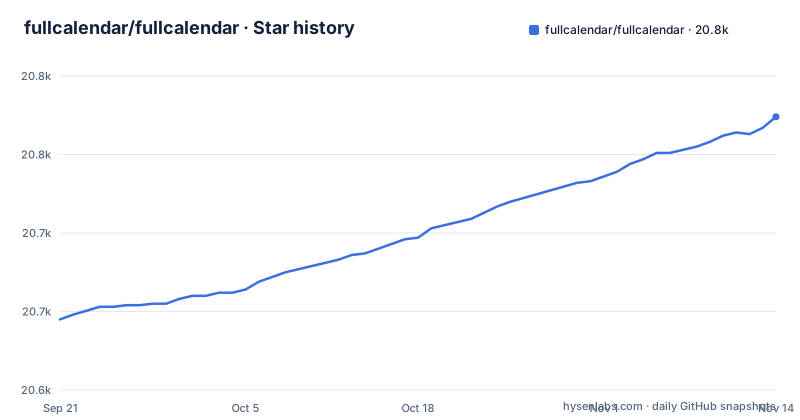
- fullcalendar/fullcalendar20,774 ★ · +129
| Repository | 2026-09-21 | 2026-11-14 |
|---|---|---|
| fullcalendar/fullcalendar | 20.6k | 20.8k |
129 Stars in the last 54 days, measured from the daily GitHub snapshot. Compare with other projects
Editorial analysis
What FullCalendar solves, and who it is actually for
FullCalendar renders a full-sized event calendar in the browser and lets users drag and drop events on it. The repository description calls it a "Full-sized drag & drop event calendar in JavaScript", and the repository is written in TypeScript under the MIT licence. The intended user is a front-end developer who needs a month, week or day grid embedded in an existing application rather than a hosted scheduling product.
The library is not a backend. It renders events you supply as an array of objects, and the README's own example passes an events array. Anything beyond that, persistence, permissions, time zone handling on the server, is the application's job. That division is the main reason to pick it: you keep your own data layer and the calendar stays a view.
It is also not a single package. The README lists connectors for React, Angular, Vue, Preact, Web Component and Salesforce LWC, and the usage example imports plugins for the classic theme, the day grid and interaction separately. Anyone expecting one import that does everything will be surprised by how much of the setup is assembling pieces.
The plugin architecture: themes, views and interaction are separate imports
The v7 usage example shows the mechanism plainly. You construct a Calendar with a DOM element and an options object, and the plugins array decides what that instance can render. The example passes classicThemePlugin, dayGridPlugin and interactionPlugin. Remove interactionPlugin and the calendar still renders but is not editable; remove dayGridPlugin and there is no month grid to show. The plugins array is the feature switch.
Options sit alongside plugins in the same object. initialView picks the starting view, editable turns on editing, and events supplies the data. The Calendar instance is created first and only painted when render() is called, which matters if you are mounting into a container that is not yet in the document.
Styling is also explicit. The example imports skeleton.css, then the classic theme's theme.css and palette.css. Those are separate files, so a build that drops CSS imports will produce an unstyled calendar rather than an error. That is a real failure mode worth knowing before you debug layout.
The repository itself is a monorepo: package.json is private, named @fullcalendar-monorepos/standard, and the workspace is driven by pnpm with turbo.json at the top level. The published packages live under packages/. The version in the root manifest is 7.1.3, matching the latest release listed for the project.
Installing FullCalendar from npm and rendering a first calendar
The README gives one install command for the vanilla-JS package. Run it in your project root:
npm install fullcalendar temporal-polyfillAfter that, the README's usage example is the shortest path to something on screen. It imports the Calendar class, three plugins and three stylesheets, then creates and renders the instance:
import { Calendar } from 'fullcalendar'
import classicThemePlugin from 'fullcalendar/themes/classic'
import dayGridPlugin from 'fullcalendar/daygrid'
import interactionPlugin from 'fullcalendar/interaction'

import 'fullcalendar/skeleton.css'
import 'fullcalendar/themes/classic/theme.css'
import 'fullcalendar/themes/classic/palette.css'

const calendarEl = document.getElementById('calendar')
const calendar = new Calendar(calendarEl, {
  plugins: [classicThemePlugin, dayGridPlugin, interactionPlugin],
  initialView: 'dayGridMonth',
  editable: true,
})

calendar.render()
You need an element with id="calendar" in your markup for getElementById to find. What you should see is a month grid, with events draggable because editable is true and interactionPlugin is loaded. If the grid appears unstyled, the three CSS imports are the first thing to check.
The README also notes that temporal-polyfill is a peer dependency, which is why it is part of the install command.
Where the MIT licence ends and the premium products begin
The repository states an MIT licence, and package.json repeats it with a copyright line for 2026 Adam Shaw. For the code in this repository that is straightforward: you can use, modify and redistribute it under those terms. Nothing here is legal advice, and the LICENSE.md file is the document that governs.
The confusion worth heading off is that FullCalendar as a product is wider than this repository. The README's link list points to the project website rather than describing paid tiers, and it does not document pricing, licence keys or premium entitlements. If your requirement is resource scheduling rather than a day grid, the homepage is the place to resolve whether that is covered.
Maintenance, release cadence and what upgrading costs you
The last push to the default branch was on 2026-10-16, and the most recent release, v7.1.3, was published the same day. That is recent, and the repository is not archived. The release list shows v7.1.2 on 2026-10-12 and v7.1.3 on 2026-10-16, alongside v6.1.22, so the v7 line is receiving patch releases rather than sitting still.
Upgrade cost depends on where you are coming from. The README does not document a migration path, and the changelog is a separate file you have to open yourself. There is no deprecation table in what the project publishes here, so treat the CHANGELOG.md as the authority before bumping a major version.
There is a second cost that is easy to miss: the plugin split means a version bump can change several packages at once. If you import the theme, the day grid and interaction separately, all three need to move together, and the CSS import paths are part of that surface. Pinning exact versions in package.json is cheaper than discovering a mismatched theme after deploy.
If you build from the monorepo rather than installing published packages, note the engine constraint. package.json declares "pnpm": ">=10.15.0", and the README says the repo must be installed with PNPM. The available scripts are build, dev, test, test:dev, lint and clean, with a ci script that runs lint, build and test in sequence. None of that applies to consumers of the published npm package.
Framework connectors, and when FullCalendar is the wrong choice
The README links connectors for React, Angular, Vue, Preact, Web Component and Salesforce LWC, each to a documentation page. That is the honest answer to the common question of whether FullCalendar works in a given framework: it does, through a wrapper that adapts the vanilla Calendar to the framework's component model, not through the core package. The vanilla install command in the README is for the framework-agnostic package only.
The clearest case where FullCalendar is the wrong tool is a server-rendered application that needs a calendar in the first paint. The library constructs a Calendar against a DOM element and calls render(), and the README's example reaches for document.getElementById. That is browser work. If your stack renders HTML on the server and you want the calendar to exist before JavaScript loads, you are adding a client-side mount regardless of framework.
A second wrong fit is anything that needs scheduling semantics the standard packages do not provide. The README describes a full-sized event calendar with drag and drop; it does not describe resource allocation, capacity planning or recurring-rule editing beyond what your own event data supplies. If those are requirements, you are looking at a different product.
A third is a very small footprint. You are shipping a calendar engine, its theme CSS and its interaction layer. For a read-only list of dates in a sidebar, that is more machinery than the problem needs.
An alternative approach: build the grid yourself
The realistic alternative for many teams is not another calendar library but a hand-built grid. The difference is where the complexity lives. FullCalendar gives you a Calendar class, a plugins array and an options object, and you spend your time learning its option names and CSS import paths. A custom grid gives you full control of markup and styling, and you spend your time writing date arithmetic, drag hit-testing and view switching.
That trade is worth taking when your calendar is read-only, or when the visual design departs far enough from a standard month grid that you would be fighting the theme anyway. It is a bad trade when you need drag and drop across views, because the interaction layer is the part of FullCalendar that is hardest to reproduce and the part the README demonstrates with interactionPlugin and editable: true.
Editorial conclusion
Adopt FullCalendar if you need a month, week or day grid with drag and drop events in vanilla JavaScript or through the React, Angular, Vue or other connectors, and if you can pin the exact v7.1.3 packages your build resolves. Do not assume it covers a scheduling or resource-timeline view: the README does not describe one, and the homepage is where premium products are described. Before committing, verify three things: that your bundler resolves the subpath imports such as fullcalendar/daygrid, that you have added the CSS files the README imports, and that your runtime meets the pnpm >=10.15.0 engine requirement if you build from the monorepo rather than installing the published package.
Frequently asked questions
Is FullCalendar free to use?
The repository is licensed under MIT and package.json repeats that licence, so the code in this repository is free to use under those terms. The README links to the project website for support and licensing details rather than describing paid tiers, and it does not document pricing or licence keys.
What is FullCalendar?
Its repository description calls it a "Full-sized drag & drop event calendar in JavaScript", written in TypeScript and distributed under the MIT licence. It renders events you supply and lets users drag and drop them, rather than providing a hosted scheduling backend.
Can I use FullCalendar in React?
The README lists a React connector, alongside connectors for Angular, Vue, Preact, Web Component and Salesforce LWC. The npm install command shown in the README is for the vanilla-JS package, so React users go through the connector rather than the core package alone.
How to install FullCalendar?
The README gives one command, npm install fullcalendar temporal-polyfill, for the vanilla-JS package and its peer dependency. After that you import the Calendar class, the plugins you need and the stylesheets, then create the instance and call render(), as shown in the README's usage example.
Is FullCalendar a library?
Yes. It ships as npm packages you import into your own build, with a Calendar class, a plugins array and an options object, and the README installs it with npm install fullcalendar temporal-polyfill. The connectors for React, Angular and Vue are separate packages rather than a hosted service.
Official sources
Add this badge to your README
If you maintain this project, the badge below links readers to this analysis and shows its maintenance status from the daily GitHub snapshot. Paste the markdown into your README; add ?metric=license or ?metric=stars to the image URL for a different field.

[](https://hysenlabs.com/projects/fullcalendar-fullcalendar)Star history chart for your README
[](https://hysenlabs.com/projects/fullcalendar-fullcalendar)Was this useful?