Warzone 2100 keeps three licence files at the root and names one on the page
Command the forces of The Project in a battle to rebuild the world after mankind has been nearly destroyed by nuclear missiles. A 100% free and open source real-time strategy game for Windows, macOS, Linux, BSD+
At a glance
- What is it?
- Warzone 2100 is the 1999 real-time strategy game whose source was released under the GPL in 2004 and has been community-run ever since. The page covers installation, five platform build pipelines and a bug-reporting protocol. Its own arrangements are where the interesting detail is.
- Who is it for?
- The game fits a player who wants an open source real-time strategy with a campaign, multiplayer and no store account, and who is willing to fetch build artefacts from a continuous integration pipeline rather than a download page. It does not fit a Linux distribution that packages it, because the videos arrive separately and the artefact names in the instructions do not always match the files.
- Can I use it commercially?
- Yes, with conditions. GPL-3.0 is a copyleft licence: if you distribute software that includes it, you must release that software's source code under the same licence. Running it internally without distributing it does not trigger that obligation.
- Is it still maintained?
- Yes. The repository last received commits 2 days ago.
- What is it written in?
- Mainly C++, according to GitHub's language statistics.
Answers come from the project's GitHub data, last synced on November 15, 2026, and from our analysis. They are not legal advice.
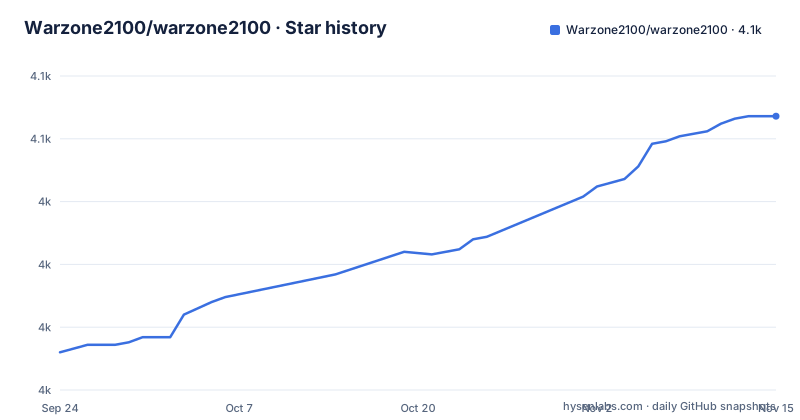
Star history
- Warzone2100/warzone21004,059 ★ · +94
| Repository | 2026-09-24 | 2026-11-15 |
|---|---|---|
| Warzone2100/warzone2100 | 4k | 4.1k |
94 Stars in the last 52 days, measured from the daily GitHub snapshot. Compare with other projects
Editorial analysis
Three licence files at the root and one licence named on the page
The history section says the source was released under the GNU General Public Licence in 2004, by the original publisher together with the studio that made the game, followed later by the remaining music and video files.
Two dates are given for the same event. One section says 2004. Another says the liberation of the source code on December 6th, 2004, and adds that every proprietary technology has since been replaced with an open-source counterpart.
The root of the repository tells you the licence story is more complicated than one file. There is a licence file, a second file with a non-GPL name, and a third file whose name marks it as the explanatory note for the two.
So the game ships under a GNU licence with a carve-out for something, and the page describes it with a single phrase. A packager who needs to know which terms apply to which files has three documents to read and no guidance on the page about how they fit together.
The rest of the file set is equally deliberate: an authors file, a changelog without a file extension, and a third-party directory.
Development builds need a code-host account, and the page says so three times
The development-build section is organised per platform, and the shape of the instructions is identical for the first three.
For each one: open the filtered list of successful builds for that workflow, select the latest run, and download the artefact from the list the run produced. Under Windows the artefact is an installer. Under macOS there are two, one for the full application bundle and one without the videos. Under Ubuntu it is a package named for the distribution version, with two versions named explicitly.
And under each of the three, the same note appears: a free account on the code host is currently required to download the artefacts.
Three repetitions of the same caveat is the project's own assessment of its friction. Anyone expecting to fetch a nightly build without an account will find out at the last step.
The macOS pair is the interesting one, because it is the only place where the artefact name encodes a decision the user has to make. A build without its videos exists because the video payload is large, and the page treats that as normal rather than as a limitation.
The Ubuntu artefact name and the file you install have different names
The Ubuntu instructions have six steps and step three is where the detail lives.
You download an artefact whose name ends in an underscore and a short suffix for the package format. Then you extract the downloaded archive to your desktop, change into that directory, and install the file from it:
cd ~/Desktop
sudo apt install ./warzone2100_ubuntu<version>_amd64.deb
The two names are not the same. The artefact uses an underscore before the format suffix; the file you install uses a dot before the extension. So a reader who copies the string out of step three does not match the string in step five, and has to notice that the packaging step renamed nothing and that the dotted form is what is on disk.
The install itself is a package install of a local file, run with elevated privileges, from inside a desktop directory. That is a normal thing to do and an unusual thing to instruct.
Linux users who want a source build are pointed at a build section that is further down the page and not part of the text shown here, with a reminder that a development build is a snapshot of the latest successfully built commit and should be treated as work in progress.
Two destination paths are given for the same video download
The videos are not bundled, and the page explains why in one line: for important information during the game, download them manually.
It then gives the download twice, and the two versions write to different directories.
In the installation section the file goes into a directory named for the game alone. In the development-build section it goes into a directory named for the game followed by a version placeholder, which the instructions tell you to update.
So a reader who follows the first command, then the second, ends up with the same payload in two places, and only one of them is where the build expects it.
The file itself is worth knowing about. It is named as if it were a binary asset and it is a renamed archive; the page says so, and says you can rename and extract it to look inside. It lives in a separate repository for the sequences with its own release tag, and it is mirrored on a file-hosting site as well, which is why the rename step exists at all.
Five platform workflows on one provider, a second provider for the rest, and a packaging tracker
The build badges at the top of the development section are a map of the project's platforms.
Five are workflow filters on the same code host, one each for Windows, macOS, Ubuntu, Fedora and a web build produced with a browser-targeting compiler toolchain. Each is filtered to the default branch and to push events, so a badge reflects the last push rather than the last release.
Then two badges from elsewhere: one for a second continuous integration provider, and one for a packaging tracker that lists the versions distributions are shipping.
So the split is: five platforms on one provider, something else on a second provider, and a third service watching what packagers do with the result. The Fedora workflow is the one that explains the second provider, since a platform family the main host does not build for is exactly what a second service is for.
The web target is the one the page does not mention again anywhere in the text shown here. It is in the badge list and nowhere in the installation instructions, which name Windows, macOS and Linux.
A legacy and a flat linter configuration sit in the same root
The repository root has an unusually wide configuration surface, and it is not a tidy one.
There are two linter configurations for the same language in two different formats, one in the older file-based style and one in the newer flat style. Alongside them are a YAML linter configuration, a Dockerfile linter configuration, an editor configuration file, and a separate configuration for checking that the editor configuration is respected.
There is also a configuration file for an automated code-review service, and one for a hosted crash-reporting service.
The pair of linter configurations is the part worth flagging. Both formats present at once is the fingerprint of a migration that was started and not finished, or of two contributors on different tools. Whichever one your editor or pipeline reads, the other one is decoration.
The rest of the root is platform tooling: a dependency fetch script for Linux in shell and one for Windows in PowerShell, a macOS CMake preset file, a CMake build definition, a Snap packaging description, a dependency manifest for a C++ package manager, and a translation directory with a crowdsourced translation configuration beside it.
Bug reports are asked for with a memory dump, and the root holds a crash-reporting configuration
The bug-reporting section is five numbered rules and the first is the demanding one.
If the game crashes, save a memory dump and upload it with the report. The page names where to find it on each platform: a file in the temporary directory on Linux, a report file under the installation directory on Windows, and the details view of the crash dialog on macOS. It adds that a backtrace you produce yourself is just as useful.
Then the context you were doing, an attempt to reproduce it, and permission to attach save games, which it describes precisely as one file and one folder, both named after the save. The fifth rule is cut off partway through the sentence.
Two observations. The upload request is reasonable for a native game, and the platform-specific paths mean a report is not portable between operating systems. And the root of the repository carries a configuration for a hosted crash-reporting service, so the project also collects crash data on its own; the page does not connect the two.
Everything else in this section is an instruction to the reporter rather than a description of the software, which is the honest shape of a page written by people who triage.
Editorial conclusion
The game fits a player who wants an open source real-time strategy with a campaign, multiplayer and no store account, and who is willing to fetch build artefacts from a continuous integration pipeline rather than a download page. It does not fit a Linux distribution that packages it, because the videos arrive separately and the artefact names in the instructions do not always match the files. Check three things before you install from the development builds. That you have an account on the code host, because the page says one is currently required to download artefacts at all. Which artefact you want, because the macOS build exists with and without its videos. And where your video file goes, because the page gives two different destination paths for the same download.
Frequently asked questions
Is Warzone 2100 still active?
The page says development continues on the code host and that bug reports and contributions are welcome, and it documents where to get the latest successful builds for five platforms. The newest release is 4.7.0 from 2026-04-07 and the last push to master is dated 2026-10-02.
When did Warzone 2100 come out?
The page says it was originally developed by Pumpkin Studios and released in 1999 as a 3D real-time strategy game, and that the source was released under the GNU General Public Licence in 2004, followed later by the remaining music and video files.
Is Warzone 2100 free?
The page describes it as 100% free and open source, lists that as a highlight, and states it was released under the GNU General Public Licence. The repository root holds three licence files, including one with a non-GPL name and one explanatory file.
what is warzone 2100
A 3D real-time strategy game with a remastered single-player campaign, online multiplayer for up to ten players, local skirmish against bots, a technology tree of over four hundred entries, and three graphics backends including Vulkan. The stable release is offered for Windows, macOS and Linux.
Official sources
Add this badge to your README
If you maintain this project, the badge below links readers to this analysis and shows its maintenance status from the daily GitHub snapshot. Paste the markdown into your README; add ?metric=license or ?metric=stars to the image URL for a different field.

[](https://hysenlabs.com/projects/warzone2100-warzone2100)Star history chart for your README
[](https://hysenlabs.com/projects/warzone2100-warzone2100)Was this useful?