chineseocr_lite: a 4.7 MB Chinese OCR stack that runs on CPU
An ultra-lightweight Chinese OCR supporting vertical text recognition, with ncnn, mnn and tnn inference backends (dbnet 1.8M + crnn 2.5M + anglenet 378KB), for a total model size of just 4.7M.
At a glance
- What is it?
- The master branch of chineseocr_lite has moved to ONNX Runtime and now ships a CLI alongside its Tornado web service. It is a small, CPU-only Chinese OCR pipeline with reference ports to C++, JVM, Android and .NET, and a licence split worth reading before you ship it.
- Who is it for?
- Adopt chineseocr_lite if you need Chinese text detection and recognition on CPU hardware, want a JSON CLI that a script or agent can parse, and are willing to work inside GPL-2.0 or negotiate a separate arrangement with the author. Do not adopt it if you need GPU throughput, a supported Python version past 3.6, or a model licence you can read from the repository.
- Can I use it commercially?
- Yes, with conditions. GPL-2.0 is a copyleft licence: if you distribute software that includes it, you must release that software's source code under the same licence. Running it internally without distributing it does not trigger that obligation.
- Is it still maintained?
- Yes. The repository last received commits 180 days ago.
- What is it written in?
- Mainly C++, according to GitHub's language statistics.
Answers come from the project's GitHub data, last synced on November 14, 2026, and from our analysis. They are not legal advice.
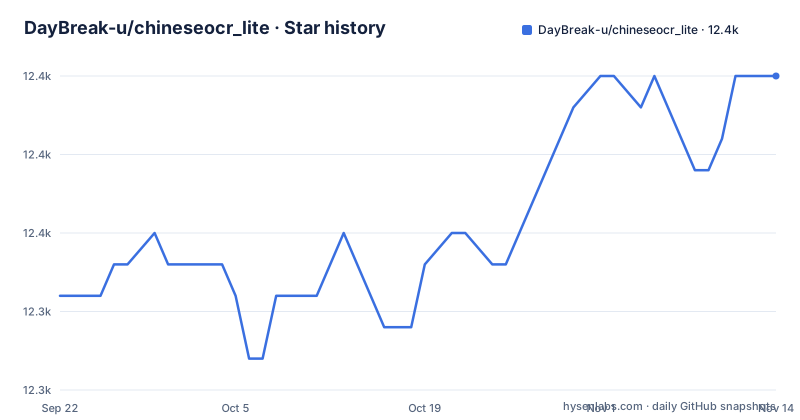
Star history
- DayBreak-u/chineseocr_lite12,355 ★ · +7
| Repository | 2026-09-22 | 2026-11-14 |
|---|---|---|
| DayBreak-u/chineseocr_lite | 12.3k | 12.4k |
7 Stars in the last 53 days, measured from the daily GitHub snapshot. Compare with other projects
Editorial analysis
What chineseocr_lite solves, and who it is aimed at
Chinese OCR is awkward to fit into a small deployment. chineseocr_lite takes the opposite position: the repository description calls it an ultra-lightweight Chinese OCR whose model set is dbnet at 1.8 MB for text detection, crnn at 2.5 MB for recognition and anglenet at 378 KB for orientation, for a total of about 4.7 MB.
The audience follows from that size. The README lists a Tornado web service, Python inference code, and independent C++, JVM, Android and .NET demos. Someone embedding OCR in a desktop application, an Android build, or a service that has no GPU would be the natural user. The README also notes that the current branch is centred on ONNX Runtime inference, which matters because the older ncnn, mnn and tnn paths still exist in the tree as demos and model files rather than as the main path.
The project is written in C++ and Python and its last push was on 2026-05-18. It is not archived. That is recent enough that the tree is worth reading as it stands, but the README does not state a support policy, so nothing here should be read as a commitment to future releases.
The two-stage pipeline: DBNet, angle classification, CRNN
The mechanism visible in the repository is a conventional three-model pipeline. DBNet finds text regions, the angle model decides whether a region is rotated, and CRNN reads the characters. The README's model table assigns each ONNX file a role: dbnet.onnx for detection, crnn_lite_lstm.onnx for recognition, angle_net.onnx for direction classification. The directory layout mirrors the same split, with dbnet/, crnn/ and angnet/ as separate code directories and config.py holding model and inference configuration.
What makes the project usable from a script is the output shape rather than the architecture. The CLI emits a JSON object with a text field for the full recognised string, a blocks array where each entry carries its own text, a score and a four-point box, and an elapsed field. A block looks like this in the README example: a score of 0.93 and a box given as four coordinate pairs. That per-block score is the part that matters in practice, because it lets a caller reject low-confidence regions instead of trusting a single merged string.
Two details are worth flagging. First, the README says the CLI output is stable JSON intended for agents and batch jobs, which is a deliberate interface promise, not an accident of printing. The README does not document what happens when the angle model is wrong,.
Installing chineseocr_lite and running a first OCR job
The README recommends Python 3.6 on Windows, Linux or macOS, with CPU inference and no CUDA requirement. Dependencies install from the requirements file. Note that requirements.txt pins exact versions, including onnxruntime 1.4.0, while pyproject.toml allows a range from 1.4.0 up to 1.20.1, so the two files do not agree on what is acceptable.
pip install -r requirements.txtThe repository also defines a console script. Installing the project in editable mode gives you a chineseocr command, and the README states that the models under models/*.onnx are installed with the package, so the CLI works without downloading anything separately.
pip install -e .
chineseocr test_imgs/res.jpg
That first run prints JSON. To keep it, and to get an annotated image at the same time, pass both output flags. The draw flag writes a copy of the input with detection boxes overlaid, which is the quickest way to see whether detection or recognition is the part failing on your image.
chineseocr test_imgs/res.jpg --output result.json --draw result.jpgThe one tuning knob the README documents is the short-side size used before detection. The README gives no default and no guidance on a sensible range, so treat it as something to measure on your own images.
chineseocr test_imgs/res.jpg --compress 960If you would rather not install a console script, the same entry point runs as a module.
python -m chineseocr_lite test_imgs/res.jpgFor the web interface instead, the README starts the Tornado backend directly. It listens on port 8089 and prints a line such as server is running: 192.168.x.x:8089, which you then open in a browser.
cd chineseocr_lite
python backend/main.py
Where chineseocr_lite gets in your way
The dependency situation is the first real constraint. The README recommends Python 3.6, and requirements.txt pins numpy 1.19.1, opencv_python 4.3.0.36 and Pillow 7.2.0. Those are old wheels. Anyone running a current Python release will not be able to install that file as written, and pyproject.toml gives only minimum versions for those libraries. The project does not document a supported modern Python version, so upgrading is your problem, not a documented path.
The Dockerfile is worse. It builds from centos:7.2.1511, installs devtoolset-7, and its final line is CMD python3 backend/main.py. The README does not describe how to run this image, and the exposed ports in the Dockerfile are 5000 and 8000, which do not match the 8089 port the README gives for the web service. If you plan to containerise the service, treat the Dockerfile as a starting point that needs reconciling with the README rather than as a supported deployment.
The licensing is the constraint that will stop some teams outright. The repository LICENSE is GPL-2.0. The pyproject.toml declares license = { text = "Apache-2.0" } and the package metadata carries no licence file reference. Those two statements cannot both be right, and the README does not resolve the conflict or say anything about the model files separately. If you intend to ship chineseocr_lite inside a closed product, that discrepancy is something to raise with the author before you build on it. This is not legal advice; it is a description of what the repository says.
Finally, the multi-platform demos are described as independent reference ports translated or wrapped from the Python version. The README does not claim they are maintained in lockstep, and it points readers to a QQ group for complete source projects if they do not want to assemble dependencies themselves. That is a distribution channel, not a package registry, and it is not something a build server can pull from.
How chineseocr_lite compares with RapidOCR and PaddleOCR-style stacks
A close comparison is RapidOCR, which is also an ONNX-based OCR runtime with a Python package. The difference is scope. RapidOCR packages the PaddleOCR model family for a general OCR runtime, with language coverage well beyond Chinese. chineseocr_lite is narrower by design: its README describes it as a Chinese OCR project, and the model set is fixed at three small ONNX files totalling about 4.7 MB. If you need Japanese or Korean alongside Chinese, chineseocr_lite is the wrong tool and its README does not suggest otherwise.
The second comparison is with the C++ inference frameworks the project supports. The README lists C++ demos for ONNX Runtime, NCNN and MNN, plus JVM, Android and .NET ports, and notes that the NCNN demos include Vulkan GPU builds while the ONNX Runtime C++ demo is CPU only. That is a genuinely different proposition from a Python-only OCR library: you can move the same three-model pipeline into an Android application or a .NET desktop program without a Python runtime. The cost is that you assemble the native dependencies yourself or fetch the full projects from the QQ group.
A third option worth naming is Tencent's TNN, which the README links as a third-party OCR example built on this project, using TNN's ARM CPU, OpenCL and Metal backends for iOS and Android. That is a case of another project reusing chineseocr_lite's models and approach rather than a drop-in replacement, and it is the path to consider if mobile GPU acceleration is the requirement.
Maintenance, licence and what an upgrade costs you
The repository is not archived and its last push was on 2026-05-18. The repository has no published GitHub releases, so version 0.1.0 in pyproject.toml is the only version marker visible, and it has no changelog behind it. Upgrades therefore mean tracking the master branch, not pulling tagged versions. If you vendor chineseocr_lite into a product, budget for reading diffs rather than reading release notes.
The pinned requirements are the practical upgrade cost. Moving to a newer onnxruntime means moving off the pinned numpy, opencv-python and Pillow as well, and the README offers no tested combination beyond what requirements.txt lists. The pyproject.toml range for onnxruntime, 1.4.0 through 1.20.1, is the only hint that a wider set of versions was considered, and it says nothing about the other three libraries.
On licence: the GPL-2.0 versus Apache-2.0 conflict is covered above, and the repository also does not state a licence for the ONNX models under models/. The README's own contribution guidance asks contributors not to commit training weights, wheels, large third-party libraries or build artefacts, which suggests the models are treated as assets rather than as ordinary source, but it does not state a model licence.
Editorial conclusion
Adopt chineseocr_lite if you need Chinese text detection and recognition on CPU hardware, want a JSON CLI that a script or agent can parse, and are willing to work inside GPL-2.0 or negotiate a separate arrangement with the author. Do not adopt it if you need GPU throughput, a supported Python version past 3.6, or a model licence you can read from the repository. Before writing any integration code, verify three things on your own images: the recognised text and per-block scores in the CLI JSON, the short-side value you pass to --compress, and whether dbnet.onnx, crnn_lite_lstm.onnx and angle_net.onnx are enough for your page layouts without the NCNN variants in models_ncnn/.
Frequently asked questions
Does chineseocr_lite need a GPU?
No. The README recommends CPU inference and states that CUDA is not required, and the ONNX Runtime C++ demo is described as CPU only. The NCNN C++ demo includes a Vulkan GPU build and the NCNN Android demo has a GPU version if you want acceleration on that path.
What port does the chineseocr_lite web service use?
The README says the Tornado backend listens on port 8089 by default and prints a line such as server is running: 192.168.x.x:8089. Note that the Dockerfile in the repository exposes ports 5000 and 8000 instead, which does not match the README.
What models does chineseocr_lite ship with?
The repository contains dbnet.onnx for text detection, crnn_lite_lstm.onnx for recognition and angle_net.onnx for direction classification under models/, plus NCNN .bin and .param files under models_ncnn/. The repository description gives their sizes as 1.8 MB, 2.5 MB and 378 KB, about 4.7 MB in total.
What format does the chineseocr_lite CLI output?
The README describes the CLI output as stable JSON containing a text field, a blocks array with per-block text, score and box coordinates, and an elapsed field. The --output flag writes that JSON to a file.
Official sources
Add this badge to your README
If you maintain this project, the badge below links readers to this analysis and shows its maintenance status from the daily GitHub snapshot. Paste the markdown into your README; add ?metric=license or ?metric=stars to the image URL for a different field.

[](https://hysenlabs.com/projects/daybreak-u-chineseocr-lite)Star history chart for your README
[](https://hysenlabs.com/projects/daybreak-u-chineseocr-lite)Was this useful?