Authentic Theme: a single-page skin for Webmin and Usermin
Official theme for the best server management panel of the 21st Century
At a glance
- What is it?
- Authentic Theme replaces the classic page-per-module Webmin interface with a single-page application built in Perl, adding hotkeys, favorites, notifications and code highlighting. It is easy to install through the theme configuration, and it introduces its own update channel and its own requirements to check before you commit.
- Who is it for?
- Adopt Authentic Theme when you run Webmin or Usermin daily and want the single-page interface, hotkeys, favorites and notification slider that its configuration panel exposes, and you are willing to track a theme release cycle separate from Webmin itself. Skip it if your installation is below Webmin 2.020, if you depend on third-party modules beyond the two with extended support, or if a separate theme update channel is a governance problem for you.
- Can I use it commercially?
- Yes. MIT is a permissive licence: you can use, modify and sell software built on it, as long as you keep its copyright and licence notices.
- Is it still maintained?
- Yes. The repository last received commits 2 days ago.
- What is it written in?
- Mainly Perl, according to GitHub's language statistics.
Answers come from the project's GitHub data, last synced on November 6, 2026, and from our analysis. They are not legal advice.
Star history
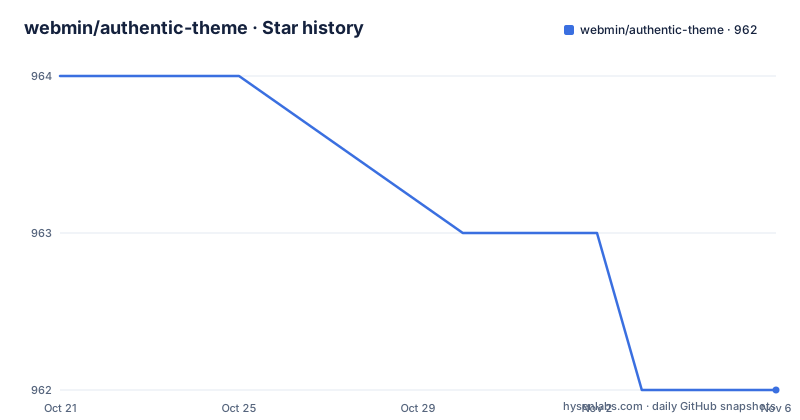
- webmin/authentic-theme962 ★ · -2
| Repository | 2026-10-21 | 2026-11-06 |
|---|---|---|
| webmin/authentic-theme | 964 | 962 |
-2 Stars in the last 16 days, measured from the daily GitHub snapshot. Compare with other projects
Editorial analysis
A theme, not a fork of Webmin
Authentic Theme is the official theme for Webmin, and the project describes it as a modern, ultrafast single-page application for Webmin and Usermin. The key word is theme. Webmin and Usermin keep their own code, their own module set and their own administration model, and Authentic replaces the presentation layer with a JavaScript driven interface that loads modules without the classic page-per-form navigation.
The implementation is Perl on the server side with the interface logic in the browser. The repository root is a list of CGI endpoints and Perl libraries: authentic.pl, authentic-lib.pl, authentic-init.pl and authentic-funcs.pl are the core, and alongside them sit config.cgi, mconfig.cgi, uconfig.cgi and tconfig.cgi for configuration, plus settings-*.cgi files for the individual settings screens, index.cgi, session_login.cgi, pam_login.cgi and login-lib.pl for authentication, and a navigation-lib.pl and stats-lib.pl for the chrome around the modules. There is a modules directory for module specific rendering, an extensions directory, a lang directory for translations and an images directory for the assets.
Two housekeeping files reveal how the theme integrates with the host. postinstall.pl and uninstall.pl are the install and removal hooks, with postinstall-usermin.pl and uninstall-usermin.pl for the Usermin variant, and theme.info and theme.info.no carry the metadata Webmin reads to register a theme. The CGI naming is what makes the theme work with Webmin's existing session and authentication model rather than around it.
Version floors decide whether the theme will load at all
The requirements are short and specific, and they are the first thing to check. Webmin 2.020 or newer is required. Usermin 1.861 or newer is optional, as are Virtualmin 7.5 or newer and Cloudmin 9.7 or newer.
The shape of that list tells you how the theme is positioned. Webmin is the foundation, and the other three are the products built on top of it, so a team running Virtualmin or Cloudmin inherits the theme only when the underlying platform is new enough. An old Usermin install alongside a new Webmin is fine; the theme simply does not add anything there.
Because these are hard floors rather than soft recommendations, the check belongs in the upgrade plan rather than in the installation step. Upgrading the theme alone on an old Webmin is the failure case, and the project does not describe any compatibility layer for it. The reverse order, upgrading Webmin first and then the theme, is the safe one.
For a Virtualmin or Cloudmin estate, remember that those products version independently. The theme requirement is about the platform beneath them, and the theme itself versions on its own schedule with numbered releases, so three version lines have to line up rather than one.
Updates arrive through the theme configuration, not a package manager
Installing and updating the theme happens inside Webmin itself, and there are three documented paths, each with a different amount of control.
The manual path is a button in the theme configuration labelled Force update theme, which installs either the stable or the development version of the theme. The automatic path is a built-in feature that notifies administrative users when an update is available, enabled by turning on Check for Authentic Theme updates in the theme configuration. The third path is a configuration file change for people who want early builds: in the theme configuration folder under Webmin you create or find the config file, open it, and change the value of the beta_updates option from 0 to 1. The value 0 is the default and 1 turns the beta notifications on.
That last step is the one to think about carefully. The stable and development channels are chosen by the operator in the Force update theme button, and the beta_updates option only controls whether beta notifications appear. In other words, there are two independent switches, one for what you install and one for what you are told about. A system that shows you beta notifications but installs stable builds is a reasonable configuration, and so is the reverse, but you have to decide both.
The downside of this design is that the theme is distributed through the Webmin interface rather than through the system package manager, so an inventory of installed software on the machine does not necessarily reflect the theme version, and an automated configuration management run has to account for it.
Customisation without forking the theme
The theme is meant to be adjusted without editing its source. The theme configuration screen exposes configurable options, and the same place allows you to upload custom logos and code custom styles.css, scripts.js and scripts.pl.
The three extension points cover the three layers of a web interface, which is a sensible design. styles.css changes appearance, scripts.js adds behaviour in the browser, and scripts.pl adds server side Perl that runs under the theme's own process. A team that wants a different colour scheme, a different logo per deployment or a small piece of extra server side logic can do all three without forking, and without losing the ability to take future theme releases.
Two related features deserve mention. There is a notification slider for instant access to pushed system messages, and there are hotkeys and favorites for quicker access, with the favorites stored through the settings-editor favorites read and write endpoints. The favorites and editor settings are kept in the Webmin configuration rather than in the browser, which is what makes them survive a cache clear and follow the user across machines.
The theme also adds code highlight when viewing and editing files, and a drop-down interface for both the Terminal and Command Shell modules, so a shell session appears inside the interface rather than in a separate screen.
The search field runs shell commands when it starts with a bang
One feature deserves a careful look before it reaches a production machine. There is a way to execute a shell command using the search field: type ! in the search box, followed by your command. The documented example is !ls /root, and the requirement is that the Terminal or Command Shell module has to be available.
!ls /rootMechanically this is neat, because the search field is already the fastest way to reach a module, so an operator who knows the exact command does not have to navigate. The security implication is not subtle. Anything typed into that field is executed on the server as a shell command, and the people who can type into it are Webmin administrators, who usually also have shell access through other modules. In other words this does not create a privilege boundary that Webmin did not already have, but it does remove the last friction between a search box and a shell.
Two operational points follow. First, access to the feature depends on the Terminal and Command Shell modules being present and enabled, so on an installation without them the bang prefix is inert. Second, the audit trail changes shape: a command executed here comes through a search field rather than a terminal session, so if your log review assumes commands arrive through the module, this path deserves a look of its own. There is also a pam_login.cgi and a session_login.cgi in the repository, which shows the theme has its own login flow, and that is where policy questions about the whole interface belong.
Module support is extended for two modules only
The theme does not render every Webmin module the same way, and the documentation is honest about the extent of it. There is extended support for the File Manager module, where the theme adds numerous features so the module can be used just as in a desktop browser. There is extended support for the ConfigServer Security & Firewall module, but here the theme only re-renders the module and adds code highlight when editing files manually.
That distinction matters when you are estimating the work. The File Manager is treated as a first class citizen of the interface, while the firewall module is a re-skin. Any other third-party module keeps the classic behaviour unless a corresponding extension exists in the extensions directory, and the repository carries that directory precisely so module specific renderers can be added.
For a Virtualmin or Cloudmin deployment this is the question to ask first. Those platforms add their own modules, and the theme's own documentation only names two modules with extended support. Nothing in the project documentation promises that a Virtualmin module will render in the single-page interface in the same way, so the safe assumption for a mixed estate is that some modules still fall back to the classic flow.
Numbered releases, an MIT licence and a busy tree
The theme versions on a calendar style numbering scheme rather than semantic versioning. The recent releases are 26.50.5 on 2026-07-28, 26.60 on 2026-08-17 and 26.70 on 2026-09-20. The repository is not archived and the last push was on 2026-10-18, so the theme is actively being changed rather than sitting still.
The version scheme has one practical consequence. The number carries a date-like meaning, so a release published in late September is labelled with the year and week rather than a minor bump, and an upgrade is not obviously backward compatible from the number alone. The CHANGELOG.md in the repository is the place to read what changed between two builds, and the development channel exists for people who would rather test the newest build than wait for the stable one.
Licensing is straightforward. The theme is released under the MIT License, with the LICENSE file at the repository root, so there is no copyleft obligation attached to the theme code itself and it can be redistributed in modified form. The rest of the stack has its own licences, and the theme is a separate artifact layered on top of Webmin rather than a fork of it.
The project is maintained by a named group. The lead developer is Ilia Rostovtsev, with code contributions credited to Jamie Cameron and Joe Cooper, and a long list of translators covering French, Italian, Dutch, Polish, German, Romanian, Catalan, Swedish, Chinese, Danish, Czech, Indonesian, Albanian, Norwegian and Japanese. That translation coverage is the practical reason to expect the interface to be usable in a non-English deployment.
Editorial conclusion
Adopt Authentic Theme when you run Webmin or Usermin daily and want the single-page interface, hotkeys, favorites and notification slider that its configuration panel exposes, and you are willing to track a theme release cycle separate from Webmin itself. Skip it if your installation is below Webmin 2.020, if you depend on third-party modules beyond the two with extended support, or if a separate theme update channel is a governance problem for you. Verify first that the theme version you install, currently release 26.70 from 2026-09-20, matches the Webmin and Usermin versions in production, and decide whether beta_updates stays at 0 or moves to 1 in the theme config.
Frequently asked questions
What are the requirements for installing Authentic Theme?
Webmin 2.020 or newer is required. Usermin 1.861 or newer, Virtualmin 7.5 or newer and Cloudmin 9.7 or newer are optional. These are hard version floors, so check the platform version before upgrading the theme.
How do I update Authentic Theme to a newer version?
In the theme configuration you can use the Force update theme button to install either the stable or the development version. For automatic notifications, turn on Check for Authentic Theme updates in the same configuration screen.
How do I get beta update notifications for Authentic Theme?
In the theme configuration folder under Webmin, create or find the config file and change the value of the beta_updates option from 0 to 1. The option controls notifications, while the stable or development choice is made separately when you install an update.
Can I run a shell command from the Authentic Theme search field?
Yes, by typing ! in the search field followed by the command, for example !ls /root. The Terminal or Command Shell module has to be available for this to work.
How do I customise the look of Authentic Theme?
The theme configuration screen lets you upload custom logos and add your own styles.css, scripts.js and scripts.pl. The three files cover styling, browser behaviour and server side Perl without forking the theme.
Official sources
Add this badge to your README
If you maintain this project, the badge below links readers to this analysis and shows its maintenance status from the daily GitHub snapshot. Paste the markdown into your README; add ?metric=license or ?metric=stars to the image URL for a different field.

[](https://hysenlabs.com/projects/webmin-authentic-theme)Star history chart for your README
[](https://hysenlabs.com/projects/webmin-authentic-theme)Was this useful?