WGDashboard's README leads with a security advisory, names its affected version range as including the fix, and documents no installation at all
Simple dashboard for WireGuard VPN written in Python & Vue.js
At a glance
- What is it?
- WGDashboard is an Apache-2.0 Vue and Python dashboard for managing WireGuard peers on your own server, last pushed to main on 2026-09-07 with the newest release from April 2026. The repository ships container files and a security policy; the README is a marketing page with an advisory at the top and nothing about how to run it.
- Who is it for?
- WGDashboard is worth considering if you run WireGuard for yourself and want a browser instead of a login and a command, because the problem it solves is small, real and constant. Two things to settle first.
- Can I use it commercially?
- Yes. Apache-2.0 is a permissive licence: you can use, modify and sell software built on it, as long as you keep its copyright and licence notices.
- Is it still maintained?
- Yes. The repository last received commits 6 days ago.
- What is it written in?
- Mainly Vue, according to GitHub's language statistics.
Answers come from the project's GitHub data, last synced on November 15, 2026, and from our analysis. They are not legal advice.
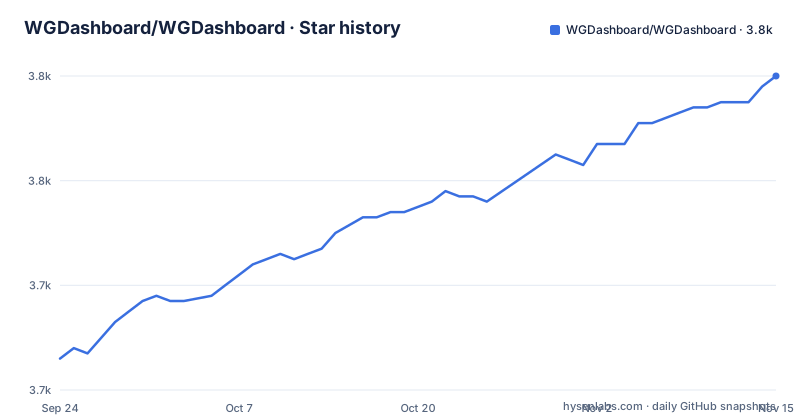
Star history
- WGDashboard/WGDashboard3,780 ★ · +54
| Repository | 2026-09-24 | 2026-11-15 |
|---|---|---|
| WGDashboard/WGDashboard | 3.7k | 3.8k |
54 Stars in the last 52 days, measured from the daily GitHub snapshot. Compare with other projects
Editorial analysis
The README opens with a security advisory, and the affected range includes the fix
The first thing in this file is a warning, not a description.
It says that all users running version 4.2.x or later who are hosted on the public internet are strongly advised to update to the latest release immediately, and it links to the release notes for the version that fixed it.
Two things about that phrasing are worth noting.
First, the affected range is written as 4.2.x or later, which includes the fixed versions themselves. A reader on the current release is told they are in the range that needs updating. The intent is obvious and the wording is loose.
Second, the release titles confirm the shape of the response. The middle one of the three most recent is titled as a security update for a month in 2026, and the release before it is a December 2025 release and the one after it is an April 2026 release.
So the sequence is a feature release, then a security update, then another feature release, all inside the same minor line. Nothing was bumped to a new major for the fix.
That matters for anyone running this on a reachable host. The advisory tells them to update immediately and not to wait for a major version, and the repository carries a security policy file at its root, which is the mechanism that such a fix would have been announced through.
Release names encode the month, the kind, and the ordinal
The three most recent release titles are worth reading as a system rather than as three strings.
The oldest of the three is named for a month and a year, labelled as the third release of that month, with a seasonal decoration around the version number.
The next is named for a different month and year and labelled as the first security update of that month.
The newest is named for another month and year and labelled as the first release of that month.
So a release name is three fields: when, whether it was a feature release or a security update, and which one it was within that month. The version number itself is a separate, conventional sequence.
The reason a project would do this is that the two axes matter to different audiences. The version number tells a packager what changed. The release title tells an operator whether the thing they are being nagged about is a feature or something they should patch tonight, without opening the notes.
It is a small piece of release engineering that costs nothing and removes the most common support question, and it is applied consistently across all three visible titles.
The whole pitch is a web interface over one shell command
The description of the problem is a single sentence and it is the whole product.
Monitoring WireGuard is not convenient; in most cases you have to log in to your server and type a command that reports the current state of the tunnel interface.
That command runs on the server, over a session, on a machine you probably reach by remembering an address and a key. So the everyday loop for someone running a VPN for themselves is: open a terminal, log in, remember the command, read the output.
This project replaces that with a browser interface for viewing and managing WireGuard configurations, which in practice means peers, keys and the settings that govern handshakes.
That framing explains the shape of the codebase without any further documentation. The primary language recorded for the repository is the front-end framework rather than the back-end one, which is what you would expect for a tool whose value is a screen rather than a service. The tree has a directory of server-side templates alongside the source, which is the other half of that.
It also explains the security posture. A tool that holds the keys to your VPN and renders them in a browser is sitting on the most sensitive file on the server, which is why the advisory at the top of the file is aimed specifically at people who have put it on the public internet.
There is no installation instruction anywhere in the file
The README is a product page. It has a headline, a sponsor block, a two-sentence problem statement, contact links, funding links, a merchandise line and an official website link, and then a screenshots heading with nothing under it in this copy.
There is no install command. No container invocation, no configuration example, no environment variable list, no default credentials note, no link to an installation page. The project says it is still striving to make it easy to install and use, which is an acknowledgement that this is the weak part.
The repository itself contradicts the omission. There is a container directory and a container ignore file at the root, so image-based deployment is supported in the tree. There is a security policy file, which is what you point people at when they need to report something. And there is a workflows directory, so releases are built automatically.
So the information exists, it just is not in the file most people read first. For an evaluation, that means the practical questions, which image, which port, which database, what does the first run ask for, are answerable only from the container files or the official site.
That is a documentation gap rather than a product gap, and it is worth naming as one, because this is a self-hosted tool and the install is the first thing a new user needs.
The project gives away VPN access to its own server, capped by time or by traffic
The second thing in the file, after the advisory, is an offer.
The project is running what it calls a testing programme. The stated purpose is to understand and improve the project's performance. In exchange, participants get free access to the maintainers' WireGuard server in Toronto, valid for twenty-four hours or up to one gigabyte of total traffic, whichever comes first.
Two limits, one on duration and one on volume, stated as alternatives rather than as a combined allowance. That is a careful design: it caps both the wall-clock exposure and the bandwidth, so a participant cannot sit on the connection for a week.
It also tells you something structural. The project operates a real VPN server with real users on it, and is asking the community to point software at it. That is a genuine testing method for a tool whose whole job is talking to WireGuard, and it is one most maintainers of dashboard projects would not think to offer.
For an evaluator it is worth weighing both sides. A public server is a realistic environment, which makes the resulting bug reports better. It also means the maintainers hold infrastructure and handle traffic from strangers, which is a different commitment from shipping a web interface.
The coding-time badge points at a different repository path than the project
The badge row has three entries and one of them is aimed at the wrong place.
There is a badge for the latest release and there is a hit counter. The third is a coding-time badge, and the repository path inside its image request names an individual account rather than the organisation this repository lives under.
A path like that resolves as long as that account keeps a copy of the project. The moment it is renamed, moved or deleted, the badge breaks and the information it was carrying is gone.
It is the only sign of that kind of drift in the file, and it is minor, but it fits the pattern the rest of the page sets: a marketing document maintained by hand rather than generated, where individual links drift from the project they describe.
The sponsor block above has a similar shape, a single short affiliate link with a tracking identifier in it, which is normal for a one-sponsor project and means the sponsor is not named in text.
Everything else in the header points at the organisation correctly, so the coding-time badge is the odd one out rather than the rule.
It states plainly that it is not affiliated with the official project
One line in the README is set apart in bold italics and it is a disclaimer.
It says the project is not affiliated with the official WireGuard project.
For a tool that sits on top of somebody else's network protocol and stores the keys to their tunnels, that sentence carries most of the trust question. Someone evaluating this is choosing to hand a web interface administrative access to their VPN, and the first thing they need to know is whose code they are actually running.
The official project is a small, well-known thing, and a same-named third-party dashboard is exactly the kind of thing people get wrong at a glance. Putting the disclaimer in the visual centre of the page rather than in a footer is the right call.
The rest of the trust surface is visible too, and it is unusually complete for a project at this size. The licence is Apache, which is permissive. There is a security policy file at the root, and the security fix landed in the current minor line with a public advisory at the top of the readme rather than a quiet changelog entry.
Three contact channels are offered, including a chat server, a community forum and a matrix room. That is a project that expects to be asked questions and has somewhere to ask them.
Four funding channels and a merchandise store priced at seventeen dollars
The support section lists four ways to pay the maintainer, and the counts are unusual for a self-hosted utility.
There is a sponsors link on the code host, a coffee link, a membership on a subscription platform, and then a merchandise store.
The merchandise line is specific about its price and its terms: seventeen United States dollars, including shipping worldwide and duties. That is a deliberate number to publish, low enough to be an impulse and high enough to cover postage, with the duty handling called out because otherwise it lands higher at the checkout for buyers outside the origin country.
Listing four channels rather than one is a statement that no single mechanism is expected to carry the project, and it removes the decision from the supporter.
It is also, alongside the free VPN offer and the public testing programme, part of a pattern: the project is funded by many small contributions and it buys testing capacity with a free service of its own. Nothing in the file asks for a licence fee or gates a feature behind payment, which is what you would want from a tool that holds your VPN keys.
Editorial conclusion
WGDashboard is worth considering if you run WireGuard for yourself and want a browser instead of a login and a command, because the problem it solves is small, real and constant. Two things to settle first. Read the advisory at the top of the README and pin a release at or after the security update rather than the latest tag blindly. And expect to get the install from the container files or the project site rather than the README, because the README does not attempt it.
Frequently asked questions
what is wgdashboard
A dashboard for WireGuard, written in Python and Vue.js, that lets you view and manage WireGuard configurations from a browser instead of logging into the server and typing the tunnel status command. It is Apache-2.0 licensed and not affiliated with the official WireGuard project.
is wgdashboard safe
The project's own README opens with a warning: users on version 4.2.x or later who are hosting it on the public internet are strongly advised to update immediately, pointing at a release titled as a security update. The affected range as written also includes the fixed versions. The repository carries a security policy, and the project is not affiliated with the official WireGuard project.
How do I install WGDashboard?
The README contains no installation instructions at all: it is a product page ending at a screenshots heading. The repository does carry a Docker directory and a workflow directory at its root, so container-based deployment is supported in the tree, and the project points readers to its own website for more information.
What do WGDashboard release names mean?
They encode three things: the month and year, whether the release was a feature release or a security update, and its ordinal within that month, alongside the conventional version number. The three most recent are a December feature release, a March security update and an April feature release, all on the same minor version.
What is the WGDashboard Testing Program?
A programme where participants get free WireGuard access to the maintainers' server in Toronto, capped at twenty-four hours or one gigabyte of total traffic, whichever comes first, in exchange for helping the project understand and improve its performance.
Official sources
Add this badge to your README
If you maintain this project, the badge below links readers to this analysis and shows its maintenance status from the daily GitHub snapshot. Paste the markdown into your README; add ?metric=license or ?metric=stars to the image URL for a different field.

[](https://hysenlabs.com/projects/wgdashboard-wgdashboard)Star history chart for your README
[](https://hysenlabs.com/projects/wgdashboard-wgdashboard)Was this useful?