winpython/winpython is the wppm package and build toolchain, not the Python distribution you download
A free Python-distribution for Windows platform, including prebuilt packages for Scientific Python.
At a glance
- What is it?
- This repository holds wppm, a small pip companion, and the scripts and GitHub Actions workflows that assemble WinPython distributions from hashed wheels. Readers looking for the portable Python itself are sent to winpython.github.io, and the README is open about that split.
- Who is it for?
- Use this repository if you want to build your own WinPython from a fork, install a hash-pinned wheel set, or run wppm to inspect and install from the bundled wheelhouse. If you only need a portable Python on Windows, take the zipped distribution from winpython.github.io and skip the source.
- Can I use it commercially?
- Yes. MIT is a permissive licence: you can use, modify and sell software built on it, as long as you keep its copyright and licence notices.
- Is it still maintained?
- Yes. The repository last received commits 9 days ago.
- What is it written in?
- Mainly Python, according to GitHub's language statistics.
Answers come from the project's GitHub data, last synced on November 7, 2026, and from our analysis. They are not legal advice.
Star history
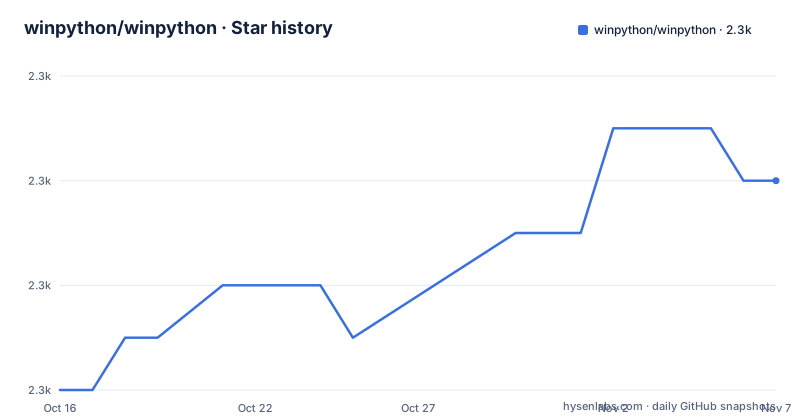
- winpython/winpython2,292 ★ · +4
| Repository | 2026-10-16 | 2026-11-07 |
|---|---|---|
| winpython/winpython | 2.3k | 2.3k |
4 Stars in the last 22 days, measured from the daily GitHub snapshot. Compare with other projects
Editorial analysis
The repository holds the tools, and the distribution lives elsewhere
The README opens by saying WinPython is a portable distribution of Python for Windows, and then draws a line: this is the wppm Python package and build toolchain repository, not the distribution itself. What you download to run Python is a zipped distribution, with or without an auto-extractor, linked from winpython.github.io. Downloads are also listed on SourceForge and in the GitHub releases.
The repository contains two things. One is the WinPython Package Manager, wppm. The other is the machinery that builds a distribution from almost nothing, in two forms: a historic batch-file toolchain and, since the news dated 2026-01-01, a GitHub Actions route. Copyright runs from Pierre Raybaut in 2009-2013 to the WinPython development team from 2014 onward, under the MIT licence.
wppm navigates the bundled wheels, and pip stays the tool for adding and removing
The README describes wppm as a complementary tool. It navigates the provided packages, installs packages from the included wheelhouse, or registers a WinPython installation. For adding or removing anything else, it says pip is the recommended way. That sets the expectations: wppm is not a replacement for pip and does not try to be a full environment manager.
In pyproject.toml, wppm has a single dependency, packaging, and requires Python 3.10 or newer. Its description reads pip companion: extras-aware dependency trees, offline wheelhouses, portable Pythons. The console script is wppm, mapped to wppm.wppm:main. One of the newest releases, wppm-17.14.20261027, is described as including wppm --sa to see published security alerts, which is the only wppm flag named in the release notes.
Forking the project and running a GitHub Action builds a release
The newer build route uses GitHub itself. Fork the project, then run a workflow named like github_workflows_build-YYYY_NN.yml, where YYYY_NN is the WinPython release, such as a year and a numbered release in that year. You can edit the list of wheels, with their hashes, to suit your preference before running it. The requirements for this are minimal: a basic GitHub account is enough, and the installer can be 7-Zip or nothing, meaning a plain .zip.
The cost of this freedom is on the person who forks. Choosing your own wheel list means you own the hash list and the consequences when a wheel is missing for your Python version. The README gives no guidance on how to pick wheels, so the changelogs directory and the existing requirements files are the reference.
The historic route needs Python 3.11 and a batch file with a toml
Before the GitHub Actions approach, distributions were built with generate_a_winpython_distropy_meta.bat driven by a toml file, and winpython_builds.toml in the root is the matching configuration. The README labels it historic. Running this build toolchain requires Python 3.11 or newer, while wppm alone runs on 3.10 or newer, so the two have different floors.
The repository root also holds helper scripts and manifests such as build_winpython_meta.py, check_updates.py, srcreq_manifest.py, hash_launch.bat, and several requirements files including requirements_slim.txt and requirements_slim315.txt, plus mandatory_requirements.txt and constraints.txt. The README does not explain what each one does, so open them before assuming a role.
A hash-pinned wheel set reproduces a distribution without the zip
The wheels assembled for a WinPython distribution can be installed on their own. The README shows this command for a release tagged 16.6.20250620final:
python -m pip install --no-deps --require-hashes https://github.com/winpython/winpython/releases/download/16.6.20250620final/requir.64-3_13_5_0slim.txtThe flags --no-deps and --require-hashes mean pip installs exactly the listed files and refuses anything whose hash does not match. A pylock.toml file for the same release is available for package managers that handle it, and the requirements-with-hash.txt files serve until pip supports pylock.toml. The name of the example file points to a 64-bit build for Python 3.13.5 in a slim variant. Using that URL installs that old set, not the latest, so pick the release you want first.
Building wppm itself uses flit
If you want to build wppm from source, the README gives two commands:
python -m pip install flit
python -m flit build
pyproject.toml declares flit_core as the build backend. The published package is built and released through the GitHub Action build_wppm_prod_publish.yml rather than by hand. The project lists the changelog for wppm under the GitHub releases filtered by wppm, and recent tags such as wppm-17.13.20261027 and wppm-17.14.20261027 show the package versions moving separately from the distribution releases.
Three releases landed on 2026-10-27 under two different naming schemes
The newest releases are wppm-17.14.20261027 and wppm-17.13.20261027 for the tool, and a distribution release titled WinPython 2026-04 of October 27th 2026. The two version schemes track different things: wppm uses a major.minor number followed by a date stamp, while the distribution uses a year and release number. The last push to the repository was 2026-10-11, and the project is not archived.
Because the wppm tags and the distribution tags are interleaved in one releases page, searching for the newest release by date can return a tool build instead of a distribution. Read the tag name first. The README points to GitHub Discussions for questions, and to the issue tracker for bugs and feature requests.
Classifiers mention several operating systems, and the README mentions only Windows
The README describes a Windows distribution, and the keywords in pyproject.toml include windows and portable. The trove classifiers, however, list MacOS, POSIX, Unix and OS Independent next to Microsoft Windows, and the development status is Production/Stable. The README states nothing about running wppm on those other systems, so the classifiers should not be read as a support promise.
The practical rule is to expect Windows. A reader on macOS or Linux who wants only the package-inspection side of wppm can try it, since it needs just Python 3.10 and packaging, but the distribution and the wheel sets in the README are Windows builds.
Editorial conclusion
Use this repository if you want to build your own WinPython from a fork, install a hash-pinned wheel set, or run wppm to inspect and install from the bundled wheelhouse. If you only need a portable Python on Windows, take the zipped distribution from winpython.github.io and skip the source. Before relying on a wheel set, read its requirements file and check the Python version in its name, because the README's own example is for Python 3.13.5.
Frequently asked questions
Is WinPython free to use?
The project describes itself as a free Python distribution for Windows, and the code in this repository is licensed under the MIT License.
Is there a portable Python for Windows?
WinPython is a portable distribution of Python for Windows. The easiest way to get the last stable release is a zipped distribution, with or without an auto-extractor, from winpython.github.io.
how to install packages in winpython
pip is the recommended way to add or remove packages. The wppm tool can install packages from the included wheelhouse or register a WinPython.
what is winpython
WinPython is a portable distribution of the Python language for Windows. This repository contains its wppm package and the toolchain used to build a distribution.
Official sources
Add this badge to your README
If you maintain this project, the badge below links readers to this analysis and shows its maintenance status from the daily GitHub snapshot. Paste the markdown into your README; add ?metric=license or ?metric=stars to the image URL for a different field.

[](https://hysenlabs.com/projects/winpython-winpython)Star history chart for your README
[](https://hysenlabs.com/projects/winpython-winpython)Was this useful?