WinSCP: PuTTY and FileZilla source, both vendored in one tree
WinSCP is a popular free file manager for Windows supporting SFTP, FTP, FTPS, SCP, S3, WebDAV and local-to-local file transfers. A powerful tool to enhance your productivity with a user-friendly interface and automation options like .NET assembly.
At a glance
- What is it?
- A Windows file manager for SFTP, FTP, FTPS, SCP, S3, and WebDAV, with a .NET assembly and batch scripting for automation. Building it needs two commercial toolchains, and the tree carries the source of two other clients you might mistake it for.
- Who is it for?
- Take WinSCP if you transfer files from Windows over any of SFTP, FTP, FTPS, SCP, S3, or WebDAV and want scripting alongside a two-pane interface. Check three things before you rely on this repository.
- Can I use it commercially?
- Check first. The repository uses a licence we do not classify automatically, so read its LICENSE file before any commercial use.
- Is it still maintained?
- Yes. The repository last received commits 2 days ago.
- What is it written in?
- Mainly C, according to GitHub's language statistics.
Answers come from the project's GitHub data, last synced on November 15, 2026, and from our analysis. They are not legal advice.
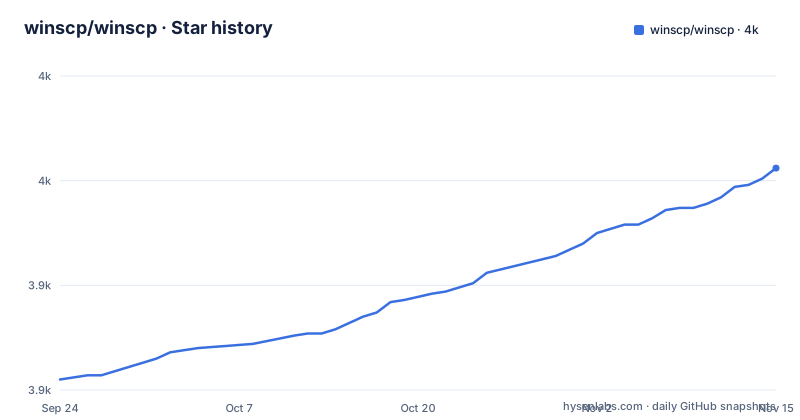
Star history
- winscp/winscp3,956 ★ · +101
| Repository | 2026-09-24 | 2026-11-15 |
|---|---|---|
| winscp/winscp | 3.9k | 4k |
101 Stars in the last 52 days, measured from the daily GitHub snapshot. Compare with other projects
Editorial analysis
The transports span seven protocols plus local copies
The scope is stated in one sentence and it is a wide sentence: WinSCP is a free file manager for Windows supporting SFTP, FTP, FTPS, SCP, S3, WebDAV, and local-to-local transfers. That list is worth pausing on because it explains why the source tree is the size it is. FTP and FTPS are the old pair, with FTPS being the encrypted variant. SFTP and SCP are file transfer over SSH. S3 is object storage, which means the tool can act as a client against a bucket rather than only against a filesystem. WebDAV is the HTTP-based protocol used by many NAS devices. And local-to-local means it is also a local file manager, which is why the same binary handles a local pane without a server. Separately, the tool is described as usable for file editing, directory synchronisation, and site management, so it is not only a transfer utility.
Automation is a first-class surface, not a script addon
The description names two automation mechanisms explicitly, a .NET assembly and batch file scripting, and the repository backs the first of them with a directory. `/dotnet` holds the source code of the WinSCP .NET assembly, and a package for it is published on NuGet under the name WinSCP. A .NET assembly is the route for anything running on Windows in a managed context, since a developer can drive transfers and file operations from C# or another .NET language rather than shelling out and parsing console output. Batch file scripting is the other route, for environments where invoking a console program with arguments is the whole automation budget. The console interface itself is a first-class part of the build, at `/source/console`, listed separately from the visual part, which is what makes the scripting surface a designed interface rather than a side effect of the GUI.
Building needs C++Builder, Visual Studio, and two binaries you place by hand
The build requirements are listed concretely and they explain why few people compile this. Embarcadero C++Builder 11 Professional is required, and that is a commercial product. Build Tools and Agents for Visual Studio 2022 are also required, specifically for C# 9.0, which is the .NET assembly half of the build. Then two external tools have to be downloaded and placed at fixed paths by hand: nasm, the assembler, stored to `buildtools/tools/nasm.exe`, and the object file converter objconv, stored to `buildtools/tools/objconv.exe`. The instruction for building from source yourself is to modify and use `build.bat` in the root folder. So there are four prerequisites, two of them commercial or toolchain-grade and two of them manual path placements, and the entry point is a batch file you are expected to edit. That is a very different picture from the download page.
The tree carries PuTTY and FileZilla, which is not the same as being either
Two directories in `source/` answer a question people ask about this project constantly. `/source/putty` is the source code of the PuTTY SSH client, and `/source/filezilla` is the source code of the FileZilla FTP client. So the answer to whether WinSCP is the same as FileZilla is no: WinSCP contains FileZilla's protocol code because that is where working implementations of those protocols came from, and it is a different program with a different interface and a different scope. The same applies to PuTTY, whose SSH and SFTP code underpins the SSH half of WinSCP. Two other directories are more surprising in a different way. `/source/components` holds native WinSCP visual components, and `/source/packages` holds general visual components, described as both the maintainer's own and third party, which is where the Delphi component library that the C++Builder build depends on would live.
The layer split explains the directory names
The directory structure is the clearest statement of the architecture available anywhere in this repository, and it separates four concerns. `/source/core` is the core non-visual part, and the page names exactly what is in it: SSH, SFTP, FTP, WebDAV, S3, and SCP code. `/source/forms` is the visual part, dialogs and windows. `/source/components` is the native visual component layer, and `/source/dragext` is a drag and drop shell extension, which is the piece that lets files be dragged from Explorer into a transfer. Everything else is support: `/source/resource` for resource strings, `/source/windows` for other sources, `/libs` for third party libraries, `/translations` for translations of WinSCP strings, and `/deployment` for the Inno Setup script that creates the setup package, with its own readme. So the code is layered so that protocol handling has no dependency on the interface, and the interface can be replaced with a console.
The licence is a file, not an identifier, and no releases exist here
Two things about how this project is published are worth stating plainly. First, the licence is not recorded as an identifier in the metadata at all, and the page does not summarise the terms. It says only to see `license.txt` for the licence conditions, and that file is at the repository root alongside `readme.md`. For a project whose description says it is open-source, that means the terms are in a file you have to open rather than in a field you can check, so read it before you redistribute the binaries in your own installer. Second, there are no GitHub releases in this repository, so there is no tag to pin and no release asset to script against, even though the program ships as an installer and as a NuGet package. The two distribution channels that exist are the installer built through the deployment script and the .NET assembly on NuGet. The default branch is `master` and its last push was 2026-10-03.
Editorial conclusion
Take WinSCP if you transfer files from Windows over any of SFTP, FTP, FTPS, SCP, S3, or WebDAV and want scripting alongside a two-pane interface. Check three things before you rely on this repository. Building from source requires Embarcadero C++Builder 11 Professional, which is a commercial product, so the source is not the practical route for most people; use the published installer or the .NET package instead. The licence is not a standard open-source licence, and this page does not summarise it, pointing only at `license.txt`, which is worth reading since it is GPL-derived with additional terms. And the bundled PuTTY and FileZilla source is not a claim that WinSCP is either of them; it is the transport code those clients' authors contributed.
Frequently asked questions
What is WinSCP used for?
It is a free file manager for Windows supporting SFTP, FTP, FTPS, SCP, S3, WebDAV, and local-to-local transfers, used for file editing, directory synchronisation, and site management, with automation through a .NET assembly or batch file scripting.
Is WinSCP the same as FileZilla?
No. WinSCP is a separate program, but its source tree contains the source code of the FileZilla FTP client under source/filezilla, since the protocol implementations came from there. It also contains the PuTTY SSH client source under source/putty.
What is the relationship between WinSCP and PuTTY?
WinSCP bundles the source code of the PuTTY SSH client in its own tree, at source/putty, and its core directory holds the SSH and SFTP code. The two remain separate programs with separate interfaces.
Official sources
Add this badge to your README
If you maintain this project, the badge below links readers to this analysis and shows its maintenance status from the daily GitHub snapshot. Paste the markdown into your README; add ?metric=license or ?metric=stars to the image URL for a different field.

[](https://hysenlabs.com/projects/winscp-winscp)Star history chart for your README
[](https://hysenlabs.com/projects/winscp-winscp)Was this useful?