WireGuard for Android: Kernel and Userspace VPN Options
Mirror only. Official repository is at https://git.zx2c4.com/wireguard-android
At a glance
- What is it?
- WireGuard for Android is the official Android GUI for WireGuard, with opportunistic kernel support and a non-root userspace fallback. The repository provides Kotlin application code, a reusable tunnel library, build instructions, and an Apache-2.0 license.
- Who is it for?
- Adopt this project when building or integrating an Android WireGuard client and verify kernel availability, tunnel library compatibility, Java 17 desugaring, and the official repository status first. Do not treat this GitHub mirror as the primary source or expect GitHub releases, because the README identifies zx2c4.com as the official repository and GitHub has no releases for it.
- Can I use it commercially?
- Yes. Apache-2.0 is a permissive licence: you can use, modify and sell software built on it, as long as you keep its copyright and licence notices.
- Is it still maintained?
- Yes. The repository last received commits 131 days ago.
- What is it written in?
- Mainly Kotlin, according to GitHub's language statistics.
Answers come from the project's GitHub data, last synced on November 6, 2026, and from our analysis. They are not legal advice.
Star history
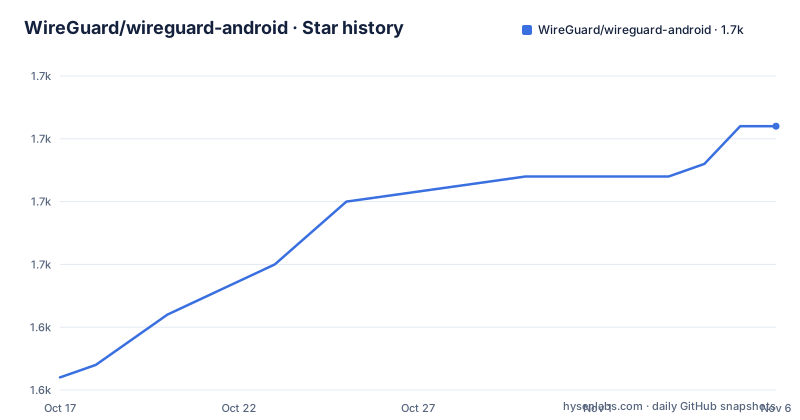
- WireGuard/wireguard-android1,661 ★ · +20
| Repository | 2026-10-17 | 2026-11-06 |
|---|---|---|
| WireGuard/wireguard-android | 1.6k | 1.7k |
20 Stars in the last 20 days, measured from the daily GitHub snapshot. Compare with other projects
Editorial analysis
WireGuard Android GUI and Its Intended Users
This repository contains an Android GUI for WireGuard. It is intended for Android users who want a WireGuard client and for developers who want to build the application or reuse its tunnel library. The application is distributed through the Play Store under the package identifier `com.wireguard.android`, while the repository itself is a mirror. The stated official repository is `https://git.zx2c4.com/wireguard-android`.
The project is written primarily in Kotlin. Its top-level layout separates the user interface from the tunnel component: `ui/` contains the Android application side, while `tunnel/` contains the tunnel library and its implementation-related code. This separation matters for teams that need an Android UI but also want to reuse the tunnel layer in another application. The README does not provide a configuration-file format, account workflow, or step-by-step guide for creating a tunnel inside the app, so those operations cannot be described as documented project features here.
Kernel and Userspace Selection in WireGuard Android
The central runtime decision is whether Android can use the WireGuard kernel implementation. According to the README, the application opportunistically uses the kernel implementation. When that option is unavailable, it falls back to the non-root userspace implementation. This means the same Android client can work without requiring root access, although the internal path and device capabilities are not described in the repository documentation.
The README links the kernel implementation to `android_kernel_wireguard` and the userspace implementation to `wireguard-go`. It does not explain how the application detects kernel support, how it switches implementations, or how device-specific Android versions affect availability. It also does not state whether both implementations expose the same behavior in every case. For adoption decisions, the documented boundary is therefore clear at a high level, but implementation-level compatibility would require inspection of the `tunnel/` sources and testing on the target Android devices.
Building the Android Application with Gradle
The README gives a self-contained build path using the repository's Gradle wrapper. Clone the repository with submodules, enter the project directory, and run the release assembly task. The `--recurse-submodules` option is included in the documented command, so the build expects repository dependencies that are managed through submodules. The release task should produce the application build output in the Gradle-generated directories, although the README does not identify an APK path.
The documented build steps are:
$ git clone --recurse-submodules https://git.zx2c4.com/wireguard-android
$ cd wireguard-android
$ ./gradlew assembleRelease
The command is written with a shell prompt marker. On a typical shell, the `$` is not typed as part of the command. The README also notes that macOS users may need `flock(1)`. It does not document Android SDK versions, JDK installation requirements beyond the embedding example, signing configuration, or release artifact publication, so those details should not be inferred from the task name.
Embedding the WireGuard Android Tunnel Library
The `tunnel` library is published on Maven Central separately from the GUI. The README provides class library documentation at Javadoc.io and shows a Gradle dependency whose version is controlled by `wireguardTunnelVersion`:
implementation 'com.wireguard.android:tunnel:$wireguardTunnelVersion'This is useful for Android projects that already have their own user interface and only need the WireGuard tunnel component. The README does not document the available version numbers, API surface beyond the existence of class documentation, artifact packaging details, or the exact initialization sequence for a new tunnel. Consumers should therefore treat the Maven Central artifact and its Javadoc as the integration contract rather than assume that the GUI's internal wiring is a public API.
The library uses Java 8 features, according to the README. The sample configuration enables core library desugaring and configures Java 17 source and target compatibility:
compileOptions {
    sourceCompatibility JavaVersion.VERSION_17
    targetCompatibility JavaVersion.VERSION_17
    coreLibraryDesugaringEnabled = true
}
dependencies {
    coreLibraryDesugaring "com.android.tools:desugar_jdk_libs:2.0.3"
}
The example establishes the configuration shape, but it does not explain which Android Gradle Plugin version supports it or whether every consuming app needs identical settings. The pinned desugaring dependency shown in the README is `com.android.tools:desugar_jdk_libs:2.0.3`.
Android Client Limitations and Unsupported Claims
The repository documentation is concise and leaves several operational questions unanswered. It does not document how to add or edit a tunnel, how keys are generated, how DNS settings are configured, how routing is selected, or how connection diagnostics are exposed. It also does not claim support for particular Android versions, device manufacturers, battery modes, or network types. Those omissions are genuine limits on what can be established from the available repository description.
The fallback to a non-root userspace implementation removes the need for a rooted device for that path, but it does not establish equivalent performance, battery behavior, or feature support to the kernel implementation. The README also gives no rollback procedure, release cadence, migration guide, or compatibility matrix. A team choosing between this client and another VPN application should not infer missing functionality or support guarantees from the project name alone. Device testing and source inspection remain necessary for those questions.
WireGuard Android Compared with a Standalone Tunnel Integration
The useful alternative approach is to embed the `com.wireguard.android:tunnel` library in an existing Android application instead of adopting the complete GUI. The difference is architectural. WireGuard Android provides an Android application interface and packages the tunnel library with the project. An integration approach supplies its own interface and depends on the published library through Maven Central. Both routes are associated with the same tunnel component, but they do not require the same UI work.
This comparison does not mean that the two approaches have identical operational behavior. The README does not document whether the published artifact contains the same implementation-selection logic as the GUI, nor does it describe APIs for connection state, permissions, or configuration management. The standalone integration may therefore be more suitable for a product that already owns its user experience, while the GUI route may be more suitable when the goal is to obtain an Android WireGuard client. The repository evidence supports that distinction, not a claim about which route has better performance.
Maintenance, Releases, and Apache-2.0 Implications
The GitHub repository is not archived, and its last push was on 2026-06-29. That indicates recent repository activity, but the README identifies the GitHub location as a mirror and points users to `https://git.zx2c4.com/wireguard-android` for the official repository. GitHub has no GitHub releases for this repository. Maintenance status should therefore be checked against the official repository rather than inferred from GitHub release metadata.
The repository is licensed under `Apache-2.0`. That license governs use and redistribution of the covered project code, but this review does not provide legal advice. Consumers should read `COPYING` and any notices applicable to the application, dependencies, translations, and redistributed binaries. The README identifies Crowdin as the translation platform and provides a `sync-crowdin.sh` script in the repository layout, but it does not document the script's inputs, required permissions, or release synchronization process. Translation and upgrade procedures therefore cannot be evaluated from the README alone.
First Practical Use and Verification Boundaries
For an end user, the documented first installation route is the Play Store link in the README. The project does not provide a separate command-line setup path for an individual Android device. For a developer, the first verifiable action is the clone and `assembleRelease` sequence shown earlier. For an integrator, the first verifiable action is adding `com.wireguard.android:tunnel:$wireguardTunnelVersion` and enabling the documented desugaring configuration.
There is no documented command for importing a tunnel, connecting to a server, or inspecting logs. Consequently, the article cannot prescribe a first connection test or claim a particular UI result. Verification should begin with the official repository's current instructions, then confirm the dependency version selected by the consuming build, the target Android configuration, and whether the device takes the kernel or userspace path.
Editorial conclusion
Adopt this project when building or integrating an Android WireGuard client and verify kernel availability, tunnel library compatibility, Java 17 desugaring, and the official repository status first. Do not treat this GitHub mirror as the primary source or expect GitHub releases, because the README identifies zx2c4.com as the official repository and GitHub has no releases for it.
Frequently asked questions
How do I build WireGuard for Android from source?
Clone `https://git.zx2c4.com/wireguard-android` with `--recurse-submodules`, enter the repository, and run `./gradlew assembleRelease`. The README also notes that macOS users may need `flock(1)`.
Does WireGuard for Android require root access?
The README says it opportunistically uses the kernel implementation and falls back to a non-root userspace implementation. It does not provide details about device detection or differences between the two paths.
Can developers embed the WireGuard Android tunnel library?
Yes. The README says the tunnel library is available on Maven Central and gives `implementation 'com.wireguard.android:tunnel:$wireguardTunnelVersion'`. It also requires Java 8 support through the documented desugaring configuration.
Official sources
Add this badge to your README
If you maintain this project, the badge below links readers to this analysis and shows its maintenance status from the daily GitHub snapshot. Paste the markdown into your README; add ?metric=license or ?metric=stars to the image URL for a different field.

[](https://hysenlabs.com/projects/wireguard-wireguard-android)Star history chart for your README
[](https://hysenlabs.com/projects/wireguard-wireguard-android)Was this useful?