whisperIME is an Android keyboard that types nothing until you speak
Android Input Method Editor (IME) based on Whisper
At a glance
- What is it?
- whisperIME turns voice into text three different ways: as an input method you can call from another keyboard such as HeliBoard, as a system-wide voice input service, and as a target for speech recognition intents. It downloads about 435MB of speech models on first launch, needs the internet for exactly that one step, and then transcribes entirely on the device.
- Who is it for?
- whisperIME fits someone who wants to dictate into an Android device without a network round trip, particularly if they already use a keyboard with a microphone button and want a speech model of their own rather than the vendor default. It does not fit someone who needs a product that will still install in 2027 on a certified device, because the project has decided not to meet Google's identity disclosure requirement.
- Can I use it commercially?
- Yes. MIT is a permissive licence: you can use, modify and sell software built on it, as long as you keep its copyright and licence notices.
- Is it still maintained?
- Yes. The repository last received commits 29 days ago.
- What is it written in?
- Mainly Java, according to GitHub's language statistics.
Answers come from the project's GitHub data, last synced on November 24, 2026, and from our analysis. They are not legal advice.
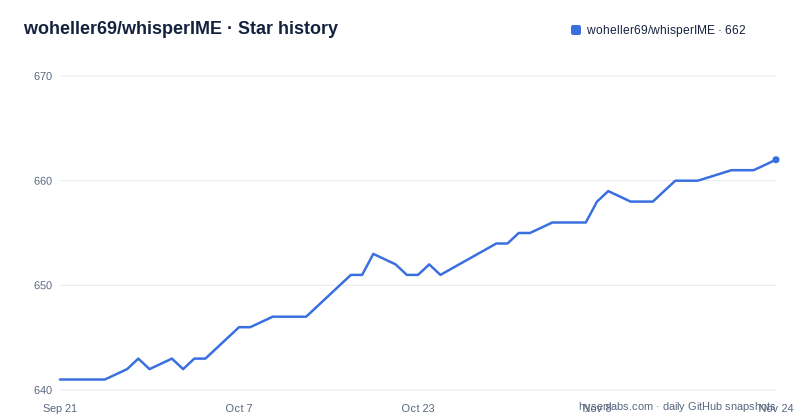
Star history
- woheller69/whisperIME662 ★ · +21
| Repository | 2026-09-21 | 2026-11-24 |
|---|---|---|
| woheller69/whisperIME | 641 | 662 |
21 Stars in the last 64 days, measured from the daily GitHub snapshot. Compare with other projects
Editorial analysis
One download, then no network at all
The privacy claim here is architectural rather than a setting, and the readme is specific about it.
On first launch the app downloads the speech recognition models it needs, about 435MB, from a model host. Then it says plainly that this is the only point at which internet permission is required, and that once the models are present, voice recognition works entirely offline.
That ordering matters for how you install it. The 435MB is a one-time cost paid on the device rather than a per-session dependency, so the app behaves like an offline tool after the first launch, and the permission prompt you see once is not a standing one.
The engine underneath is the Whisper speech recognition project, with the models distributed in a mobile-friendly build format from a model repository, and the application itself is a port of an earlier Android project by another author, which the licence section credits along with its own licence.
The application is written in Java, built with Gradle, and distributed through an independent app store and a third-party app directory, with translations handled on a separate platform rather than in the repository.
Three ways in, and only one of them is a keyboard
Whisper presents itself in three roles, and they overlap in a way that can be confusing when you first install it.
As an input method, it is a keyboard. You activate it from another keyboard, and the readme names a popular alternative keyboard as an example of where you would reach it, through that keyboard's microphone button. That is the mode people usually mean when they call it an IME.
As a standalone application, it does the same transcription without being a keyboard, and adds one capability the keyboard mode does not need: it can translate any supported language into English. So the standalone path is the one to use for a quick dictation-and-translate rather than for typing.
As a system-wide voice input service, it registers with the operating system as a speech input provider. That is a separate registration from being a keyboard, and it has its own settings screen, reached from the system's language and speech settings rather than from inside the app.
It also answers speech recognition intents sent by other applications, which is what makes it usable as a target for any app that asks the system to recognise speech. Three registrations, one set of models.
The first paragraph is about certified devices, not features
The readme opens with a notice that has nothing to do with how the app works, and it is the most consequential thing in the document.
It states that Google has announced that, starting in 2026 and 2027, all apps on certified Android devices will require the developer to submit personal identity details directly to Google. It then states that the developers of this app do not agree to that requirement, and therefore that the app will no longer work on certified Android devices after that time.
So this is a deliberate refusal with a stated expiry date rather than an oversight. If you are planning to install this in a year or two, the answer is in that sentence, and no amount of sideloading changes it because the certification requirement is about distribution.
It also explains something about the project's other choices. An app that downloads its models once and then works offline, ships as an independent store package, and does not want an account with a platform vendor is consistent with that decision rather than at odds with it.
The rest of the readme is written for someone who has already decided, which is worth noting before you start reading the usage notes.
Voice input registration sometimes needs an adb write
There is a known failure mode after installation, and the readme documents the fix precisely rather than waving at it.
If Whisper does not appear as a voice input option in system settings, or appears only alongside a short hard-coded list of vendor entries such as the Google and Samsung ones, the registration has not taken.
The fix requires enabling USB debugging on the device and then writing the system setting directly. One command does it, naming the application identifier and the class of its recognition service:
adb shell settings put secure voice_recognition_service org.woheller69.whisper/com.whispertflite.WhisperRecognitionServiceThe class name in that command is itself informative, since it names the mobile build format of the engine, which is the same family the downloaded models come in.
Once the setting is written, the app appears in the system's voice input list and its own settings become reachable from there. That settings screen is where you choose the model for the voice input role specifically, which is a separate control from the in-app model choice even though the effect overlaps.
A command that writes a secure system setting is not something to run without knowing why, so the readme's framing is right: it is a repair step for a specific symptom, not part of normal setup.
Two models, and a 30-second ceiling
Model choice is the one decision that changes how the app feels, and the readme frames it as a trade rather than a preference.
One model is compact and English only, and it prioritises speed. The other is comprehensive and multilingual, and it is described as much slower while supporting a broader range of languages. There is no third option and no partial download.
The choice is made inside the app and then applies consistently across every use, including when the app is acting as the keyboard. That consistency is the point: you do not pick a fast model for the keyboard and a multilingual one for dictation.
The recording limit is 30 seconds, and the usage notes are practical rather than promotional. Hold the button while speaking, or use automatic mode where it is available. Pause briefly before you start, which reduces the chance of the recogniser treating the start of your sentence as noise. Speak clearly, loudly and at a moderate pace.
That last advice is the honest summary of what a speech model can and cannot fix: clarity at the microphone is worth more than any setting in the app.
The credits read like a dependency audit
The licence section is unusually complete, and it is the clearest picture of what the app actually depends on.
The project itself is MIT licensed. It is based on an earlier Whisper project for Android, also MIT, and it uses the OpenAI speech recognition engine, also MIT, with a paper reference for details. It uses a voice activity detection library, MIT, which is what lets the app know when you have stopped talking. It uses a Chinese conversion library under Apache-2.0, which is the one permissively-licensed but copyleft-adjacent component in the list and the one worth knowing about if you redistribute.
The models are not bundled. They are downloaded from a model repository on Hugging Face at first start, under MIT.
That last arrangement is the one to think about. The code is MIT, but the thing that makes the app useful arrives at runtime from somewhere else, which means the app's behaviour depends on a repository that is not part of this one and not versioned with it.
Around that, the project is a single-application repository with a Gradle build, an application module, and a release automation directory, and the author publishes a long list of other applications on the same store.
Editorial conclusion
whisperIME fits someone who wants to dictate into an Android device without a network round trip, particularly if they already use a keyboard with a microphone button and want a speech model of their own rather than the vendor default. It does not fit someone who needs a product that will still install in 2027 on a certified device, because the project has decided not to meet Google's identity disclosure requirement. Before you rely on it, read the first paragraph of the readme, then decide which of the two models you want, since the faster English-only one and the much slower multilingual one are not interchangeable for typing speed.
Frequently asked questions
What is the Whisper app used for?
In whisperIME it is an Android keyboard that turns speech into text. It can be activated from another keyboard such as HeliBoard, run as a standalone application that can also translate a supported language into English, be selected as the system-wide voice input service, and answer speech recognition intents from other applications.
Does whisperIME work offline?
After the first launch, yes. The app downloads its speech recognition models, roughly 435MB, from a model repository on first use, and the readme states that this is the only point at which internet permission is required. Recognition then runs entirely on the device.
Why will whisperIME stop working on certified Android devices?
The project states that Google has announced that from 2026 and 2027 apps on certified devices must have their developers submit personal identity details directly to Google, and that the developers of this app do not agree to that requirement, so it will no longer work on certified Android devices after that time.
How do I make whisperIME appear as a voice input option?
It becomes selectable from the system's language and speech settings once activated there. If it does not appear, or only the hard-coded vendor entries do, enable USB debugging and write the secure voice recognition service setting directly with an adb command naming the app's recognition service class.
Which model should I choose in whisperIME?
There are two: a compact English-only model that prioritises speed, and a more comprehensive multilingual model that is much slower but supports a broader range of languages. The choice is made in the app and applies to every use, including when it is used as the keyboard.
How long can a whisperIME recording be?
Each recording is limited to 30 seconds. The usage notes also recommend holding the button while speaking or using automatic mode where available, pausing briefly before starting, and speaking clearly, loudly and at a moderate pace.
Official sources
Add this badge to your README
If you maintain this project, the badge below links readers to this analysis and shows its maintenance status from the daily GitHub snapshot. Paste the markdown into your README; add ?metric=license or ?metric=stars to the image URL for a different field.

[](https://hysenlabs.com/projects/woheller69-whisperime)Star history chart for your README
[](https://hysenlabs.com/projects/woheller69-whisperime)Was this useful?