react-lifecycle-methods-diagram carries its meaning in bold, and its test script only lints
Interactive React Lifecycle Methods diagram.
At a glance
- What is it?
- An interactive React component built from a single social post, where every method name links to its official documentation and the common ones are set in a heavier weight. The repository's own quality gate is a script named test that runs a linter, a type checker and a formatter, because there is no test suite.
- Who is it for?
- This diagram is worth using if you teach React lifecycle methods and want something a student can click through rather than a screenshot, because every name is a link to the official documentation and the whole thing works from a static build with no server behind it. Three things to know first.
- Can I use it commercially?
- Yes. MIT is a permissive licence: you can use, modify and sell software built on it, as long as you keep its copyright and licence notices.
- Is it still maintained?
- Yes. The repository last received commits 5 days ago.
- What is it written in?
- Mainly TypeScript, according to GitHub's language statistics.
Answers come from the project's GitHub data, last synced on November 22, 2026, and from our analysis. They are not legal advice.
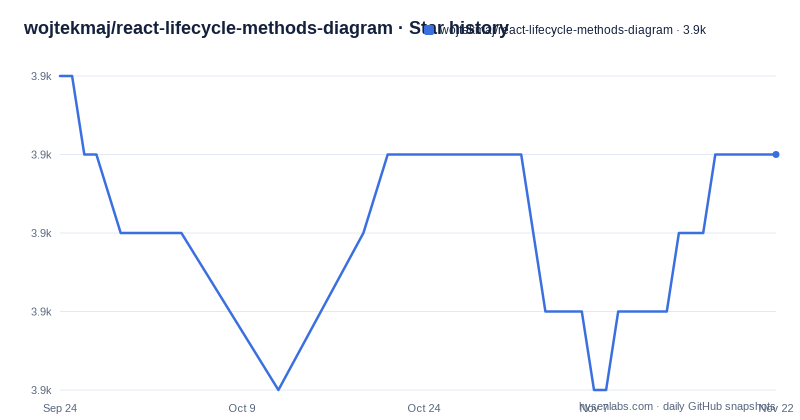
Star history
- wojtekmaj/react-lifecycle-methods-diagram3,931 ★ · -1
| Repository | 2026-09-24 | 2026-11-22 |
|---|---|---|
| wojtekmaj/react-lifecycle-methods-diagram | 3.9k | 3.9k |
-1 Stars in the last 59 days, measured from the daily GitHub snapshot. Compare with other projects
Editorial analysis
A social post, remade, with two extension points
The diagram's origin is a single post on social media, linked from the first line of the file by its status address. Everything in the repository since has been maintenance of that one artefact rather than a growing application, which explains both the shape of the project and one of its risks: a post is a link that can disappear. There are exactly two documented ways to extend it. You can add a translation, and there is a separate guide for that in the source tree. You can add a new version of the diagram for when React changes its lifecycle methods, with a second guide beside it. The README goes further and names translation as the contribution most wanted, because the maintainer knows only a limited number of languages. That is a well-stated request, and it is the one piece of project management in a file that is otherwise about how to read a picture.
Bold carries the meaning, and italics carry a second kind
The instructions for reading the diagram are three lines, and two of them are about typography. Click any method name to read its official documentation in a new tab. Methods in bold are the most common ones. And entries in italics are not lifecycle methods at all but actions that help you follow the diagram. So the styling is not decoration, it is a classification system, and the way to read the picture correctly is to see which weight a label is set in. The same README then says the author did his best to make the diagram fully accessible, for keyboard navigation and for screen readers. Those two commitments pull against each other: a screen reader that announces the text has no way to report the weight. The underlying content is genuinely reachable, since every name is a link and the diagram is keyboard navigable, but what is lost is the emphasis that tells a reader where to start.
The script named test runs a linter and a formatter
There is no test suite in this repository, and there is a script called test. It runs three things in sequence: the linter, then the TypeScript compiler, then the formatter. Formatting and linting are both handled by a single tool, so those two checks plus a type check are the entire quality gate, and the README never mentions tests at all. Two details worth knowing if you plan to contribute. The formatter is invoked without a write flag, so despite the name it reports problems rather than fixing them, which is the opposite of what a script called format usually does in a JavaScript project. And the lint step is a separate binary invocation rather than a combined command, so a contributor who runs only one of the three gets a partial answer and may believe the gate passed.
One wildcard among eleven pinned dependencies
The dependency list is careful almost everywhere. The formatter and linter tool is pinned to an exact patch version rather than a range. The bundler and its React plugin sit on caret ranges for a specific major. The TypeScript compiler and the CSS modules plugin are on caret ranges. The React type definitions are on caret ranges matching the React major. Then the Node type definitions are set to a wildcard, which means any version of them at all satisfies the manifest. For a project whose entire quality gate is a type check, the types that describe the platform it runs on are the one dependency allowed to move without a version change, so a major release of those definitions can break the build on a day nobody touched the repository.
Two of the seven runtime dependencies are the author's own
Seven packages ship with the component, and two of them are published by the person who maintains this repository, in his own account: a hooks library and a translation library. That is ordinary and often the right call, and it also means two of seven runtime dependencies are versioned in step with this repository rather than independently, so a regression in either arrives with the other. The remaining five are the React runtime and its DOM renderer on the same major, a class name helper, a package that converts a country code into a flag emoji, and one that detects the user's locale. Those last two are how the language system works: detect a locale, then show it as a flag. That pairing is what the separate translation guide is about, and it is why the maintainer's request for help is specific rather than general.
The flag needs a font the reader may not have
Showing the selected language as a flag means converting a country code into an emoji, and rendering that emoji depends on the operating system shipping a font that can draw it. Where it cannot, the same choice appears as the two letters of the country code, which is still perfectly usable, and in some terminals the pairing of regional indicators renders as a different pair of letters than the one that was encoded. None of this is a bug so much as a portability assumption, and it is worth naming for a project whose README leads with an accessibility claim: the language picker is one of the first things a screen reader user and a user on an unusual system will both meet. Nothing in the file mentions it, and the accessibility effort described in the README is described entirely in terms of keyboard navigation and screen readers.
The backers list points at a different project
The last section of the file has two funding blocks, one for sponsors and one for backers, each offering to put an image on the readme in exchange for support. The sponsor block points at this project's own funding page. The backers image link resolves to a different repository entirely, one for a calendar component. So the bottom of the readme asks for backing and then displays a list belonging to something else, which is what happens when two blocks are copied from a template and only one of the links is updated. Two smaller things in the same file: the online version link is plain http while the repository's homepage metadata uses https, and the prerequisites list Node.js and Yarn with no version numbers, even though the package manifest pins the package manager to a specific major and minor. Neither would matter much on their own; the misdirected link is the one a reader would notice.
Editorial conclusion
This diagram is worth using if you teach React lifecycle methods and want something a student can click through rather than a screenshot, because every name is a link to the official documentation and the whole thing works from a static build with no server behind it. Three things to know first. The emphasis in the diagram is carried by font weight, which means a screen reader announcing the text alone cannot tell you which methods are the common ones, so read the styling as part of the content. The quality gate is a script called test that runs a linter, a type checker and the formatter, so nothing is executed and no behaviour is checked. And two of the seven runtime dependencies are published by the same person who maintains the repository, in the same account, so a bug in either is a bug in both. The package version is 1.0.0, there are no GitHub releases, and the last push is dated 2026-09-09.
Frequently asked questions
What is react-lifecycle-methods-diagram?
An interactive React component that renders the React lifecycle methods diagram, originally a single social post, with every method name linking to its official documentation in a new tab. The README says it was built with React and that the author aimed to make it fully accessible by keyboard and to screen readers.
How do I read the react lifecycle methods diagram?
Click any method name to open its official documentation. Methods in bold are the most common ones, and entries in italics are not lifecycle methods at all but actions that help you follow the diagram, so the font weight is part of the classification rather than decoration.
How do I build react-lifecycle-methods-diagram?
With Node.js, Yarn and an editor. Run the install command once, then the development server, or the build script for a production bundle built by Vite. The package manifest pins the package manager to a specific version even though the README only names Yarn.
Does react-lifecycle-methods-diagram have tests?
There is no test suite. The script named test runs the linter, then the TypeScript compiler, then the formatter. Formatting and linting are both done by one tool, and the formatter is invoked without a write flag, so it reports rather than applies changes.
How can I help translate react-lifecycle-methods-diagram?
The README names translation as the most valuable contribution because the maintainer knows only a limited number of languages, and says adding a locale is straightforward with a separate guide in the repository. There is a second extension point, a separate guide for adding a new diagram version when React changes its lifecycle methods.
Official sources
Add this badge to your README
If you maintain this project, the badge below links readers to this analysis and shows its maintenance status from the daily GitHub snapshot. Paste the markdown into your README; add ?metric=license or ?metric=stars to the image URL for a different field.

[](https://hysenlabs.com/projects/wojtekmaj-react-lifecycle-methods-diagram)Star history chart for your README
[](https://hysenlabs.com/projects/wojtekmaj-react-lifecycle-methods-diagram)Was this useful?