XIViewer puts FFXIV sheet structure back into view, and needs trunk or a container
Cross-platform FFXIV game data viewer
At a glance
- What is it?
- XIViewer is a Rust viewer for Final Fantasy XIV Excel data, with web and native builds, Docker self-hosting and EXDSchema integration for the sheet structure the game does not ship. Reading a local game install works only in Chromium browsers, and the 3D viewers are tested outside cargo test entirely.
- Who is it for?
- XIViewer suits FFXIV data miners and tool authors who want sheet data with its structure attached instead of raw binaries, and who can use xiviewer.app, a native build or the container. It does not suit a non-Chromium browser that needs to read a local game install, because that path depends on the directory picker API.
- Can I use it commercially?
- Yes. MIT is a permissive licence: you can use, modify and sell software built on it, as long as you keep its copyright and licence notices.
- Is it still maintained?
- Yes. The repository last received commits 29 days ago.
- What is it written in?
- Mainly Rust, according to GitHub's language statistics.
Answers come from the project's GitHub data, last synced on October 21, 2026, and from our analysis. They are not legal advice.
Star history
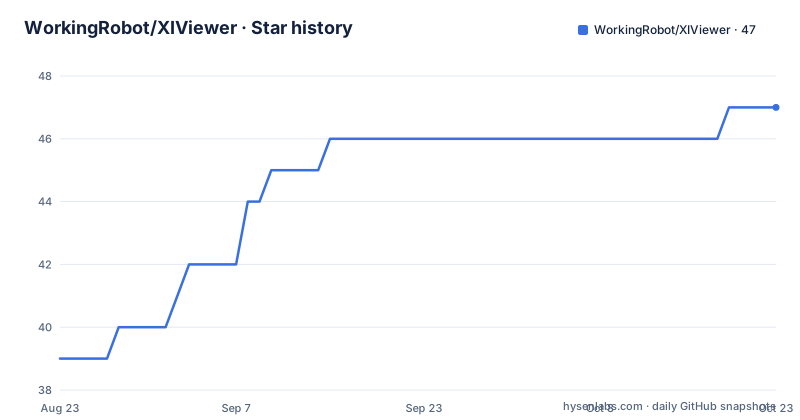
- WorkingRobot/XIViewer47 ★ · +8
| Repository | 2026-08-23 | 2026-10-21 |
|---|---|---|
| WorkingRobot/XIViewer | 39 | 47 |
8 Stars in the last 59 days, measured from the daily GitHub snapshot. Compare with other projects
Editorial analysis
Self-hosting is two commands and one manual settings step
The container path is the shortest documented route to your own instance:
docker pull ghcr.io/workingrobot/xiviewer:main
docker run -p 8080:80 ghcr.io/workingrobot/xiviewer:main
Then you open http://localhost:8080. The port mapping is the only configuration in the command, and the container ships the binary and its static assets together, so there is no volume and no database to wire up.
The part that catches people is what happens next. You give it a few seconds to load the latest game version, and then you set the API url to `http://localhost:8080/api` in the settings. That is a manual step the documentation keeps separate from the container start, and skipping it leaves a running container whose interface is not talking to the data next to it.
The other two routes are equally short: use the hosted version at xiviewer.app, or take a pre-built binary for your platform from the Releases page.
One workspace, two binaries, and trunk decides which one you get
Building from source starts with a clone, and the repository is a Cargo workspace with eight members: framediff, glyphnames, luadec, pathlist, shaders, shadermerge, viewer and web. The workspace pins resolver 3 and edition 2024, with the version held in one place, currently 1.9.0.
The native app is a single command:
cargo build --bin viewer --releaseThe web build has a fork in the road, and the distinction is whether you need an API server. Without one, you serve the viewer alone:
trunk serve --release --config viewerWith one, you build the web binary instead, and the documentation notes it internally builds the viewer binary as well:
cargo run --bin web --releaseEither way you need trunk on the PATH first, installed with `cargo install --locked trunk` or through the trunk guide. So the web build has a toolchain prerequisite the native build does not, which is the practical difference between the two.
EXD files live in SqPack category 0A and carry data without structure
The data XIViewer reads is specific. Inside SqPack, category 0A, the files named like `0a0000.win32`, hold Excel sheets serialized into a proprietary binary format that only the game itself reads. The `.exd` files inside carry the actual data, while the `.exh` headers carry the structure.
The structural half is the problem. FFXIV's internal development cycle generates a header file per sheet and compiles it into the game, which means the client ends up with no usable description of the sheet layout. Anyone reading the files directly is left inferring column meaning from context.
That is the gap EXDSchema fills. It consolidates the header knowledge into a language agnostic schema that any language can parse and that describes the EXH files as they are given to the client. XIViewer integrates with it closely enough to edit a schema inside the viewer, so you can correct a column description without leaving the tool and without hand-editing JSON.
For context on the ecosystem, programmatic access to these files usually goes through Lumina in C#, ironworks in Rust, or the XIVAPI REST service.
Reading a local install needs the browser directory picker
The hosted version at xiviewer.app does more than stream sheets. It supports local game installs and schema files, and it covers all four regions. Taiwan is listed but disabled, with the stated reason that it stays off until the data is published on Thaliak.
There is a browser constraint on those features, and it is not a preference. Local game installs and schema files need the directory picker API, so they work in Chromium-based browsers only. That is the entire reason a Safari or Firefox user sees fewer options, and it is worth knowing before you plan a workflow around your own installed copy of the game.
The rest of the interface is built for large tables. The README names `Item`, `Action` and `Quest` as the sheets that are huge, and claims efficient handling of all sheets including those. Filtering comes in three forms, simple, fuzzy and complex, which is the difference between finding an item by name and narrowing a quest table by several conditions at once.
cargo test never sees the 3D viewers, so smoke/run.sh drives chromium
Testing is split, and the split is documented rather than glossed. `cargo test` covers the parsers and the UI logic. The 3D viewers, meaning the model and scene viewers, are only really testable in a browser.
So there is a second harness. `smoke/run.sh` builds the wasm application, drives headless chromium over the model and scene viewers, and fails on any GL error, any panic, or any log line at `ERROR` level.
Making that possible required deliberate build configuration rather than just a shell script. A `smoke` profile inherits release settings, and the comment explains why overflow-checks stay on: release build speed is what matters, but on the 32-bit wasm target an oversized file could otherwise silently wrap a usize instead of panicking. A package-level override turns debug-assertions back on for `egui_glow`, because its own GL error polling is gated on debug assertions and is the only thing that catches an error class chromium's own renderer log stays silent about.
Five crates.io dependencies are redirected into deps/ by patch.crates-io
The Cargo manifest patches several well known crates to local paths, which tells you where the real dependencies live. `dxbc` and `hlsl` come from `deps/d3dasm`, `ironworks` from `deps/ironworks`, and the two downloader crates `xiv-dl-cache` and `xiv-dl-core` from `deps/ffxiv-downloader` under its rust directory.
One patch is a fork rather than a path: `catppuccin-egui` points at a git repository on a branch called `egui35`. Themes are therefore pinned to a specific egui version through a fork, which is the kind of coupling worth knowing before a version bump.
The manifest also documents a wasm-specific problem in a long comment attached to a dev profile override. A debug build of epaint acquires its context lock with a timeout measured through `std::time::Instant`, which wasm32-unknown-unknown does not implement, so a lock that misses the uncontended fast path panics and kills the task. Release builds take an untimed path, which is why only dev builds hit it.
The container compiles with trunk_assets and ships two artifacts
The Dockerfile is two stages on Alpine. The builder starts from `rust:alpine`, installs `musl-dev` and trunk, and adds the `wasm32-unknown-unknown` target, then builds the web binary with a feature flag:
RUN cargo build --bin web --release --features trunk_assetsThat flag is what bundles the frontend into the binary instead of expecting a separate asset directory at runtime. A comment explains why no OpenSSL headers are installed: reqwest runs on rustls and the lock file carries no openssl-sys, so there is nothing to link against.
The runtime stage copies exactly two things out of the builder, the `web` binary and the `static` directory, and runs `./web`. Nothing else survives into the image, which is why the published image stays small despite the build stage pulling a full Rust toolchain.
Around that, the repository root carries the tooling a graphics-heavy viewer needs: `shaders/` and `shadermerge/` for the rendering side, `capture/` and `config.yml` at the root, a `paths/` directory of path data, and `smoke/` for the browser test described earlier.
Editorial conclusion
XIViewer suits FFXIV data miners and tool authors who want sheet data with its structure attached instead of raw binaries, and who can use xiviewer.app, a native build or the container. It does not suit a non-Chromium browser that needs to read a local game install, because that path depends on the directory picker API. Before trusting a self-hosted instance, watch what the container pulls on its first load and then set the API url to http://localhost:8080/api in the settings, which the documentation calls out as a separate manual step from the docker run itself.
Frequently asked questions
What is XIViewer used for?
It is a cross-platform viewer for Final Fantasy XIV Excel data, the structured in-game tables holding item stats, quests, NPC data and more. You can use it in a browser at xiviewer.app or as a native build from the Releases page.
How do I self-host XIViewer with Docker?
Pull ghcr.io/workingrobot/xiviewer:main and run it with -p 8080:80, then open http://localhost:8080. After it has spent a few seconds loading the latest game version, set the API url to http://localhost:8080/api in the settings.
Which browsers can XIViewer read a local game install from?
Chromium-based browsers only, because local game installs and schema files go through the browser's directory picker API. All four regions are supported, with Taiwan listed but disabled until it is published on Thaliak.
How do I build XIViewer from source?
Clone the repository, then run cargo build --bin viewer --release for the native app. For the web build, install trunk with cargo install --locked trunk, then either trunk serve --release --config viewer without an API server, or cargo run --bin web --release with one.
Does XIViewer have automated tests for its 3D viewers?
cargo test covers the parsers and the UI logic only. The 3D viewers are covered by smoke/run.sh, which builds the wasm app and drives headless chromium over the model and scene viewers, failing on any GL error, panic or ERROR-level log.
Official sources
Add this badge to your README
If you maintain this project, the badge below links readers to this analysis and shows its maintenance status from the daily GitHub snapshot. Paste the markdown into your README; add ?metric=license or ?metric=stars to the image URL for a different field.

[](https://hysenlabs.com/projects/workingrobot-xiviewer)Star history chart for your README
[](https://hysenlabs.com/projects/workingrobot-xiviewer)Was this useful?