PaperSpine5 runs the whole paper as one skill, and its four kits are still an unsigned alpha
PaperSpine5 — local-first, evidence-bound paper research, writing, figures, review and delivery. Download: https://wubing2023.github.io/PaperSpine/v5/
At a glance
- What is it?
- A Python skill installed into codex, Claude or openclaw that takes a research direction through literature search, outlining, drafting, figures, citation checks, review and typesetting, ending in editable Word or LaTeX source. Version v0.4.0-alpha.3 ships four platform kits between 26.5 MB and 56.2 MB, verified by SHA-256 but carrying no independent cryptographic signature.
- Who is it for?
- PaperSpine5 fits a researcher who already has a direction and real source files, and who would rather have the outline, the figures and the citation checks run in one host session than in six tools. It does not fit a Linux arm64 server or an Alpine image, since neither has a kit, and the macOS build asks you to clear an unsigned first launch before it runs.
- Can I use it commercially?
- Yes. MIT is a permissive licence: you can use, modify and sell software built on it, as long as you keep its copyright and licence notices.
- Is it still maintained?
- Yes. The repository received new commits within the last day.
- What is it written in?
- Mainly Python, according to GitHub's language statistics.
Answers come from the project's GitHub data, last synced on November 15, 2026, and from our analysis. They are not legal advice.
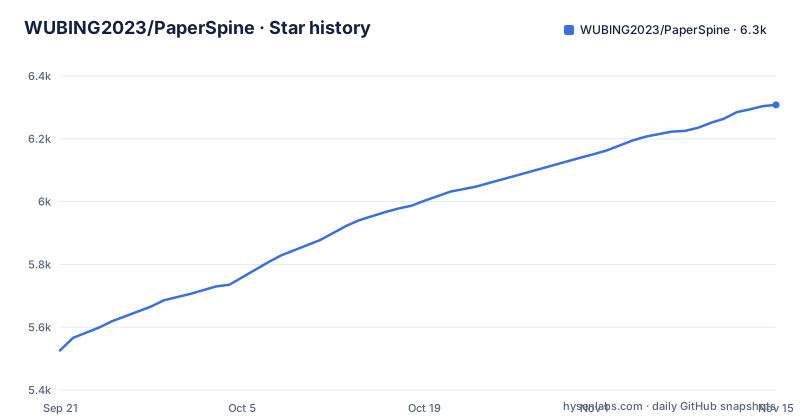
Star history
- WUBING2023/PaperSpine6,308 ★ · +782
| Repository | 2026-09-21 | 2026-11-15 |
|---|---|---|
| WUBING2023/PaperSpine | 5.5k | 6.3k |
782 Stars in the last 55 days, measured from the daily GitHub snapshot. Compare with other projects
Editorial analysis
One `paper-spine` invocation carries the outline, the draft and the typesetting
Everything happens inside one skill started as `paper-spine`. It searches literature, sorts the arguments, builds an outline, writes the text, generates the figures, verifies citations, reviews and revises, then typesets. What you get back is editable Word or LaTeX source, not only a rendered PDF, and that difference decides whether a venue template can be applied later. Figures belong to the same run: a data plot, a mechanism diagram and a method framework diagram are produced in the task that writes the prose rather than bolted on afterwards.
The web page closes the loop. Pick a plan, preview the text and the pictures, leave revision comments, download the result. Research material is kept locally by preference, and the project states that arguments, citations and charts all rest on real evidence. So `paper-spine` is the entire user interface. There is no second command to remember for figures and no third one for the reference list.
Which host runs it depends on the projection you install. The public repository holds `dist/codex/skills/paper-spine`, `dist/claude/skills/paper-spine` and `dist/openclaw/skills/paper-spine`, with `dist/claude/commands/paperspine.md` as the Claude command entry. One skill, three host layouts.
The four kits run from 26.5 MB to 56.2 MB, and the old 0.70 MB ZIP installs nothing
The current release publishes four complete kits and nothing smaller. Windows x64 is about 26.5 MB, Linux glibc x86_64 about 56.2 MB, macOS Apple Silicon about 40.6 MB and macOS Intel x86_64 about 40.5 MB. Every download is listed in a public release manifest and checked with SHA-256. The version string is `v0.4.0-alpha.3`, a prerelease, and the product page at the repository homepage is where the links are served from.
The trap for anyone holding an older link is the Skill-only ZIP of roughly 0.70 MB. It carries no Web core and no runtime, so it cannot perform a first install, and it cannot repair a missing kit pointer either. The current release does not offer it at all. Managing the skill from an already verified full kit is the advanced path instead.
`-CleanLegacy` writes an archive only when it finds a legacy conflict
Windows x64 installs through PowerShell:
powershell -ExecutionPolicy Bypass -File .\install.ps1 -Target codex -CleanLegacymacOS and Linux use the shell script with the same flag in long form:
sh ./install.sh --target codex --clean-legacy`-CleanLegacy` runs a read-only preview before it touches anything. An archive is written only when it actually finds a conflict with an older version, and even then paper task data, host settings and unknown files are left alone. Deletion is not on its list of behaviours. Both installers check byte counts, the SHA-256 digest, integrity inside the kit and a self-check on first launch, so a truncated or altered download should stop the installer instead of leaving you with a half-working skill.
`-CheckOnly` and `-Target codex` answer two different questions
Checking and installing are separate calls on both platforms:
# Windows
powershell -ExecutionPolicy Bypass -File .\install.ps1 -CheckOnly
powershell -ExecutionPolicy Bypass -File .\install.ps1 -Target codex# macOS / Linux
sh ./install.sh --check-only
sh ./install.sh --target codexRun the check first and you learn whether anything is out of date before overwriting an install that works. When a newer version exists, rerunning the installer performs a rollback-capable update, keeps task data and repeats the launch self-check. When the installed copy is already current and the skill is intact, it continues without downloading or overwriting anything. The skill also checks for updates on each invocation and upgrades the full kit and the updater itself when it finds one, unless you have explicitly switched auto-update off. Rollback, update and removal each have their own file in the repository root: `ROLLBACK.md`, `UPDATE.md` and `UNINSTALL.md`.
The checks are named scripts, not decisions the model makes while writing
This is where the approach differs from asking a general-purpose assistant for a manuscript in one reply. The internals are named units: `writing_rationale_matrix` for the argument work, `citation_support_bank` for the citation side, `translation_package` for translations. Verification is separate again, with `artifact_check.py`, `reference_inventory.py` and `citation_bank_check.py` for the citation chain and `latex_guard.py` and `word_guard.py` guarding the two formats that get delivered. Because the guards are format-specific, a LaTeX build and a Word file are both inspected instead of one of them being an afterthought.
The trade is a fixed sequence. You get the checks this release ships, in the order it ships them, and nothing in the repository documents swapping a guard or inserting your own review stage between two of them. The only example file in the tree is `examples/v4_acceptance.py`, so there is no worked configuration to copy and adapt.
Linux arm64 and musl are missing from the platform list
Four platforms are covered: Windows x64, Linux glibc x86_64, macOS arm64 and macOS x86_64. Windows x64 has been through local install, update and workbench verification, and a post-release CI run passed legacy updater upgrades and workbench launch on all four. Linux arm64 and musl or Alpine builds are not declared supported. On an ARM Linux server or inside an Alpine container there is no kit to download, which rules the tool out before any feature question comes up.
The signing story is thinner than the checksum story. macOS kits are neither signed nor notarized, so a first launch can stop on a permission prompt only you can approve, and this is an alpha prerelease with no independent cryptographic signature. The SHA-256 in the public release manifest tells you the bytes match what was published. That is a weaker guarantee than a signature: it confirms the download is intact, not who produced it.
The release authorizes nothing after the download
Shipping the software does not authorize using it to submit a paper, upload private data, pay, or contact anyone outside your own machine. Those four sit outside the release in the project's own words, and none of them is a setting you can flip afterwards. The support entry is described as voluntarily maintained, adds no features and does not read payment status, so a support conversation changes nothing about what the skill is allowed to do.
The public repository draws the same line with what it keeps. Source code and tests stay in; local tasks, clinical data, caches and development run logs stay out. For work touching patient data that is the correct default, and the side effect is that no finished paper sits in the tree to study. The root instead holds nine README translations, `product-release.json`, `ruff.toml`, `atlas/`, `release/`, `tests/` and `website/`.
Three alpha tags in nine days, with two already marked superseded
Three tags landed between 2026-09-15 and 2026-09-24: `v0.4.0-alpha.1-dev`, then `v0.4.0-alpha.2` on 2026-09-21, then `v0.4.0-alpha.3` on 2026-09-24. The names of the two older releases carry the note that alpha.3 supersedes them, so the project marks its own history in place rather than rewriting release names. The last push to the default branch is dated 2026-10-14, after the current tag.
A channel moving three times in nine days will move again. Read the release notes for the tag you are about to install before pointing the installer at a working setup, since `-CleanLegacy` and the rollback path are documented in the repository but the version history behind them is short. Licensing is MIT, which leaves a research group free to modify the skill without a copyleft obligation.
Editorial conclusion
PaperSpine5 fits a researcher who already has a direction and real source files, and who would rather have the outline, the figures and the citation checks run in one host session than in six tools. It does not fit a Linux arm64 server or an Alpine image, since neither has a kit, and the macOS build asks you to clear an unsigned first launch before it runs. The alpha.3 tag closed a run of three tags in nine days, so compare the SHA-256 in the public release manifest against your download before running sh ./install.sh, and confirm your platform is one of the four the post-release CI run covered.
Frequently asked questions
How do I install PaperSpine5 on macOS or Linux?
Run `sh ./install.sh --target codex --clean-legacy` from the downloaded kit. The flag runs a read-only preview first and archives only when an older-version conflict exists. To check without installing, run `sh ./install.sh --check-only` instead.
Does PaperSpine5 work on Linux arm64 or Alpine?
No kit is published for either. Linux arm64 and musl or Alpine are not declared supported, while Windows x64, Linux glibc x86_64, macOS Apple Silicon and macOS Intel x86_64 all have a verified kit.
What does the PaperSpine5 Skill-only ZIP do?
The historical ZIP of roughly 0.70 MB contains no Web core and no runtime, so it cannot perform a first install and cannot repair a missing kit pointer. The current release ships only the four complete platform kits, ranging from about 26.5 MB to 56.2 MB each.
Which hosts can run the PaperSpine5 skill?
The repository ships host projections at `dist/codex/skills/paper-spine`, `dist/claude/skills/paper-spine` and `dist/openclaw/skills/paper-spine`, and `dist/claude/commands/paperspine.md` as the Claude command entry. The skill itself is started as `paper-spine`.
Can PaperSpine5 submit a paper or make a payment for me?
No. The release does not authorize submission, uploading private data, payment or external contact. The support entry adds no features and does not read payment status either.
Official sources
Add this badge to your README
If you maintain this project, the badge below links readers to this analysis and shows its maintenance status from the daily GitHub snapshot. Paste the markdown into your README; add ?metric=license or ?metric=stars to the image URL for a different field.

[](https://hysenlabs.com/projects/wubing2023-paperspine)Star history chart for your README
[](https://hysenlabs.com/projects/wubing2023-paperspine)Was this useful?