Wukong AICRM is a Salesforce-shaped CRM where the AI assistant is the only entry point
Wukong-AICRM is an open-source AI CRM and Salesforce alternative powered by conversational AI, handling customer management, knowledge base queries and task execution entirely through chat.
At a glance
- What is it?
- A Java and Vue CRM for sales and customer success teams that routes every request through one assistant into three subsystems, and that calls itself open source while licensing commercial use away.
- Who is it for?
- The architecture here is a bet worth naming: put a single assistant in front of the whole system rather than bolting a chat box onto a traditional CRM. The README's diagram shows CRM, RAG, and Workflow hanging off one assistant that sits over PostgreSQL, Redis, and MinIO, which is why the AI task generation and knowledge base features are described as feeding the same context rather than as separate modules.
- Can I use it commercially?
- Check first. The repository uses a licence we do not classify automatically, so read its LICENSE file before any commercial use.
- Is it still maintained?
- Yes. The repository last received commits 14 days ago.
- What is it written in?
- Mainly Java, according to GitHub's language statistics.
Answers come from the project's GitHub data, last synced on October 21, 2026, and from our analysis. They are not legal advice.
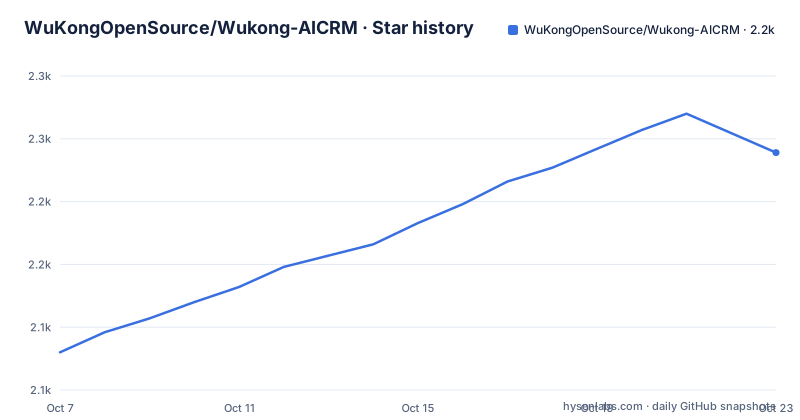
Star history
- WuKongOpenSource/Wukong-AICRM2,270 ★ · +190
| Repository | 2026-10-07 | 2026-10-21 |
|---|---|---|
| WuKongOpenSource/Wukong-AICRM | 2.1k | 2.3k |
190 Stars in the last 14 days, measured from the daily GitHub snapshot. Compare with other projects
Editorial analysis
One assistant in front, three subsystems behind
The architecture section states the central design decision in one sentence: the AI assistant is the unified interaction entry point, connecting customer management, knowledge base question answering, and task execution in the same workflow.
The diagram that follows is deliberately spare. A user talks to an AI assistant, and the assistant fans out to three labeled subsystems, CRM, RAG, and Workflow, which in turn sit on three infrastructure services, PostgreSQL, Redis, and MinIO.
       │
 ┌─────┼─────┐
 │     │     │
 CRM  RAG  Workflow
 │     │     │
 └─────┼─────┘
       │
       ▼
 PostgreSQL
 Redis
 MinIO
That fan-out is the whole thesis, and it explains the feature list better than the feature list does. A CRM where the assistant reads the record is ordinary. A CRM where the same assistant also pulls from a document knowledge base and writes tasks into a workflow engine is a different product, and the three capabilities are only coherent together because they share one entry point.
The README frames the gap this addresses in a way that is worth reading carefully. The claim is that traditional CRMs are good at recording customer information, while what sales actually needs each day is to know who to contact today, what to do next, why a deal has stalled, and how to reply professionally. Everything in the feature set follows from those four questions.
Six capabilities, and email is the one that does the work
The core capabilities section lists six items. The AI conversation assistant is described as answering questions about customers, performance, tasks, and knowledge base content the way you would ask a colleague, combining structured data with enterprise documents to produce answers that are traceable and actionable.
The knowledge base capability is RAG-based. You upload product manuals, contracts, proposals, meeting notes, and sales scripts, and the assistant answers from that material rather than from repeated searching. The customer management capability is the conventional part: customer records, contacts, follow-up notes, opportunity stage, and customer context in one place, with automatic recognition of stage, requirement focus, and potential risk.
Task generation is the piece that closes the loop. After a conversation or a customer analysis, todos, reminders, and priorities can be produced directly, which the README describes as turning what should be done into trackable work items.
The sixth capability is the one with the most engineering behind it and the least marketing: email and communication capture. It connects Gmail, Outlook and Microsoft 365, and custom IMAP and SMTP, accumulating email context and helping draft replies. This matters more than its position in the list suggests. Almost everything else in the product depends on knowing what a customer actually said, and in a real sales org that history lives in mailboxes rather than in the CRM.
The version numbers are specific enough to plan around
The README publishes a full version table, which is more than most open-source CRM projects bother with, and it pins everything. The backend runs Java 21 with Spring Boot 3.3.12, Spring AI 1.0.0 for LLM integration over an OpenAI-compatible API, PostgreSQL 17 as the primary database, MyBatis-Plus 3.5.7 for persistence, Redis for caching and session management, and MinIO for object storage of documents and files.
The frontend is equally pinned: Vue 3.4, TypeScript 5.5, Element Plus 2.8, Pinia 2.2, Tailwind CSS 3.4, and Vite 5.4.
Spring AI 1.0.0 with an OpenAI-compatible API is the detail that matters most for anyone planning to deploy this, because it means the model provider is not baked in. Anything that speaks the OpenAI interface can serve the assistant, which is the difference between this being a demonstration and being deployable against whatever model gateway a company already runs.
The project structure block in the README is conventional, with `backend/` holding the Maven project and `frontend/` the npm one.
├── backend/                 # 后端 Spring Boot 项目
├── frontend/                # 前端 Vue 项目
├── docker/                  # Docker 部署配置
├── docs/                    # 文档与产品截图
Note that the tree in the repository also contains a `desktop/` directory, which this structure listing does not mention, along with `AGENTS.md` and `CLAUDE.md` at the root. The desktop client appears to exist without documentation in the README, which is worth checking before you assume the deployment story is entirely Docker Compose.
Release notes are date-stamped, and only one of the two has content
There are two releases and neither uses semantic versioning. They are named `20260610` and `20260210`, matching the dates on which they were cut, which is a common convention for teams who tag by release day rather than by version sequence.
The February release has an empty body. The June one has notes, and they are worth reading because they describe what actually had to be fixed rather than what was added.
The June release is version 1.0.0, and its stated work covers local deployment and the knowledge base. WeKnora initialization configuration is supported, tenant API keys are written automatically, a default knowledge base is created, and LLM and embedding model configuration is synchronized. It also adds generating sales scripts from the knowledge base, and it documents Docker deployment as `docker-compose up -d --build`.
Two of the fixes in that list are more informative than the features. One is that the frontend is rebuilt from source and packaged into the CRM image, explicitly to avoid stale frontend assets. The other is a fix for the AI reusing historical results when querying the customer list, which is the classic RAG caching bug: a query that should return current records returning a previous answer instead.
Taken together, these notes describe a project that reached 1.0.0 by making deployment reproducible rather than by adding surface area. If you are evaluating it, the June release is the single best document in the repository.
Open source in the description, noncommercial in the license
This is the contradiction to resolve before anything else, and the repository does not hide it, it just presents both halves prominently.
The repository description calls it an open-source AI CRM and a Salesforce alternative. The README's own summary calls it an open-source version of Salesforce plus ChatGPT. But the two badges at the top of the README say Noncommercial Use and Commercial Use Authorization Required, and the repository's license field reads NOASSERTION rather than naming a standard license.
Those are not reconcilable as written, and the tree explains where the real terms live. There is a `LICENSE`, a `LICENSE.en.md`, a `NOTICE`, and a `TRADEMARKS.md`. A dedicated trademark file in a repository of this size is a signal that the project name is being protected separately from the code terms.
So the accurate description is: source-available under noncommercial terms, with commercial use requiring authorization. That is a different proposition from open source, and for a CRM, which is exactly the category of software companies most often need to run commercially, the distinction decides whether the project is usable at all. Read the `LICENSE` file rather than the badge or the description.
The rest of the README is consistent with a project that expects real deployment. There is a live demo at 72crm.ai, a community forum, an English README under `docs/i18n/`, and an explicit warning to change the initial administrator password and disable demo data after going to production.
Editorial conclusion
The architecture here is a bet worth naming: put a single assistant in front of the whole system rather than bolting a chat box onto a traditional CRM. The README's diagram shows CRM, RAG, and Workflow hanging off one assistant that sits over PostgreSQL, Redis, and MinIO, which is why the AI task generation and knowledge base features are described as feeding the same context rather than as separate modules. The thing to settle before anything else is licensing. The repository is described as an open-source AI CRM and the README carries a noncommercial-use badge plus a separate commercial-authorization-required badge, and the tree holds `LICENSE`, `LICENSE.en.md`, `NOTICE`, and `TRADEMARKS.md`. For an evaluation team that determines whether this is usable, read those files first. Then read the `20260610` release, which is the only one with substantive notes and which introduces WeKnora for the knowledge base.
Frequently asked questions
What does AI CRM mean?
In this project it means a CRM whose primary interface is a conversational assistant rather than a set of forms and dashboards. The assistant fronts three subsystems at once: conventional CRM records, a RAG knowledge base over company documents, and task workflows, so a single question can read a customer record and generate follow-up work from it.
Can I use Wukong AICRM commercially?
Not under the terms as published. The README carries a noncommercial-use badge and a separate commercial-authorization-required badge, and the repository license field reads NOASSERTION, even though the description calls the project open source. The repository contains `LICENSE`, `LICENSE.en.md`, `NOTICE`, and `TRADEMARKS.md`, so read those files to establish what commercial use requires.
What database and stack does Wukong AICRM use?
Java 21 with Spring Boot 3.3.12, Spring AI 1.0.0, PostgreSQL 17, MyBatis-Plus 3.5.7, Redis, and MinIO on the backend, with Vue 3.4, TypeScript 5.5, Element Plus, Pinia, Tailwind CSS, and Vite on the frontend. Spring AI talks to any OpenAI-compatible API, so the model provider is not fixed.
How do I deploy Wukong AICRM?
With Docker Compose, using `docker-compose up -d --build` according to the 1.0.0 release notes. The build flag matters: that release specifically changed the process so the frontend is rebuilt from source and packaged into the CRM image, to avoid shipping stale frontend assets. A live demo is also available at 72crm.ai.
Official sources
Add this badge to your README
If you maintain this project, the badge below links readers to this analysis and shows its maintenance status from the daily GitHub snapshot. Paste the markdown into your README; add ?metric=license or ?metric=stars to the image URL for a different field.

[](https://hysenlabs.com/projects/wukongopensource-wukong-aicrm)Star history chart for your README
[](https://hysenlabs.com/projects/wukongopensource-wukong-aicrm)Was this useful?