jinwyp/one_click_script: A Shell Menu for Swapping Linux Kernels and Turning On BBR
install latest or LTS linux kernel and enable BBR or BBR plus
At a glance
- What is it?
- A Bash installer that walks you through replacing the kernel on Debian, Ubuntu or CentOS and enabling BBR, BBR Plus or BBR2, plus a separate path for Wireguard and Cloudflare WARP. It is a menu-driven script, not a package, and it reboots your server twice.
- Who is it for?
- Adopt it if you run a throwaway VPS on Debian 9+, Ubuntu 16+ or CentOS 7+ and you want BBR or BBR Plus without hand-editing GRUB and sysctl. Do not adopt it if the machine cannot tolerate two reboots, if it runs a distribution outside that list, or if you need an unattended, idempotent configuration-management path, because this is an interactive menu.
- Can I use it commercially?
- Yes. MIT is a permissive licence: you can use, modify and sell software built on it, as long as you keep its copyright and licence notices.
- Is it still maintained?
- Yes. The repository last received commits 16 days ago.
- What is it written in?
- Mainly Shell, according to GitHub's language statistics.
Answers come from the project's GitHub data, last synced on November 14, 2026, and from our analysis. They are not legal advice.
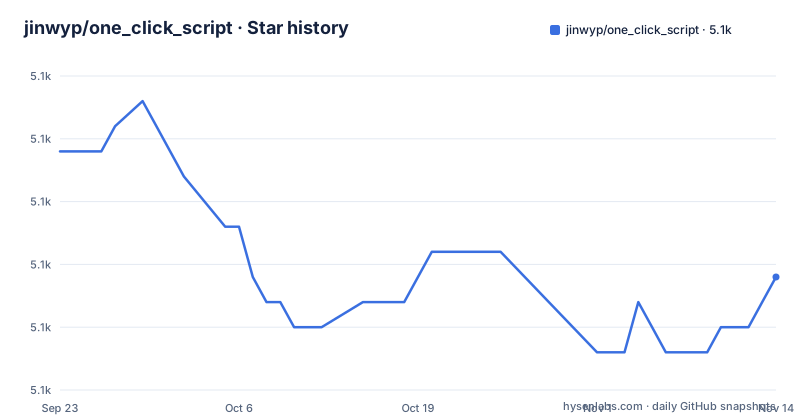
Star history
- jinwyp/one_click_script5,137 ★ · -5
| Repository | 2026-09-23 | 2026-11-14 |
|---|---|---|
| jinwyp/one_click_script | 5.1k | 5.1k |
-5 Stars in the last 52 days, measured from the daily GitHub snapshot. Compare with other projects
Editorial analysis
The problem: kernel swaps and congestion control on a rented VPS
Most VPS images ship an old kernel and the cubic congestion control algorithm. Getting to a newer kernel means adding a repository, installing a metapackage, editing the bootloader entries, rebooting, confirming the new kernel actually booted, and then writing the right lines into sysctl.conf. Each distribution does this differently, and on CentOS the kernel package naming is different again from Debian. The README frames the project as a way to switch between the latest kernel and the 5.16, 5.10 LTS, 5.4 LTS, 4.19 LTS and 4.14 LTS lines, and to enable BBR or BBR Plus with FQ, FQ-Codel, FQ-PIE or CAKE. That is the whole scope: kernel selection and congestion control, plus a separate Wireguard and Cloudflare WARP path for people who care about streaming region locks and Google reCAPTCHA. It is aimed at the single-server operator who is comfortable running a script as root and watching a menu, not at a fleet managed by Ansible.
How the menu drives kernel replacement and sysctl changes
The entry point is install_kernel.sh. The README describes the flow as numbered choices rather than flags: on CentOS, AlmaLinux or Rocky Linux you pick 31 for the latest 5.16 kernel or 35 for LTS 5.10, which the README calls recommended. On Debian the LTS 5.10 choice is 41, and on Ubuntu it is 45. BBR Plus is a separate branch of the menu: 61 installs a BBR Plus 4.14.129 kernel and 66 installs BBR Plus on 5.10 LTS. XanMod is a third branch, choice 51, which the README ties to BBR2 on Debian or Ubuntu. Once a kernel is in place, you rerun the script: choice 2 enables BBR with CAKE (the README's recommendation) or FQ, and choice 3 enables BBR Plus. The script therefore does not do everything in one pass. Kernel installation and congestion-control activation are two separate runs, and the README states the whole installation reboots twice. The repository also carries KERNEL.md and KERNEL_CN.md as the dedicated documentation files for this part, separate from the README2 files that cover the v2ray and trojan scripts.
Installing it and enabling BBR: a first run
The README gives three ways to start. The shortest pipes a remote script into bash, which means you are executing code you have not read. The curl and wget variants save install_kernel.sh to disk first, but as written they chain straight into ./install_kernel.sh, so split the command if you want to read the script before it runs.
bash <(curl -Lso- https://git.io/kernel.sh)That is the one-liner form. The equivalent download-and-run form uses curl:
curl -O https://raw.githubusercontent.com/jinwyp/one_click_script/master/install_kernel.sh && chmod +x ./install_kernel.sh && ./install_kernel.shOn Debian the README says to choose 41 for the LTS 5.10 kernel, and on Ubuntu 45 for the same kernel. The script installs the kernel packages, and the README warns that it will reboot twice during the process. When a large warning screen appears during removal of the old kernel, the instruction is to answer NO and continue. Do not abort the kernel removal, the README says. Once the reboot cycle finishes, run the script again and choose 2 to turn on BBR with CAKE, or 3 for BBR Plus. Expect to see the new kernel name reported by uname after the reboots, and the congestion control setting reflected in the kernel's sysctl values. The README does not print the exact sysctl file path it writes.
Two reboots, an interactive prompt, and no rollback path
The design assumes the machine will come back. Two reboots on a remote VPS is a real risk if the new kernel does not boot, and the README does not document a rollback procedure, a way to pin the previous kernel as the default boot entry, or a rescue flag. The warning screen about kernel removal is the point where a mistake is expensive: the README tells you to answer NO to continue, which means the script is asking your permission to remove something, and the safe answer depends on reading the prompt rather than trusting the menu number. The second limitation is scope. The supported list is Debian 9 and later, Ubuntu 16 and later, and CentOS 7 and later. AlmaLinux and Rocky Linux appear in the CentOS instructions, and XanMod is limited to Debian and Ubuntu. Anything else, including containers that share the host kernel, is out of scope: you cannot change the kernel of a container from inside it. Third, the script is a menu, so it does not fit unattended provisioning. There is no documented non-interactive mode, no configuration file, and no flag list in the README. If you need the same kernel state reproduced across a hundred hosts, this is the wrong tool.
Alternatives: XanMod, distribution backports, and configuration management
The closest alternative inside the same problem space is the XanMod repository, which the script itself can install as choice 51 for BBR2 on Debian and Ubuntu. The difference is that XanMod is a kernel flavour with its own build options and its own package repository, so you get BBR2 and the XanMod patches but you take on a third-party kernel on every upgrade, whereas the script's default path installs kernels such as 5.10 LTS. If you only want a newer kernel and nothing else, Debian backports or the Ubuntu mainline kernel packages do the job without a menu. The other alternative is configuration management: Ansible, cloud-init or a preseed file can install a kernel package and write sysctl values idempotently, and they will not ask you a question halfway through. The trade-off is that you write the distribution-specific logic yourself, which is exactly what install_kernel.sh already contains. For the Wireguard and WARP side, the README points at its own v2ray script in the same repository, so the alternative there is a manual wg-quick setup plus the Cloudflare WARP client rather than choice 11 or 12.
Maintenance, licence, and what the repository actually ships
The last push to the repository was on 2026-10-29, which is recent enough that the kernel menu is unlikely to be stale, but the repository has no published releases, so there is nothing to pin and no changelog to read between commits. Upgrading means pulling the current install_kernel.sh and re-reading it, because the menu numbers and the kernel versions they map to can change between commits. The licence is MIT, which permits use, modification and redistribution with the licence text retained; the repository includes a LICENSE file at the top level. MIT says nothing about the kernel packages the script installs, which carry their own licences, and nothing about the Cloudflare WARP client or the wireguard tools it may pull in. The README also lists a Patreon sponsorship link, so the project has a funding channel separate from the code. Treat the script as a convenience wrapper over distribution package managers, not as a supported product with a release cadence.
Editorial conclusion
Adopt it if you run a throwaway VPS on Debian 9+, Ubuntu 16+ or CentOS 7+ and you want BBR or BBR Plus without hand-editing GRUB and sysctl. Do not adopt it if the machine cannot tolerate two reboots, if it runs a distribution outside that list, or if you need an unattended, idempotent configuration-management path, because this is an interactive menu. Before you start, confirm your provider exposes a console or rescue mode, read install_kernel.sh to see which kernel packages it pulls for your distribution, and note that there are no releases to pin.
Frequently asked questions
Which Linux distributions does jinwyp/one_click_script support?
The README lists Debian 9 and later, Ubuntu 16 and later, and CentOS 7 and later. AlmaLinux and Rocky Linux are covered in the CentOS instructions, and the XanMod option is limited to Debian and Ubuntu.
How many times does jinwyp/one_click_script reboot the server during kernel installation?
The README states it will reboot twice during the whole installation, both for the standard kernels and for BBR Plus. After the reboots you rerun the script to enable the congestion control algorithm.
How do I enable BBR Plus with jinwyp/one_click_script?
Run the script and choose 61 to install the BBR Plus 4.14.129 kernel, or 66 for BBR Plus on 5.10 LTS. After the kernel installation and reboots finish, rerun the script and choose 3 to enable BBR Plus.
What should I answer when the big warning screen appears during kernel removal?
The README says to choose NO to continue installation, and warns not to abort kernel removal. The warning appears while the old kernel is being removed, so the answer controls whether the script proceeds.
Official sources
Add this badge to your README
If you maintain this project, the badge below links readers to this analysis and shows its maintenance status from the daily GitHub snapshot. Paste the markdown into your README; add ?metric=license or ?metric=stars to the image URL for a different field.

[](https://hysenlabs.com/projects/jinwyp-one-click-script)Star history chart for your README
[](https://hysenlabs.com/projects/jinwyp-one-click-script)Was this useful?