AI Safety HOT Hub for AI Agent Research and Monitoring
Safety News & Research Monitor. https://aisafetyhot.com
At a glance
- What is it?
- AI Safety HOT Hub gives coding agents skills and an MCP endpoint for AI safety briefings, paper discovery, lab monitoring, and incident checks. It suits researchers and engineering teams that want a focused discovery feed, while its summaries and incident results require checking against linked sources.
- Who is it for?
- Researchers and AI engineering teams should adopt it when an agent-accessible, bilingual AI safety feed would shorten routine literature and news discovery. It is a poor fit for teams that require independently reproducible retrieval, English-only source coverage, or guarantees about incident checks.
- Can I use it commercially?
- Check first. The repository uses a licence we do not classify automatically, so read its LICENSE file before any commercial use.
- Is it still maintained?
- Yes. The repository received new commits within the last day.
- What is it written in?
- Mainly TeX, according to GitHub's language statistics.
Answers come from the project's GitHub data, last synced on November 7, 2026, and from our analysis. They are not legal advice.
Star history
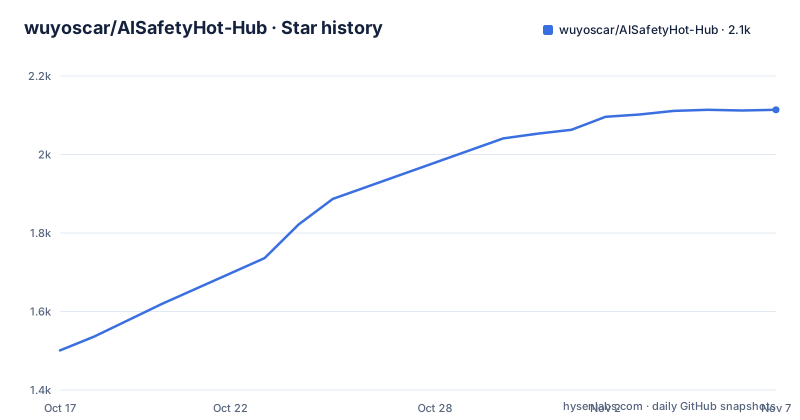
- wuyoscar/AISafetyHot-Hub2,114 ★ · +613
| Repository | 2026-10-17 | 2026-11-07 |
|---|---|---|
| wuyoscar/AISafetyHot-Hub | 1.5k | 2.1k |
613 Stars in the last 21 days, measured from the daily GitHub snapshot. Compare with other projects
Editorial analysis
AI Safety HOT Hub's Monitoring Problem
AI Safety HOT Hub addresses information fragmentation around AI safety. Its stated coverage includes jailbreaks, prompt injection, agent security, evaluations, incidents, policy, and research papers. The intended user is not limited to researchers reading a website. The project is designed for agents used in workflows such as coding assistants, where someone can request a recent safety briefing or papers in a particular direction without manually visiting several sources.
The repository packages information access in two forms. The public site at `aisafetyhot.com` provides editorial pages, including News, hotspot events, papers, conferences, daily reports, and an observation view. The repository also contains skills under `skills/` and MCP configuration, allowing an agent to request content through natural-language interaction. This makes the project a curated research and news access layer rather than a model evaluator, vulnerability scanner, or safety testing package.
Its audience is likely to value breadth and speed. The README says the daily paper selection contains 30 non-repeating entries. Half come from the previous two months, while the rest are selected from work within the previous six months or earlier, with newer work receiving priority. The README also says the selector favors known researchers, top laboratories, and university teams. Those are selection rules, not evidence that the list covers every relevant paper or represents the field without omissions.
The site supports readers who do not use an MCP client. Its interface can switch between Chinese and English. Separate views serve recurring monitoring and deeper review: News provides editorial introductions and links, hot events consolidate coverage of the same event, and conference pages group relevant papers by venue. This mix is useful for an engineer deciding where to investigate, but it does not replace direct review of the sources behind each item.
Skills, MCP, and the Agent Request Path
The documented architecture places an agent-facing skill layer over the hosted service. The `aisafetyhot` skill is described as the MCP tool foundation for the other skills. The task skills divide common requests into briefings, paper discovery, related-work drafting, laboratory monitoring, and incident checks. After installation, the README says the agent can choose an appropriate skill from a natural-language request.
The request path is therefore a client, a selected skill, the hosted MCP service, and returned research or news information. For a client that supports Streamable HTTP, the documented endpoint is `https://aisafetyhot.com/api/mcp`. The README says anonymous use is available and that no API Key is required. It refers developers to `docs/agent.md` for MCP tools and the anonymous access scope, plus `docs/mcp-examples.md` for examples. The README does not reproduce individual tool names or response schemas, so clients should not be assembled by guessing them.
The skills have distinct scopes. `aisafety-brief` covers the previous 24 hours or seven days. `aisafety-paper-scout` searches by direction and returns a short explanation with BibTeX. `aisafety-related-work` uses an abstract to draft related-work text. `aisafety-lab-watch` follows one laboratory, while `aisafety-incident-check` asks whether a model or tool has had a recent incident.
That division maps repeated research tasks to named instructions. It also introduces a dependency on source selection and synthesis rules that are not visible in the README excerpt. The documentation does not state how a skill selects stories, merges duplicate coverage, assigns confidence to an incident report, or handles a paper outside the catalogue. Clients needing exact result fields should inspect `docs/agent.md` and the skill definitions in `skills/` before automation.
Installing AI Safety HOT Hub in Claude Code
For Claude Code, the README documents installation as a marketplace plugin operation. The first command registers `wuyoscar/AISafetyHot-Hub` as a plugin marketplace. The second installs `aisafetyhot@aisafetyhot-hub`, which the project describes as installing the skill package and MCP integration together.
/plugin marketplace add wuyoscar/AISafetyHot-Hub
/plugin install aisafetyhot@aisafetyhot-hub
After those commands complete, a briefing request provides a practical first use. The README gives “这周 AI 安全有什么大事?” as an example for `aisafety-brief`. An English-language client can receive the equivalent request: “What happened in AI safety this week?” According to the skill description, the intended result covers the previous seven days. The README does not define a fixed output schema, so users should not depend on a specific heading or field layout unless their client configuration defines one.
The briefing is a discovery step. A user should follow its links to the original reports before treating a claim as confirmed. The README says the News view includes a short introduction and a link to the original report, which supports that workflow. It also provides a message board for reporting errors. The presence of that feedback channel is useful, but the README does not state correction targets or how quickly corrections appear.
The public site offers a separate first use for readers who do not want an agent integration. Its observation page is intended to show where material came from and which direction it belongs to. The News flow connects incoming stories to subject areas, while the featured timeline groups editorial entries and active topics. These views are convenient for manual monitoring, but Claude Code users should judge the plugin by whether its agent-facing results match the site's linked reporting.
Codex, Cursor, and Other MCP Clients
Codex, Cursor, and other agents use two documented steps. The skills are added through `npx skills`, and the hosted MCP service is registered separately. Neither command includes an API Key.
npx skills add wuyoscar/AISafetyHot-Hub
codex mcp add aisafetyhot --url https://aisafetyhot.com/api/mcp
The first command adds the repository's skills to a supported agent environment. The second registers an MCP server named `aisafetyhot` for Codex. For a different client, the README says to add `https://aisafetyhot.com/api/mcp` using its Streamable HTTP configuration. It does not provide a generic JSON snippet for all clients, so the exact transport fields must come from that client's MCP documentation.
Paper discovery provides a useful second request after setup. The README example asks for 15 papers about agent prompt injection and requests BibTeX. A new user can ask the installed agent: “Find 15 papers on agent prompt injection and include BibTeX.” This exercises topic filtering, result formatting, and the paper interpretation feature rather than merely checking that the homepage loads.
The README supports the request format and `aisafety-paper-scout` capability, but it does not document search completeness, validation of citation fields, or a peer-review filter. A caller should inspect the generated BibTeX and follow each paper link. If a workflow depends on stable identifiers or a fixed result count, it should confirm the behavior against the MCP documentation and an actual client response before depending on it.
News, Hot Events, and Paper Catalogue
The hosted site separates several information types. News presents an editorial timeline with introductions and links to original reports. Hot events group multiple reports about the same event, rank events by attention, and display a heat curve. The paper section contains nearly 2,000 AI safety entries that can be filtered by direction and type, with a one-sentence description and a quick read for each item.
Conference pages organize AI safety papers from ICLR, ICML, NeurIPS, ACL, S&P, USENIX Security, CCS, and NDSS. Daily reports group developments by direction and update as new progress arrives. These surfaces serve different needs. A team following an incident can inspect clustered coverage, while a literature reviewer can use direction, type, or conference filters. The agent layer offers another route through bounded requests such as a weekly briefing or a prompt-injection paper search.
The principal boundary is evidentiary. A heat curve indicates that the site considers an event prominent, but the README does not publish the scoring formula or explain how it separates independent reporting from repeated claims. A one-sentence paper explanation is an editorial aid, not a substitute for reading the paper. The README links interpretations and source records, giving users a path to verification, but it does not document deduplication confidence or correction latency.
The same caution applies to `aisafety-incident-check`. Its documented purpose is to find recent reports involving a model or tool. It should function as a lead generator for an analyst, not as proof that a product has been breached. A security decision still depends on the underlying reports, affected versions, dates, and response from the vendor. The README does not claim that the skill performs that verification itself.
Custom License and Repository Maintenance
The repository declares a custom license that GitHub cannot classify and directs readers to `LICENSE`. Without that file's text, this review cannot state its permissions, restrictions, redistribution rules, or treatment of generated content. This is a material adoption check for an organization that plans to modify the skills, redistribute repository files, operate a private service, or incorporate returned material into another product.
The repository is not archived, and the last push was on 2026-10-17. It has no GitHub releases. There is therefore no documented GitHub release channel or versioned upgrade procedure. Maintenance cost has two parts. Agent clients depend on the hosted MCP endpoint at `aisafetyhot.com`, while adopters of the skills also depend on repository instructions. Changes to either side could affect tool selection, source coverage, or output behavior without a GitHub release marking a migration point.
The repository layout includes versioned content directories such as `daily/`, `daily-papers/`, `papers/`, and `archive/`, along with skills and agent documentation. That layout suggests a mix of retained records and reusable agent instructions. The README does not document retention periods for incidents, deletion requests, or synchronization between the repository's content directories and the hosted service.
Teams needing a fully controlled evidence pipeline may prefer building a private index from primary sources. Such a system can define ingestion rules, retain raw records, and make ranking decisions explicit. AI Safety HOT Hub takes a different approach through hosted aggregation, editorial organization, paper interpretations, natural-language skills, and event clustering. It is more useful as a discovery and monitoring front end than as the authoritative record for a security decision.
Editorial conclusion
Researchers and AI engineering teams should adopt it when an agent-accessible, bilingual AI safety feed would shorten routine literature and news discovery. It is a poor fit for teams that require independently reproducible retrieval, English-only source coverage, or guarantees about incident checks. Before adoption, inspect `LICENSE`, test the documented briefing and paper-search paths in the intended client, and compare sample summaries, rankings, and incident results with their linked primary sources.
Frequently asked questions
How do I install AI Safety HOT Hub in Claude Code?
Register the repository as a plugin marketplace, then install `aisafetyhot@aisafetyhot-hub`. The README says this installs the skill package and MCP integration together.
Does AI Safety HOT Hub require an API Key?
No. The README says no API Key is required and that the MCP service supports anonymous use, subject to the access scope documented in `docs/agent.md`.
Can AI Safety HOT Hub return BibTeX for selected AI safety papers?
Yes. The `aisafety-paper-scout` skill supports paper searches by direction, provides a short explanation, and includes BibTeX according to the README.
Which clients can connect to the AI Safety HOT Hub MCP service?
The README gives setup commands for Claude Code, Codex, and Cursor. Other clients can use `https://aisafetyhot.com/api/mcp` when they support its Streamable HTTP transport.
Does AI Safety HOT Hub have a public GitHub release history?
No GitHub releases are listed. The repository is not archived, and the last push was on 2026-10-17, but the README does not define a versioned upgrade process.
Official sources
Add this badge to your README
If you maintain this project, the badge below links readers to this analysis and shows its maintenance status from the daily GitHub snapshot. Paste the markdown into your README; add ?metric=license or ?metric=stars to the image URL for a different field.

[](https://hysenlabs.com/projects/wuyoscar-aisafetyhot-hub)Star history chart for your README
[](https://hysenlabs.com/projects/wuyoscar-aisafetyhot-hub)Was this useful?