ant-design-x-vue claims 1.6.0 while the README documents no component
Ant Design X For Vue. 🔥
At a glance
- What is it?
- ant-design-x-vue is a Vue port of the Ant Design X React library, published on npm and documented almost entirely in Chinese. Its own example never renders, the file list contains ESLint and Prettier configs while the lint script runs only ESLint, and the newest release predates the latest commit by nine months.
- Who is it for?
- ant-design-x-vue suits a Vue team that wants Ant Design X chat components and is willing to read the docs site rather than the README, and its component surface, style entry and unplugin resolver are all present in the tree. Four checks come first.
- Can I use it commercially?
- Yes. MIT is a permissive licence: you can use, modify and sell software built on it, as long as you keep its copyright and licence notices.
- Is it still maintained?
- Yes. The repository received new commits within the last day.
- What is it written in?
- Mainly TypeScript, according to GitHub's language statistics.
Answers come from the project's GitHub data, last synced on November 25, 2026, and from our analysis. They are not legal advice.
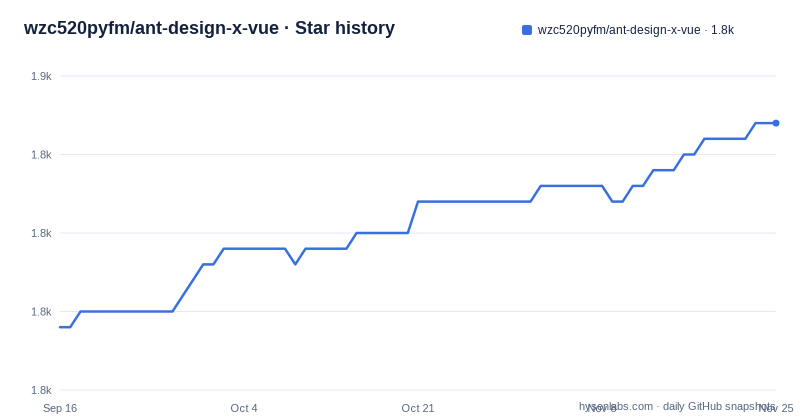
Star history
- wzc520pyfm/ant-design-x-vue1,847 ★ · +13
| Repository | 2026-09-16 | 2026-11-25 |
|---|---|---|
| wzc520pyfm/ant-design-x-vue | 1.8k | 1.8k |
13 Stars in the last 70 days, measured from the daily GitHub snapshot. Compare with other projects
Editorial analysis
The example imports XProvider and never renders it
The single usage example in the README is eleven lines and does not work as written:
<script setup lang="ts">
import { Bubble, XProvider } from 'ant-design-x-vue';
</script>

<template>
  <Bubble content="Hello AI" />
</template>
XProvider is imported and never used, which in a script setup block is dead code rather than a parent wrapper. The component that is used, Bubble, is given a static content string and no provider around it, so the example shows neither the streaming path, the sender, the conversation list nor any of the data flow the feature list promises. Nothing else in the README changes that: the example section has exactly one entry, and the rest of the file moves from features straight to install commands. The example is therefore a shape, not a demonstration, and anyone checking whether the port works is pushed to the documentation site.
Nine months between the 1.6.0 tag and the latest commit
The published line and the branch have drifted apart. v1.4.0 went out on 2025-12-01, v1.5.0 on 2025-12-09 and v1.6.0 on 2026-01-05, four days and then twenty-seven, and the manifest version is 1.6.0 to match. The last commit on main is dated 2026-10-02, so three quarters of work sit on the branch with no release to show for it. A CHANGELOG.md is in the tree and the release script calls changelogen, which is what generates it, so the history is recorded rather than lost. It also means the README sits at a version tag: the documentation that names 1.6.0 describes the npm artefact from January, not the code in the repository today. Contributors are pointed at issue 1 as a roadmap instead of at a changelog, which is where the intent for the next release is actually written down.
Prettier is configured, formatted and never read by the lint script
The root carries .prettierrc.js, .prettierignore and .eslintrc.js, plus a .husky/ directory, so the repository is set up for two formatters and a hook runner. The lint script resolves to one of them:
$ pnpm lintwhich calls lint:es, and that is a single ESLint pass over the src and test globs for js, jsx, ts, tsx and vue. No Prettier invocation appears anywhere in the script list, and no format script exists either, so the Prettier configuration has no command attached to it. The pre-commit hook may run it, since husky is present, but nothing in the manifest says so. The practical consequence is that formatting is enforced by whatever the hook does and invisible in the published scripts, and a contributor following the README gets an ESLint result that says nothing about the Prettier rules sitting in the same root.
The Windows install line starts with two dollar signs
Three package managers are offered, and the three blocks are not written alike. npm and yarn each have a single command, with the prompt marker on the line, while the pnpm block uses that marker on every line it contains:
$ pnpm install

$ pnpm docs:dev

$ pnpm run build
In the npm and yarn blocks the marker is part of a shell convention that a user deletes or never typed. Repeated on its own line, as it is here, it becomes two literal characters that no shell will accept, so the pnpm instructions are transcription rather than copy and paste. It is a small thing in the one section a new user reads first, and it is the kind of detail that tells you the developer scripts were written on a different platform from the install instructions, since the whole rest of the file is npm first and pnpm second.
The Vue version floor lives in a badge, not in the manifest
The compatibility promise for this port is stated in a badge URL rather than in the package metadata: img.shields.io/badge/vue-%20%3E%3D%203.5 encodes the text vue >= 3.5. Nothing in the visible part of package.json repeats it, because there is no peerDependencies block in view at all. The exports map, by contrast, is fully specified, with types pointing at ./typings/index.d.ts, an import condition at ./es/index.mjs and a require condition at ./lib/index.js, plus a separate style export and the resolver entry. So the library ships two module formats, a stylesheet and a resolver, and the requirement that would decide whether it installs at all is the one thing carried only by an image. Renovate is configured in the tree, which is how a floor like that could drift upward without anyone reading a manifest diff.
Three build outputs, one of them compiled a second way
The build is a run-p of three tasks. build:es runs Vite and then vue-tsc against tsconfig.build.json to emit ES modules with types. build:resolver does not use Vite at all: tsc compiles resolver/index.ts on its own into resolver-dist with declarations, so the unplugin resolver ships as a separately compiled package rather than a folder copied out of the source. build:dist is the third, using a second Vite configuration, vite.config.dist.mts, which is what produces the style entry the exports map points at. That gives the package four published artifacts, an ES build, a CommonJS build, a stylesheet and a resolver, and the typecheck script is separate again, running vue-tsc with no emit across the whole project. Three vite and vitest configuration files sit at the root, one for the dev server, one for the distribution build and one for tests, so the three build modes are genuinely different pipelines.
npm ships no README, so the Chinese description is what a user sees
The repository keeps two readmes, README.md in Chinese and README.en.md, and the top of the Chinese one links the English version as its translation. Neither appears in the files array of the manifest, which lists the dist, es, lib and resolver-dist outputs along with package.json and the typings, so a registry page for ant-design-x-vue gets no readme at all. What it does get is the description Craft AI-driven interfaces effortlessly, seven keywords, and the licence field. The README itself points elsewhere for the substance, at the documentation site on Netlify and at a DeepWiki page for the repository, which is a reasonable arrangement but it means npm is the one place where this library is described in English and in one sentence. The description is also narrower than the feature list, which claims RICH interaction patterns and data flow management.
Editorial conclusion
ant-design-x-vue suits a Vue team that wants Ant Design X chat components and is willing to read the docs site rather than the README, and its component surface, style entry and unplugin resolver are all present in the tree. Four checks come first. The README example does not compile, so nothing in the repository demonstrates a working render, and the documented version floor of Vue 3.5 or later comes from a badge rather than from a peer range. The Prettier config in the tree is not read by the lint script, which runs ESLint alone. The Windows pnpm install instruction starts with two dollar signs, which no shell will accept. And the npm manifest ships neither README.md nor README.en.md in files, so the Chinese description is what reaches a registry page. Version 1.6.0 was published on 2026-01-05 and the last commit on main is dated 2026-10-02.
Frequently asked questions
How do you install ant-design-x-vue?
Install it next to ant-design-vue, with npm i ant-design-vue ant-design-x-vue, yarn add for the same pair, or pnpm add for the same pair. The library is published on npm as ant-design-x-vue, on jsDelivr and on unpkg, and it is MIT licensed.
Which Vue versions does ant-design-x-vue support?
Vue 3.5 or later, according to the badge in the README, which encodes vue >= 3.5 in its URL. The peer requirement is not repeated in the visible part of the package manifest, so the badge is the only place the floor is stated.
What components does ant-design-x-vue provide?
The README documents a single example that imports Bubble and XProvider from the package and renders Bubble with a content string, without using the provider. The richer surface, covering conversation scenarios, data flow management and OpenAI-standard inference services, is described in Chinese in the feature list and in the linked documentation rather than shown in the README.
Does ant-design-x-vue ship a bundler resolver?
Yes. The manifest exports a resolver subpath with its own types at ./resolver-dist/index.d.ts, and it is built by a separate tsc invocation that compiles resolver/index.ts with declarations, so it is compiled independently of the Vite builds that produce the ES and distribution bundles.
How is ant-design-x-vue developed locally?
With pnpm: pnpm install, then pnpm docs:dev to develop the library through the documentation demos, pnpm run build for the library source, pnpm run docs:build and pnpm run docs:preview for the docs, and pnpm lint for ESLint. Tests run through vitest, with a coverage variant and a separate typecheck.
Official sources
Add this badge to your README
If you maintain this project, the badge below links readers to this analysis and shows its maintenance status from the daily GitHub snapshot. Paste the markdown into your README; add ?metric=license or ?metric=stars to the image URL for a different field.

[](https://hysenlabs.com/projects/wzc520pyfm-ant-design-x-vue)Star history chart for your README
[](https://hysenlabs.com/projects/wzc520pyfm-ant-design-x-vue)Was this useful?