x1unix/go-playground: A Self-Hosted Go Code Playground
Better Go Playground with autocompletion and syntax highlight
At a glance
- What is it?
- x1unix/go-playground is a web-based Go playground with autocompletion, syntax highlighting, file persistence, tutorials, and WebAssembly support. It suits developers who want a controlled browser-based scratchpad, although deployment controls still need review.
- Who is it for?
- Developers and organizations that want a configurable, self-hosted Go scratchpad should consider x1unix/go-playground after reviewing docs/deployment/README.md and confirming the execution and persistence model fit their environment. It is a poor fit for users who need a documented local installation, a fully local compiler sandbox, or a turnkey development workflow.
- Can I use it commercially?
- Yes. MIT is a permissive licence: you can use, modify and sell software built on it, as long as you keep its copyright and licence notices.
- Is it still maintained?
- Yes. The repository last received commits 3 days ago.
- What is it written in?
- Mainly Go, according to GitHub's language statistics.
Answers come from the project's GitHub data, last synced on November 7, 2026, and from our analysis. They are not legal advice.
Star history
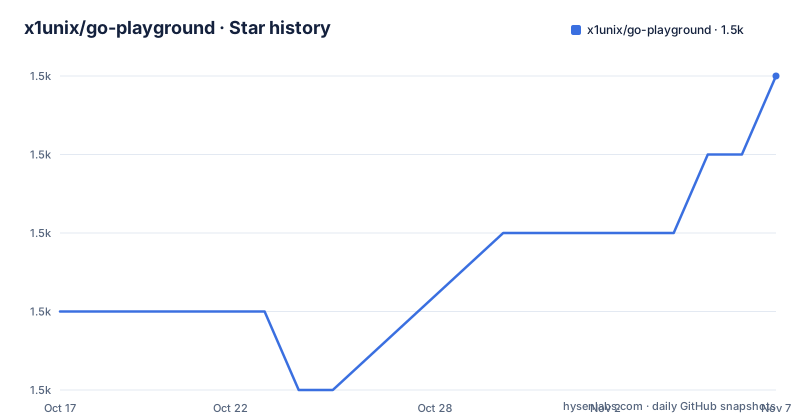
- x1unix/go-playground1,493 ★ · +3
| Repository | 2026-10-17 | 2026-11-07 |
|---|---|---|
| x1unix/go-playground | 1.5k | 1.5k |
3 Stars in the last 21 days, measured from the daily GitHub snapshot. Compare with other projects
Editorial analysis
Why x1unix/go-playground Exists Beyond the Public Go Playground
x1unix/go-playground addresses a familiar problem in Go experimentation: the official public playground is useful for short programs, but it is not a development environment that a team controls. This project provides its own web application at goplay.tools and includes a Go server, a web interface, a Docker-oriented repository structure, and deployment documentation. That makes it relevant to Go developers, educators, internal platform teams, and organizations that want to operate a browser-based code scratchpad under their own infrastructure.
The project does not describe itself as a local Go development environment or IDE replacement. Its scope is closer to an enhanced playground. The documented feature set includes syntax highlighting, code autocompletion, VIM mode, color and image output, file loading and saving, snippets, tutorials, editor customization, and WebAssembly support. The public application therefore offers conveniences associated with an online editor while retaining a short-execution workflow for Go examples.
That distinction matters for evaluation. A team may like the editor experience but still need to answer operational questions about compilation, resource limits, network access, persistence, authentication, and isolation. The README does not document those controls. It attributes the default run server to play.golang.org and points to docs/deployment/README.md for installation and deployment, so those controls must be confirmed in that deployment guide before treating the application as an internal multi-user service.
The go-playground Repository Structure and Request Path
The repository layout shows a conventional split between the Go application and its frontend. The module is named github.com/x1unix/go-playground and declares Go 1.26.0. The application entry point is ./cmd/playground, while reusable or supporting code can live under internal/ and pkg/. The web application is rooted at ./web. The Makefile passes that directory to the server as the static directory, using the value web/build during a local run.
The local run target constructs a Go process from ./cmd/playground and supplies several command-line settings. It uses the host's GOROOT, sets APP_SKIP_MOD_CLEANUP=true, selects the built frontend directory, enables debug mode by default, and binds the API server to 127.0.0.1:8000. These values come directly from the Makefile. They show that the repository has a server-side command with configurable flags rather than being only a static browser application.
The repository topics and feature list identify Monaco Editor as part of the web tooling. Syntax highlighting and autocompletion therefore belong to the frontend editing experience, while the Go command under cmd/playground serves the application and static assets. The README does not document the exact HTTP endpoints or request serialization, so it would be inaccurate to claim a specific API path or execution protocol from the available documentation.
There is also a build pipeline composed of build/, build.mk, docker.mk, and the Makefile. The root Makefile includes both build.mk and docker.mk, then delegates its default all target to build. The repository therefore supports more than ad hoc `go run` execution, but the README excerpt does not spell out each container image, release artifact, or build output.
Starting the Go Server and Web Interface from the Repository
The README does not provide a complete local installation tutorial in the available text. It directs readers to docs/deployment/README.md instead. The root Makefile does expose a concrete development command, so the following is the first repository-level start path documented there. It does not replace the deployment guide, and it assumes the required Go and Yarn tooling and frontend build are already available.
From the repository root, this target starts the Go playground application and serves the static directory from web/build:
make runThe target is defined with `LISTEN_ADDR := 127.0.0.1:8000`, `DEBUG ?= true`, and `PKG := ./cmd/playground`. It also sets `APP_SKIP_MOD_CLEANUP=true` for the development process. The reader should expect the server command to be invoked with these Makefile values, although the README does not state the browser URL or startup output.
For frontend work, the repository provides a separate UI target:
make uiThis target checks whether web/node_modules exists, runs `yarn --cwd="web" install` when needed, and then starts the web application with `yarn --cwd="web" start`. It exports `LISTEN_ADDR` from the Makefile to the UI process. Because `make run` points at web/build rather than starting the frontend development server, these targets serve different development stages. The README does not document the production build sequence or all prerequisites for either command.
The deployment documentation is the correct place to determine whether Docker, reverse proxy configuration, persistent storage, or other operational components are required. No port, environment variable, or Docker command from that document should be inferred from the Docker badge alone.
What Monaco Editing Features Change for Go Experiments
The editor-oriented features are the main distinction from a bare form that submits source code to a compiler endpoint. The README names syntax highlighting, autocompletion, VIM mode, customization for fonts and ligatures, and file loading and saving. These are user-facing capabilities rather than claims about compiler correctness or execution performance.
Autocompletion can reduce friction when recalling standard library names, common Go constructs, or tutorial patterns. The README credits tj/vscode-snippets as inspiration for the completion snippets, which indicates that at least part of the assistance material is predefined rather than necessarily derived from a running language server. The README does not say whether completion understands every imported package, project-local symbols, generics, or errors from a particular build.
VIM mode and editor customization are useful for users who want keyboard-oriented editing or a different visual setup. File loading and saving can help preserve snippets between sessions, but the README does not identify the storage backend, whether files are local or server-side, or whether saved files are shared between users. Snippets and tutorials are also listed as supported features, with tutorial content credited to gobyexample.com. That makes the project more useful for guided Go examples, although the documentation does not enumerate the available tutorial set.
The interface is not a substitute for `go vet`, `go test`, dependency management, or project-aware tooling. A user should therefore treat completion as editing assistance and verify compilation and program behavior through the playground's execution result.
Execution Boundaries for WebAssembly and External Run Servers
The project lists WebAssembly support, which broadens the range of Go programs that can be presented through a browser-based workflow. At the same time, the README states that the default playground run server is provided by play.golang.org. That creates an important architectural distinction: the web application can be self-hosted while code execution may still depend on a separate run service unless the deployment is configured differently.
This arrangement is useful when the goal is to operate the frontend and editor independently from the execution backend. It also means that a deployment review must determine whether the default server is acceptable, whether traffic reaches an external service, and what happens when that service is unavailable. The README does not document timeout behavior, network isolation, CPU or memory limits, package restrictions, temporary-file handling, or the exact failure response from the run server.
WebAssembly support should not be read as a promise that every Go playground program can run entirely in the browser. The README gives no details about supported standard library packages, syscall restrictions, build tags, file access, or compatibility differences between server-side and WebAssembly execution. Programs that depend on unavailable operating-system facilities may need a different environment.
For sensitive code, infrastructure testing, or private dependencies, the absence of a documented isolation policy is a concrete reason to pause. The deployment guide or source configuration must establish whether code and source data remain within the intended boundary. The public repository's MIT license does not answer those deployment-security questions.
Operational Limits of the Published Playground
The strongest limitation is documentation depth at the deployment boundary. The root README identifies the feature set and links to docs/deployment/README.md, but it does not explain authentication, authorization, persistence, concurrency, quotas, or sandboxing. That makes the project harder to assess as a shared internal service than as a personal demonstration instance.
The repository also has a recent release history and a recent last push date, but release availability is not the same as operational compatibility. The module requires Go 1.26.0, so builders need a toolchain compatible with that declaration. The web target relies on Yarn and the contents of web/node_modules, while the Go run target expects a prepared web/build directory. The README does not provide a single command that provisions all of these prerequisites.
The project is written in Go, but the editor experience is not limited to backend development. The Makefile's separate UI target, `.nvmrc`, and frontend directory indicate a JavaScript-based build component. The exact Node.js version cannot be confirmed because `.nvmrc` is listed but its contents are not included. Pinning the toolchain and documenting the frontend build process are therefore part of an adoption review, not optional details.
The README also does not document a rollback procedure for the hosted service, a compatibility policy for third-party packages, or an upgrade guide from the default run server to another backend. Those omissions are especially relevant for an internal deployment because they affect incident recovery and dependency planning.
Choosing go-playground Versus play.golang.org or a Full IDE
play.golang.org is the closest documented alternative because it is also the default run server credited by the README. Its approach is a public, hosted Go playground. x1unix/go-playground adds a separate web application with richer editor features, file handling, tutorials, VIM mode, customization, and WebAssembly support. In practical terms, the distinction is between adopting an enhanced front end and possibly retaining an existing execution backend, rather than assuming that go-playground replaces every part of the public service.
A full local IDE is a different category. An IDE can provide project-aware completion, refactoring, dependency management, testing, debugging, and filesystem integration. The README for go-playground does not claim those capabilities. It is better suited to isolated examples, demonstrations, tutorials, and quick experiments than to maintaining a multi-package repository.
The choice should follow the required control boundary. Choose the public playground when convenience and no infrastructure ownership matter. Choose x1unix/go-playground when its editor features justify operating a separate web application and the deployment model is acceptable. Keep a full IDE when source context, local modules, test workflows, or debugging are central. The key unresolved issue is not whether the editor looks capable, but where compilation happens and who controls that environment.
Editorial conclusion
Developers and organizations that want a configurable, self-hosted Go scratchpad should consider x1unix/go-playground after reviewing docs/deployment/README.md and confirming the execution and persistence model fit their environment. It is a poor fit for users who need a documented local installation, a fully local compiler sandbox, or a turnkey development workflow. The first checks should be the deployment prerequisites, the default playground server configuration, and whether WebAssembly support satisfies programs that cannot safely run there.
Frequently asked questions
How do I install and run x1unix/go-playground?
The README directs users to docs/deployment/README.md for installation and deployment. For a repository-level development start, the Makefile provides `make run`, which launches ./cmd/playground with the frontend static directory and a default address of 127.0.0.1:8000.
Does x1unix/go-playground provide Go autocompletion and syntax highlighting?
Yes. The README lists syntax highlighting and code autocomplete as features, and the repository topics identify Monaco Editor as part of the project tooling. The README does not specify the completion scope or supported Go language features.
Where does x1unix/go-playground execute Go code?
The README says the default playground run server is provided by play.golang.org. It also lists WebAssembly support, but it does not document the execution endpoints or explain whether a deployment always uses that default server.
Official sources
Add this badge to your README
If you maintain this project, the badge below links readers to this analysis and shows its maintenance status from the daily GitHub snapshot. Paste the markdown into your README; add ?metric=license or ?metric=stars to the image URL for a different field.

[](https://hysenlabs.com/projects/x1unix-go-playground)Star history chart for your README
[](https://hysenlabs.com/projects/x1unix-go-playground)Was this useful?