Icaros Shell Extensions for Windows Explorer Media Integration
Official issue tracker and download location for Icaros Shell Extensions
At a glance
- What is it?
- Icaros adds generated thumbnails and media properties to Windows Explorer for a broad range of video and audio files. It is useful on current supported Windows systems, but the repository distributes proprietary release binaries rather than source code.
- Who is it for?
- Icaros fits Windows users who want Explorer integration for many video and audio formats and are comfortable configuring a proprietary binary package. It does not fit projects that require source access, Linux support or complete Windows XP property support.
- Can I use it commercially?
- Not without permission. GitHub finds no licence file in the repository, and without a licence all rights are reserved by default: you may read the code but not reuse it. Check the README, or ask the authors, before using it.
- Is it still maintained?
- Yes. The repository last received commits 144 days ago.
- What is it written in?
- GitHub does not report a main language for this repository.
Answers come from the project's GitHub data, last synced on November 7, 2026, and from our analysis. They are not legal advice.
Star history
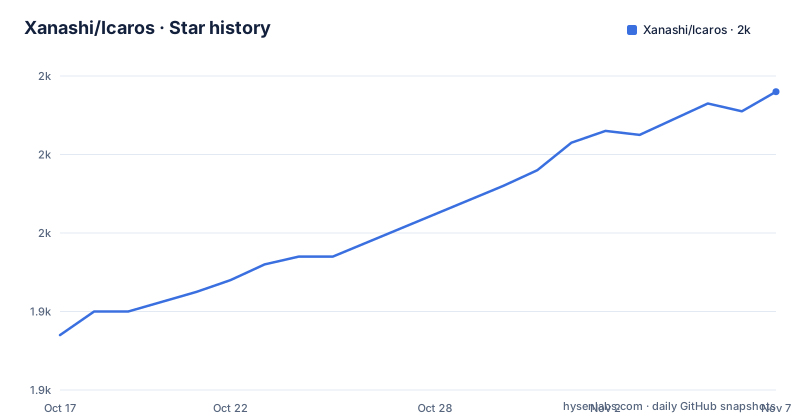
- Xanashi/Icaros1,996 ★ · +62
| Repository | 2026-10-17 | 2026-11-07 |
|---|---|---|
| Xanashi/Icaros | 1.9k | 2k |
62 Stars in the last 21 days, measured from the daily GitHub snapshot. Compare with other projects
Editorial analysis
Icaros Coverage for Explorer Media Files
Icaros addresses a specific gap in Windows Explorer: many media files receive generic icons rather than a representative image or useful file details. Its thumbnail provider can generate Explorer thumbnails for essentially any video format supported by FFmpeg. The README lists examples including MKV, FLV, AVI, MP4, MOV, RMVB, M2TS, and OGM. This makes the package relevant to users who browse mixed media libraries without opening each file in a dedicated player first.
Icaros also includes custom parsers that can produce cover-art thumbnails for MKV, FLAC, APE, MPC, and several other formats. This distinction matters because FFmpeg-based video decoding and embedded cover art are separate capabilities. A container may therefore receive a video frame thumbnail while an audio format uses artwork embedded in the file. The documentation does not guarantee that every codec or every malformed media file will produce an acceptable image.
The property handler addresses the other side of Explorer integration. The documented file types include MKV, MK3D, MP4, MOV, WEBM, OGM, OGG, FLV, AVI, RM, RMVB, FLAC, Opus, SPX, APE, MP3, MPC, MKA, TAK, TTA, OFR, and WAV. According to the README, the properties shown in Explorer can include length, width, height, title, and channels. Users should not interpret that list as proof of a particular codec profile, because the repository does not publish a codec-by-codec compatibility matrix.
Icaros Installation, Activation and Registrations
The README identifies the repository's GitHub Releases page as the download location. Installation therefore begins by obtaining the relevant Icaros release from that page rather than treating the repository itself as the application source. The documentation states that the shell extensions have no dependencies. IcarosConfig, however, requires .NET Framework 4. The installer is expected to install .NET 4, and the README supplies a Microsoft download page for systems where that has not happened.
For a first use, open IcarosConfig.exe with administrative privileges. In the Activation Panel, select a component such as `THUMBNAILING` or `PROPERTIES` to change it from deactivated to active. The README says these options can be changed while Icaros is active and that IcarosConfig applies changes immediately. It also provides an activation state for the cache, with choices documented as disabled, enabled with static behavior, or enabled with dynamic behavior.
The safest first registration is a preset or a small set of known files rather than every supported extension. Presets apply groups of common file types, while the `Add New Filetypes` button opens a file picker and performs a thumbnail check on the selected files. Users can also drop files or folders onto the thumbnail page, although subdirectories are ignored. If Icaros cannot create a thumbnail, the selected files are reported and the user can decide whether to discard or apply the failed registrations. This check is the clearest documented way to evaluate support before deployment.
Adding Uncommon Formats Through IcarosConfig
IcarosConfig provides four documented methods for managing thumbnail file types. The first is a preset, which is useful when the goal is to register a known group of common extensions without editing a list. The second is the file picker, which derives extensions from selected files after testing whether thumbnails can be generated. The third is drag-and-drop, where dropped files are processed in the same way as files chosen through the dialog. Dropping a folder processes its files, but it does not traverse subdirectories.
The fourth method is direct editing of the thumbnail file-type string. The README gives this syntax:
avi;flv;mov;ogv;flacFile types are separated by semicolons and may optionally begin with a period. The field can also be used to remove a single file type. This text-entry route is the most precise control when removing one registration, but it also transfers more responsibility to the user than the tested file-selection workflow.
IcarosConfig also remembers a previous shell extension when a file type is already assigned elsewhere. According to the README, deactivation or removal from Icaros reinstates that earlier extension for that type. This is a useful ownership detail for systems with another thumbnail provider. It is not a documented general rollback system, because the README does not describe backups, transaction logs, installer rollback, or recovery from an interrupted registration.
Thumbnail Position and Explorer Cache Controls
Icaros exposes a thumbnail position setting that can be expressed as a percentage or as a timestamp in milliseconds. The selected position determines where Icaros attempts to retrieve the image from the stream. For timestamp mode, the documentation states that Icaros first tries the specified timestamp and falls back if that attempt fails. This matters for videos whose opening seconds contain black frames, titles, or other material that is not useful in an Explorer icon.
A timestamp is not the same as a keyframe index, and the README does not claim that Icaros makes an exact edit decision at the requested time. The generated result still depends on decoding and on the content present in the file. Percentage mode can also select an unsuitable scene if the source is padded with leader footage or begins with a title sequence. Testing representative files through IcarosConfig is therefore more informative than applying the setting across an entire library without checking.
The cache component has its own control with disabled, static, and dynamic modes. The README excerpt names these modes but does not fully define their retention policies, cache locations, invalidation rules, or memory behavior. It also does not provide a purge or rebuild procedure in the documented section. Icaros is therefore a reasonable choice for media browsing, but adopters who need deterministic cache retention should not infer those details from the available documentation.
Windows Compatibility Boundaries for Icaros
The documented operating-system range includes Windows Vista, Windows 7, Windows 8 and 8.1, Windows 10, and Windows 11. Icaros 3.0.3 and earlier have partial Windows XP support for Windows XP SP2 and later, with thumbnails described as the supported feature. The Icaros Property Handler is not supported on XP because of how that operating system handles file properties. A Windows XP SP2 installation also requires an additional imaging component for the thumbnail provider, with separate 32-bit and 64-bit links in the README.
That boundary means Icaros should not be treated as a uniform Windows deployment target. A machine that can run an older thumbnail provider may still lack the property integration needed by a file-management workflow. Likewise, the GUI's .NET Framework 4 requirement applies to IcarosConfig, while the README describes the shell extensions themselves as dependency-free. An administrator should distinguish between installing the extensions and installing the configuration utility.
The available compatibility statement is also version-specific for XP. It refers to Icaros 3.0.3 and earlier, not to the current v3.3.6 release. Users should therefore treat XP as a legacy exception and verify the exact release behavior before deploying it on an older system.
Release State and Proprietary Distribution Model
The repository explicitly states that Icaros is not open source. It is an official issue tracker and release download location, not a public source tree for building or modifying the extensions. This distinction affects adoption in several ways. Reviewers can inspect the issue tracker and release assets, but they cannot use the repository to audit the implementation, reproduce a build or contribute a source patch through the normal open-source workflow. The repository's license is also not identified in the available repository description.
The release list shows v3.3.6 on 2026-06-17, v3.3.5 on 2026-04-02, and the v3.3.4 Beta 1 release from 2025-03-02. The repository's last push was on 2026-06-17, which gives a concrete maintenance signal but does not establish how quickly individual issues are resolved. The repository is not marked as archived.
Compared with an open-source shell extension whose code and build process are available, Icaros offers a different operational model: users download a released Windows component and configure it through a GUI. That can be convenient for a packaged desktop experience, but it leaves source review and build reproducibility outside the documented repository workflow.
Where Icaros Is the Wrong Choice
Icaros is the wrong choice when open-source licensing, source-level review or reproducible builds are requirements. The README's own statement that the product is not open source settles that boundary. It is also unsuitable as a general Windows file-property replacement on XP, because the property handler is explicitly unsupported there. Users who need a media workflow on Linux or macOS cannot use this Windows Shell Extensions package for that purpose.
The product is also a poor fit for environments where unverified codec coverage is acceptable only after installation. The file-picker check and drag-and-drop test help identify unsupported file types, but the README does not document what happens when a file is technically recognized yet produces a blank frame, incorrect dimensions or incomplete metadata. The absence of a detailed codec matrix means those cases require direct testing.
Finally, administrators who require a documented rollback process should not assume one exists. Icaros remembers prior shell extensions for file types that were already registered, but the available documentation does not promise restoration after every failed operation. The supported choice is to activate a limited set of tested types first and record the component states before making broader changes.
Editorial conclusion
Icaros fits Windows users who want Explorer integration for many video and audio formats and are comfortable configuring a proprietary binary package. It does not fit projects that require source access, Linux support or complete Windows XP property support. Before adopting it, use IcarosConfig to check representative files, confirm that Icaros can read their codecs, and note the exact version and activation choices that succeeded.
Frequently asked questions
What is Icaros used for?
Icaros adds Windows Explorer thumbnails and file properties for many video and audio formats. It supports formats handled by FFmpeg and includes custom parsers for cover art in several containers.
Does Icaros work on Windows XP?
Icaros 3.0.3 and earlier support Windows XP SP2 or later only partially. Thumbnails are supported, while the Icaros Property Handler is not supported on XP.
Is Icaros open source?
No. The README states that Icaros is not open source and that the repository is used for issue tracking and downloading the latest releases.
How do you add a file type to Icaros?
You can select files with `Add New Filetypes`, drop files onto the thumbnail page, apply a preset, or edit the semicolon-separated thumbnail file-type list directly.
Official sources
Add this badge to your README
If you maintain this project, the badge below links readers to this analysis and shows its maintenance status from the daily GitHub snapshot. Paste the markdown into your README; add ?metric=license or ?metric=stars to the image URL for a different field.

[](https://hysenlabs.com/projects/xanashi-icaros)Star history chart for your README
[](https://hysenlabs.com/projects/xanashi-icaros)Was this useful?