developer-icons: the icons are build output, and clean deletes them
A collection of well-optimized SVG tech logos for developers and designers—customizable, scalable, and free.
At a glance
- What is it?
- An MIT licensed TypeScript package that turns a directory of SVG tech logos into named React components, published to npm as compiled output only. The generation step lives in the repository and never reaches the tarball, so what you install is one flat entry point with no source, no raw SVG export path, and no rollback story.
- Who is it for?
- Take this package if your build already runs React and you want one import per logo. Treat it as compiled output rather than a source of truth: verify with a quick `ls node_modules/developer-icons` that `dist` is all you get, confirm your bundler honours `sideEffects: false` before assuming icons tree-shake away, and budget for a major version jump since three tags landed between May and August 2026.
- Can I use it commercially?
- Yes. MIT is a permissive licence: you can use, modify and sell software built on it, as long as you keep its copyright and licence notices.
- Is it still maintained?
- Yes. The repository last received commits 78 days ago.
- What is it written in?
- Mainly TypeScript, according to GitHub's language statistics.
Answers come from the project's GitHub data, last synced on October 25, 2026, and from our analysis. They are not legal advice.
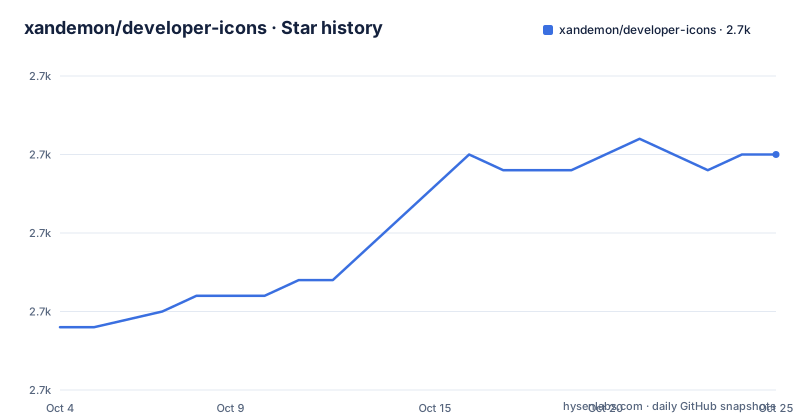
Star history
- xandemon/developer-icons2,670 ★ · +11
| Repository | 2026-10-04 | 2026-10-25 |
|---|---|---|
| xandemon/developer-icons | 2.7k | 2.7k |
11 Stars in the last 21 days, measured from the daily GitHub snapshot. Compare with other projects
Editorial analysis
The published tarball is compiled output and nothing else
The `files` array in `package.json` names one entry, and it is not a source directory:
"files": [
  "dist"
]
Everything a consumer installs is whatever the build leaves in that folder, and the two fields that decide the whole import story point into it. `main` is `dist/main.js` and `types` is `dist/main.d.ts`, so the runtime entry is a single compiled JavaScript file and the type entry is its generated declaration. The raw `.tsx` components never leave the repository. The 14 `keywords` entries say `svg icons`, `vector icons` and `react icons` in the same breath, which reads like a set of vector assets you can drop into a design file, but the shape of the package is a component library with one entry point.
The neighbouring `"type": "module"` matters more than it looks. The package is ESM only, so a CommonJS consumer cannot `require` it, and the `main` field, not an `exports` map, is the only pointer a bundler gets. A project resolving this through a legacy resolution path will read `dist/main.js` as CommonJS and find nothing it can parse.
npm run clean deletes the components it is about to regenerate
The build is a four step chain, and its first step reaches into a source directory:
"build": "npm run clean && npm run generate:icons && tsc --p ./tsconfig-build.json && vite build"That first step is `rimraf --glob dist && rimraf --glob lib/icons/*.tsx`, so it removes the compiled output and every generated component under `lib/icons/`. The regeneration step is `tsx ./lib/scripts/build.ts`, which writes those same components back. The generator and its output therefore share the `lib/` tree: the script sits at `lib/scripts/build.ts` while its products land in `lib/icons/`, a sibling folder inside the same source tree rather than somewhere disposable like `dist/`.
The practical consequence is that `clean` is not safe to run on its own. Run it outside a build and `lib/icons/` is empty, with nothing in the repository reporting a problem. Nothing warns that a folder full of generated code just disappeared, because from the package layout the folder is indistinguishable from hand written source.
Compression happens before the component is written, and the generator is never shown
Two named tools sit between the `icons/` directory and the shipped components. SVGO is the compressor, configured by `svgo.config.mjs` at the repository root, and SVGSON is described as the tool that converts SVGs to JSON and back. That round trip is the part worth understanding. A logo that has been reduced to optimised path data and then serialised through JSON is no longer a file a designer can open, and the README points design work at a separate download path on the hosted site instead.
The customization promise is also a build time promise. The feature list says customizations cover size, colour and stroke width, and that every icon comes with its own set of families such as light and dark mode and wordmark. The usage paragraph covers it again from the consumer side, naming `size`, `color` and `style` as the props you adjust. What no document in the repository shows is what `lib/scripts/build.ts` emits, how a family is addressed, or whether a variant ships as a separate named import. Those answers sit in one file that is not reproduced anywhere.
The documented usage is one JavaScript example in a TypeScript package
The whole integration story fits in one fence, a named import and a JSX element:
import { HtmlIcon, JavascriptIcon } from "developer-icons";

//inside your React component JSX
export const YourReactComponent = () => {
  return (
    <div>
      <HtmlIcon className="html-icon" />
      <JavascriptIcon size={52} style={{ marginLeft: 20 }} />
    </div>
  );
};
`className` passes straight through, and `size` and `style` are handed to whatever the component renders, so ordinary SVG attributes keep working. `sideEffects: false` is declared, which tells a bundler it may drop imports it cannot see used, so the named import form matters: pull the specific icon you need rather than reaching for a barrel.
The gap is the language. The opening paragraph calls the set fully compatible with TypeScript and ideal for React and Next.js, and `types` points at `dist/main.d.ts` so a typed consumer will resolve. But the only example in the repository is plain JavaScript, no `.tsx` sample appears, and nothing says which JSX runtime the compiled output expects. A Next.js project with the automatic runtime is not something this page resolves for you.
Three install commands, one lockfile in the repository
The install section offers three equivalent routes:
npm i developer-iconsyarn add developer-iconspnpm add developer-iconsAll three resolve the same name from the same registry, so the choice is your toolchain, not the package. The repository itself only demonstrates one of them. The top level of the project carries `package-lock.json` and no yarn or pnpm lockfile, and every script in `package.json` is written against npm: `npm ci --prefix showcase`, `npm run format:check`, `npm run lint`, `npm run typecheck`. The published artefact does not change with your package manager, but the project's own reproducible state is pinned for npm alone.
verify reaches into a second project the root scripts otherwise ignore
The root has four surfaces, and only some of them are the package. `dev:playground` runs `vite` against a root `index.html`, `vite.config.ts` and a `public/` folder, with a `playground/` directory alongside for scratch work. A separate `showcase/` directory is its own npm project, reached by scripts that change directory first: `cd showcase && npm run dev`, `cd showcase && npm run build`, `cd showcase && npm run preview`. Three of them, none of them quoting the root config.
The verification entry point is where that split becomes expensive. `verify:root` is `npm run format:check && npm run lint && npm run typecheck`, and the full `verify` appends `npm ci --prefix showcase && npm run build --prefix showcase`. So the green check installs a second complete dependency tree and builds a second application, and the lint step carries `--report-unused-disable-directives --max-warnings 0`, meaning a single warning fails the run rather than being tolerated. A contributor without a warm `showcase` cache pays for that install before the first build, and the homepage build in `vite build` has no matching `astro build` script despite Astro being named first in the tech stack.
Usage, contributing and license text all resolve to the hosted site
Three of the five navigation links in the README point at `xandemon.github.io`, and the closing line sends the reader to `https://xandemon.github.io/developer-icons/docs` for complete documentation. The Contributing section does the same with a link to `.../docs/contributing/`. What that means in practice is that the repository is not self contained on the questions a consumer has to answer before installing.
Not stated anywhere in the files: which Node version the build expects, which browsers the rendered components target, how to roll back to a previous major, whether raw `.svg` files or a sprite sheet can be produced from the same source, and how the light and dark families are addressed on import. The license line is similarly thin, reading `Licensed under MIT License and copyrights reserved` and deferring the full text to the hosted docs, while `LICENSE` sits at the repository root and `package.json` repeats `"license": "MIT"`.
The feature list also carries a typo worth flagging if you search it, since the customization bullet begins `Cusomizations are available for all icons`. The hosted site carries the answers to the questions above. The repository, which is what npm consumers clone, carries the compiled package and one build script.
Editorial conclusion
Take this package if your build already runs React and you want one import per logo. Treat it as compiled output rather than a source of truth: verify with a quick `ls node_modules/developer-icons` that `dist` is all you get, confirm your bundler honours `sideEffects: false` before assuming icons tree-shake away, and budget for a major version jump since three tags landed between May and August 2026. If you need raw SVG files, sprite sheets, or a documented rollback, the hosted docs are the only place to look, and they are not in the repository.
Frequently asked questions
Does developer-icons ship raw SVG files, or only React components?
Only compiled components. The package.json files array lists dist, and main points at dist/main.js with types at dist/main.d.ts, so the tarball is a single compiled entry point. Raw SVG downloads are offered on the hosted website instead.
How do I add a new icon to developer-icons?
The build script is the only entry point: the generate:icons script runs tsx ./lib/scripts/build.ts, and the icons directory is its input. The repository does not show that script or the required icon file format, so its Contributing Guidelines page is where the procedure is described.
What package managers can install developer-icons?
Three are documented: npm i developer-icons, yarn add developer-icons and pnpm add developer-icons. The repository itself carries package-lock.json and no yarn or pnpm lockfile, so its own resolved state is npm only.
Are the developer-icons components typed for TypeScript?
The types field points at dist/main.d.ts, and the README calls the set fully compatible with TypeScript. The single usage example is plain JavaScript JSX with no TypeScript variant shown anywhere in the repository.
Official sources
Add this badge to your README
If you maintain this project, the badge below links readers to this analysis and shows its maintenance status from the daily GitHub snapshot. Paste the markdown into your README; add ?metric=license or ?metric=stars to the image URL for a different field.

[](https://hysenlabs.com/projects/xandemon-developer-icons)Star history chart for your README
[](https://hysenlabs.com/projects/xandemon-developer-icons)Was this useful?