Husi build and platform guide for multiplatform proxy clients
Husi is a non-professional proxy-set-based multiplatform proxy tool set.
At a glance
- What is it?
- Husi is a Kotlin-based proxy client toolkit for Android and desktop, backed by a separate Go core and a plugin system. Its build process is reproducible but demanding, with strict JDK, Go, NDK, Zig, and Cronet constraints.
- Who is it for?
- Husi suits developers who need to build its Android or desktop client from source, inspect its Go core and plugins, or deploy a relocatable desktop package. It is a poor fit for users seeking a simple one-command installation or supported Darwin Intel and Windows ARM builds.
- Can I use it commercially?
- Check first. The repository uses a licence we do not classify automatically, so read its LICENSE file before any commercial use.
- Is it still maintained?
- Yes. The repository received new commits within the last day.
- What is it written in?
- Mainly Kotlin, according to GitHub's language statistics.
Answers come from the project's GitHub data, last synced on October 23, 2026, and from our analysis. They are not legal advice.
Star history
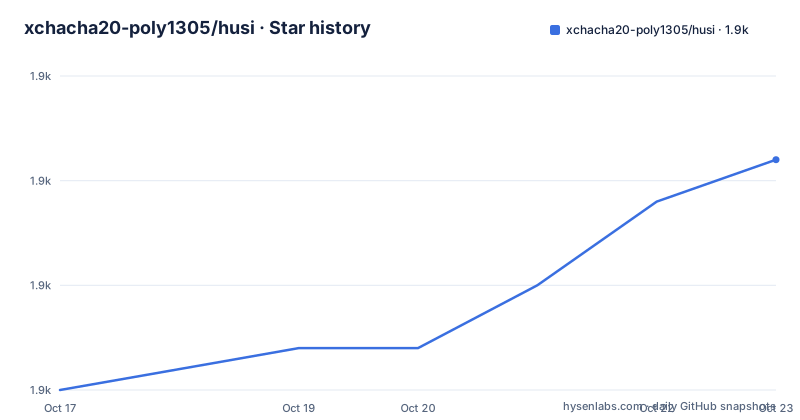
- xchacha20-poly1305/husi1,881 ★ · +11
| Repository | 2026-10-17 | 2026-10-23 |
|---|---|---|
| xchacha20-poly1305/husi | 1.9k | 1.9k |
11 Stars in the last 6 days, measured from the daily GitHub snapshot. Compare with other projects
Editorial analysis
Husi's split Kotlin and Go proxy architecture
Husi addresses developers and technically experienced users who need a multiplatform proxy tool set rather than a narrowly packaged client. The repository identifies Android, Linux, Shadowsocks, and the SIP002, SIP004, SIP007, SIP008, and SIP022 topics, while its primary implementation language is Kotlin. The README calls it a "non-professional proxy-set-based multiplatform proxy tool set," which is a useful warning about its intended positioning. It is not presented as a general network security suite or a conventional server administration tool.
The most consequential design choice is visible in the desktop build. Husi does not embed its Go networking core into the JVM application. Instead, `make core_desktop` produces a separate `husi-core` executable, and the desktop application runs that binary as another process. The README states that the JVM side loads no Go code. This boundary keeps the Kotlin application and native networking core as separate build and runtime components, but it also makes deployment more demanding. `husi-core` must be discoverable beside a packaged launcher or on `PATH`, and on Linux and Windows it needs the corresponding prebuilt Cronet shared library next to it.
For Android, `make libcore_android` instead generates `composeApp/libs/libcore.aar`. The repository therefore supports two different integration shapes: an AAR for Android and a native process for desktop. That distinction matters when reviewing plugins, diagnosing startup failures, packaging a desktop bundle, or deciding whether an existing application can consume the core without adopting the complete Husi user interface.
Cloning Husi and preparing its pinned toolchain
The README describes a source build rather than a short application installer. Start by cloning the default repository content and allowing Husi's helper to retrieve the required submodules. The documented clone is shallow, so this is not a complete development history.
git clone https://github.com/xchacha20-poly1305/husi.git --depth=1
cd husi/
./run lib source
After those commands, the working directory should be the `husi` source tree with submodules initialized by `./run lib source`. The README says Linux release builds should use matching JDK, NDK, Go, and the Go version defined in `buildScript/init/version.sh`. It specifies OpenJDK 21 for the listed build paths and notes that newer versions may work.
Go patch handling is not optional across all documented versions. For Go 1.23.0 through 1.23.3, the README directs contributors to apply the listed Go patch and run `make patch_go1230`. Go 1.23.4 has a separate patch and `make patch_go1234` instruction. Go 1.22.5 requires a repository patch to `${GOROOT}/src/runtime/cgocall.go`. These are source-level toolchain changes. A reproducible build therefore means reproducing the documented compiler state as well as selecting a JDK.
For Android, the stated environment is `jdk-21`, NDK `30.0.16248370`, and the Go version in `version.sh`. If the Android variables are absent, source the repository's environment script and record the SDK path in `local.properties`:
source buildScript/init/env_ndk.sh
echo "sdk.dir=${ANDROID_HOME}" > local.properties
That script determines the SDK and NDK paths. Writing `sdk.dir` connects the Gradle build to `${ANDROID_HOME}`; replacing `local.properties` is a consequential step because doing so can remove existing local configuration.
Building Husi's Android AAR and release APK
The smallest documented Android-native build target is `libcore.aar`. Generate it with the repository Makefile, then continue through asset preparation and APK compilation if a complete application is required.
make libcore_androidThe expected result is `composeApp/libs/libcore.aar`. This is the Android integration artifact, distinct from the final APK. The build installs the `gomobile` and `gobind` versions pinned in `libcore/go.mod`, so changing those tools independently would depart from the documented setup.
Before creating the signed release, the README calls for downloading geographic resource files. License metadata generation is also documented for Android and Go components. Those steps update the project's generated attribution data and resources rather than only compiling Kotlin code.
make assets
make aboutlibraries_go
make aboutlibraries_android
The Android metadata is written to `composeApp/src/androidMain/composeResources/files/aboutlibraries.json`. The release process mentions optional signing preparation using `release.keystore`, but the repository also contains that filename. The README says to replace it with the builder's own keystore, and it lists the local properties used for signing. Production adoption should not treat a repository keystore as a private release credential.
Compile the release APK after the environment, resources, metadata, and signing decisions are ready:
make apkThe README places the output under `androidApp/build/outputs/apk`. It does not provide a stable APK filename in the README, so selecting the release artifact should be done from that directory rather than by guessing a versioned name.
Running the Husi desktop client for a first local use
Desktop development requires `jdk-21` and Zig `0.16`. Build the desktop core for the host first. Gradle can infer the target from `os.name` and `os.arch`, while `-PdesktopTarget` provides an explicit alternative.
make core_desktop
./gradlew -p composeApp run
`make core_desktop` should create `libcore/build/<host-platform>_<host-arch>/husi-core`, with `libcronet.so` on Linux or `libcronet.dll` on Windows beside it. The Gradle run process searches under the matching `libcore/build/<os>_<arch>/` directory, next to a packaged launcher, or on `PATH`. An explicit target is useful when the host does not represent the intended artifact:
./gradlew -p composeApp run -PdesktopTarget=linux/amd64The common documented targets are `linux/amd64`, `linux/arm64`, and `darwin/arm64`; the Makefile also lists `windows/amd64`. Cross-building multiple desktop targets is available through `DESKTOP_TARGETS`:
make core_desktop DESKTOP_TARGETS=linux/amd64,darwin/arm64A Darwin ARM target built on a non-Darwin host requires an explicit macOS SDK:
make core_desktop DESKTOP_TARGETS=darwin/arm64 DARWIN_SDK=/path/to/MacOSX.sdkLinux and Windows desktop core builds do not require cgo because `husi-core` loads prebuilt Cronet. Linux requires glibc 2.17 or newer. The executable and shared library must remain together. A first run that cannot locate `husi-core`, `libcronet.so`, or `libcronet.dll` is therefore a packaging problem before it is evidence of a proxy or platform defect.
Packaging Husi without root on managed computers
The repository does not limit installation to system package managers. For managed machines, Husi documents a relocatable `tarball` containing the JAR, launcher, `husi-core`, and its installer. Building it requires `tar` and `zstd`. The `deb`, `rpm`, and `pacman` formats use a package manager and require root, so they do not fit a standard non-root installation.
The installer supports a user-local default and an explicit prefix:
./install.shThe default installs under `~/.local` without root. An administrator-managed location can be selected with:
./install.sh --prefix /opt/husiThe README also documents daemon installation through `pkexec`:
./install.sh --with-daemonThat mode is not equivalent to the fully non-root path because it invokes `pkexec` for the daemon. On a workstation without an approved authentication policy, the command can stop at a privilege prompt or fail. The relocatable application should be preferred when the requirement is specifically installation without administrative access and a daemon is not required.
Native Linux packages are produced through `nfpm`, which requires host tools including `zig`, `git`, and `nfpm`. The documented default formats are `deb`, `rpm`, and `pacman`, with packages written under `composeApp/build/compose/packages/linux/`. Package timestamps come from the git tag `v<VERSION_NAME>` derived from `husi.properties`, not the local build time. Reproducible packaging therefore depends on release tag state as well as the pinned build tools.
Husi platform gaps and Cronet deployment boundaries
Husi has explicit platform exclusions that a generic proxy-client description would hide. Darwin Intel, identified as `darwin/amd64` or `osx_x64`, is no longer supported because `androidx sqlite-bundled` has no binary for that target and Room cannot open its database. Windows ARM is temporarily not shipped for the same database-library reason. The Makefile currently enables `windows/amd64`, leaves the Windows ARM selection commented out, and points to external tracker entries for both boundaries.
Cronet creates another deployment constraint. Linux and Windows use prebuilt Cronet libraries loaded at runtime, while Darwin uses cgo. Native Darwin builds require Xcode on macOS. Other hosts can use Zig with a macOS SDK supplied through `DARWIN_SDK` or the direct script option. A build that produces `husi-core` but cannot package the database component or Cronet dependency is not a supported desktop artifact.
The custom license is another boundary. GitHub classifies it as "Other" and directs readers to the `LICENSE` file. The repository metadata does not establish redistribution rights for plugins, generated packages, Cronet components, or modified binaries. Maintainers should review that file before packaging or distributing a build. This is a license identification point, not legal advice.
The repository is not archived, and its last push was on 2026-10-17. Recent releases include `v2.3.0-beta.2` and two `plugin-shadowquic` releases. The beta label remains visible in a recent application release, while plugin releases use a separate versioning track. Upgrade planning must account for both.
Husi's separate-process trade-off versus an embedded core
The clearest architectural alternative is a proxy client that keeps its networking implementation inside the application process. Husi instead makes the Go core a separate desktop executable. An embedded approach can simplify process startup and component lookup because the application does not need to discover and launch a sibling binary. It can also avoid serializing application and core state across a process boundary.
Husi's arrangement offers a different boundary. The JVM application does not load Go code, so native core behavior and JVM behavior remain separate. This makes the core artifact independently addressable for desktop distributions and allows `make core_desktop` to target supported operating systems and architectures explicitly. The cost is operational: the launcher needs `husi-core`, desktop Gradle has location rules, and native packaging must preserve the core alongside Cronet. A missing shared library or wrong `PATH` turns what appears to be an application launch into a deployment failure.
For Android, that comparison is narrower because Husi produces an AAR rather than using the desktop process arrangement. Consumers integrating that artifact must evaluate the Android-specific ABI, database, and AAR requirements instead of assuming the desktop packaging model applies unchanged. Husi is most compelling when that explicit multiplatform core boundary is acceptable to the builder and deployment process.
Editorial conclusion
Husi suits developers who need to build its Android or desktop client from source, inspect its Go core and plugins, or deploy a relocatable desktop package. It is a poor fit for users seeking a simple one-command installation or supported Darwin Intel and Windows ARM builds. Before adoption, inspect the custom LICENSE file, confirm that the host matches the JDK, Go, NDK, Zig, SDK, and glibc requirements, then validate the desired proxy configuration against the documentation available in the selected build.
Frequently asked questions
How do I build the Husi Android core?
Set up the documented JDK, Go, and NDK environment, initialize the source submodules, and run `make libcore_android`. The README says this generates `composeApp/libs/libcore.aar`.
How do I run the Husi desktop application?
Build the desktop core with `make core_desktop`, then run `./gradlew -p composeApp run` with JDK 21 and Zig 0.16. The application looks for `husi-core` under the matching build directory, beside a packaged launcher, or on `PATH`.
Does Husi support installing without root?
Yes. The relocatable `tarball` format supports `./install.sh` under `~/.local` without root. Adding `--with-daemon` invokes `pkexec`, while `deb`, `rpm`, and `pacman` use package managers and require root.
Official sources
Add this badge to your README
If you maintain this project, the badge below links readers to this analysis and shows its maintenance status from the daily GitHub snapshot. Paste the markdown into your README; add ?metric=license or ?metric=stars to the image URL for a different field.

[](https://hysenlabs.com/projects/xchacha20-poly1305-husi)Star history chart for your README
[](https://hysenlabs.com/projects/xchacha20-poly1305-husi)Was this useful?