Xed-Editor on Android: one APK for LSP, a terminal and a plugin SDK
Advanced Text Editor for Android
At a glance
- What is it?
- Xed-Editor folds syntax highlighting, LSP code intelligence, a built-in terminal and extensions into a single Kotlin application for Android. The build story needs reading twice, because the container path copies your working tree and never fetches submodules for you.
- Who is it for?
- Adopt Xed-Editor when you edit source on an Android device and want LSP, extensions and a shell inside one installed package instead of three separate apps. Pass on it if you need a real Linux userland or a desktop-class editor.
- Can I use it commercially?
- Yes, with conditions. GPL-3.0 is a copyleft licence: if you distribute software that includes it, you must release that software's source code under the same licence. Running it internally without distributing it does not trigger that obligation.
- Is it still maintained?
- Yes. The repository last received commits 4 days ago.
- What is it written in?
- Mainly Kotlin, according to GitHub's language statistics.
Answers come from the project's GitHub data, last synced on October 21, 2026, and from our analysis. They are not legal advice.
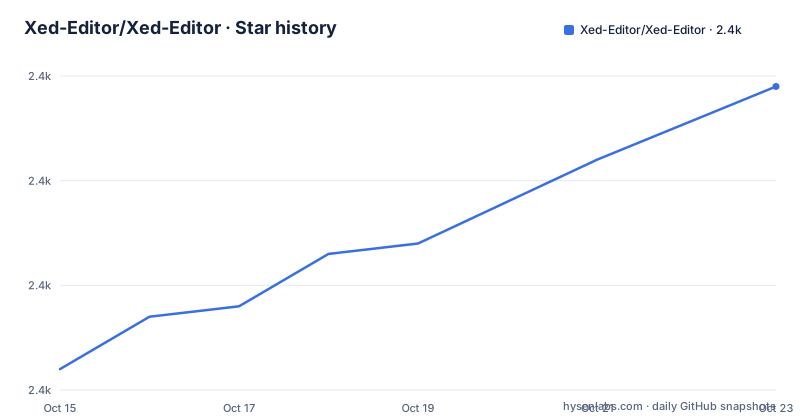
Star history
- Xed-Editor/Xed-Editor2,392 ★ · +20
| Repository | 2026-10-15 | 2026-10-21 |
|---|---|---|
| Xed-Editor/Xed-Editor | 2.4k | 2.4k |
20 Stars in the last 6 days, measured from the daily GitHub snapshot. Compare with other projects
Editorial analysis
Syntax highlighting and LSP inside one Android application
Xed-Editor is a Kotlin text editor for Android that puts syntax highlighting, LSP-backed code intelligence, a built-in terminal, extensions and project-wide file tools into a single application, rather than a plain editor with a file browser attached. The user it targets is someone editing source files on a phone, or treating an Android tablet as a primary machine, which is why the repository topics lean on mobile-ide and code-editor-mobile instead of generic text editing.
Bundling all of that carries a consequence the feature line does not spell out. Every subsystem has to live inside one Android application sandbox, and the top-level layout shows how the work is divided: directories for the editor core, a separate `plugin-sdk/` for extension authors, a `terminal-view/` and a `terminal-emulator/`, two benchmark modules and one directory simply named `soraX` that nothing in the README explains. Read that tree before the feature list, because the tree is where the actual boundaries of the project show.
Two build paths, one JDK version, two signing routes
The project ships two ways to produce an APK, and they are not interchangeable. The first is an ordinary Gradle build on a machine that already has the Android SDK and JDK 21:
./gradlew assembleDebugThat task builds the debug APK, signed with the test key included in the repository, and writes it to `app/build/outputs/apk/debug/app-debug.apk`.
The second path exists for anyone without that toolchain. The README positions it as the option for people who do not have the Android SDK or JDK 21 installed locally, and it runs the same Gradle work inside a container based on `eclipse-temurin:21-jdk`:
DOCKER_BUILDKIT=1 docker build --target export-stage --output ./out .Here the artifact lands at `out/debug/app-debug.apk`. Inside the image, `BUILD_TASK` defaults to `assembleDebug` while `assembleRelease` is accepted too, so both routes default to the debug variant rather than something distributable. What genuinely differs is signing. The container sets `GITHUB_ACTIONS=true` to match the signing logic in `app/build.gradle.kts`, and it decodes `RELEASE_KEYSTORE_BASE64` and `RELEASE_PROPERTIES_BASE64` into `/tmp/xed.keystore` when both are supplied. A local build has neither variable, so what lands on your disk carries the test key. The last push was on 2026-09-28 and the repository is not archived.
The Docker path copies your tree but never fetches submodules
One step of that container command is easy to miss. A comment in the Dockerfile instructs the builder to copy the project files and adds a note that submodules must be checked out on the host beforehand. No step in the image runs `git submodule update`, yet a `.gitmodules` file sits at the top level, so the copy takes whatever your working tree happens to contain:
git submodule update --init --recursiveClone, install Docker, run the documented command in a clean checkout, and you can end up with no APK and no message pointing at the reason. The remedy is one command to run before the build rather than a change to the Dockerfile, and the README does not repeat it.
The rest of the image setup shows how little it assumes about the host. It installs `git`, `wget`, `unzip` and `build-essential`, points `ANDROID_HOME` at `/opt/android-sdk`, pulls the command-line tools archive `commandlinetools-linux-14742923_latest.zip`, then accepts licences without any prompt:
RUN yes | sdkmanager --licenses || trueThe trailing `|| true` is the part worth noting. A step that fails no longer halts the build, so the consequence arrives later as a Gradle error against a half-configured SDK rather than at the point where the step broke.
Where the binaries live and which package id carries them
Installing means choosing a channel. Listings exist for both F-Droid and IzzyOnDroid under the package id `com.rk.xededitor`, and that same id appears in the direct APK links in the README, so an automated F-Droid client can pin a known identifier rather than track a display name. For builds newer than either store, the project splits its two channels: alpha builds come from the Actions run list, stable builds come from the published binaries page. Documentation, extensions, themes, icon packs and account features all live on the website at `xed-editor.app`, which is where the README sends a reader who wants more than a download link.
What is absent is as telling as what is there. There is no first-run configuration, no keybinding table, no sample project and no example of the extension API, so a tutorial has nowhere further to go than the APK. Anyone adopting this has to settle how it behaves on their own files by trying it.
Three published builds, two spellings of the name
Read the published build titles and the project's own naming contradicts itself. The newest, `v3.4.5`, is titled `Xed-Editor v3.4.5`, with the hyphen used by the repository and the website. The two before it are titled `Xed Editor v3.3.4` and `Xed Editor v3.3.3`, with a space. Something in the packaging pipeline stamps the application name from a string that is not the repository name, and if you script a mirror or a rename pipeline you need to know which form arrives.
The intervals between those dates tell a second story. `v3.3.3` and `v3.3.4` landed two days apart, on 2026-06-26 and 2026-06-28, which reads like one fix that shipped twice under two numbers. `v3.4.5` did not follow straight away: its date is 2026-09-14, more than two months after the 3.3 line. The recorded build list ends on that date, so a clone of main sits ahead of every numbered build listed, and anyone wanting the newest code has to build rather than download.
A bundled terminal whose Linux layer stays undocumented
The terminal is the least documented part of the whole thing. The feature summary names a built-in terminal, and the topic tags go further: `proot`, `proot-android`, `proot-distro`, `terminal-based` and `terminal-emulator` all appear among them, which describes running a Linux userland in user space rather than a rooted shell. Separate modules for `terminal-view/` and `terminal-emulator/` support that reading at the source level.
What none of it documents is where the environment comes from. The README does not say where a distribution image is fetched, how it gets unpacked, how much storage it occupies, or how it interacts with the files the editor opens, and it gives no command for provisioning one. For a feature that decides how much room the app needs on a phone, that is the wrong corner to leave dark, and the topic tags are the only evidence that a userland is involved at all.
An adopter who cares will have to measure the storage and memory cost directly rather than assume it, or accept the editor as a file editor and ignore the terminal tab.
Benchmark modules and a baseline profile with no method
The tree holds the scaffolding of a performance programme that the documentation never fills in. Alongside `benchmark/` and `benchmark2/` there is `baselineprofile/`, the Android tooling that targets cold start and jank, plus `renovate.json` for automated dependency updates. Two benchmark modules is the odd part in itself: either two harnesses are live, or one was forked into a second and neither was retired. Nothing states which module is authoritative, how to run either, on what hardware, or what the results were.
Stating that gap plainly matters, because speed is part of how the editor is marketed and the project ships the measurement infrastructure for that claim without publishing a method. Treat the performance story as unverified until you run it. For someone who wants to add measurements, `benchmark/` and `benchmark2/` are the first two places to look, since extending either one means inheriting the harness the maintainers already chose, mistakes included.
Bundled editor versus a full distro in the terminal
There are two ways to get a Linux-capable editing environment onto Android, and Xed-Editor commits to the second. The first is a general purpose terminal application, a distribution unpacked into it with user-space tooling, and a full editor run from inside that userland. What you gain there is every editor and every language server a desktop distribution ships. What you pay is the image size, the setup before the first keystroke, and keybindings and themes fixed by whatever editor that distribution happens to carry.
Xed-Editor takes the opposite route, keeping the editor, its syntax highlighting, its LSP support, its extensions and its terminal inside one Android package installed under a single id. You give up the long tail of a full userland and gain an install with nothing to provision. The trade is fair only when what you edit on a phone is small enough for a phone editor, which is the case that needs language-server support most and is the one this design targets.
One licensing fact belongs in the same breath. The code is under GPL-3.0, so a fork you redistribute to end users carries the same terms, and that has to be settled before any team plans to ship a modified build rather than install one.
Editorial conclusion
Adopt Xed-Editor when you edit source on an Android device and want LSP, extensions and a shell inside one installed package instead of three separate apps. Pass on it if you need a real Linux userland or a desktop-class editor. Verify three things first: build from main rather than trusting a store copy, run `git submodule update --init --recursive` before any container build, and measure what the bundled terminal costs you in storage. A store install is the cheap route; a self-built APK is the only one that matches the code on main.
Frequently asked questions
Is Xed-Editor available on F-Droid, and what is its package id?
Yes. It is listed on both F-Droid and IzzyOnDroid under the package id `com.rk.xededitor`, and the same id appears in the direct APK links. The README does not mention a Google Play listing.
What do I need to build Xed-Editor from source?
JDK 21 and the Android SDK, or Docker if you have neither. The container image is based on `eclipse-temurin:21-jdk` and downloads the Android command-line tools itself, so the host needs neither.
Why does my Docker build of Xed-Editor not produce an APK?
The image copies your working tree but never fetches git submodules, while the repository ships a `.gitmodules` file. Run `git submodule update --init --recursive` on the host before invoking the build.
How does the built-in terminal in Xed-Editor get a Linux environment on Android?
The feature list names a built-in terminal and the repository topics include `proot`, `proot-android` and `proot-distro`, but nothing says where the distribution image comes from or how it is provisioned. That part is undocumented.
Can I build a signed release of Xed-Editor myself?
The Dockerfile accepts a `BUILD_TASK` that defaults to `assembleDebug`, and release signing keys can be passed as `RELEASE_KEYSTORE_BASE64` and `RELEASE_PROPERTIES_BASE64`, which it decodes into `/tmp/xed.keystore`. A plain local `./gradlew assembleDebug` gives you a test-key debug APK instead.
How do I contribute code or translations to Xed-Editor?
The README points contributors at `/docs/CONTRIBUTING.md` and sends translations to Weblate. Documentation, extensions, themes and icon packs live on the website at `xed-editor.app` rather than in the repository.
Official sources
Add this badge to your README
If you maintain this project, the badge below links readers to this analysis and shows its maintenance status from the daily GitHub snapshot. Paste the markdown into your README; add ?metric=license or ?metric=stars to the image URL for a different field.

[](https://hysenlabs.com/projects/xed-editor-xed-editor)Star history chart for your README
[](https://hysenlabs.com/projects/xed-editor-xed-editor)Was this useful?