tun2socks: a TUN to proxy bridge built on a userspace TCP/IP stack
tun2socks - powered by gVisor TCP/IP stack
At a glance
- What is it?
- tun2socks takes the packets a TUN device hands it, terminates the TCP/IP connection in user space through gVisor, and forwards the flows to an upstream HTTP, SOCKS, Shadowsocks, SSH or relay proxy. The Docker image is configured entirely through environment variables, and the README's benchmark claim points at a wiki page rather than at anything in the repository.
- Who is it for?
- Adopt tun2socks when you need a single process to hand every flow of an application to an upstream proxy, you can live with environment variables instead of a config file, and you are willing to read entrypoint.sh and restapi/ yourself. Do not adopt it expecting a documented configuration schema, a benchmark you can reproduce from the source, or a written-down answer on REST API authentication, because the README offers none of the three.
- Can I use it commercially?
- Yes. MIT is a permissive licence: you can use, modify and sell software built on it, as long as you keep its copyright and licence notices.
- Is it still maintained?
- Yes. The repository last received commits 18 days ago.
- What is it written in?
- Mainly Go, according to GitHub's language statistics.
Answers come from the project's GitHub data, last synced on November 15, 2026, and from our analysis. They are not legal advice.
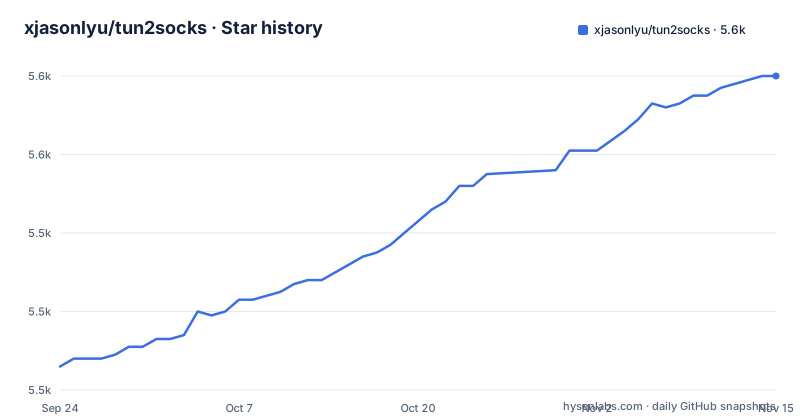
Star history
- xjasonlyu/tun2socks5,580 ★ · +74
| Repository | 2026-09-24 | 2026-11-15 |
|---|---|---|
| xjasonlyu/tun2socks | 5.5k | 5.6k |
74 Stars in the last 52 days, measured from the daily GitHub snapshot. Compare with other projects
Editorial analysis
A TUN device in front, a userspace stack behind it
The mechanism is in the name. A TUN device receives the packets, a TCP/IP stack runs in user space behind it, and the flows that stack terminates get handed to an upstream proxy. That middle layer is gVisor, credited in the README as an application kernel for containers and pinned in go.mod as gvisor.dev/gvisor. The README lists Linux, macOS, Windows, FreeBSD and OpenBSD as supported, and the Makefile builds a separate binary per target.
The tree splits the same way in code. The top level holds core/, engine/, tunnel/, proxy/, dialer/, transport/, dns/, buffer/, log/, metadata/, restapi/ and internal/, with main.go at the root.
Read those packages instead of the feature list and the design is plain: a userspace NAT whose upstream happens to be a proxy rather than the internet.
The image ships with PROXY=direct:// and nowhere to forward
Configuration lives in the Docker image, and the defaults are readable in the Dockerfile rather than in any documented config file. Five variables decide the basics:
ENV TUN=tun0
ENV ADDR=198.18.0.1/15
ENV LOGLEVEL=info
ENV PROXY=direct://
ENV MTU=9000
PROXY=direct:// is the line to read twice. A container booted on the shipped defaults creates tun0, gives it 198.18.0.1/15 and then has no upstream proxy to hand anything to. The final layer is alpine:latest with iptables, iproute2 and tzdata installed, and docker/entrypoint.sh as the entrypoint, so the privileged tooling the routing needs is already inside the image.
The README sends you to the wiki for Install from Source and for Quickstart Examples. The repository itself shows the other route, which is a Makefile target.
31 named build targets, 5 of them in the default all
Cross compilation is a Makefile matter. The default target is five platforms:
all: linux-amd64 linux-arm64 darwin-amd64 darwin-arm64 windows-amd64The file names 31 targets in total, 27 under UNIX_ARCH_LIST and 4 under WINDOWS_ARCH_LIST, among them 386, mips softfloat and hardfloat variants, ppc64, ppc64le, s390x, loong64 and armv5 through armv7. Where the CPU supports it, a v3 variant sets GOAMD64=v3 explicitly, as darwin-amd64-v3 and windows-amd64-v3 do.
One local build is a single target, and the Dockerfile uses exactly that:
make tun2socksEvery build runs with CGO_ENABLED := 0 and GO111MODULE := on, so the output is a static Go binary with no libc to satisfy, which is what lets the same artifact drop into an alpine layer.
The version string is whatever the nearest git tag says
The binary stamps its own identity, and where that string comes from is worth knowing before you ship it. The Makefile derives the version from the nearest tag and the commit from HEAD:
LDFLAGS += -w -s -buildid=
LDFLAGS += -X "$(MODULE)/internal/version.Version=$(BUILD_VERSION)"
LDFLAGS += -X "$(MODULE)/internal/version.GitCommit=$(BUILD_COMMIT)"
BUILD_VERSION is `git describe --abbrev=0 --tags HEAD`, so a checkout without tags yields an empty version string rather than a failed build. The image build copies the whole context and then runs make tun2socks, which means the stamp only lands if .git is inside that context. A .dockerignore sits at the root and settles that question, and the README does not say what it excludes.
For anyone triaging a bug report, that string is the first thing worth asking for, because it is the only record of what was actually built.
TUN_INCLUDED_ROUTES and TUN_EXCLUDED_ROUTES start empty
Two variables decide which traffic enters the tunnel, and the image declares both without a value:
ENV TUN_INCLUDED_ROUTES=
ENV TUN_EXCLUDED_ROUTES=
Empty means no include list and no exclude list, so everything reaching the device is handled until you narrow it. MULTICAST_GROUPS is declared the same way and starts empty too. The syntax of these three values is not in the README. It lives in docker/entrypoint.sh, a file the README never describes, so split routing means reading shell.
That matters most in gateway mode, where tun2socks acts as a Layer 3 gateway and routes traffic for other devices on the same network. The feature list gives that one sentence and nothing about address assignment, forwarding rules or which clients may use it.
RESTAPI starts empty, and its access control is undocumented
RESTAPI is declared with no value in the Dockerfile, and the tree carries a restapi/ package backed by github.com/go-chi/chi/v5 v5.4.0, go-chi/cors, go-chi/render and github.com/gorilla/websocket v1.5.3. An HTTP control surface exists in the code and stays off until you set the variable, with a CORS layer and a websocket library in its dependencies.
What none of that answers is whether it authenticates. The README does not mention the REST API at all, so a deployment that sets RESTAPI to a port inherits an interface whose access control is written down nowhere, on a program whose entire job is to sit on a network path. Read the source of restapi/ before binding that port to anything reachable, and treat the empty default as the safe one.
The proxy types themselves can carry optional authentication, which is a different mechanism from the local control interface.
The benchmark sentence points at a wiki page
The performance claim is one sentence: for all scenarios of usage, tun2socks performs best, followed by a link to a benchmarks page in the project wiki. The repository holds no numbers, no measurement setup and no named project to compare against, so the sentence cannot be checked from the source you clone and carries no evidence on its own.
Two other feature lines do have something behind them. User-Space Networking points at gVisor, which is a real dependency with a version in go.mod. Cross-Platform is backed by 31 Makefile targets rather than by a claim. The rest, Universal Proxying and Multi-Protocol, are the product description restated.
Judge the routing layer on the dependency list and the build matrix, and treat the wiki page as something to reproduce yourself before relying on it.
v2.7.0 shipped 2026-07-12, main moved on 2026-09-13
Release cadence is irregular. v2.6.0 came out on 2025-06-07, v2.7.0 on 2026-07-12, and the last push to main was on 2026-10-29, which leaves the branch more than three months ahead of the newest tag. A build from main is therefore not the same binary as a build from the release, and anyone comparing behaviour needs to say which one they used.
The module path is github.com/xjasonlyu/tun2socks/v2 with go 1.27.1 declared, so the import path carries the major version and the toolchain floor is recent. The dependency list is dominated by the stack rather than by the proxy protocols: gvisor.dev/gvisor and golang.zx2c4.com/wireguard are direct requirements, golang.zx2c4.com/wintun arrives as an indirect one, and github.com/go-gost/relay v0.7.0 sits alongside the feature list's mention of relay as a supported proxy type.
Licence is MIT, with the file at the root of the repository.
Editorial conclusion
Adopt tun2socks when you need a single process to hand every flow of an application to an upstream proxy, you can live with environment variables instead of a config file, and you are willing to read entrypoint.sh and restapi/ yourself. Do not adopt it expecting a documented configuration schema, a benchmark you can reproduce from the source, or a written-down answer on REST API authentication, because the README offers none of the three. Verify two things before anything else: that PROXY actually names an upstream, since the image ships PROXY=direct:// and boots with nothing to forward to, and which tag you install, because v2.7.0 from 2026-07-12 is older than the 2026-10-29 push to main.
Frequently asked questions
What is Tun2Socks used for?
It transparently routes all network traffic from any application through a proxy, using the gVisor TCP/IP stack in user space. The supported upstream types are HTTP, SOCKS, Shadowsocks, SSH and relay, with optional authentication.
What is tun2socks?
A Go program that sits between a TUN device and a proxy. It terminates the TCP/IP connection in user space through gVisor and forwards the flows to the upstream proxy you name, and it runs on Linux, macOS, Windows, FreeBSD and OpenBSD.
How do I install tun2socks?
The README points to an Install from Source page in the project wiki and to a Docker image on Docker Hub. From a checkout, `make tun2socks` builds the binary, and the Dockerfile shows a two stage build that installs make and git, runs that same target, and copies the result into alpine:latest.
How do I use tun2socks?
Through environment variables in the image: TUN names the device, ADDR is the address assigned to it, PROXY names the upstream, and LOGLEVEL, MTU, UDP_TIMEOUT, TCP_SNDBUF and TCP_RCVBUF tune the rest. Usage questions are pointed at the Quickstart Examples page in the wiki.
Official sources
Add this badge to your README
If you maintain this project, the badge below links readers to this analysis and shows its maintenance status from the daily GitHub snapshot. Paste the markdown into your README; add ?metric=license or ?metric=stars to the image URL for a different field.

[](https://hysenlabs.com/projects/xjasonlyu-tun2socks)Star history chart for your README
[](https://hysenlabs.com/projects/xjasonlyu-tun2socks)Was this useful?