Xybrid: a Rust core for running LLM, ASR and TTS models inside Flutter, Kotlin, Swift, React Native and Unity apps
Cross-platform on-device AI toolkit
At a glance
- What is it?
- xybrid-ai/xybrid is an Apache-2.0 Rust toolkit for running speech and language models on the device. This article follows the install lines, platform floors and build setup that decide whether it fits a shipping app.
- Who is it for?
- Choose Xybrid if you are building a mobile app or game that must run speech and language models on the device, and you can accept a pre-1.0 toolkit with fast releases and per-SDK platform floors. Skip it if you need a settled API or cannot raise your Android minimum to 29, and test a first launch without network before promising offline use.
- Can I use it commercially?
- Yes. Apache-2.0 is a permissive licence: you can use, modify and sell software built on it, as long as you keep its copyright and licence notices.
- Is it still maintained?
- Yes. The repository received new commits within the last day.
- What is it written in?
- Mainly Rust, according to GitHub's language statistics.
Answers come from the project's GitHub data, last synced on November 25, 2026, and from our analysis. They are not legal advice.
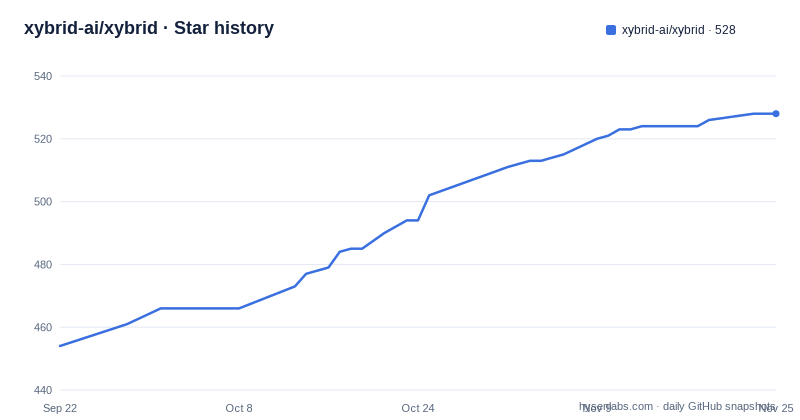
Star history
- xybrid-ai/xybrid528 ★ · +74
| Repository | 2026-09-22 | 2026-11-25 |
|---|---|---|
| xybrid-ai/xybrid | 454 | 528 |
74 Stars in the last 64 days, measured from the daily GitHub snapshot. Compare with other projects
Editorial analysis
The Android floor is API 28 on the Flutter line and API 29 on the Kotlin and React Native lines
Xybrid describes itself as a cross-platform on-device AI toolkit, written in Rust and licensed under Apache-2.0. Its tagline is running LLMs, ASR and TTS natively in apps and games, private and offline, with no cloud required. The Flutter install is a single dependency line:
dependencies:
  xybrid_flutter: ^0.16.0
The Flutter plugin needs iOS 16.0, macOS 14.0 and Android 9 (API 28) or later. A few lines further down, the Kotlin section says releases 0.16.0 and later require Android 10 (API 29), and the React Native section repeats that requirement with minSdkVersion 29. Nothing in those lines reconciles the two numbers for a Flutter app, which sits on the same 0.16.0 release. If your Flutter project targets API 28 devices, test on a real API 28 device before you promise support to anyone. Setting the minimum to 29 removes the question, at the price of dropping Android 9 users from your install base.
Kotlin builds fail at the manifest merge below minSdk 29, and the SDK declares no permissions
The Kotlin artifact is ai.xybrid:xybrid-kotlin, published on Maven Central, and the pinned version is exact:
dependencies {
    implementation("ai.xybrid:xybrid-kotlin:0.16.0")
}
Two things in this section catch teams out. The first is the minimum SDK. Releases 0.16.0 and later require Android 10, so you set `minSdk = 29` or higher in your app's `defaultConfig`. If you leave an older value, the build does not warn at runtime; it fails at the manifest merge, which means you find out in CI rather than on a device.
The second is network access. Downloading models from the registry needs the internet, yet the SDK declares no permissions of its own. You have to add `<uses-permission android:name="android.permission.INTERNET" />` to your app's `AndroidManifest.xml`. Forget it and model downloads cannot work, even though every Xybrid call compiles. The Kotlin run call is `model.runAsync(Envelope.text("Hello world"))` after `Xybrid.model("kokoro-82m").load()`.
React Native requires the New Architecture, and Expo Go cannot load the native module
The npm package is @xybrid/react-native, installed at an exact version:
npm install @xybrid/[email protected]It targets a React Native 0.76+ app with the New Architecture enabled, or an Expo SDK 52+ development build. That excludes older React Native projects that still run the legacy bridge, and it excludes anyone whose workflow depends on Expo Go. For Expo you run `npx expo prebuild`, because the native module has to be compiled into your own development build. For bare React Native you run `cd ios && pod install`.
On Android the same API 29 floor applies, and here the trap is documented in the template defaults: the React Native and Expo templates default `minSdkVersion` to 24, so a fresh project is below the requirement from the first commit. You have to raise it yourself, and the project's React Native guide shows how. The practical consequence is that adding Xybrid to an existing Expo app is a native build change, not a JavaScript dependency bump, and your team needs a working iOS and Android toolchain.
Every SDK loads a model by name and runs it on an envelope
The same three steps appear in the Flutter, Kotlin and Swift examples: name a model, load it, and run it on an envelope that carries the input. The model in every example is `kokoro-82m`, and the comment under each example says the result is 24kHz WAV audio. In Dart it reads like this:
final model = await Xybrid.model('kokoro-82m').load();
final result = await model.run(XybridEnvelope.text('Hello world'));
// result → 24kHz WAV audio
The Swift version uses `try await Xybrid.model("kokoro-82m").load()` and `model.runAsync(envelope: Envelope.text("Hello world"))`, with the package added through Swift Package Manager from `https://github.com/xybrid-ai/xybrid.git` at version 0.16.0. Because the call shape is shared, moving a feature between platforms is mostly a translation of syntax. The limit is that the shown example is text to speech. The examples do not show an ASR or LLM call, so the input envelope for audio or chat has to be learned from the docs at docs.xybrid.dev, not guessed from the quick start. Models also come from a registry, which brings the network requirement back into the picture.
Offline use depends on the model already being on the device
The headline promise is private and offline, but the Kotlin notes say that downloading models from the registry needs network access. Those two statements fit together only if the download happens once and later runs reuse the files. The quick start text does not walk through where downloaded models are stored or how long they stay, so that detail has to come from the docs before you design around it.
The consequence for product planning is straightforward. A first launch on a plane, in a basement or behind a restrictive corporate network can fail at the download step, regardless of how private the inference itself is. If your app must work from the very first run without a connection, you need to confirm whether a model can be bundled with the app, and check the install size that implies. If you only need offline use after setup, a visible download screen with a retry path is the honest design. Either way, treat the registry as a runtime dependency of the first run, and for Android declare the INTERNET permission yourself.
A sixteen member Rust workspace sits under all the language bindings
The root Cargo.toml defines a workspace at version 0.16.0, edition 2021, with resolver 2, and it has sixteen members. The crates are xybrid, xybrid-core, xybrid-sdk, xybrid-ffi-facade, xybrid-bolt, xybrid-cli, llama-cpp-sys, whisper-cpp-sys, zzz-sys, xybrid-llama and xybrid-whisper, followed by bindings/flutter/rust, bindings/web/runtime, macros, xtask and integration-tests. The names of llama-cpp-sys and whisper-cpp-sys point at native inference code pulled in through Rust sys crates, and the xybrid-ffi-facade crate sits where the foreign language bindings meet the core.
Around that, the repository ships a Package.swift for Swift Package Manager, a bindings directory, and examples for android, flutter, ios and unity. A Rust user can depend on the xybrid crate from crates.io, and there is a bindings/python directory and a web setup page for the other two badges. The root also holds install.sh and install.ps1, a CLI crate named xybrid-cli, and documents such as GOVERNANCE.md, MAINTAINERS.md and SECURITY.md. The breadth of members means a source build compiles a lot of native code, which matters for the next two sections.
Debug builds ship unoptimized inference unless the dev profile is overridden
The workspace Cargo.toml carries an unusually candid comment about debug builds. Dependencies are optimized even in dev builds, while workspace crates keep opt-level 0 for fast incremental compiles, so that candle, ort and tokenizers get real code generation. The stated reason is a measurement on a Pixel 8: one 5 second Whisper-tiny window took minutes in a debug build, against about 3.5 seconds in release. Without the override, a `flutter run` debug build ships unoptimized inference kernels.
The cost is named too. The first cold build is slower, and dependency artifacts are cached after that. The profile also sets `debug = false` for dependencies, because optimized dependency artifacts with full debuginfo are enormous; the comment says a single Android cargokit build exceeded 45 GB. Dependencies therefore keep their names in backtraces through symbols only. For an app developer the lesson is practical: speech-to-text that seems hopeless in a debug session is a build mode problem, so judge latency on a release build, and keep a large free disk for the first Android build.
Building from source means both Cargo and Bazel, with Metal switched on for macOS
The justfile is the contributor entry point, and its own comment says to run `just --list` to see every command. The default recipe is that listing. The Cargo recipes are direct: `cargo build --workspace` for build, `cargo build --workspace --release` for release, `cargo test --workspace` for tests and `cargo clippy --workspace -- -D warnings` for lint. Formatting is `cargo fmt --all`, with a check variant that adds `-- --check`.
A second path goes through Bazel. The bazel-build recipe runs `bazelisk build` against `//crates/xybrid-cli:xybrid`, and on macOS it adds `--config=macos-metal`, which is the only conditional in the file. The bazel-analyze and bazel-test recipes mirror the CI graph, including //bindings/..., //macros/..., //xtask/... and //integration-tests/.... The repository root holds MODULE.bazel, .bazelrc, .bazelversion and several patches for emsdk, hermetic LLVM, rules_android_ndk, rules_foreign_cc and rules_rust. That is a sign that the Bazel build is customized, and a limit for outside contributors: matching CI means installing bazelisk as well as a Rust toolchain.
A pre-1.0 version number and fast releases argue for exact pins
The workspace version is 0.16.0, the latest tagged release is v0.16.0 from 1 November 2026, and two precompiled binaries releases were published on 30 October and 1 November. The last push to the repository was on 2 November 2026. The project is not archived and is moving quickly.
The install lines are already strict about versions. Flutter uses a caret range of ^0.16.0, Kotlin and React Native use the exact 0.16.0, and Swift uses `from: "0.16.0"`. Release 0.16.0 also raised the Android minimum to 29, which shows that a minor version step in this line can change what devices you can support. Pin exact versions in lockfiles, read CHANGELOG.md and RELEASES.md before every bump, and rebuild on your oldest target device after each upgrade. A team that wants a frozen API for years of maintenance should wait for a version that signals stability, since 0.x numbers carry no such promise.
Editorial conclusion
Choose Xybrid if you are building a mobile app or game that must run speech and language models on the device, and you can accept a pre-1.0 toolkit with fast releases and per-SDK platform floors. Skip it if you need a settled API or cannot raise your Android minimum to 29, and test a first launch without network before promising offline use.
Frequently asked questions
What is Xybrid?
Xybrid is a cross-platform on-device AI toolkit written in Rust and licensed under Apache-2.0. It runs LLM, ASR and TTS models natively in apps and games, with SDKs for Flutter, Swift, Kotlin, React Native, Unity and Rust.
Does Xybrid need an internet connection?
Downloading models from the registry needs network access, and on Android you must add the INTERNET permission yourself because the SDK declares none. The project's pitch is private and offline use, so check the docs on how downloaded models are stored.
Which Android version does Xybrid 0.16.0 require?
The Kotlin and React Native instructions say releases 0.16.0 and later require Android 10 (API 29), and Kotlin builds fail at the manifest merge below that. The Flutter plugin line lists Android 9 (API 28) or later.
Official sources
Add this badge to your README
If you maintain this project, the badge below links readers to this analysis and shows its maintenance status from the daily GitHub snapshot. Paste the markdown into your README; add ?metric=license or ?metric=stars to the image URL for a different field.

[](https://hysenlabs.com/projects/xybrid-ai-xybrid)Star history chart for your README
[](https://hysenlabs.com/projects/xybrid-ai-xybrid)Was this useful?