macos-defaults, a catalogue of the hidden System Settings keys behind macOS preferences
Incomplete list of macOS `defaults` commands with demos ✨
At a glance
- What is it?
- macos-defaults is a documentation project that collects the defaults commands macOS exposes for preferences that have no visible switch in System Settings, and it shows a demo of what each one does. It also ships the discovery script the author used to find them, so the list can be extended rather than only consumed.
- Who is it for?
- Adopt macos-defaults as a reference when you are configuring a Mac for automation, kiosk use or a scripted setup, and skip it if you are looking for a tool that applies settings, because this is a catalogue and a discovery aid rather than a configuration manager.
- Can I use it commercially?
- Yes. MIT is a permissive licence: you can use, modify and sell software built on it, as long as you keep its copyright and licence notices.
- Is it still maintained?
- Yes. The repository last received commits 10 days ago.
- What is it written in?
- Mainly HTML, according to GitHub's language statistics.
Answers come from the project's GitHub data, last synced on November 7, 2026, and from our analysis. They are not legal advice.
Star history
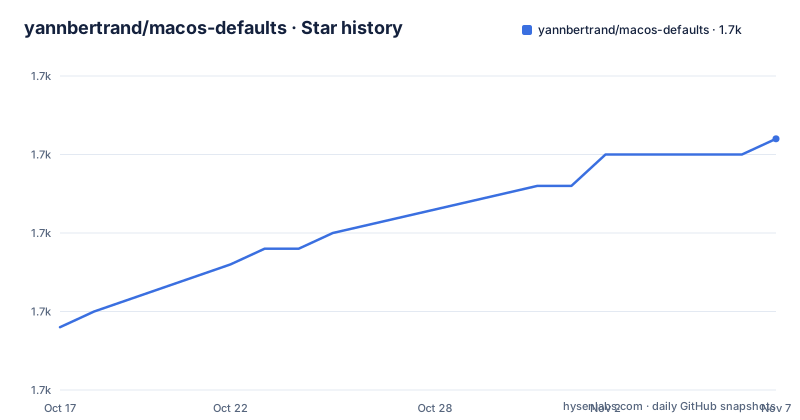
- yannbertrand/macos-defaults1,671 ★ · +12
| Repository | 2026-10-17 | 2026-11-07 |
|---|---|---|
| yannbertrand/macos-defaults | 1.7k | 1.7k |
12 Stars in the last 21 days, measured from the daily GitHub snapshot. Compare with other projects
Editorial analysis
The preferences macOS does not show you
Most of what people want from a Mac configuration tool is a list of settings that the operating system keeps but does not surface. The defaults command line utility is the way to reach them, and it allows you to programmatically set System Settings of your Mac, which is the project description in one sentence. The project is an up-to-date list of those commands with demos, published at macos-defaults.com, and it describes itself as an incomplete list, which is an honest framing for a catalogue of undocumented behaviour. The reason the list is valuable is that the behaviour is reachable but undiscoverable. The defaults database holds preferences for applications and for the system itself, and the ones without a checkbox in System Settings are only findable by reading the database or by diffing it. The repository is MIT licensed, the primary language recorded for it is HTML, and the last push was on 2026-10-14, so the catalogue is actively extended.
`defaults` commands allow you to programmatically set System Settings of your Mac.The discovery script, which is the real contribution
The most reusable part of the repository is not the list but the method behind it. The project documents how to discover a defaults command, and it provides a bash script for the purpose. Using diff.sh, with the script run as bash ./diff.sh, you are able to find out which key changed when you change a system or app setting. That is the whole technique stated plainly: change one setting in the interface, diff the defaults database, and whatever key appeared is the one you were looking for. It is a form of differential debugging applied to preferences, and it is why the catalogue can keep growing without a maintainer having to read Apple's source. After finding the key with your options, you simply run defaults find with the key name to find the domain it is saved in, and the project insists on that step for a good reason, because a key without its domain is not a command you can run.
bash ./diff.shContributing, and the two ways to add an entry
The project accepts new commands in two ways, and the issue route is the one that costs the author least. You can feel free to open an issue if you know an unlisted command, which means the catalogue grows even when nobody writes code. It is also possible to add the command yourself by creating a pull request, and the contribution guidelines are linked from the site. The two routes sit side by side in the documentation, which is a reasonable design for a catalogue where the discovery work has already been done by the person reporting and only the writing remains. The repository also has a dedicated bug template and a feature request template in its issue tracker, and a broken.md file at the top level, which suggests the author tracks entries that have stopped working, most likely as macOS releases change the internal keys. The project also runs a status badge, so the site itself is monitored.
Feel free to open an issue if you know an unlisted command.How the site is built, and why it is a VuePress project
The site tooling is what the package metadata shows, and it is a small VitePress setup. The package is private, named as a production builder, and the scripts are the standard VitePress ones: a clean that removes the VitePress cache and dist directories, a build that runs a production VitePress build over the docs directory, a start that runs the dev server, a preview, and separate format and lint scripts driven by Prettier. The dependencies are VitePress itself and a sidebar plugin, and the dev dependencies include a Netlify Lighthouse plugin, Prettier and rimraf. The netlify.toml at the repository root, together with the Lighthouse plugin, tells you the site is deployed to Netlify and is checked for performance in the build. The topics attached to the repository confirm the choice, with vuepress among them.
bash ./diff.shThe recorder and the builder, preserved in history
Two features of the project were removed and survive only in the git history, and the README is upfront about both. The macos-defaults recorder is the more interesting one, since some screenshots and videos were recorded programmatically in the past, and the record folder in the project history is where you go to learn how it worked. A recorder makes sense for a catalogue whose whole value is showing you what a hidden preference actually does on screen, and recording it programmatically means the demonstration is reproducible rather than a hand-taken picture. The builder is simpler to explain. This project used to help compare Static Site Generators, and that part was removed, but an old comparison between a few of them, covering Docsify, Docusaurus, VuePress and GitHub markdown, is still in the project history. The history is not clutter here, it is the archive of how the project got to where it is.
Some screenshots and videos were recorded programmatically in the past.What a reader should do with the catalogue
The practical use of this project is a lookup, and the shape of the entries is what makes it work. Each entry is a defaults command with a demo of the effect, so the pattern is to find the key, find the domain, run the command, and see the result. That makes the catalogue a good fit for scripted Mac setups, for a machine you hand to someone else, or for a kiosk image, and a poor fit if you want a maintained configuration tool that applies a known-good set of settings, because that is a different project with different maintenance obligations. Two cautions are worth repeating. The keys are internal implementation details of a particular macOS release, so a command that works on one version may be inert on the next. And the demos were recorded at a point in time, so the screenshots show the behaviour as it was rather than as it is. If you are scripting a fleet, treat the catalogue as a source of candidate keys and verify each one on the target macOS version, and use the diff script to find the ones that the catalogue does not yet list. The macos-defaults.com site is the canonical place to read it, and the project documentation is the source.
defaults find ${keyname}Editorial conclusion
Adopt macos-defaults as a reference when you are configuring a Mac for automation, kiosk use or a scripted setup, and skip it if you are looking for a tool that applies settings, because this is a catalogue and a discovery aid rather than a configuration manager. Verify three things before you follow any of its commands: that the key still exists in the macOS version you are running, since defaults keys change between releases; that you know which domain the key lives in, because the project insists on running a find against the key name for that reason; and that a demo reflects the behaviour you want, since the screenshots were recorded programmatically and the pages were built at a point in time.
Frequently asked questions
What is the macos-defaults project?
It is an up-to-date list of macOS defaults commands with demos, published at macos-defaults.com. The defaults command line utility allows you to programmatically set System Settings of your Mac, and the project catalogues the preferences that macOS keeps but does not expose in its own interface.
How do I discover a new macOS defaults key myself?
The project ships a bash script for it. Using diff.sh, run as bash ./diff.sh, you are able to find out which key changed when you change a system or app setting. Once you have the key, run `defaults find` with the key name to find the domain it is saved in.
How do I contribute a command to macos-defaults?
There are two routes. You can open an issue if you know an unlisted command, or you can add the command yourself by creating a pull request, following the contribution guidelines linked from the site. The issue route is useful when the discovery work has been done and only the writing remains.
How is the macos-defaults website built and deployed?
It is a VitePress project. The build script runs a production VitePress build over the docs directory, with separate start, preview, format and lint scripts, and the repository includes a netlify.toml along with a Netlify Lighthouse plugin in the dev dependencies.
Official sources
Add this badge to your README
If you maintain this project, the badge below links readers to this analysis and shows its maintenance status from the daily GitHub snapshot. Paste the markdown into your README; add ?metric=license or ?metric=stars to the image URL for a different field.

[](https://hysenlabs.com/projects/yannbertrand-macos-defaults)Star history chart for your README
[](https://hysenlabs.com/projects/yannbertrand-macos-defaults)Was this useful?