Every download row points at the same releases/latest URL
AI Gist is a privacy-first AI prompt management tool, aiming to get the most value out of your personal prompt collection. Supports variable substitution, Jinja templates, AI-assisted generation and tuning, version history and cloud backup.
At a glance
- What is it?
- A local-first prompt manager that ships as a desktop app, a mobile app and a self-hosted web build, with variable templates, optional AI rewriting and CSV export. The mechanics worth reading are the distribution details: one download link for six platforms, a macOS path that depends on signature state, and a store build that skips one architecture.
- Who is it for?
- AI Gist is a reasonable choice if you want prompt templates with real variables, a history, and a data export you can read without the app, and the local-first claim is backed by a CSV export plus optional WebDAV and iCloud backups rather than by a promise. Three things to settle first.
- Can I use it commercially?
- Yes, with strict conditions. AGPL-3.0 is a network copyleft licence: if people use a modified version over a network, for example as a hosted service, you must offer them its source code under the same licence.
- Is it still maintained?
- Yes. The repository last received commits 27 days ago.
- What is it written in?
- Mainly TypeScript, according to GitHub's language statistics.
Answers come from the project's GitHub data, last synced on November 25, 2026, and from our analysis. They are not legal advice.
Star history
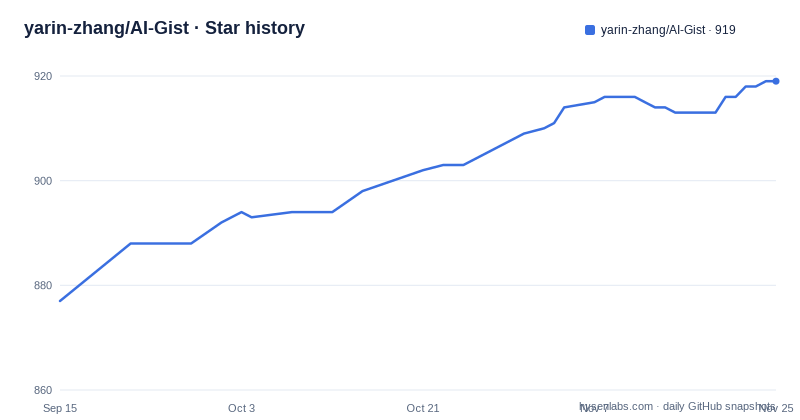
- yarin-zhang/AI-Gist919 ★ · +42
| Repository | 2026-09-15 | 2026-11-25 |
|---|---|---|
| yarin-zhang/AI-Gist | 877 | 919 |
42 Stars in the last 71 days, measured from the daily GitHub snapshot. Compare with other projects
Editorial analysis
Six platform rows, one download link
The download table lists a Windows Setup, macOS for Apple Silicon, macOS for Intel, a Linux AppImage and an Android APK, and every one of those package links points at the same generic releases/latest URL rather than at a named asset. The table's platform column is also empty in the file itself, with the labels carried by icons instead of text.
What the table does distinguish is the store route. Windows is on the Microsoft Store, macOS on the App Store, and Linux on the Snap Store, and the mobile rows point at their own listings. The App Store links appear with two country codes for the same application identifier, so the regional listings are the same app rather than two builds.
Underneath there is a second table of mirrors, with a note that if the GitHub download is slow in China. It offers a Baidu Pan link with an extraction code in the table, and a SourceForge project link recommended for users outside China.
So the practical answer to which file to download is not in the README. You go to the releases page and match the asset to your platform yourself.
macOS has two install paths depending on signature state
The installation notes give one line per platform, and the macOS line is two lines long.
You download the .dmg, open it, and drag the app into Applications. Signed builds that have been notarised by Apple launch directly. Older builds that were not signed need a command in a terminal first:
xattr -cr /Applications/AI\ Gist.appThat is the quarantine attribute removal step, and the README is honest that it applies only to the older unsigned versions. A CODE_SIGNING_POLICY.md at the repository root holds the project's position on signing, which is the document to read if you are deciding whether to trust a build you did not produce.
The other three are shorter. Windows is a double-clicked .exe. Linux needs the AppImage made executable with `chmod +x ai-gist-linux.AppImage`. Android is an .apk where you allow installation from a browser or file manager in system settings.
The build scripts back this up. The continuous integration variants pass CSC_IDENTITY_AUTO_DISCOVERY=false, which disables automatic certificate discovery so a build machine does not sign with whatever identity it happens to find.
Two releases twenty one minutes apart
The tag history is short and uneven. v2.1.1 is dated 2026-08-22. Then v2.1.2 at 17:28:20 on 2026-09-15 and v2.1.3 at 17:49:14 the same day, twenty one minutes apart. The last push to the repository is 2026-09-30, two weeks after the newest tag.
The root manifest agrees with the newest tag on version 2.1.3, and adds a second field the tag does not have: buildRevision, set to 1. So a build carries both a semver string and a revision counter, and the counter is what a rebuild bumps when nothing about the release itself changed.
That pairing is typical of an Electron application where the packaged renderer changes without a user-visible version change, and it means two builds of the same version can differ. Nothing in the release notes tells you which.
The contribution section explains the pace instead: the project is mainly developed by one person, with all code open source, and issues and pull requests are welcome.
The store builds skip an architecture the Windows one covers
There are two families of build script in the manifest, and the difference is which targets you name.
The plain builds run the application build step and then electron-builder for Windows, macOS or Linux, with no target flags. The store builds are specific:
- the Windows store build targets an appx package for both x64 and arm64 - the macOS store build targets a universal binary - the Linux store build targets snap for x64 only
So Windows is the only platform where the store artefact covers two instruction sets, and Linux is the one place an arm64 machine is not in the store path. The Mac build also forces python3 into the environment for two variables, which is an electron-builder convention for codesigning rather than something this project needs at build time.
If you are on an arm64 Linux box, the AppImage is the route, and that is the case the download table does not tell you about.
Local-first, and also a web build you can host yourself
The privacy story is the project's opening claim: all data is stored locally, and in the default state no network access is needed. Export and import are complete, in a general CSV format, and cloud backup is optional through WebDAV or iCloud for moving data between devices.
Alongside that sits a second deployment shape. There is a docker-compose.web.yml at the root, a docker/ directory, and two scripts named build:web and serve:web that produce and host a browser build through Vite. The development notes also describe a web-only preview with yarn dev:web, and there is a document in docs/ specifically about web deployment and the differences between platforms.
So the same application runs as a local desktop app, as a browser application you can host yourself, and as a mobile app through Capacitor, with capacitor.config.ts alongside android/ and ios/ directories and the mobile scripts yarn build:mobile, yarn cap:ios and yarn cap:android.
A locally hosted web deployment changes the privacy calculation rather than the feature set, since the data now lives wherever you put the container.
One dev flag runs the Windows client from WSL
The development section is the most technical part of the README and the only place with an unusual flag.
yarn install
yarn dev
yarn dev:win
yarn dev:web
The plain dev script runs a node script that starts the app with hot reload, where renderer changes are picked up by Vite immediately. The Windows variant passes a --windows flag, and its stated purpose is for a project sitting inside WSL that still wants to preview the Windows client. The documentation also says the first run caches a Windows Electron development runtime, after which no repackaging is needed.
Changes to the Electron main process and the preload script are treated differently from renderer changes: they trigger an automatic rebuild and a restart of the client rather than a hot swap.
The rest of the command set is packaging, with yarn build writing to a dist directory and per-platform scripts for Windows, macOS and Linux. The docs directory holds a project architecture guide, the mobile guide, the web deployment notes and a document on the GitHub Actions build and release.
History is recorded when you copy, and the author advises editing first
The prompt workflow is worth reading because it is concrete. You create a prompt, type the template with variables in double brace form such as {{variable name}}, and the application reads those variables out of the text itself. When you use the template you pick it, fill in the values, and click the copy action, which is also what records the use in history.
That last part is a small design decision with a consequence: the history is tied to a copy button rather than to a send, so it records what you copied rather than what an assistant replied to.
Around that there are three views, card, table and category, and the organising features are tags, categories, a rating and a favourite flag. The advanced filter and the table view are the two most feature-dense screens among the twelve the README captions, which also cover variable filling, prompt editing, Jinja templates, model management, adding an AI configuration, quick AI adjustments, folder view, category management, data backup and light mode.
One line in the feature section is advice rather than description: before you use it, edit it. For a prompt manager that is the correct instruction, and it is the author's own.
Editorial conclusion
AI Gist is a reasonable choice if you want prompt templates with real variables, a history, and a data export you can read without the app, and the local-first claim is backed by a CSV export plus optional WebDAV and iCloud backups rather than by a promise. Three things to settle first. Which build you actually download, since all six package links in the table resolve to the same latest-releases page and the platform labels are icons rather than text. Whether you are on an arm64 Linux machine, where the store build is x64 only and the AppImage is the route. And whether you want the local desktop app or the self-hosted web deployment, because the second changes where your data lives even though the features are identical. On code signing, read the policy file at the root before trusting a build you did not compile, since older macOS releases still need the quarantine attribute removed by hand.
Frequently asked questions
What does AI Gist do?
It manages AI prompt templates. You write a template with variables in double brace form and the app detects them, then fills the values in when you use it. Prompts are organised in card, table and category views with tags, categories, ratings and favourites, and using a template through the copy action records it in history. Jinja templates are supported.
Where is my prompt data stored in AI Gist?
Locally by default, with no network access needed in that state. Export and import are complete and in a general CSV format. Cloud backup is optional, through WebDAV or iCloud, for syncing between devices. There is also a self-hosted web build, since the repository ships a docker compose file and build and serve scripts for a browser deployment.
Which platforms does AI Gist publish for?
Windows, macOS on both Apple Silicon and Intel, Linux as an AppImage, Android as an APK and iOS through the App Store. Downloads come from the GitHub releases, with Microsoft Store, App Store and Snap Store listings as alternatives, plus a Baidu Pan and a SourceForge mirror for users behind a slow GitHub connection.
Does AI Gist need a cloud AI service to work?
No. Local models through Ollama or LM Studio are supported, and online providers such as OpenAI or DeepSeek are additions. The AI features are prompt generation, rewriting an existing prompt to be more specific, and extracting variables automatically, and the system prompt and the rewriting prompt are both customisable.
Why does the macOS build need an xattr command?
Signed builds that Apple has notarised launch directly after being dragged into Applications. Older unsigned versions still carry the quarantine attribute, and the README tells macOS users to run xattr -cr on the installed app from a terminal first. The repository holds a code signing policy document at its root.
Official sources
Add this badge to your README
If you maintain this project, the badge below links readers to this analysis and shows its maintenance status from the daily GitHub snapshot. Paste the markdown into your README; add ?metric=license or ?metric=stars to the image URL for a different field.

[](https://hysenlabs.com/projects/yarin-zhang-ai-gist)Star history chart for your README
[](https://hysenlabs.com/projects/yarin-zhang-ai-gist)Was this useful?