openai-chat-api-workflow, an Alfred workflow that has to be re-downloaded by hand
🎩 An Alfred 5 Workflow for using OpenAI Chat API to interact with GPT models 🤖💬 It also allows image generation/editing/understanding 🖼️, speech-to-text conversion 🎤, and text-to-speech synthesis 🔈
At a glance
- What is it?
- openai-chat-api-workflow is an Alfred 5 workflow that calls the OpenAI Chat API for chat, file understanding, image generation, speech to text, and text to speech, with a web UI the workflow builds and serves on your Mac. The repository has no releases, the self-updater was removed, and its homepage points at a differently named repository, so the packaging is the weak part rather than the features.
- Who is it for?
- Use this workflow if you live in Alfred on a Mac, already pay for the Powerpack and an OpenAI API key, and want one hotkey that covers chat plus the audio and image endpoints without leaving the keyboard. Check four things first.
- Can I use it commercially?
- Yes. MIT is a permissive licence: you can use, modify and sell software built on it, as long as you keep its copyright and licence notices.
- Is it still maintained?
- Yes. The repository last received commits 23 days ago.
- What is it written in?
- Mainly Ruby, according to GitHub's language statistics.
Answers come from the project's GitHub data, last synced on November 15, 2026, and from our analysis. They are not legal advice.
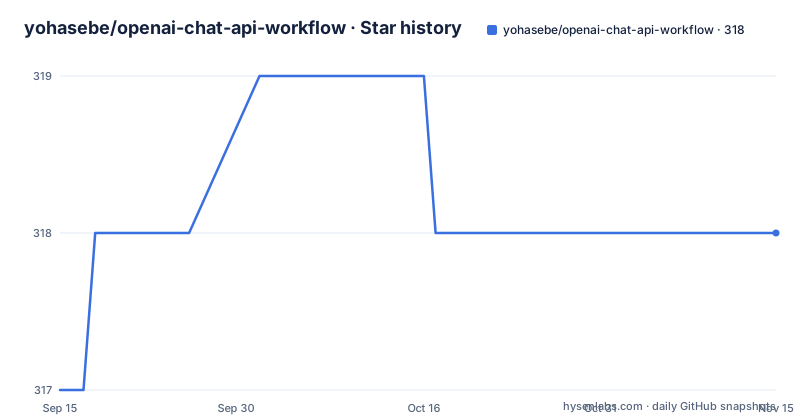
Star history
- yohasebe/openai-chat-api-workflow318 ★ · +1
| Repository | 2026-09-15 | 2026-11-15 |
|---|---|---|
| yohasebe/openai-chat-api-workflow | 317 | 318 |
1 Stars in the last 61 days, measured from the daily GitHub snapshot. Compare with other projects
Editorial analysis
The homepage points at a repository with another name
The repository is openai-chat-api-workflow and the homepage recorded in its metadata is a different repository entirely: yohasebe/openai-text-completion-workflow.
That is the residue of a rename. The download link in the README points at the current name, openai-chat-api.alfredworkflow on the main branch, and the file is described as version 5.7.0. The stale field is the one a package index or a directory listing would read, so anything that resolves the project by homepage lands one repository over.
The root listing explains how versioning works without releases. There is a version.txt and a CHANGELOG.md, and there is no GitHub releases section at all. The workflow file itself is committed at the top level, next to docs/, icons/, and a test/ directory.
For a project whose entire distribution is one binary blob in a repository, having the blob at a predictable raw URL is what makes it installable. Everything else about versioning here is documentation.
Updating means downloading the file because the updater was removed
Version 5.3.0 deleted the update path on purpose.
The entry removed the check-for-update keyword and the web UI's Check for Update button, and the note in its place tells you to download the latest version from the link above. Combined with the absence of GitHub releases, there is no automated route from 5.6.0 to 5.7.0. You find the version number in the README, fetch the raw file, and run it.
The same version also removed the last CDN dependencies. Markdown rendering, syntax highlighting, and icons are now bundled with the workflow and served locally, and voice recording uses the browser's built-in recorder instead of an external polyfill.
That is a defensible set of choices for a tool whose selling point is that your chat messages go from the workflow straight to OpenAI. Bundled assets mean the web UI renders the same way with no network in between, which matters for a page that displays whatever a model returned. The cost is that nothing about the update path is automatic any more.
The default chat model has moved twice in three versions
Read the default model line across 5.1.0, 5.2.0, and 5.5.0 and it changes twice.
In 5.1.0 the default moved from gpt-5-mini to gpt-5.4-mini for a better balance of cost and capability. In 5.2.0, when the three GPT-5.6 frontier models arrived, gpt-5.6-sol as flagship, gpt-5.6-terra as balanced, and gpt-5.6-luna as cost-efficient, the default deliberately stayed at gpt-5.4-mini because the 5.6 family is priced above the mini tier. Then 5.5.0 moved the default to gpt-5.6-luna, described as a newer generation at about a quarter of the previous cost with a 1M-token context window, and pointed very large document work at gpt-5.6-terra.
All three 5.6 models support reasoning effort from none up through xhigh, and 5.5.0 added max. The default effort on a fresh install is none.
So a fresh install and an upgraded install can be on different models with different prices, and the difference is invisible until you open the settings.
Ten silent retries on a timeout is what 5.7.0 removed
Two adjacent versions fixed two independent timeout bugs, and one of them had a billing dimension.
The 5.7.0 entry says a request that times out waiting for the response is no longer resent, and adds in parentheses that chat requests used to be resent up to ten times. Ten automatic retries on a slow response is ten billable requests for one answer, and it only stops when the last one succeeds or the tenth fails.
The 5.6.0 entry had already fixed the opposite failure: an image request that kept timing out never gave up. A retry loop with no ceiling and a request with no ceiling are the same bug pointed in opposite directions, and each release fixed one side.
The same 5.7.0 entry also fixed long conversations losing their system content, with answers sometimes coming back empty at a higher reasoning effort or with Stream output turned off. Stream is therefore a real toggle, and turning it off used to interact badly with reasoning models.
Subtitle output left with the models that produced it
The srt and vtt formats were removed in 5.7.0, and the reason was upstream.
The entry reads that transcription models OpenAI is shutting down were removed, and with them the srt and vtt formats. So a workflow that could previously hand you a subtitled file now cannot, not because the workflow chose to drop the feature but because the provider models behind it are going away.
Audio to English changed shape at the same time. It now transcribes and then translates, which the entry notes also makes it work for Japanese. Before that fix, translating an audio file failed unless the transcription model happened to be whisper-1, the only model supporting translation.
There is a second instance of the same class of problem in 5.6.0: the text-to-speech and transcription settings now fall back to a working model if they were left pointing at one that no longer exists. Between the two versions, the workflow learned to survive a retired model twice, in the menu and in the saved setting.
Two voice paths, and only the terminal one needs SoX
The dependency list is unusually short and has a single exception.
Alfred 5 Powerpack and an OpenAI API key are the two prerequisites. Beyond that, no external tools such as Homebrew are required for any feature, with one carve-out: the terminal voice recorder started by the openai-speech keyword needs SoX.
Voice input in the web UI needs nothing extra, because it uses the browser's built-in Web Audio API. That note appears twice, once in the dependency paragraph and once as a callout under installation, which suggests it has been the most common point of confusion.
So there are two ways to speak to the workflow with different requirements. The keyword path shells out to SoX on your PATH. The web UI path stays inside the browser. If you already have SoX for other reasons the distinction costs nothing; if you do not, the web UI is the path that works on a clean machine.
The key itself lives in the workflow settings as an environment variable called apikey, and openai-set-key replaces it later without opening the settings screen.
Reasoning effort defaults to none and Max Tokens is disabled
The two settings that control how hard the model thinks are coupled, and the interface says so.
Max Tokens explains why it is disabled for reasoning models, which is the correct behaviour since a reasoning model allocates its own budget. Reasoning effort on a fresh install is none, and the available levels for the GPT-5.6 models run none, low, medium, high, xhigh, and, since 5.5.0, max.
The 5.7.0 notes tie the two together from the other direction. Answers could come back empty at a higher reasoning effort or with Stream output turned off, so the setting combination that looked most capable was the one most likely to return nothing.
The mode picker is a segmented control and only the selected mode's settings are shown, which means the settings you cannot see are the ones belonging to the other five or seven commands, including image editing, image understanding, speech to text, and text to speech. The flagship pro models and the o-series models are deliberately not bundled, and 5.1.0 removed the confirmation dialog that used to sit in front of expensive models.
Editorial conclusion
Use this workflow if you live in Alfred on a Mac, already pay for the Powerpack and an OpenAI API key, and want one hotkey that covers chat plus the audio and image endpoints without leaving the keyboard. Check four things first. That you are willing to re-download the .alfredworkflow when a model is retired, since there is no release feed and no updater. Which model you leave selected as default, because it has moved twice in three versions and the cost profile differs. Whether you need subtitle output, which is gone as of 5.7.0. And whether the SoX-dependent terminal recorder matters to you or whether the browser voice input in the web UI is enough.
Frequently asked questions
What is an API workflow in openai-chat-api-workflow?
It is an Alfred 5 workflow distributed as a single .alfredworkflow file, currently version 5.7.0, that calls the OpenAI Chat API. You reach it from the Alfred UI, from selected text, or from a web UI that the workflow constructs and runs locally on your Mac.
Is the OpenAI API the same as ChatGPT in openai-chat-api-workflow?
No. The workflow calls the API with your own key and needs both Alfred 5 Powerpack and an OpenAI API key. With default settings calls go directly from the workflow to OpenAI, and the README notes that OpenAI does not use data sent through its API for training by default.
What is openai-chat-api-workflow used for?
Chat with GPT models, file understanding for images, PDFs, Office documents, and code, image generation, speech-to-text, and text-to-speech. A conversation is shown on one scrollable page, can be exported to JSON, and can be imported later to continue the chat.
Does openai-chat-api-workflow update itself?
No. Version 5.3.0 removed the check-for-update keyword and the web UI's Check for Update button, and tells you to download the latest version from the README link. The repository has no GitHub releases; the version lives in version.txt alongside a CHANGELOG.md.
Official sources
Add this badge to your README
If you maintain this project, the badge below links readers to this analysis and shows its maintenance status from the daily GitHub snapshot. Paste the markdown into your README; add ?metric=license or ?metric=stars to the image URL for a different field.

[](https://hysenlabs.com/projects/yohasebe-openai-chat-api-workflow)Star history chart for your README
[](https://hysenlabs.com/projects/yohasebe-openai-chat-api-workflow)Was this useful?