Meme Search: self-hosted semantic retrieval for image folders
The open source Meme Search Engine and Finder. Free and built to self-host locally with Python, Ruby, and Docker.
At a glance
- What is it?
- Meme Search indexes a local image collection by describing each file with a vision model, embedding the description, and serving keyword and semantic search from a Docker Compose stack. It is built for one operator on one machine, and its documentation says so explicitly.
- Who is it for?
- Adopt Meme Search if you have a personal image folder, a machine that can run a vision model locally, and no requirement to expose the UI beyond 127.0.0.1. Do not adopt it as a multi-user service or as anything reachable from the public internet: the README states the web UI has no user authentication, that API bearer tokens cover only the versioned integration endpoints, and that direct public exposure is unsupported.
- Can I use it commercially?
- Yes. Apache-2.0 is a permissive licence: you can use, modify and sell software built on it, as long as you keep its copyright and licence notices.
- Is it still maintained?
- Yes. The repository last received commits 14 days ago.
- What is it written in?
- Mainly Ruby, according to GitHub's language statistics.
Answers come from the project's GitHub data, last synced on November 13, 2026, and from our analysis. They are not legal advice.
Star history
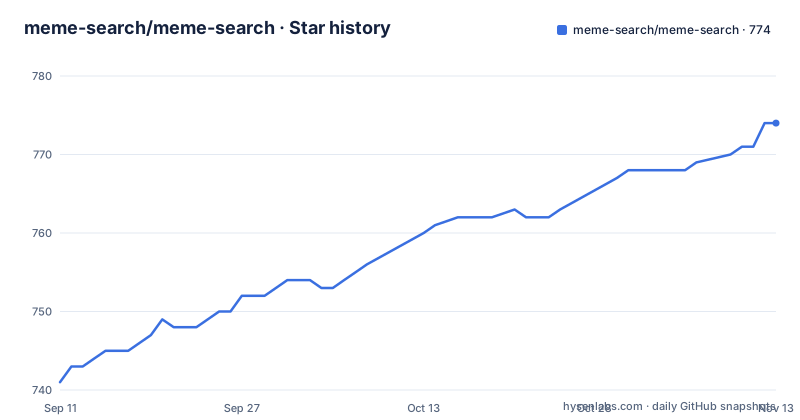
- meme-search/meme-search774 ★ · +33
| Repository | 2026-09-11 | 2026-11-13 |
|---|---|---|
| meme-search/meme-search | 741 | 774 |
33 Stars in the last 63 days, measured from the daily GitHub snapshot. Compare with other projects
Editorial analysis
The problem: filenames do not describe image content
A folder of saved memes is searchable only by whatever the file is called. `cat_typing.gif` is findable; the screenshot you saved as `IMG_4821.png` is not, and neither is the reaction image whose punchline is rendered inside the pixels. Meme Search attacks that gap by treating each image as a document. It runs a vision language model over the file to produce a text description, then indexes that description so the image can be retrieved by words that never appear in its filename. The README frames the audience directly: people who want their memes "easily retrievable for your meme warfare pleasures," with processing performed locally by default. That default matters. The description text is generated on your hardware, embeddings are computed on your hardware, and search runs on your hardware, so the image collection never leaves the machine unless you deliberately opt into a remote vision API.
Description first, embedding second: the indexing pipeline
The architecture implied by the README is a two-stage pipeline. Stage one is image-to-text: a vision language model reads the image and emits a description covering content and any text visible in the image. Stage two turns that description into a vector and stores it in a vector database, which is what the semantic-search topic tag refers to. Keyword search runs alongside semantic search, so a query can match both literal terms in a generated description and approximate meaning. The repository is a multi-service Compose stack rather than a single binary. Ruby is the primary language, with Python in the mix for the model side and Docker as the packaging layer. The practical consequence of the two-stage design is that description quality caps retrieval quality. If the model misreads an image, no amount of vector search recovers it, which is why the project ships manual description editing as a first-class feature rather than a fallback.
Six vision models, and the memory bill that comes with them
Model choice is the main resource dial. The README lists Florence-2-base as the default, described as roughly 250 million parameters, alongside Florence-2-large at about 700 million, SmolVLM-256 and SmolVLM-500 at 256 and 500 million, Moondream2 at 2 billion, and Moondream2-INT8, a quantized build intended for memory-constrained hardware. The README gives one concrete number: quantization reduces Moondream2 memory from about 5GB to about 1.5 to 2GB, described as minimal quality loss, and calls the INT8 variant ideal for CPU-only machines. That is the clearest signal about who each model is for. A 2-billion-parameter model on a machine without a capable GPU is the wrong default; the INT8 path or one of the SmolVLM variants is the documented alternative. Note also that the first local description generation downloads the selected model, so the initial run is slower than subsequent ones. That download is a one-time cost per model, not per image, but it is a cost you pay before you see whether the descriptions are good enough for your collection.
Running it: three commands and a loopback binding
The quick start is short. Clone the repository, change into it, and bring up the stack:
git clone https://github.com/meme-search/meme-search.git cd meme-search docker compose up
Then open http://localhost:3000 and drag, drop, or paste images on the upload page. The web UI binds to 127.0.0.1 by default. The README states the reason plainly: the UI does not include user authentication. Custom bind address and app port are configurable, and there is a documented path for building the app locally with Docker rather than pulling images. For automation, the project ships a token-authenticated Search API v1 documented in docs/search-api.md, a dependency-free local CLI in integrations/cli/README.md, and an experimental unpacked Chromium popup under integrations/browser-extension/README.md. The API is read-only and officially supported on loopback only. Bearer tokens protect the versioned integration endpoints; they do not protect the web UI or the settings pages.
The security boundary is the honest part of this project
Most self-hosted projects bury the exposure caveat. This README leads with it. The web UI has no authentication, the API tokens do not cover the UI or settings, official support is loopback-only for API v1 and the bundled clients, and direct public exposure is unsupported. Proxy or VPN operation is described as advanced and unsupported, with authentication, TLS, and network controls left entirely to the operator. Read that as a design decision rather than an oversight: the project is scoped to a single trusted machine, and the maintainers decline to pretend otherwise. The failure mode follows directly. The moment you put this behind a reverse proxy on a public hostname, you have an unauthenticated interface that can read your image library and change its settings, and you are outside the support envelope. There is no documented multi-user mode, no role model, and no per-collection access control. If you need shared access, this is the wrong tool, and the README effectively says so.
Where the documentation thins out
The README is strong on setup and boundaries and thin on operations. It does not state which vector database backs the index, how large the index grows relative to the image count, or what happens to existing embeddings when you switch vision models. That last gap is the one worth probing before you commit to a large collection. If descriptions are regenerated under a new model, are the old vectors replaced or duplicated? Rescan is a visible feature, with screenshots for rescan, rescan status, and rescan options, so re-indexing exists as a workflow, but the README does not document its semantics for model changes. The same applies to backup and migration: how to move an index between machines matters because the index is the expensive artifact. These are questions to answer from the repository's docs and issue tracker, not from the marketing page.
Against a hosted vision API and against plain folder search
Two alternatives frame the choice. The first is using a hosted vision API to caption images and a hosted embedding service to index them. That approach removes the model download, the memory ceiling, and the hardware question entirely, and for a few thousand images the per-call cost may be trivial. The difference in approach is where the data lives: with a hosted pipeline, every image or every description transits a third party. Meme Search inverts that. Its README notes you can optionally use an OpenAI-compatible vision API for description generation while keeping embeddings and search local, which is a middle path: outsource the captioning, keep the index on your disk. The second alternative is doing nothing beyond filenames and your operating system's file browser. That is genuinely adequate if your collection is small, well named, or rarely searched. Meme Search earns its keep when the collection is large enough that you cannot remember filenames and the content is text-heavy, which is exactly the case where a vision model reading the rendered text inside an image beats any filename convention.
Maintenance cost, licensing, and what to check first
The project is active, not archived, with a last push in September 2026 and three releases in the v2.3.x line during July and August 2026. That cadence suggests you should expect to pull updates, and each update carries the usual Compose risk of schema or service changes. The licence is Apache-2.0, which permits commercial and private use and modification and includes an explicit patent grant; it also requires that you preserve copyright and licence notices and state significant changes if you redistribute. That is a summary of the licence text, not legal advice, and if you plan to redistribute a modified version you should read the full Apache-2.0 terms yourself. The recurring costs are disk for models and the index, memory during generation, and the time to re-describe images when you change models. The one-time cost is the first model download. Before adopting, run the three-command quick start against a small test folder with the default Florence-2-base model, confirm the descriptions are accurate enough on your own images, and only then point it at the full collection.
Editorial conclusion
Adopt Meme Search if you have a personal image folder, a machine that can run a vision model locally, and no requirement to expose the UI beyond 127.0.0.1. Do not adopt it as a multi-user service or as anything reachable from the public internet: the README states the web UI has no user authentication, that API bearer tokens cover only the versioned integration endpoints, and that direct public exposure is unsupported. Before committing, verify that your hardware fits the model you intend to run (the README cites roughly 5GB for Moondream2 and 1.5 to 2GB for Moondream2-INT8 on CPU-only machines), confirm that the first-run model download completes on your connection, and read docs/search-api.md and integrations/cli/README.md to check that the loopback-only API surface matches how you plan to query the index.
Frequently asked questions
How do I run Meme Search locally?
Clone the repository, cd into meme-search and run docker compose up, then open http://localhost:3000 and drag, drop or paste images onto the upload page. Docker and Docker Compose are the recommended path. Local development instead needs Ruby 3.4.2 and Rails 8, and the first description generation downloads the selected model.
Does Meme Search need an OpenAI API key?
No. Description generation is local by default through IMAGE_DESCRIPTION_PROVIDER=local, and embeddings and search stay local as well. An OpenAI-compatible vision API is optional, configured with OPENAI_API_BASE_URL, OPENAI_API_KEY and OPENAI_VISION_MODEL, and images selected for description generation are then sent to that endpoint.
Can I expose Meme Search to my LAN or to the internet?
Official support is loopback only. The web UI has no user authentication, APP_BIND_ADDRESS and APP_PORT control the bind, and non-loopback binding is described as advanced and unsupported in the compose file and in .env.example. MEME_SEARCH_ALLOWED_HOSTS only accepts exact Host header values and does not authenticate anything.
What does the token-authenticated Search API v1 cover?
It is read-only, officially supported on loopback, and exists so community integrations get a stable boundary that does not expose your database. Its bearer tokens protect only the versioned integration endpoints, not the web UI and not settings.
Which image-to-text models does Meme Search support?
Six: Florence-2-base, which is the default, Florence-2-large, SmolVLM-256, SmolVLM-500, Moondream2 and Moondream2-INT8. Sizes run from about 200 million to 2 billion parameters, and the INT8 variant is quantised to cut memory from roughly 5GB to 1.5 to 2GB for CPU-only machines.
How does Meme Search handle animated GIFs?
They stay animated when displayed in the interface, but descriptions and search indexing use the first frame. Uploads accept JPG, PNG, WEBP and GIF, in bulk runs of up to 50 files, and are written to the direct-uploads directory for automatic scanning.
Official sources
Add this badge to your README
If you maintain this project, the badge below links readers to this analysis and shows its maintenance status from the daily GitHub snapshot. Paste the markdown into your README; add ?metric=license or ?metric=stars to the image URL for a different field.

[](https://hysenlabs.com/projects/meme-search-meme-search)Star history chart for your README
[](https://hysenlabs.com/projects/meme-search-meme-search)Was this useful?