One of filterlists' twelve list files has no extension, and the whole subscription mechanism depends on raw URLs
Collection of blocklists to fill in the gaps
At a glance
- What is it?
- filterlists is a set of twelve plain-text blocking lists that patch the gaps in a browser's default lists, written for one specific blocker. Its own guidelines argue against overblocking and for the minimum number of lists, one guideline cites a JPEG rather than a source, the import instructions differ across six browsers and one of them forbids the subscribe link the file relies on, and one file in the root is missing its extension.
- Who is it for?
- Use filterlists if your blocker already handles the standard advertising lists and you have found specific gaps it misses, because that is the stated purpose and the guidelines are explicit that adding more blocking makes the experience worse rather than better. Three things to know before you subscribe to anything here.
- Can I use it commercially?
- Not without permission. GitHub finds no licence file in the repository, and without a licence all rights are reserved by default: you may read the code but not reuse it. Check the README, or ask the authors, before using it.
- Is it still maintained?
- Yes. The repository last received commits 34 days ago.
- What is it written in?
- GitHub does not report a main language for this repository.
Answers come from the project's GitHub data, last synced on November 14, 2026, and from our analysis. They are not legal advice.
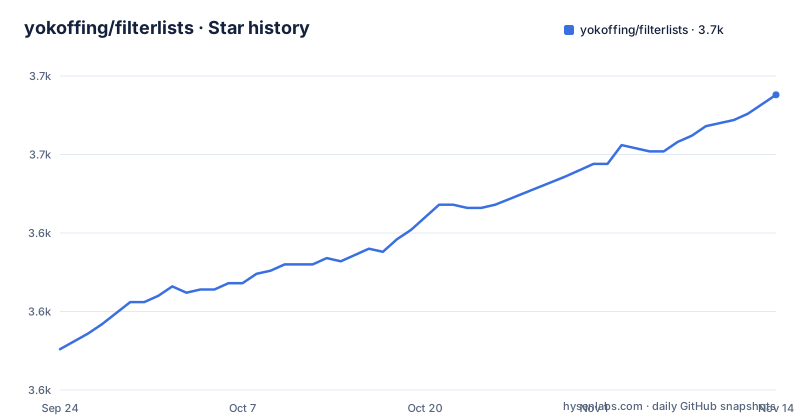
Star history
- yokoffing/filterlists3,669 ★ · +81
| Repository | 2026-09-24 | 2026-11-14 |
|---|---|---|
| yokoffing/filterlists | 3.6k | 3.7k |
81 Stars in the last 51 days, measured from the daily GitHub snapshot. Compare with other projects
Editorial analysis
The first guideline cites a JPEG rather than a source
The file opens with three guidelines, and each one links to something that justifies it.
The second cites a browser vendor's post on the mounting cost of stale blocking rules. The third cites a wiki page on which lists to select.
The first cites an image. The link goes to a resized picture on a blogging platform's content delivery network, with a path that says it was scaled to a width, and an image extension at the end.
So the first rule, which is the most important of the three and states that blocking more is not the same as blocking better, is evidenced by something a reader can only look at rather than read. The other two rules can be checked against their sources.
That asymmetry is worth noting because it says something about how the file was assembled. Two rules were written with their reasoning in front of them and one was written with a picture in mind, which is fine for a project of this kind and means a reader who wants to check the first claim has nowhere to go.
The three rules themselves are sound and short: avoid overblocking, prefer efficient resources over exhaustive ones, and use as few lists as you can get away with.
Six browsers, three import flows, and one forbids the subscribe link
Every list in this repository is published with a subscribe link, and the instructions for using it differ for every product.
For the blocker this project targets, it is three steps: click the list's subscribe link, click Subscribe at the top right of the tab that opens, close the tab and repeat.
For a second product it is four steps, because the dialog says Next, then asks you to toggle a box labelled Trusted, and only then offers Subscribe. The extra step is a trust confirmation, and skipping it means the list is not added.
For a third, the instructions say in capitals not to use the subscribe link. That browser ships with the default lists of the targeted blocker already built in, and it wants you to copy the raw file address from the forge and paste it into an internal settings page. Four steps, none of which involve the link the rest of the file is built around.
Then a collapsed section for everything else, which contains two more named products with their own dialogs and a generic fallback that goes back to copying the raw address.
Six instructions, four different button labels, one explicit prohibition. A user who subscribes to everything without reading this section will find some lists missing.
One list has no file extension and the mechanism depends on raw addresses
The repository root is thirteen entries, and twelve of them are list files.
Eleven of those end in a text extension. One does not: the combined annoyances file that avoids element hiding has no extension at all.
That matters more than it looks. Every subscribe link in the file points at a raw file address served by the forge, and the browsers on the other side of those links fetch them as plain text. The file without an extension is served with a different content type, or with none, depending on how the forge handles it.
So one of the twelve lists may fail to subscribe while looking identical to the other eleven in the rendered page. A user comparing two combined lists would see two working links and one that does nothing, with nothing in the page to explain why.
The naming convention is otherwise consistent and descriptive. The files are named for what they do, and several carry qualifiers: one list avoids element hiding deliberately, as does the anti-paywall list, which tells you those two are meant to be cosmetic-filter-free so they do not break layouts. The set also includes an adult-content annoyance list, a third-party font blocklist, a clean reading experience list, a YouTube-specific list and a personal list.
The gap is one missing dot.
A thousand rules, forty-seven, and the small one is optional
The file states rule counts, and the two numbers it states for the first two lists are far apart.
The first list is a thousand rules. The second is forty-seven, and it is described as optional if you are already taking the first.
That relationship is the whole point of the second entry. The forty-seven rules turn third-party audio and video players into placeholders that load only when clicked, and the first list includes them. So the small list exists for people who want click-to-load behaviour without the thousand rules that come with it, and the file says so in the entry itself.
The claims made for the small list are worth reading as claims: it speeds up page load, uses less bandwidth and browser resources, and reduces privacy exposure by contacting fewer domains while the page loads. Three benefits, one mechanism, and no measurement attached to any of them.
The first list is described differently, as a curated list for advanced hardening that also blocks requests the targeted blocker's defaults do not cover. The word curated does a lot of work there, and the entries that follow it link to the blocker's own author for the underlying technique.
The privacy list carries a warning about breaking third-party logins
One entry in the file has a warning callout attached to it, and the warning is specific.
It says the privacy list may prevent you from logging into sites that use Facebook, Google or other third-party accounts.
That is the collateral damage of the hardening rules the list is built on. The entry above the warning describes blocking requests of the kind that let a page talk to an identity provider's endpoints, and those are the same endpoints a login button needs.
So the project states plainly that its most aggressive list breaks social and single-sign-on logins, and it says so in the same visual treatment used for warnings elsewhere in the file rather than burying it.
That is more honesty than most list collections manage, and it has a practical consequence worth stating: this list is for people hardening a browser they control, not for a shared or work machine where a broken login has a support cost.
The other visible entry carries a marker that is used to flag recommended lists, and a link explaining the click-to-load technique from the blocker's own author rather than from the list maintainer.
The content map only resolves when the readme is viewed on the forge
There is a table of contents, and every link in it carries a query string.
The query asks the forge to render the readme in its web view rather than serve the raw file. Every anchor below it does the same.
So the map works when you open the readme on the forge's website and does not work when you clone the repository and read the file in an editor, because a local file has no notion of that view.
The map itself is good: eight sections with nested entries under the first three, covering how to add custom filters with four category pages, three worked example profiles, a mobile section with two sub-topics, advanced settings, the lite version of the targeted blocker, a FAQ, further reading and mentions.
Two of the anchors do not match their headings in any way a reader could predict. The entry labelled Additional reading points at an anchor named for reading, and the entry labelled Mentions points at an anchor named for mentions. Those two will resolve. But the mobile section's anchors and the example profiles' anchors are not visible in the portion of the file available here, so whether all eight resolve cannot be confirmed from this view, and a reader who finds one broken has no way to tell whether the section is missing or the anchor is wrong.
Users of another blocker are sent to a different repository
Inside the collapsed section for other blockers, the first entry is a redirect.
It says there is a branch specifically for the syntax of a different popular blocker, and links to another repository maintained by a different person for it.
So one browser gets its own fork of these lists, elsewhere, and the file's own subscribe links are for the primary target. A user who arrived from a search for that other blocker lands here first and is sent away in the second paragraph.
The entry immediately after is for a different product with a similar name, and it has its own two-step flow ending in a confirmation dialog.
Then a generic fallback: copy the raw address, paste it into your blocker, follow its own instructions. That works, and it is the only instruction in the file that is not tied to a specific product.
The scope statement at the top of the section is the honest frame for all of it: this repository is tailored to one blocker and the author cannot guarantee the filters work in others. Everything below that line is damage control rather than support, and the redirect to a separate repository for one of them is the most concrete example.
Editorial conclusion
Use filterlists if your blocker already handles the standard advertising lists and you have found specific gaps it misses, because that is the stated purpose and the guidelines are explicit that adding more blocking makes the experience worse rather than better. Three things to know before you subscribe to anything here. The first list is aggressive and the project says so, warning in capitals that it may prevent you from logging into sites using third-party accounts. The import flow is not portable, since the same subscribe link takes three different routes in different browsers and one browser is told explicitly not to use it at all. And the scope is narrow, because the file states it is tailored to one blocker and cannot guarantee the filters work elsewhere, which is why users of a different blocker are sent to a different repository for a syntax variant.
Frequently asked questions
How to add filter list to uBlock Origin?
Three steps for the blocker this repository targets: click a list's subscribe link, then click Subscribe at the top right of the tab that opens, close the tab and repeat for each list. The same links take four steps in a second product because its dialog asks you to press Next and then toggle a box labelled Trusted before subscribing. A third browser is told explicitly not to use the subscribe link, and to copy the raw file address into its internal settings page instead.
What is yokoffing/filterlists?
It is a collection of custom blocking lists intended to fill the gaps left by a browser's default lists. The README says the repository is tailored to one specific blocker and that the author cannot guarantee the filters will work in other ad blockers, and users of a different popular blocker are pointed to a separate repository with a syntax variant for it. The lists themselves are plain text files at the repository root.
What rules do the yokoffing/filterlists guidelines follow?
Three. Avoid overblocking, because diminishing returns mean always blocking more is not a better blocking experience. Aim for efficiency without sacrificing quality, using sane resources, evidenced by a browser vendor's post on the cost of stale rules. And implement the minimum number of useful lists, to avoid redundancy and bloat, evidenced by a wiki page on which lists to select. The first guideline's link resolves to an image rather than to readable text.
Will the Privacy Essentials list in yokoffing/filterlists break my logins?
Possibly, and the file says so in a warning callout: the list may prevent you from logging into sites that use Facebook, Google or other third-party accounts. The reason is in the entry above it, which describes blocking requests of the kind that a blocker's defaults do not cover, and those are the same endpoints a third-party login needs. The list is presented as curated for advanced hardening.
Does yokoffing/filterlists work in Adblock Plus?
Not directly from this repository. The README says there is a branch specifically for that blocker's syntax and links to a separate repository maintained by someone else for it. The file also gives import steps for two similarly named products, one ending in a confirmation dialog, and a generic fallback that asks you to copy the raw file address and follow your own blocker's instructions.
What is in the yokoffing/filterlists repository?
Twelve list files and the README. Eleven files end in a text extension and one combined annoyances file does not, even though every subscribe link in the README points at a raw file address that browsers fetch as plain text. The lists cover privacy hardening, annoyances including one for adult content, anti-paywall filters without element hiding, third-party font blocking, a clean reading experience, click-to-load, enhanced site protection, a personal set and a YouTube-specific set.
Official sources
Add this badge to your README
If you maintain this project, the badge below links readers to this analysis and shows its maintenance status from the daily GitHub snapshot. Paste the markdown into your README; add ?metric=license or ?metric=stars to the image URL for a different field.

[](https://hysenlabs.com/projects/yokoffing-filterlists)Star history chart for your README
[](https://hysenlabs.com/projects/yokoffing-filterlists)Was this useful?