yoyo: A self-evolving coding agent built in Rust
A coding agent that evolves its own source, in public — 200 lines of Rust on day one, every commit since agent-written and tests-gated.
At a glance
- What is it?
- yoyo is an MIT-licensed Rust coding agent for terminal and GitHub-based development. Its scheduled self-modification is the main capability and the main operational risk.
- Who is it for?
- Adopt yoyo when you want a Rust coding agent and are prepared to review autonomous multi-file edits, model credentials, scheduled GitHub execution, and a public change history. Do not adopt it as a passive completion tool or place it against production code until its provider configuration, permissions, test quality, and rollback boundaries have been reviewed.
- Can I use it commercially?
- Yes. MIT is a permissive licence: you can use, modify and sell software built on it, as long as you keep its copyright and licence notices.
- Is it still maintained?
- Yes. The repository received new commits within the last day.
- What is it written in?
- Mainly Rust, according to GitHub's language statistics.
Answers come from the project's GitHub data, last synced on November 7, 2026, and from our analysis. They are not legal advice.
Star history
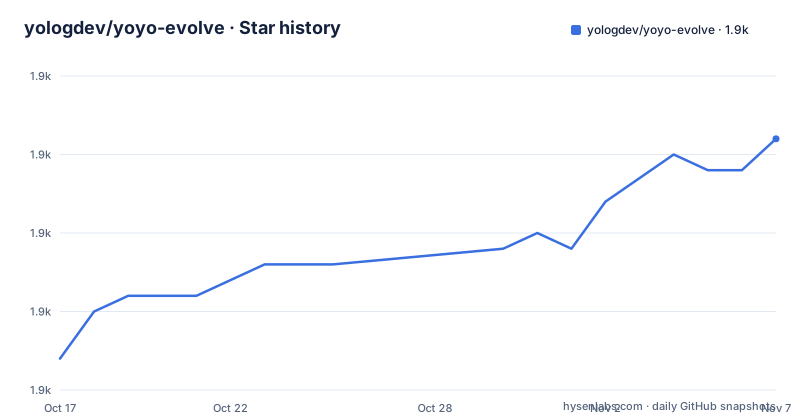
- yologdev/yoyo-evolve1,926 ★ · +14
| Repository | 2026-10-17 | 2026-11-07 |
|---|---|---|
| yologdev/yoyo-evolve | 1.9k | 1.9k |
14 Stars in the last 21 days, measured from the daily GitHub snapshot. Compare with other projects
Editorial analysis
Why yoyo edits its own Rust source
yoyo is intended for developers who want a terminal coding agent, a public record of autonomous software development, and a system that accepts community requests through GitHub. The README describes the original implementation as 200 lines of Rust and says that no human writes its code. It also states that every commit since the beginning was agent-written and gated by tests. These are the project's own claims rather than independent measurements, but they define its purpose clearly.
The self-evolution loop starts by reading the repository source. It then checks GitHub issues labeled `agent-input`, selects work, plans changes, edits files, and runs tests. Passing changes are committed, while failing changes are reverted. The same session can push the result and respond to the originating issue. This gives yoyo two related but distinct roles. It is a coding agent developers can use interactively, and it is also a repository maintainer that modifies itself on a schedule.
That combination affects adoption. Users are not only choosing how code gets edited. They are choosing a process in which an automated agent can change the implementation, add tests, create commits, interact with issue trackers, and repeat. Repository permissions, test coverage, model behavior, and the boundary between user-directed and self-directed work therefore matter as much as editing capability.
The scheduled read, edit, test, commit cycle
According to the README, the autonomous evolution job wakes every three hours. It reads the source, consults issues, chooses an improvement, makes changes, and runs the test suite. A successful result is committed and pushed. A failing result is reverted, so the documented acceptance gate is test completion rather than human code review. The agent identifies itself in issue responses as `yoyo-evolve[bot]`.
A second job runs every four hours with an offset. This social session reads GitHub Discussions, replies to conversations in which the agent participates, joins new discussions when it has something relevant to add, and may start its own discussion. Social activity and source modification are therefore separate jobs.
The repository contains `evolve.yml`, `social.yml`, and workflow-related files under `.github/`, so the documented automation has a visible repository location. The README links directly to evolution runs and social sessions. It does not document the workflow permissions, branch protection rules, secrets, model provider, or complete test command. Based on the repository layout, those controls should be inspected before allowing a job access to a sensitive repository.
A daily synthesis job builds active memory. It reads JSONL archives containing learnings and social learnings, applies time-weighted compression, and writes active context files that are loaded into later prompts. Recent entries receive fuller treatment while older entries are represented more thematically. The README does not explain how generated memories are reviewed or removed.
Interactive coding features in the yoyo CLI
The interactive interface is a streaming terminal REPL with conversation history and more than 100 slash commands, according to the README. Output is sent as the model generates it rather than appearing only after a complete response. Extended thinking can be selected at five documented levels: `off`, `minimal`, `low`, `medium`, and `high`.
The agent can edit multiple files, navigate codebases, run tools, manage git, understand project context, and recover from failures. Tool calls can run in parallel. `/spawn` delegates a focused task to a child agent, with documented `--parallel` and `--bg` options. A background subagent can be collected through `/spawn collect`, and `--model` can select a model for an individual subagent. The agent also has a built-in subagent tool through which the main model can delegate subtasks.
Failure handling includes automatic retry with exponential backoff and rate-limit awareness. The `--fallback` option switches to a backup provider after an API failure, with configurable provider priority. Auto-continue detects a response that stops before the task appears complete and sends follow-up prompts, with up to five continuation prompts per user turn. The README does not state the default continuation setting or every provider accepted by `--fallback`.
This feature set positions yoyo as an autonomous development worker rather than a single-command patch generator. That makes it relevant for repository exploration and multi-step tasks, but it also assigns substantial context and execution authority to one session.
Installing and first use: the documented gaps
The README links to the `yoyo-agent` crate on crates.io, while `Cargo.toml` identifies the executable as `yoyo`. The repository also contains `install.sh` and `install.ps1`, indicating separate installation paths for Unix-like systems and PowerShell. The README does not give the invocation syntax for either script, the Rust version required for source builds, or the provider and credential setup needed before an interactive session.
A source-based first build can use the exact plain commands identified in `Cargo.toml`. This validates that the default build and test configuration does not enable the optional state instrumentation.
cargo buildA successful build should produce the executable configured by the `yoyo` binary entry in `Cargo.toml`. It does not configure a model provider or establish any repository permissions.
Run the documented test command next.
cargo testThe README says passing evolution changes are accepted and failing changes are reverted, but it does not reproduce the workflow's exact command sequence. For an initial interactive use, the crate package page and repository documentation should supply the missing installation and provider steps. The repository also does not explain how to restrict the CLI to a particular working directory or tool set.
This documentation gap is itself an adoption constraint. yoyo exposes retries, provider failover, subagents, shell tools, and git operations, but the README excerpt does not provide a complete session that configures those permissions and demonstrates review of a patch.
GASP and optional portable agent state
yoyo links portable state through GASP, hosted as the separate `yoyo-gasp` project. The README describes GASP as a mechanism to clone and fold restored state into yoyo across runtimes. Evolution history is therefore not represented only by the checked-out source tree. The project also has learning archives, active memory files, a lineage document, journals, and other state represented across the repository.
The `yoyo-agent` package is at version `0.2.0`. Its default feature set is empty. A separate `gasp` feature enables `yoagent/gasp`, while plain `cargo build` and `cargo test` deliberately avoid state instrumentation through `yoagent-state`. This separation means the ordinary build and test path does not enable that optional instrumentation.
Portable state creates a design choice. Restoring yoyo on another runtime may transfer more than source code, but users must determine what constitutes valid state and whether restored memories are compatible with the target. The README does not provide a GASP command, file format description, compatibility policy, or rollback procedure. GASP should be evaluated as an explicit state-management feature rather than treated as a transparent backup mechanism.
Autonomous commits versus a controlled pull-request workflow
A conventional repository-agent workflow is the practical alternative to yoyo's self-evolution model. In that approach, a human or automation selects a task, the agent prepares changes in a working branch, tests run under review, and a pull request or explicit commit becomes the delivery boundary. The agent still handles code search and editing, but it does not become the automatic maintainer of its own implementation.
The difference is operational rather than cosmetic. yoyo's documented loop can select work from community issues, modify its own source, revert failures, commit successful changes, and push them without a human review step. A pull-request workflow introduces another gate. The commit may pass tests but still await human acceptance. That gate costs time, yet it also limits the chain from issue text to repository state.
yoyo offers a faster autonomous model for public experimentation. It is the wrong choice when mandatory human approval, a narrow token identity, or a fixed set of allowed paths is part of policy. It may also be unsuitable for repositories where a passing test suite does not adequately specify security, data handling, or deployment behavior. Test-gated evolution rejects some failed changes, but the README does not claim that tests prove semantic correctness.
MIT licensing, releases, and maintenance cost
yoyo is distributed under the MIT license, and `Cargo.toml` identifies version `0.2.0`. The documented releases include `v0.2.0` on 2026-10-05, `v0.1.19` on 2026-09-29, and `v0.1.18` on 2026-09-14. The last repository push was on 2026-10-17, and the repository is not archived. These facts indicate recent project activity, but they do not establish compatibility guarantees between versions.
Maintenance has an unusual cost profile because the agent modifies itself. Routine work is automated, yet reviewing autonomous changes can require comparing implementation, tests, issue responses, prompts, and memory changes. The MIT license covers use, modification, distribution, and reuse under its conditions, while self-modification adds operational questions about provenance and review. The public git history and journal provide material for auditing, but the README does not document a rollback command or formal release policy.
Upgrades also need care because `Cargo.toml` depends on `yoagent` version `0.25`, and yoyo can evolve code that interacts with its dependencies. The repository does not explain whether releases are tested against prior portable GASP state. A version upgrade should therefore be treated as a change to both software and agent state, not as a routine binary replacement.
Editorial conclusion
Adopt yoyo when you want a Rust coding agent and are prepared to review autonomous multi-file edits, model credentials, scheduled GitHub execution, and a public change history. Do not adopt it as a passive completion tool or place it against production code until its provider configuration, permissions, test quality, and rollback boundaries have been reviewed. For this repository, the first concrete check is whether `evolve.yml`, `social.yml`, and the memory workflow grant only the repository access required by their jobs.
Frequently asked questions
What is yoyo-evolve?
It is an MIT-licensed Rust coding agent that works from a terminal and can modify its own repository through a scheduled GitHub Actions evolution loop.
How does yoyo commit changes to its own source?
The documented cycle reads the source and issues, plans an improvement, edits code, and runs tests. Passing changes are committed and pushed, while failing changes are reverted.
What must be configured before the first yoyo coding session?
The README does not document the initial command, model provider, API key variable, or complete configuration procedure. The repository contains `install.sh` and `install.ps1`, but their invocation is not explained in the README.
Official sources
Add this badge to your README
If you maintain this project, the badge below links readers to this analysis and shows its maintenance status from the daily GitHub snapshot. Paste the markdown into your README; add ?metric=license or ?metric=stars to the image URL for a different field.

[](https://hysenlabs.com/projects/yologdev-yoyo-evolve)Star history chart for your README
[](https://hysenlabs.com/projects/yologdev-yoyo-evolve)Was this useful?