camera-controls: you install three.js into it before you construct it
A camera control for three.js, similar to THREE.OrbitControls yet supports smooth transitions and more features.
At a glance
- What is it?
- This is a camera controller for three.js that sits where OrbitControls sits and adds transitions, boundaries, collision and configurable gestures. Its distribution shape is the interesting part. It is a peer dependency with a floor from 2021, its manifest version is a release placeholder, and the build emits a minified module the package exports never expose.
- Who is it for?
- Adopt camera-controls when you want camera moves with transitions rather than an immediate jump, since dolly, rotation and trucking are first-class operations with their own semantics and the gesture mapping is configurable rather than hard-coded. Do not adopt it expecting a drop-in swap for the built-in control, because the constructor is preceded by a mandatory install step whose absence produces undefined references at runtime rather than a type error.
- Can I use it commercially?
- Yes. MIT is a permissive licence: you can use, modify and sell software built on it, as long as you keep its copyright and licence notices.
- Is it still maintained?
- Yes. The repository last received commits 3 days ago.
- What is it written in?
- Mainly TypeScript, according to GitHub's language statistics.
Answers come from the project's GitHub data, last synced on October 23, 2026, and from our analysis. They are not legal advice.
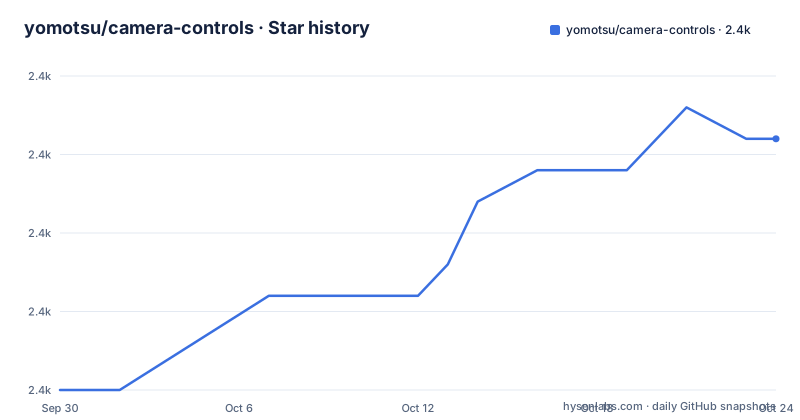
Star history
- yomotsu/camera-controls2,438 ★ · +8
| Repository | 2026-09-30 | 2026-10-23 |
|---|---|---|
| yomotsu/camera-controls | 2.4k | 2.4k |
8 Stars in the last 23 days, measured from the daily GitHub snapshot. Compare with other projects
Editorial analysis
The install step is mandatory and its absence is a runtime error
The usage section opens with a call that has to happen before anything else:
CameraControls.install( { THREE: THREE } );The README states this in bold and explains the failure mode: three.js must be installed before using the library, and not doing so leads to runtime errors described as undefined references to the engine. So the dependency is injected rather than imported, and the cost of forgetting is an exception at first use instead of a build error.
The reason for the pattern is bundle size, and the documentation does not leave it there. If you do not want the whole engine, you can install a subset, and the list is given explicitly:
const subsetOfTHREE = {
	Vector2   : Vector2,
	Vector3   : Vector3,
	Vector4   : Vector4,
	Quaternion: Quaternion,
	Matrix4   : Matrix4,
	Spherical : Spherical,
	Box3      : Box3,
	Sphere    : Sphere,
	Raycaster : Raycaster,
};
Nine classes, and they are the ones the controller touches for its coordinate maths, its bounds tests and its picking. That is a useful thing to have written down, because the alternative is discovering the missing one from an exception.
Three default gestures, in a table you can replace
The input model is a small table with three rows, and the header notes that the default user input is configurable.
Orbit rotation is a left mouse drag, or a one-finger touch move. Dolly is a middle mouse drag, or the mouse wheel, or a two-finger pinch. Truck, which is panning, is a right mouse drag, or a two-finger or three-finger touch move.
Nothing about that mapping is unusual. What is worth noting is that it is data rather than code, because every example in the repository builds on it: one is titled user input config, another covers mouse drag with modifier keys, another covers combined gestures, and another is titled event attach and detach for when you want to take over the element yourself.
The same three operations are also the vocabulary the library uses to move the camera, so a scripted transition and a user gesture are expressed with the same three terms. That is why the repository can demonstrate a timed rotation with easing, or a path animation, without a separate animation concept.
The one place the terminology is contested is dolly against zoom, and the documentation handles it by definition and by link. A zoom changes the lens focal length, which in this engine means changing the camera's field of view while the camera stays put. A dolly moves the camera physically. The example that shows the difference lives in a different repository, which is where to look if the words matter to you.
Spherical coordinates, and the polar angle depends on your up axis
Orbit rotation is described in one short section, and it uses spherical coordinates.
The detail that matters is what the two angles mean. The documentation says that if your camera is Y-up, the azimuthal angle is the angle for rotation about the vertical axis and the polar angle is the angle for vertical position. So the same two numbers describe a different pair of rotations depending on which axis you treat as up.
The repository ships an example for the other case, titled z-up camera, which is the usual setup for terrain and for pipelines that came from a graphics background. For anyone porting camera code between engines with different up conventions, that one example is the thing to read, because a silent difference in up axis is the classic source of a camera that rotates around the wrong plane.
The rest of the terms section is the dolly against zoom distinction, which is defined rather than demonstrated, with the demonstration delegated to another repository.
The manifest version is a placeholder and the last release is from November
The package manifest does not carry a version number a human chose:
  "name": "camera-controls",
  "version": "0.0.0-semantic-release",
That placeholder is the semantic-release convention, and the repository carries a release configuration file at the root to match it. So the published version comes from commit messages rather than from a file in the tree, which is why a checkout of the default branch reports no meaningful version at all.
The release list shows what that produced. Three tags are listed, and the newest is 3.1.2 from 2025-11-17, after 3.1.1 in October and 3.1.0 in July of that year. The last push to the default branch was 2026-10-01.
So there are roughly ten months of commits on the branch with no release on top, which for a library consumed by copy-paste means the version in your lockfile and the code on the branch have drifted. There is also a second signal worth noting: the default branch is named dev, not main, so anyone cloning without thinking gets the development line rather than the stable one.
A peer dependency floor from 2021, and a minified bundle nobody imports
The manifest's distribution fields are precise and slightly odd at the edges.
The package is dual-format. It points a main field at a CommonJS bundle, a module field at an ES module bundle and a types field at the declarations, and the exports map repeats all three with types listed first so a type-aware resolver takes it. Only the dist directory ships, in the files array.
The peer dependency is a single entry with a floor rather than a caret:
  "peerDependencies": {
    "three": ">=0.126.1"
  },
That floor is from a much older release than the one the project develops against, and the development dependencies pin a current engine version and its types side by side. So the declared compatibility window is very wide, and nothing in the manifest tests the old end of it.
The build script is where the oddity is. It compiles with a bundler, then runs a minifier over the ES module to produce a separate minified module file, keeping comments that begin with an exclamation mark, and finally downlevels the declaration files. The exports map lists the unminified module and the CommonJS bundle; the minified file it just produced is not an entry anyone can import by name, so the extra step only benefits a consumer who reaches into the package directory by hand.
The dev server script ends by killing a background job
The development scripts are short and one of them has a problem worth naming.
The dev task runs three tasks in parallel: the bundler in watch mode, a static server, and a command that opens the examples directory in a browser once the server is up. The server task reads:
"dev:serve": "serve -S -p 3000 ./ && kill $!",The kill targets the most recent background process of the shell, and it is chained after the server command with an and rather than run in parallel. Since the static server runs in the foreground and blocks, that kill only executes when the server exits, at which point it has nothing useful to kill and can, depending on the shell, report an error or kill an unrelated child.
The rest of the toolchain is ordinary for a library of this kind: a bundler with a TypeScript plugin and a replace plugin for build-time constants, a minifier, a declaration bundler plus a tool that downlevels declarations to an older TypeScript target, TypeDoc for the documentation site, a release bot with the conventional-commits changelog preset, husky with a staged-file configuration, and npm's run-all helper to fan the parallel tasks out.
Linting is scoped to the source directory, and the editor version is pinned twice at the root, once for each of the two conventions.
Thirty-three examples, two of them hosted somewhere else
The example list is the documentation, and it is worth reading as a feature matrix.
It starts with the basics and moves through fitting a camera to a rectangle, to a padding box and to a bounding sphere, an infinite dolly, a boundary, a focal offset, and setting the orbit point by clicking. Then it covers scripting: looking in a direction, several controls in one canvas, a z-up camera, an orthographic camera, taking over and releasing the element's events, configuring the input, modifier keys, combined gestures, keyboard events, rest and sleep events, and changing the cursor.
Then the harder features: collision, and a custom collision example, a first-person mode, a third-person example that uses a sibling project of the same author, pointer lock, automatic rotation, view offset translation, a camera shake effect, a timed rotation with easing, a path animation, complex transitions awaited in sequence, padding combined with view offset, a worker example using an offscreen canvas, and dragging from outside an iframe.
Three of those need something you do not have yet. The easing and path examples name an external animation library. The third-person example lives in another repository's documentation site. And the two React integration examples are not in this repository at all; they are sandboxes on another site, one described as the simplest and one pointing at the docs of a component library.
The examples directory also holds committed build output and two image assets alongside the demo pages.
Editorial conclusion
Adopt camera-controls when you want camera moves with transitions rather than an immediate jump, since dolly, rotation and trucking are first-class operations with their own semantics and the gesture mapping is configurable rather than hard-coded. Do not adopt it expecting a drop-in swap for the built-in control, because the constructor is preceded by a mandatory install step whose absence produces undefined references at runtime rather than a type error. Before you upgrade, note two things: the peer dependency accepts a three.js version from 2021 onward, which means you can be several major versions apart from what the project builds against, and the published version number comes from a release bot rather than a value in the manifest, so pin by tag and read the release notes.
Frequently asked questions
How do I set up camera-controls for three.js?
Call CameraControls.install with the three.js namespace before creating a new CameraControls instance, then construct it with a perspective or orthographic camera and optionally a DOM element for the draggable area. Skipping the install step produces runtime errors from undefined references to the engine.
Can camera-controls work without importing all of three.js?
Yes. The README shows installing a subset object containing Vector2, Vector3, Vector4, Quaternion, Matrix4, Spherical, Box3, Sphere and Raycaster, and passing that to the install call instead of the whole engine, which is the way to keep tree-shaking effective.
What mouse and touch gestures does camera-controls use?
A table of configurable defaults: left mouse drag or one-finger touch for orbit rotation, middle mouse drag, mouse wheel or two-finger pinch for dolly, and right mouse drag or two- or three-finger touch for trucking, which is panning. Examples exist for user input configuration, modifier keys and combined gestures.
Which three.js versions does camera-controls support?
The manifest declares a single peer dependency on three with a floor rather than a caret, and the development dependencies pin a much newer engine and its types, so the declared compatibility window is wide and its older end is not exercised by the project's own development setup.
How are camera-controls versions published?
From commits rather than from the manifest: the package version is a semantic-release placeholder and the repository carries a release configuration file. The newest listed tag is 3.1.2 from 2025-11-17, while the default branch is named dev and was pushed on 2026-10-01.
Official sources
Add this badge to your README
If you maintain this project, the badge below links readers to this analysis and shows its maintenance status from the daily GitHub snapshot. Paste the markdown into your README; add ?metric=license or ?metric=stars to the image URL for a different field.

[](https://hysenlabs.com/projects/yomotsu-camera-controls)Star history chart for your README
[](https://hysenlabs.com/projects/yomotsu-camera-controls)Was this useful?