godot-mcp-pro says 162 tools in its description and 187 in its readme
162 MCP tools for AI-powered Godot 4 development. Scene, animation, 3D, physics, particles, audio, shader, input simulation, runtime analysis, navigation, testing & more. $15 one-time.
At a glance
- What is it?
- youichi-uda/godot-mcp-pro publishes a free Godot editor addon and sells the Node server that does the work, so a clone contains nothing runnable. Its tool counts disagree between surfaces, its mode table does not add up, and its two entry points document different ports and different build commands.
- Who is it for?
- Buy it if you want an assistant driving a live Godot editor rather than editing scene files, and expect nothing to run until the paid zip is in place. Before you install, check your client's tool limit against the four modes rather than the headline number, since the mode you can actually use may be a third of the advertised surface.
- Can I use it commercially?
- Check first. The repository uses a licence we do not classify automatically, so read its LICENSE file before any commercial use.
- Is it still maintained?
- Yes. The repository last received commits 52 days ago.
- What is it written in?
- Mainly GDScript, according to GitHub's language statistics.
Answers come from the project's GitHub data, last synced on November 15, 2026, and from our analysis. They are not legal advice.
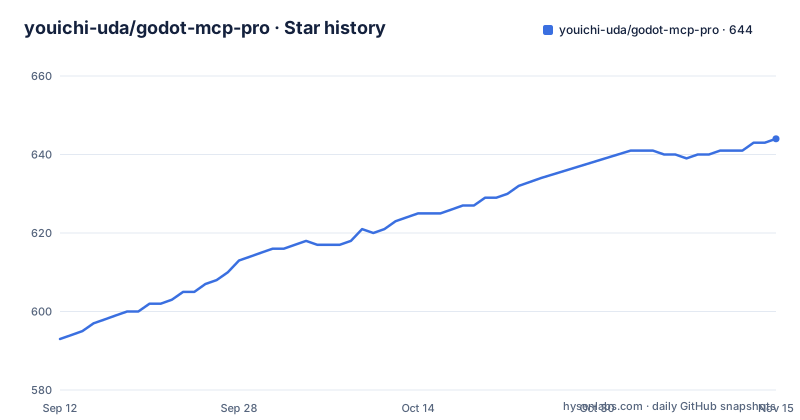
Star history
- youichi-uda/godot-mcp-pro644 ★ · +51
| Repository | 2026-09-12 | 2026-11-15 |
|---|---|---|
| youichi-uda/godot-mcp-pro | 593 | 644 |
51 Stars in the last 64 days, measured from the daily GitHub snapshot. Compare with other projects
Editorial analysis
The clone is not the product, and the readme says so first
The second thing the document says, before any instructions, is that this public repository contains only the free Godot addon. The Node server that connects an assistant to the editor is distributed as part of a paid package sold as a one-time purchase with lifetime updates, through two separate storefronts. The paid archive contains the addon, a server directory of pre-built JavaScript, an install document and instructions for AI clients. The document is explicit that a missing server directory after cloning is expected rather than a broken checkout. That candour is to the project's credit, and it also means the open repository cannot be used to evaluate the tool: what you can read is an editor plugin, and everything that connects it to a model sits behind a purchase.
The description says 162 tools and the readme says 187
The repository's own summary line advertises 162 tools. The document says 187, in the opening paragraph, again in the mode table, and again in the heading that introduces the tool inventory. So the number a visitor sees first and the number a reader sees after opening the repository are different, with no note reconciling them. The inventory itself is where the disagreement becomes unresolvable: the visible portion lists ten project tools, ten scene tools and seventeen node tools, thirty-seven in total, and then stops partway through the third table. Everything needed to reach 187 or 162 is in the part a reader cannot see, so neither figure can be checked against the list. The summary also pins the engine to Godot 4, a requirement the document body never repeats.
The 3D mode names eight omissions and still claims to reach 100
The mode table exists because clients cap how many tools they will load, and one row makes the arithmetic visible. The 3D mode is described as the core tools plus physics, animation-tree and navigation support, and it states that it drops eight named tools to stay under a hundred-tool cap: the two resource-identifier conversion helpers, screenshot comparison, output clearing, script closing, reloading of open scripts, the anchor preset setter, and clicking a button by its text. Eight omissions from 187 is 179, not 100. Around seventy more tools are therefore removed without being named, which makes the list a partial disclosure rather than a specification. The other two reduced modes are looser about it again: one is described by eight tool families and the smallest by seven, with no individual names in either case.
Two entry points, two port ranges, and two build instructions
The architecture runs from an assistant over a standard-input protocol to a Node server, then over a WebSocket on port 6505 to the editor plugin, and the client configuration sets that port through an environment variable. The command-line mode, which talks to the same plugin without any assistant in the loop, states a different requirement: a free port in the 6510 to 6514 range. Two entry points, two disjoint ranges, and no statement about which one the plugin listens on when both are in use. The build instructions diverge too. The install step says to change into the server directory and run an install followed by a build:
cd server
npm install
npm run build
The command-line section then lists the prerequisite as a setup script run through node with an install argument, which is a different route to the same artifact and is not reconciled with the first.
The tool count is the design constraint, and the client table is why
Four modes exist for one reason, and the compatibility table makes it explicit. Two clients are described as having a hard limit of a hundred tools, a third as having an approximate hundred, and one editor client as having no limit at all thanks to dynamic context discovery that groups tools on demand. Another entry notes that models degrade past roughly forty tools, which is why the smallest mode and the command-line path are both recommended for it, and that for locally hosted models the context window is the bottleneck rather than the tool count. So the advertised 187 is a ceiling for one class of client and unusable for another, and the mode you end up on is decided by your assistant rather than by your project. Two modes are recommended for a hundred-tool client, one of them sitting exactly on the cap.
The command line exists to dodge tool limits, and still needs the paid build
The alternative to the protocol path is presented as the way to avoid context overhead entirely. Its argument is progressive discovery: a top-level help call lists command groups, a group help call lists commands, and a command help call lists options, so a model learns what exists by asking rather than by loading every definition at once:
node /path/to/server/build/cli.js --help
node /path/to/server/build/cli.js project info
The document claims this works with any client that has terminal access, regardless of tool count limits, which is a fair claim about the mechanism. The catch is stated in the same breath as the feature: the command line still requires the server to be built first, so it is not a way to evaluate the tool from the repository either. It is a way to run the paid artifact without an assistant in the loop.
Two committed editor settings files and an llms.txt at the root
The top level is small and slightly unexpected. There is the addon directory, a documentation directory, an icon, a changelog, a licence file and a security file, and then two settings files whose names follow the convention for machine-local editor state that most repositories exclude from version control. Their presence, and the fact that one of them carries a permissive variant in its name, suggests the tool ships two permission profiles for an assistant rather than that they are leftovers. Alongside them is a plain-text file following the convention for content aimed at language models, which is a deliberate nod to being read by a machine. The licence file exists while no licence value appears in the repository metadata. On releases, two tags landed on the same morning in late September, the second published seconds after the last push.
Editorial conclusion
Buy it if you want an assistant driving a live Godot editor rather than editing scene files, and expect nothing to run until the paid zip is in place. Before you install, check your client's tool limit against the four modes rather than the headline number, since the mode you can actually use may be a third of the advertised surface. And if you are evaluating from the repository alone, remember that the component doing the work is not in it, so the free part tells you nothing about whether the rest functions.
Frequently asked questions
Can Claude Code be used with Godot MCP Pro?
Yes. The configuration step adds a server entry to the client's settings file with the node command, the path to the built entry point and the port variable, and the compatibility table recommends the full mode of 187 tools for it, noting that deferred tool loading keeps the context cost small.
how to install godot mcp pro
Copy the addon folder into your Godot project's addons directory and enable it under project settings. The server itself comes only from the paid package, after which you change into the server directory and run npm install followed by npm run build.
How many tools does Godot MCP Pro expose?
It depends on the mode: the opening paragraph and the tool inventory heading say 187, while the 3D mode is listed at 100, the Lite mode at 88 and the Minimal mode at 35. The repository description advertises 162, so the two surfaces do not agree on the headline number.
Which ports does godot-mcp-pro use?
The architecture and the client configuration put the WebSocket link between the Node server and the editor plugin on port 6505, set through an environment variable in the client settings. The command-line mode instead requires a free port in the 6510 to 6514 range.
Why does the 3D mode of Godot MCP Pro omit more tools than it lists?
It names eight tools it drops to stay under a hundred-tool cap, which accounts for eight of the roughly eighty-seven removed from the full set, since the full mode is listed at 187. The remaining omissions are not named, so the mode table is a partial description of what the reduced mode actually contains.
Official sources
Add this badge to your README
If you maintain this project, the badge below links readers to this analysis and shows its maintenance status from the daily GitHub snapshot. Paste the markdown into your README; add ?metric=license or ?metric=stars to the image URL for a different field.

[](https://hysenlabs.com/projects/youichi-uda-godot-mcp-pro)Star history chart for your README
[](https://hysenlabs.com/projects/youichi-uda-godot-mcp-pro)Was this useful?