mdq for Markdown: structured queries and install options
like jq but for Markdown: find specific elements in a md doc
At a glance
- What is it?
- mdq is a Rust command-line tool for selecting Markdown elements with filters modeled on Markdown syntax. It fits template validation, checklist checks, and scripts that need structured Markdown data rather than regular-expression-only matching.
- Who is it for?
- Engineers who repeatedly inspect or validate Markdown should consider mdq when its supported element and filter syntax covers their documents. Teams dealing with arbitrary prose, unsupported syntax, or layout-dependent transformations should verify those boundaries first, then confirm the exact behavior needed from README.md, the tutorial, or the user manual before adopting it.
- Can I use it commercially?
- Yes. Apache-2.0 is a permissive licence: you can use, modify and sell software built on it, as long as you keep its copyright and licence notices.
- Is it still maintained?
- Yes. The repository last received commits 61 days ago.
- What is it written in?
- Mainly Rust, according to GitHub's language statistics.
Answers come from the project's GitHub data, last synced on November 7, 2026, and from our analysis. They are not legal advice.
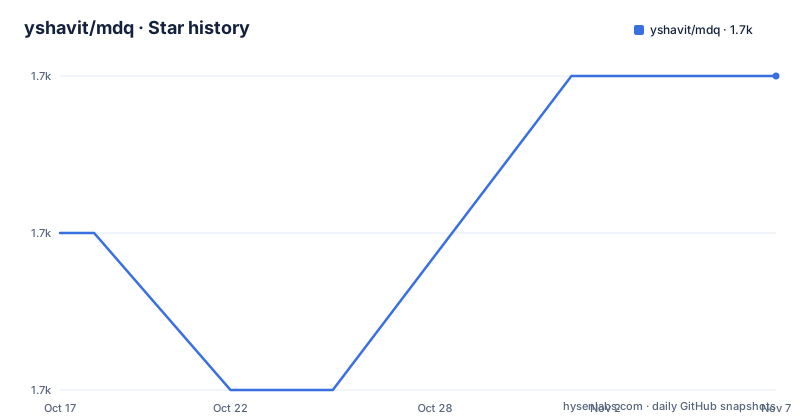
Star history
- yshavit/mdq1,749 ★ · +1
| Repository | 2026-10-17 | 2026-11-07 |
|---|---|---|
| yshavit/mdq | 1.7k | 1.7k |
1 Stars in the last 21 days, measured from the daily GitHub snapshot. Compare with other projects
Editorial analysis
Why mdq targets Markdown instead of JSON
mdq addresses a practical gap between plain-text searching and structured document processing. Markdown contains recognizable components such as headings, list items, links, images, block quotes, code blocks, HTML tags, tables, and front matter, but those components are usually flattened into lines of text. Regular expressions can find some strings, yet they do not express structural intent well. A heading that happens to contain a phrase should not necessarily be confused with a paragraph containing the same phrase.
The project positions mdq as a Markdown counterpart to jq. That comparison is useful because both tools select parts of a structured document instead of asking the author to write one-off extraction code. mdq does not try to turn Markdown into a general-purpose query language identical to jq. Its selectors resemble the Markdown constructs they target, which should make templates easier to inspect for people who already read and write Markdown.
The intended users are engineers and repository maintainers who work with Markdown templates, GitHub pull request descriptions, issue forms, checklists, and documentation. A concrete example is enforcing an organization rule that requires every reviewer to complete a checklist item. Another is extracting a referenced ticket link from a pull request description so another program can consume it as JSON. The README explicitly presents the first case as a replacement for cumbersome regexes.
This is a query and selection tool, not a general Markdown renderer or editor. Its purpose is narrower: locate elements, render selected elements, report whether matches exist, or support later processing with tools such as jq. That boundary matters when choosing it. A team seeking document conversion, semantic analysis, or arbitrary prose editing needs a different category of software.
How mdq maps selectors to Markdown structure
The selector vocabulary follows Markdown syntax. `# title text` selects a section, `- unordered list item text` selects an unordered list item, and `1. ordered list item text` targets ordered list items. Task syntax is more specific: `- [ ]` finds uncompleted tasks, `- [x]` finds completed tasks, and `- [?]` finds either state. The documented output format is Markdown again, so an extracted element can remain readable within a shell pipeline.
Other selectors identify links with `[display text](url)`, images with ``, block quotes with `> block quote text`, fenced code blocks by language and content, raw HTML by tag, plain paragraphs with `P: paragraph text`, tables with row syntax, and front matter with `+++[toml|yaml]`. Tables are the notable departure. The README states that table filters may select particular headers and rows, changing the shape of the returned element rather than simply returning the same original block.
Text inside a selector can be unquoted, quoted, anchored, or treated as a regular expression. Unquoted strings start with a letter and are case-insensitive. Quoted strings are case-sensitive. The `^` and `$` anchors constrain a string to its start or end. Slash-delimited expressions use regex matching, while `!s/regex/replace/` applies a replacement. The README links to the user manual for replacement caveats because those details are not fully reproduced in the overview.
Pipes compose filters. A first filter can narrow the document to sections containing `usage`, then a second filter can search those sections for unordered list items. This staged model mirrors how a user reads the source: first identify the relevant section, then inspect a narrower element inside it.
Based on `Cargo.toml`, mdq is implemented in Rust and depends on `markdown`, `pest`, `pest_derive`, `fancy-regex`, `clap`, `serde`, and `serde_json`. That dependency set fits a CLI with grammar-based parsing, regular expressions, JSON support, and a document model. The repository also contains `src/`, parser-related tests under `tests/`, and Markdown examples. The README does not fully specify internal module boundaries, so the exact parser call sequence cannot be confirmed.
Installing mdq and running the first section query
The README offers Homebrew, Docker, release binaries, and `cargo install`. For macOS or Linux with Homebrew already installed, this is the shortest documented local installation path:
brew install mdqAfter installation, create or obtain a Markdown file containing a section with `usage` in its heading. The documented pipe form reads the document through standard input and prints sections matching that text:
cat example.md | mdq '# usage'The output should be the selected Markdown section rather than the entire input document. If `example.md` is not the filename in use, replace it with the local document path. The `examples/` directory includes `examples/hello.md`, but the README does not show the complete contents of that file, so it cannot confirm that the example contains a `usage` section.
A second query demonstrates composition. It first finds sections containing `usage`, then searches those results for unordered list items:
cat example.md | mdq '# usage | -'The narrower result should contain list items belonging to matching sections. This is the first useful check because it exercises both Markdown input and the pipe-based filter chain without requiring an output-format option.
For environments where the container image is more convenient, the README documents this installation and immediate query sequence:
docker pull yshavit/mdq
echo 'My [example](https://github.com/yshavit/mdq) markdown' | docker run --rm -i yshavit/mdq '[]()'
The echo line supplies one Markdown link, and the `'[]()'` selector asks for links. Specific release tags can be used as `yshavit/mdq:<version>`. The README directs users to Docker Hub for the available tags rather than defining a fixed version scheme in this repository page.
Rust developers can install directly from the Git repository:
cargo install --git https://github.com/yshavit/mdqThis route requires `rustc >= 1.85.1`. The repository's `Cargo.toml` declares the same minimum under `rust-version`. Users who do not want to compile the Rust project can instead download an artifact from the latest GitHub release. The README also provides a macOS quarantine command for downloaded binaries, but that command should be used only if macOS reports that the binary cannot be checked for malicious software.
Checklist enforcement with exit status and JSON
mdq is more useful in automation when selection is combined with a stable exit status. The `-q` option follows grep's model: it writes no matching output to standard output and exits with status 0 when items are found, or a nonzero status otherwise. The README gives this issue-template check:
if echo "$ISSUE_TEXT" | mdq -q '- [x] I have searched for existing issues' ; then
  ...
The completed-task selector means an unchecked `- [ ]` item will not satisfy the condition. This is an exact structural and textual requirement. A shell action can follow inside the `then` block, but the README ends that action with an ellipsis and does not define it.
This pattern fits CI checks, form validation, and repository policy scripts. It is preferable to treating every Markdown line as an undifferentiated string because the selector explicitly requests a completed task. It also avoids coupling the check to the indentation or line formatting that a raw grep expression might accidentally depend on.
The README also states that mdq can extract a link from Markdown as JSON, allowing `jq` to perform subsequent processing. However, the shown command and JSON-output option are truncated in the README. Before building an extraction workflow around JSON, a user should confirm the exact invocation in the tutorial or user manual.
For a tool built around shell pipelines, the distinction between ordinary output and query status is central. `-q` is documented for validation. Visible selectors are documented for output. Assuming that a selector always emits JSON would be incorrect because the available examples show Markdown output and the JSON workflow is described without its complete command.
Parsing limits and cases where mdq is the wrong fit
The largest limitation is that usefulness depends on selecting the right structural category. A heading, list item, paragraph, HTML block, and table row are different objects even when their visible text is identical. A check written for `- [x]` will not recognize the same words in a paragraph. A section filter will not necessarily match text elsewhere in the file. This precision is a feature, but it also means that teams must know how their templates are represented in Markdown.
Regex support does not erase that model boundary. mdq can use `/regex/` within the documented selectors, but the README still organizes matching around recognized Markdown elements. It is therefore not equivalent to searching arbitrary bytes for every occurrence. Code inside a fenced block, inline code, link destinations, table cells, front matter, and raw HTML may require their respective selectors. The overview does not explain every parsing edge case, malformed Markdown behavior, or interaction between overlapping constructs.
mdq is also the wrong choice for semantic questions. It can locate sections and elements, but the README does not claim that it classifies meaning, evaluates natural-language requirements, or understands arbitrary document structure beyond its supported Markdown model. It does not replace a Markdown processor chosen for rendering, validation against an organization-wide schema, or a full-text search system with ranking and indexing.
There is a real alternative for teams that only need straightforward line matching: `grep`. A regular expression can search text quickly, and grep is a conventional Unix building block, but it does not use mdq's Markdown-shaped selectors or distinguish document elements in the same way. mdq earns its extra dependency and parsing layer when that structural distinction is required. If the real requirement is only, for example, finding a literal token in any line, grep is likely the smaller tool.
A second alternative is custom code using a Markdown parser and JSON serialization. That approach can expose a general document tree and support transformations outside mdq's filters, but it requires application logic, error handling, and maintenance. mdq packages a narrower command-line workflow for users who want filters and shell composition without writing that parser integration.
mdq releases, licensing, and upgrade work
The repository is not archived, and its last push was on 2026-09-08. Release history includes v0.10.0 on 2026-03-22, v0.9.0 on 2025-08-17, and v0.8.0 on 2025-08-04. The current `Cargo.toml` identifies the package as `0.10.1-dev`, which indicates development after the listed v0.10.0 release. Those facts support recent development activity, but they do not by themselves describe compatibility between releases.
The release pages can provide platform-specific binaries, while `cargo install --git` builds from the default branch and Docker users can select an explicit image tag. Choosing an explicit release version is the clearest approach for automation where dependency drift matters. The README states that a specific Docker version uses `yshavit/mdq:<version>`, and it links to GitHub releases for downloadable artifacts.
The repository includes `Cargo.lock`, `release_procedure.md`, GitHub workflows, and a multi-stage `Dockerfile`. The Dockerfile compiles in a Rust Alpine builder and copies the release executable into an Alpine runtime image. Based on that file, the container distribution is a small CLI image with the `mdq` binary set as its entry point. The release process itself is not documented in the README excerpt, so the exact versioning policy should be checked in `release_procedure.md`.
`Cargo.toml` declares `license = "MIT OR Apache-2.0"`, and the README says users may choose Apache 2.0 or MIT. The repository contains `LICENSE-MIT` and `LICENSE-APACHE`. Projects integrating a release binary should retain the applicable license text and notices required by their distribution method. This is a compliance check, not legal advice.
Upgrade cost appears lower for users who consume immutable binaries or versioned containers, but query behavior should be checked when upgrading. Users compiling from Git may receive development code from `main` rather than a tagged release. Pinning a release artifact or Docker tag avoids that branch-level movement.
Editorial conclusion
Engineers who repeatedly inspect or validate Markdown should consider mdq when its supported element and filter syntax covers their documents. Teams dealing with arbitrary prose, unsupported syntax, or layout-dependent transformations should verify those boundaries first, then confirm the exact behavior needed from README.md, the tutorial, or the user manual before adopting it.
Frequently asked questions
How do I install mdq on macOS or Linux?
The README documents `brew install mdq` for Mac and Linux systems with Homebrew. It also supports release binaries, Docker, and installation from Git with `cargo install --git https://github.com/yshavit/mdq`.
How do I find a Markdown section with mdq?
Pipe the Markdown document to mdq and use a section selector such as `'# usage'`. The documented command is `cat example.md | mdq '# usage'`.
Can mdq check for completed Markdown tasks?
Yes. `- [x]` selects completed tasks, while `- [ ]` selects uncompleted tasks. With `-q`, mdq exits 0 when matching items are found and exits nonzero when none are found.
Official sources
Add this badge to your README
If you maintain this project, the badge below links readers to this analysis and shows its maintenance status from the daily GitHub snapshot. Paste the markdown into your README; add ?metric=license or ?metric=stars to the image URL for a different field.

[](https://hysenlabs.com/projects/yshavit-mdq)Star history chart for your README
[](https://hysenlabs.com/projects/yshavit-mdq)Was this useful?