yudao-ui-admin-vue3: calendar versions, a 2023 dependency table and six committed env files
Yudao Admin, a management dashboard built with Vue3 and Element Plus, supporting dynamic RBAC permissions, data permissions, SaaS multi-tenancy, Flowable workflow, third-party login, payments, SMS, e-commerce, CRM, ERP, MES, IM, AI/LLM and IoT features.
At a glance
- What is it?
- yudao-ui-admin-vue3 is a Vue 3 and Element Plus admin front end from the 芋道 platform, shipping monthly under calendar version numbers and covering permissions, multi-tenancy, workflow and seventeen business systems. Its files say more than its features list: an eight gigabyte build heap, six checked-in environment files behind five build modes, and two ESLint configuration formats side by side.
- Who is it for?
- Use this as a starting point rather than a dependency, because it is a full application template with its own opinions about versioning, environment handling and workflow, and the lock file rather than the README table is what determines your actual dependency versions. Two things to decide early.
- Can I use it commercially?
- Yes. MIT is a permissive licence: you can use, modify and sell software built on it, as long as you keep its copyright and licence notices.
- Is it still maintained?
- Yes. The repository last received commits 2 days ago.
- What is it written in?
- Mainly Vue, according to GitHub's language statistics.
Answers come from the project's GitHub data, last synced on November 15, 2026, and from our analysis. They are not legal advice.
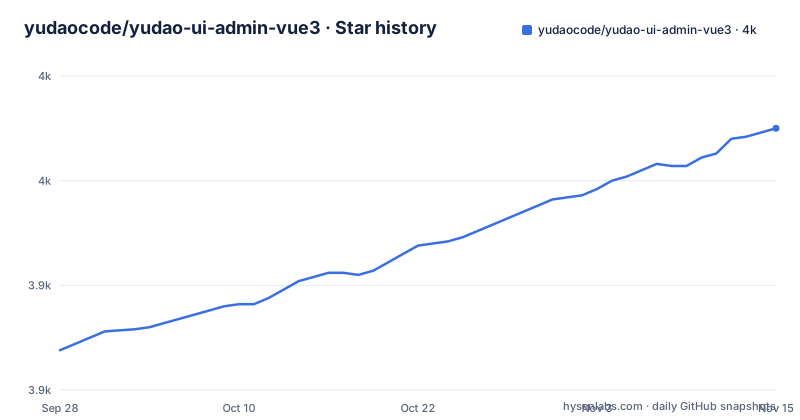
Star history
- yudaocode/yudao-ui-admin-vue33,975 ★ · +106
| Repository | 2026-09-28 | 2026-11-15 |
|---|---|---|
| yudaocode/yudao-ui-admin-vue3 | 3.9k | 4k |
106 Stars in the last 48 days, measured from the daily GitHub snapshot. Compare with other projects
Editorial analysis
Calendar versions and a package that still says snapshot
The release numbering is a date, not a version. The three newest tags are v2026.06, v2026.07 and v2026.08, published on the last day of June, the last day of July and the middle of September, so the number is the year and month of the train rather than an ordering of APIs. Each release title is a full sentence describing what shipped: v2026.06 added instant messaging and formally released Spring Boot 4.X support in both monolithic and microservice forms, v2026.07 finished mobile adaptation across all modules and enhanced workflow and CRM statistics, and v2026.08 added the HRM and FMS systems plus independent mobile client operation. Against that, the manifest version is `2026.08-snapshot`, so the package on npm is named after a month and a snapshot rather than after a release, and the last commit to the branch is 2026-09-26, later than any of the three tags.
The dependency table has not moved while the releases ship monthly
The tech stack table gives exact versions for eleven libraries, and every one of them is from the period when the table was written: Vue 3.3.8, Vite 4.5.0, Element Plus 2.4.2, TypeScript 5.2.2, pinia 2.1.7 described as a replacement for vuex5, vueuse 10.6.1, vue-i18n 9.6.5, vue-router 4.2.5, unocss 0.57.4, iconify 3.1.1 and wangeditor 5.1.23. Those are 2023-era numbers in a project whose release train has produced three monthly tags in 2026. Two things follow. First, nobody should treat that table as an install recommendation; the lock file is the source of truth for what a build actually resolves. Second, it shows which part of the documentation gets maintained and which does not: the feature tables, the release descriptions and the workflow coverage are all current, while the stack table is a snapshot from whenever the README was last reorganised. The prose introduction is also stale in the same way, describing Vue3 and Vite4 as the most recent technology at the time.
Six environment files, five build modes and an eight gigabyte heap
The scripts are unusually explicit about memory. Every type check and every build runs node with `--max_old_space_size=8192`, so the project's own configuration assumes an eight gigabyte heap is needed to compile it. There are five build modes, `local`, `dev`, `test`, `stage` and `prod`, each passing a different mode flag to the bundler, plus matching preview commands, and a `dev` script that defaults to the local mode. The repository carries six environment files to feed those modes, `.env`, `.env.dev`, `.env.local`, `.env.prod`, `.env.stage` and `.env.test`, all checked in rather than ignored. That combination is worth knowing about: if a deployment target differs only by a mode flag, the values for every target are in version control, so what separates a staging build from a production build is a set of committed files rather than injected secrets.
Two ESLint configuration formats sit side by side
The root holds both `.eslintrc-auto-import.json` and `eslint.config.mjs`, which are the old and new ESLint configuration formats respectively, so a migration is either in progress or abandoned. Around them are three more tool configs: `stylelint.config.js` with a `.stylelintignore`, `prettier.config.js` with a `.prettierignore`, and `lint-staged.config.mjs` for the pre-commit subset. `uno.config.ts` configures the atomic CSS layer and `web-types.json` ships component metadata for editor tooling. The lint scripts themselves are split into a checking path and a fixing path, `lint` runs the three checks in sequence while `lint:eslint` and `lint:format` apply fixes, and both keep their caches inside `node_modules/.cache` so a developer switching branches does not carry stale lint state. pnpm is mandatory rather than optional, and its lock file is committed, which is the consistent choice for a repository with six environment files and eight build modes.
Eighteen workflow rows, all ticked, and one strong opinion
The workflow section is the most assertive part of the project. It is built on Flowable and is stated to support domestic Chinese databases, and it ships two designers rather than one: a simple one modelled on DingTalk and Feishu for light configuration, and a full BPMN one for complex orchestration. The stated position is that a workflow engine must ship both, with the doubled exclamation marks left in the text. Then the feature table, where every row is marked complete: countersign where several people must all agree, or-sign where any one suffices, sequential approval, carbon copy with per-process de-duplication, rejection back to the initiator or to any node, transfer, delegation, adding approvers forwards or backwards, removing approvers, withdrawal by the initiator, termination by an administrator at any node, per-node form permissions, timeout approval that auto-passes or auto-rejects, scheduled reminders over SMS and email, parent and child flows in synchronous and asynchronous form, and the four branch types including routing with a default. Eighteen rows, no gaps, which is unusual for a project document.
Menus are cached locally and error codes change without a restart
Two of the system functions are described in a way that tells you about the implementation rather than the feature list. Menu management covers system menus, operation permissions and button permission identifiers, and notes that a local cache is provided for performance, which is the standard answer to a permission check on every route change. Error code management is the more interesting one: it collects every error code in the system and allows the error message to be modified online without restarting the service. That means the human-readable text for a failure is data rather than code, so a support team can reword an error without a deployment, and it also means the text a user sees is whatever the database currently holds. Between them they describe a system where the permission model and the user-facing copy are both editable at runtime.
The no commercial version declaration is the first line
The file opens with a statement in bold that there will be no commercial version now or in the future and that all code is open source, followed by two lines about enjoying writing code and enjoying open source for its own sake, and a note that the author works at a large Shanghai company during the day and contributes to open source at night. The platform section repeats the commitment from the commercial side, describing it as free for individuals and enterprises alike. Set against that is the feature scope, which is broad for a front end: seventeen business systems listed as available on demand, including a mall, office automation, ERP, WMS, CRM, CMS, MES, HRM, FMS, project management, an AI platform, IoT and instant messaging, plus SMS and email integration with Chinese cloud providers and SSO applications supporting several OAuth2 grant types. The declaration is about monetisation, not about scope, and both things are on the same page.
A duplicated sentence in the built-in functions list
The built-in functions section opens with a line that appears twice in a row, and the sentence itself is malformed: it repeats the same word twice and then trails off before finishing its verb phrase. It is the kind of artefact that survives because the section underneath it is long and useful, so nobody rereads the paragraph above it. The list that follows is organised in three tiers, which is a more useful structure than the sentence introducing it. General modules that are required cover system functions and infrastructure. General modules that are optional cover workflow, payments, data reports and a member centre. Business systems on demand are the seventeen listed above. Each system function row also carries a marker: a rocket for the substantial ones such as tenants, tenant packages, SMS, email, in-site messages, operation logs, error codes, sensitive words, SSO applications and regions, and a star for the two that are called out as particularly complete, online user monitoring with manual forced sign-out and login logs including anomalies.
Editorial conclusion
Use this as a starting point rather than a dependency, because it is a full application template with its own opinions about versioning, environment handling and workflow, and the lock file rather than the README table is what determines your actual dependency versions. Two things to decide early. Read what the five build modes actually select from, because all six environment files are committed and the difference between staging and production is a committed file rather than an injected secret. And note that the tooling migration is unfinished, with both ESLint configuration formats in the root. The workflow engine is the part most worth stealing, since eighteen completed rows covering countersign, delegation, timeout approval and subflows is more than most commercial engines document. If you need a maintained dependency rather than a starting point, this is not that, and the author's own declaration about not shipping a commercial version is the reason.
Frequently asked questions
What is yudao-ui-admin-vue3?
A Vue 3 admin front end built on Element Plus, MIT licensed, part of the 芋道 platform family. It covers RBAC dynamic route permissions, data permissions scoped by organisation, SaaS multi-tenancy, a Flowable workflow engine and a long list of business modules including mall, OA, ERP, WMS, CRM, CMS, MES, HRM, FMS, project management, an AI platform, IoT and instant messaging.
What do I need to run yudao-ui-admin-vue3?
Node.js above 16.18.0 and pnpm above 8.6.0, with pnpm mandatory rather than optional. Three demo deployments are listed, covering Vue 3 with Element Plus, Vue 3 with vben 5.0 on ant-design-vue, and Vue 2 with Element UI. The quick start and video documentation live on doc.iocoder.cn, and the recommended editor is VS Code with a listed set of extensions.
Which workflow features does yudao-ui-admin-vue3 support?
It is Flowable based and ships two designers, a DingTalk and Feishu style simple one and a full BPMN one. The completed list covers countersign, or-sign, sequential approval, carbon copy, rejection to the initiator or any node, transfer, delegation, adding and removing approvers, withdrawal, administrator termination, per-node form permissions, timeout approval, scheduled reminders, synchronous and asynchronous parent and child flows, and conditional, parallel, inclusive and routing branches.
How are permissions handled in yudao-ui-admin-vue3?
Roles assign menu permissions and divide data scope by organisation; departments are a tree that backs those data permissions; tenants and tenant packages give each tenant its own menu, operation and button permissions for SaaS deployments; and menu management stores operation and button permission identifiers while caching them locally for performance. Error messages are separately editable online without restarting the service.
Does yudao-ui-admin-vue3 have a paid or commercial version?
Not according to its own README, which opens by declaring that there will be no commercial version now or in the future and that all code is open source, and describes the platform as free for both individuals and enterprises. The scope is broad regardless, with seventeen business systems listed as available on demand.
Official sources
Add this badge to your README
If you maintain this project, the badge below links readers to this analysis and shows its maintenance status from the daily GitHub snapshot. Paste the markdown into your README; add ?metric=license or ?metric=stars to the image URL for a different field.

[](https://hysenlabs.com/projects/yudaocode-yudao-ui-admin-vue3)Star history chart for your README
[](https://hysenlabs.com/projects/yudaocode-yudao-ui-admin-vue3)Was this useful?