Infinite Image Browsing: a local gallery that reads generation metadata
A full-featured image/video management app with AI-powered organization and semantic search. Supports metadata from SD-webui, ComfyUI, Fooocus, NovelAI, StableSwarmUI, and more. Available as standalone app, SD-webui extension, or library.
At a glance
- What is it?
- Infinite Image Browsing reads the metadata SD-webui, ComfyUI, Fooocus, NovelAI and StableSwarmUI leave inside generated files, then layers tag search, walk mode and AI clustering on top. It copes with a very large local library, but both AI features need an endpoint key and the shipped authentication key is empty.
- Who is it for?
- Adopt it when your folders already hold thousands of generated images with intact metadata and you keep losing track of them: the tag index, walk mode and multi-select file operations are the payoff, and MIT licensing means a fork costs nothing. Leave it alone when your library has no embedded metadata, since the parsers then have nothing to read, or when prompts must never leave the machine.
- Can I use it commercially?
- Yes. MIT is a permissive licence: you can use, modify and sell software built on it, as long as you keep its copyright and licence notices.
- Is it still maintained?
- Yes. The repository last received commits 1 day ago.
- What is it written in?
- Mainly Vue, according to GitHub's language statistics.
Answers come from the project's GitHub data, last synced on October 25, 2026, and from our analysis. They are not legal advice.
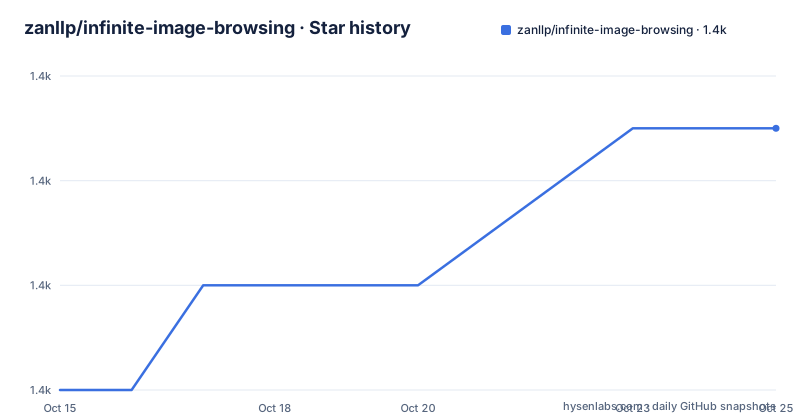
Star history
- zanllp/infinite-image-browsing1,363 ★ · +5
| Repository | 2026-10-15 | 2026-10-25 |
|---|---|---|
| zanllp/infinite-image-browsing | 1.4k | 1.4k |
5 Stars in the last 10 days, measured from the daily GitHub snapshot. Compare with other projects
Editorial analysis
Metadata parsers turn output folders into a tag index
Generative tools write images into folders and then forget them. Infinite Image Browsing, called IIB everywhere in its own docs, exists to make that pile searchable: it reads the metadata each generator embeds, converts the prompt, model and Lora fields into tags, and sorts those tags by frequency of use. Fuzzy matching covers fragments of a filename or fragments of the generation info, and an advanced query mode works along the lines of Google operators. You can register your own folders as search paths, filter by media type, search video tags, and sort randomly once alphabetical order stops meaning anything. Favourites have no separate table at all: you toggle a custom tag from the right-click menu, so a favourite is a tag like any other and can be searched or applied in bulk.
One row of the support table deserves a second look. ComfyUI is marked partially supported, the only entry not simply marked supported, even though the project description names it among the first metadata sources. Invoke.AI sits in the table as supported but never appears in the description. The last row, Pixiv, is also marked supported, and its Provided by column points at the separate pixiv_iib_plugin repository, so nothing about Pixiv ships inside this tree.
Extending coverage means writing a parser under scripts/iib/parsers and submitting it, which is also why the same author's SpindleStudio studio is called out on the front page: images it produces carry SD WebUI-compatible metadata and are indexed by IIB with nothing extra to configure.
Walk mode flattens nested folders into a single stream
Climbing a deep output tree one directory at a time is the dull part of reviewing a generation session. Walk mode removes the nesting: it loads the next folder automatically, in a way the README compares to os.walk, and flattens everything into one list so you never back out of a directory again. The README puts a number on it: walk mode is described as tested with over 27,000 files.
That figure counts files rather than timing, and it is the only measured claim in the entire feature list. The caching section, by contrast, promises display in a few milliseconds with no measurement, no hardware and no library versions behind the sentence. Anyone benchmarking the cache path is left to do the work themselves.
The neighbouring modes are built for the same rapid review. TikTok-style view scrolls images and videos vertically with an info panel, and delete events stay in sync across it, so a file removed in the grid disappears from the vertical feed as well. Full-screen preview takes arrow keys for previous and next, custom shortcut bindings, and nested JSON navigation through EXIF and generation metadata with the matching fields highlighted. Images go straight to other tabs or to third-party extensions such as ControlNet and openOutpaint, video files play from a remote server, and a two-up comparison view puts both the pixels and their generation parameters side by side.
Thumbnails default to 512 pixels, the cache to a temp directory
Every frame of that browsing rests on a thumbnail, and the defaults are given as numbers. Thumbnails render at 512 pixels out of the box, the resolution is adjustable on the global settings page, and grid image width can be set anywhere from 64px to 1024px. Two flags pre-generate the expensive parts, --generate_video_cover for video covers and --generate_image_cache for image caches, instead of leaving a first view to trigger the work.
Where that cache lands is the part worth checking before a first run. IIB_CACHE_DIR sets the directory for both caches, and the shipped default is the system temporary directory. The front page presents that key as an environment variable, while the file the repository actually ships is a dotenv file, .env.example, and python-dotenv sits in the dependency list, so the same value can arrive either from a real environment variable or from a copied .env.
The dependency list is short enough to read line by line:
fastapi
uvicorn
piexif
python-dotenv
Pillow
pillow-avif-plugin
imageio
av>=14,<15
lxml
filetype
requests>=2.0.0,<3.0.0
numpy>=1.10.0,<3.0.0
hnswlib>=0.0.0,<1.0.0
fastapi and uvicorn carry the server, Pillow with pillow-avif-plugin decode images, imageio with av covers video, and filetype, piexif and lxml handle sniffing and metadata. Nothing here is a GPU dependency, which is why the same build serves the SD-webui extension, a standalone Python run and the desktop build.
Semantic clustering and Smart Organize need an endpoint key
Two features leave your machine, and they share one set of stated requirements: OPENAI_BASE_URL, OPENAI_API_KEY, and the Python packages numpy and hnswlib. Semantic clustering embeds prompts and groups images by meaning instead of by filename, then names the new folders in whichever language you ask for. You review the proposal before anything moves and can skip or adjust it, large folders are processed in the background while you keep browsing, and the move itself is configurable: copy or move, a minimum cluster size, whether to recurse into subfolders. Topic search draws a tag relationship graph that exposes clusters of tags.
A close look at requirements.txt shows what that costs by default. numpy and hnswlib are installed by everyone who runs the stock requirements, even though the features that consume them stay dark until two keys are entered, so the vector search dependency is paid for whether or not semantic search is ever opened. hnswlib>=0.0.0,<1.0.0 sets its floor at zero, which excludes nothing at all beneath 1.0.0, and numpy>=1.10.0,<3.0.0 stretches across an unusually wide span, while av>=14,<15 is the one entry pinned to a single major band.
A second embedding backend exists and is commented out in the same file, so nothing downloads it unless you edit the file:
# Optional: TwelveLabs Marengo embedding backend (set EMBEDDING_MODEL=marengo3.0).
# Only needed if you opt in; the default OpenAI-compatible path does not require it.
# twelvelabs>=1.2.8
The default path is any OpenAI-compatible endpoint, which also means the endpoint is your choice rather than the project's.
Copying the dotenv file is the whole configuration path
The setup the project documents is a file copy. .env.example opens by telling you to copy it, rename it to .env, fill in the values your case needs, and never share the result because it can hold sensitive information. Three keys are worth setting before anything else runs:
IIB_SECRET_KEY=
IIB_SERVER_LANG=auto
IIB_DB_FILE_BACKUP_MAX=4
IIB_SERVER_LANG accepts zh, en or auto and governs the tab title plus most server-side error messages, while the front-end language is a separate choice on the extension's global settings page. IIB_DB_FILE_BACKUP_MAX caps how many database file backups are kept, at four by default. The interface ships in Simplified Chinese, Traditional Chinese, English and German, and a new language means editing i18n.ts and submitting the change.
The front page links an Installation / Running section rather than carrying the commands itself, so read that section for the exact invocation before installing anything. The repository root shows what sits behind the three delivery routes: app.py for the standalone server, install.py for setup, migrate.py and normalize_filenames.py for existing libraries, and pyinstaller_hooks/ behind the desktop build offered alongside the SD-webui extension. docs/ai-agents.md covers use with Claude Code, Cursor and OpenClaw, which lines up with the skills/ and .claude/ directories at the root, while zip_temp/ sits next to the packaging hooks as a leftover working directory. The last push was on 2026-08-22, and the v1.9.0 build carries the same date.
An empty secret key ships beside the promise of default safety
The privacy story has a crack in it, and the crack is visible in the config file itself. .env.example states that IIB is already sufficiently secure by default and that you do not need to take any additional actions, then ships IIB_SECRET_KEY= empty a few lines further down. Authentication is therefore off until you type a key, and once a key exists the extension prompts for it on open and rejects every request when validation fails.
File system access control is the other half of the answer. It is enabled by default when the service allows public access, and while it is on, access is limited to the pre-set folders, including those SD-webui provides, the folders you add to Quick Move, and anything listed in IIB_ACCESS_CONTROL_ALLOWED_PATHS. That is a narrow default for a service that browses arbitrary paths.
Read the two halves together and the AI features sit awkwardly. Smart Organize and Topic Search embed prompt text through an endpoint you choose with OPENAI_BASE_URL and authenticate with OPENAI_API_KEY, so on a shared machine the remedy for local file access is not the remedy for prompt text leaving the process. One more setting is easy to miss: the support table marks SD web UI (Stealth) as supported while the same row records it as disabled by default, so stealth-fork users must find and flip that switch before the extension shows anything.
Two parser routes and two embedding backends
Two decisions in this project have a built-in route and an external one, and picking the wrong one costs an afternoon. For Pixiv the built-in route does not exist: the table marks it supported and credits pixiv_iib_plugin, a separate repository you install yourself, while every other generator is handled by a parser under scripts/iib/parsers. For embeddings the default path is any OpenAI-compatible endpoint reached through OPENAI_BASE_URL, and the alternative is TwelveLabs Marengo, which stays commented out in requirements.txt until you set EMBEDDING_MODEL=marengo3.0 and uncomment twelvelabs>=1.2.8.
The fairest comparison here is with a plain file manager, because the file operations on offer are not unique to IIB. Hold Ctrl, Shift or Cmd to select several items, then delete, move, copy, pack download, add or remove tags, move or copy into another folder, or drag and drop, with a Keep Multi-Select button holding the selection while you work through it, and move and copy operations that continue past an error instead of stopping dead. A file manager does all of that too.
What it cannot do is read the prompt, model and Lora out of a binary file, rank the hits by tag frequency, and hand the result back as a comma-separated prompt for ControlNet. That parsing layer is the entire argument for running IIB rather than opening Finder.
Editorial conclusion
Adopt it when your folders already hold thousands of generated images with intact metadata and you keep losing track of them: the tag index, walk mode and multi-select file operations are the payoff, and MIT licensing means a fork costs nothing. Leave it alone when your library has no embedded metadata, since the parsers then have nothing to read, or when prompts must never leave the machine. First, open the Installation / Running section for the exact command, then confirm a parser for your generator exists under scripts/iib/parsers.
Frequently asked questions
How does Infinite Image Browsing know which tool made an image?
It reads the metadata each tool embeds in the file. The support table marks SD-webui, Fooocus, NovelAI, StableSwarmUI and Invoke.AI as supported, ComfyUI as partially supported, and Pixiv as supported through the separate pixiv_iib_plugin repository rather than anything built in.
Does Infinite Image Browsing work without an API key?
Browsing, tagging, walk mode and the file operations do. Smart Organize and Topic Search need OPENAI_BASE_URL, OPENAI_API_KEY, and the numpy and hnswlib packages, and those two packages are already in the stock requirements.txt.
How do I keep other people out of my image library?
Set IIB_SECRET_KEY in .env, after which the extension prompts for the key on open and rejects requests when validation fails. File system access control is enabled by default when the service allows public access, and it confines browsing to the pre-set folders plus IIB_ACCESS_CONTROL_ALLOWED_PATHS.
Can I run Infinite Image Browsing outside SD-webui?
Yes, three delivery routes are offered: an SD-webui extension, an independent Python run using app.py at the repository root, and a desktop app built with the pyinstaller_hooks directory.
What does walk mode do in Infinite Image Browsing?
It loads the next folder automatically, in a way the README compares to os.walk, and flattens nested folders into one list so you do not page in and out of directories. It is described as tested with over 27,000 files.
Official sources
Add this badge to your README
If you maintain this project, the badge below links readers to this analysis and shows its maintenance status from the daily GitHub snapshot. Paste the markdown into your README; add ?metric=license or ?metric=stars to the image URL for a different field.

[](https://hysenlabs.com/projects/zanllp-infinite-image-browsing)Star history chart for your README
[](https://hysenlabs.com/projects/zanllp-infinite-image-browsing)Was this useful?