MyBatis-Plus-Join for Typed Multi-Table Queries
支持连表查询的mybatis-plus,mybatis-plus风格的连表操作提供left join、right join等操作
At a glance
- What is it?
- MyBatis-Plus-Join is a Java extension for adding left join and other multi-table query operations to MyBatis-Plus. It suits developers who want lambda-based joins while retaining familiar mapper and wrapper conventions.
- Who is it for?
- Adopt MyBatis-Plus-Join when a Java application already uses MyBatis-Plus and needs readable multi-table queries without abandoning its mapper and wrapper conventions. Do not choose it for a simple single-table query or when the extra dependency, version alignment, and join-specific behavior are unwanted.
- Can I use it commercially?
- Yes. Apache-2.0 is a permissive licence: you can use, modify and sell software built on it, as long as you keep its copyright and licence notices.
- Is it still maintained?
- Yes. The repository last received commits 5 days ago.
- What is it written in?
- Mainly Java, according to GitHub's language statistics.
Answers come from the project's GitHub data, last synced on November 7, 2026, and from our analysis. They are not legal advice.
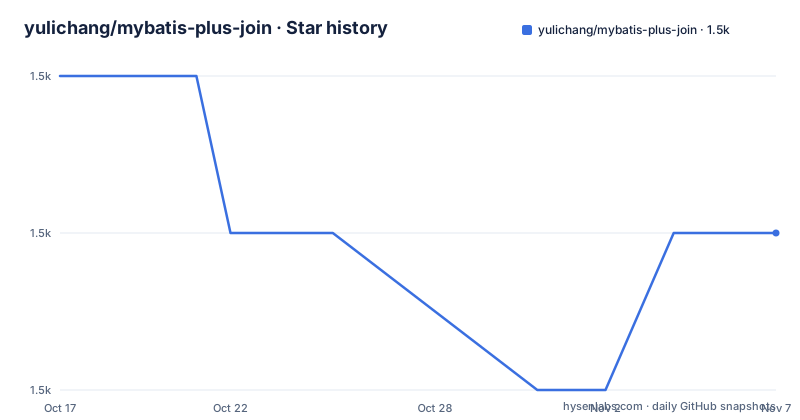
Star history
- yulichang/mybatis-plus-join1,523 ★ · -1
| Repository | 2026-10-17 | 2026-11-07 |
|---|---|---|
| yulichang/mybatis-plus-join | 1.5k | 1.5k |
-1 Stars in the last 21 days, measured from the daily GitHub snapshot. Compare with other projects
Editorial analysis
Why MyBatis-Plus-Join Extends MyBatis-Plus
MyBatis-Plus-Join addresses a specific gap in MyBatis-Plus applications: expressing queries across multiple tables through a familiar mapper and lambda-wrapper model. The repository describes itself as an extension for multi-table queries and explicitly lists operations such as left join and right join. Its intended users are Java developers who already depend on MyBatis-Plus and want join conditions, selected columns, filters, and result mapping to remain part of the application data-access layer.
The project does not replace the mapper inheritance model. Its documented usage requires a mapper to extend MPJBaseMapper, after which methods such as selectJoinList and selectJoinPage accept a join wrapper and a destination result type. This design is useful when a service already relies on MyBatis-Plus wrappers. It also keeps query construction close to existing mapper code instead of separating multi-table SQL into a separate query style.
The repository identifies Java as its primary language and includes modules for the boot starter, core, annotation, adapter, extension, tests, and plugin code. The documentation homepage is separate from the repository, so the README provides a concise introduction while the linked wiki is the fuller usage reference.
The Wrapper-to-SQL Path
The documented flow begins with a mapper that extends MPJBaseMapper. A query is assembled through JoinWrappers.lambda(UserDO.class), which returns an MPJLambdaWrapper for the primary entity. The wrapper selects all fields from UserDO, selects one field from AddressDO, declares a left join, and applies predicates to both sides.
The join declaration supplies the joined entity class and two method references. In the example, AddressDO::getUserId is the join key on the address table, while UserDO::getId is the key on the user table. The generated SQL shown by the README uses the aliases t and t1, selects the user columns and address.tel, and places both conditions in the WHERE clause. This makes the data flow inspectable: entity classes provide mapped column names and method references, the wrapper records selections and predicates, and the mapper returns the result into UserDTO.
The README also shows pagination through selectJoinPage. Its documentation notes that the MyBatis-Plus pagination plugin must be enabled first. Therefore, adding the dependency does not by itself establish pagination behavior in an application. The project depends on correct integration between the starter, MyBatis-Plus configuration, mapper registration, entity mappings, and the destination DTO.
Installing the Boot Starter with Maven or Gradle
The README gives two dependency options. The documented version is 1.5.9, while the version table states that MyBatis-Plus-Join 1.5.9 corresponds to MyBatis-Plus 3.5.17 or later. Maven users can add the boot starter to an existing dependency block.
<dependency>
    <groupId>com.github.yulichang</groupId>
    <artifactId>mybatis-plus-join-boot-starter</artifactId>
    <version>1.5.9</version>
</dependency>
Gradle users can use the same group, artifact, and version with the `implementation` configuration.
implementation 'com.github.yulichang:mybatis-plus-join-boot-starter:1.5.9'The README also describes cloning the code and running `mvn install` locally before introducing the dependency. That option is relevant when building against a local checkout. After installation, the first concrete step is to make the application mapper extend MPJBaseMapper. The repository does not document every Spring Boot setting, mapper scan rule, or XML integration detail, so those pieces must be checked against the linked usage documentation and the existing MyBatis-Plus setup.
A First Lambda Join and Pagination Call
The following example is the README's first-use path. It injects UserMapper, builds a left-join wrapper, restricts the user by ID, applies a telephone `like` condition to AddressDO, and maps the selected data into UserDTO. The mapper call returns a list. A second call uses the same wrapper for a page.
class test {
    @Resource
    private UserMapper userMapper;

    void testJoin() {
        MPJLambdaWrapper<UserDO> wrapper = JoinWrappers.lambda(UserDO.class)
                .selectAll(UserDO.class)
                .select(AddressDO::getTel)
                .leftJoin(AddressDO.class, AddressDO::getUserId, UserDO::getId)
                .eq(UserDO::getId, 1)
                .like(AddressDO::getTel, "1");

        List<UserDTO> list = userMapper.selectJoinList(UserDTO.class, wrapper);

        Page<UserDTO> listPage = userMapper.selectJoinPage(
                new Page<>(2, 10), UserDTO.class, wrapper);
    }
}
The important integration detail is that UserDTO must be able to receive the selected columns. The README shows `AddressDO::getTel` as the only selected address field, so an application should inspect its DTO mapping before expecting additional address properties. The generated SQL example shows a left join followed by predicates on the joined table. Applications with null-sensitive filtering should review whether a predicate in the WHERE clause changes the intended left-join behavior, because the README does not describe predicate placement rules for every join type.
Join Semantics and DTO Mapping Boundaries
The project supports more than the single left join shown in the README, since its description names left join and right join operations. However, the README does not enumerate every supported join type or document their complete SQL behavior. That limitation matters because join choice affects rows returned, unmatched records, and null values. The visible example is enough to understand the API shape, but not enough to settle edge cases involving outer joins, duplicate rows, or database-specific null semantics.
The wrapper also makes projection explicit. `selectAll(UserDO.class)` requests the primary entity's fields, while `select(AddressDO::getTel)` adds a specific joined field. This is more precise than selecting every table column and helps keep a destination DTO small. The cost is that the application owns the mapping contract between selected columns and DTO properties. The README does not state the exact annotation or naming convention used for every DTO field, so that mapping must be verified in the actual entities and result classes.
For queries involving several joined tables, the same pattern would require additional join declarations and selections, but the README does not provide a full multi-table example. The linked wiki is the appropriate place to confirm support for those combinations.
Dependency Alignment and Maintenance Cost
MyBatis-Plus-Join publishes version compatibility information, which is a central part of adoption. The README lists MyBatis-Plus-Join 1.5.9 with MyBatis-Plus 3.5.17 or later, and MyBatis-Plus-Join 1.5.8 with MyBatis-Plus 3.1.2 through 3.5.16. This means an upgrade is not only a matter of changing the join library version. The MyBatis-Plus version and the application mapper configuration need to be checked together.
The repository is not archived, and its last push was on 2026-10-15. The release information includes v1.5.7 and v1.5.6 on 2026-04-16, plus v1.5.5 on 2025-12-05. These dates provide maintenance history, but the README does not define a release policy, migration guide, or compatibility procedure beyond the version table. Upgrade cost therefore depends on the existing MyBatis-Plus version, the joins used by the application, and whether result mappings change.
The repository license is Apache-2.0. That identifies the project's declared licensing terms, but it is not a substitute for reviewing the license text, dependency licenses, or obligations applicable to a particular distribution.
Choosing MyBatis-Plus-Join Against Direct MyBatis-Plus
The real alternative is to keep using MyBatis-Plus without the join extension and write the multi-table SQL directly in the mapper or another query mechanism. The difference is not a claim that both approaches produce identical SQL. The extension adds join declarations and join-aware mapper methods to the existing MyBatis-Plus programming model. Direct MyBatis-Plus leaves the multi-table statement under the application's existing SQL conventions instead of adding a new wrapper API.
MyBatis-Plus-Join is more appropriate when a service already uses lambda wrappers and the team wants join syntax, column selection, filters, and result type mapping in one chain. Direct SQL may be clearer for a complex query whose join structure, database hints, or optimization plan is easier to review as SQL. The README does not document performance characteristics, generated-SQL customization, or a benchmark, so it cannot establish that either approach is faster.
The choice should therefore be based on query readability, existing mapper conventions, and the need for join-specific methods. The library is a poor fit when a single-table wrapper already covers the requirement or when introducing another module solely for one query is not worthwhile.
Editorial conclusion
Adopt MyBatis-Plus-Join when a Java application already uses MyBatis-Plus and needs readable multi-table queries without abandoning its mapper and wrapper conventions. Do not choose it for a simple single-table query or when the extra dependency, version alignment, and join-specific behavior are unwanted. Verify first that the selected library version matches the project's MyBatis-Plus version and that generated joins map cleanly to the intended DTO fields.
Frequently asked questions
How do I install MyBatis-Plus-Join in a Maven project?
Add the `com.github.yulichang:mybatis-plus-join-boot-starter` dependency with version `1.5.9`, as shown in the README. The documented compatibility table pairs that version with MyBatis-Plus 3.5.17 or later.
How do I write a left join with MyBatis-Plus-Join?
Create an MPJLambdaWrapper with JoinWrappers.lambda, select the primary and joined columns, then call `leftJoin` with the joined entity and the two key references. The mapper must extend MPJBaseMapper.
Does MyBatis-Plus-Join support pagination?
The README shows `selectJoinPage` with a Page object and states that the MyBatis-Plus pagination plugin must be enabled. The library provides the join query method, while pagination also depends on application configuration.
Official sources
Add this badge to your README
If you maintain this project, the badge below links readers to this analysis and shows its maintenance status from the daily GitHub snapshot. Paste the markdown into your README; add ?metric=license or ?metric=stars to the image URL for a different field.

[](https://hysenlabs.com/projects/yulichang-mybatis-plus-join)Star history chart for your README
[](https://hysenlabs.com/projects/yulichang-mybatis-plus-join)Was this useful?