CC GUI: one IntelliJ panel for the Claude Code and Codex CLIs
Jetbrains Claude Code and Codex GUI Plugin
At a glance
- What is it?
- CC GUI is a Java plugin for IntelliJ IDEA that puts Claude Code, OpenAI Codex and six beta CLIs behind one panel. The build is two npm installs plus Gradle, and the Docker build uses npm install because the lockfiles drift from package.json and break npm ci.
- Who is it for?
- CC GUI fits an IntelliJ IDEA user who wants Claude Code and Codex in a panel with MCP support, a skills slash command system and code diff comparison, and who is willing to configure it from the plugin page rather than from documentation. It does not fit anyone who needs a documented home for API keys, or an IDE other than JetBrains ones.
- Can I use it commercially?
- Yes. MIT is a permissive licence: you can use, modify and sell software built on it, as long as you keep its copyright and licence notices.
- Is it still maintained?
- Yes. The repository received new commits within the last day.
- What is it written in?
- Mainly Java, according to GitHub's language statistics.
Answers come from the project's GitHub data, last synced on November 14, 2026, and from our analysis. They are not legal advice.
Star history
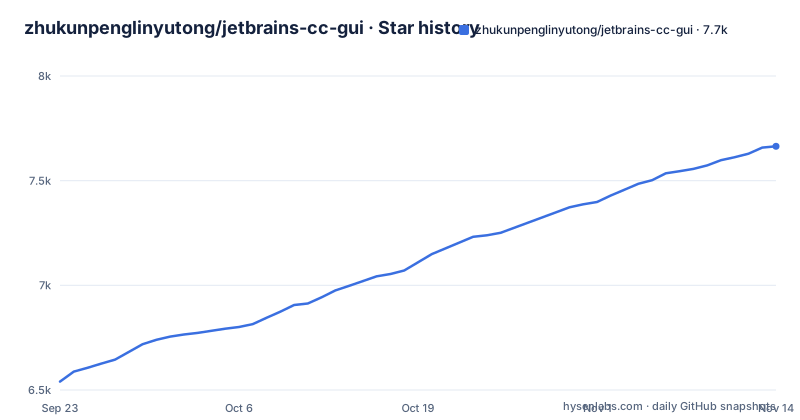
- zhukunpenglinyutong/jetbrains-cc-gui7,664 ★ · +1,124
| Repository | 2026-09-23 | 2026-11-14 |
|---|---|---|
| zhukunpenglinyutong/jetbrains-cc-gui | 6.5k | 7.7k |
1,124 Stars in the last 52 days, measured from the daily GitHub snapshot. Compare with other projects
Editorial analysis
Renamed to CC GUI because the Claude name carries trademark risk
The project started life as Claude Code GUI and now calls itself CC GUI (Claude, Codex and More). The stated reason is trademark risk around the Claude name, and the logo was changed in the same pass to drop Chinese-specific elements. The old name survives in the repository in three places that anyone auditing the project will notice: the badge image URLs at the bottom of README.md, the AtomGit G-Star certification link, and the contributors line, which thanks those who help make IDEA-Claude-Code-GUI better.
The rest of the identity is short. Primary language Java, MIT licence, default branch main, and a plugin listing on the JetBrains Marketplace under the identifier 29342. The homepage for the project is that marketplace page rather than a site of its own, which tells you where installation is supposed to happen.
Eight CLIs share one panel, and six of them are labelled Beta
The engine list is the actual product surface. Claude Code is listed first, supporting Opus 4.5 and other models, then OpenAI Codex. Everything after that carries a Beta label: Grok CLI from xAI, Kimi CLI from Moonshot AI, OpenCode, PI CLI, OMP CLI and DeepSeek Harness. Two of the stable entries are vendor CLIs and the rest are command-line agents, so the panel is a shell for other tools rather than a model of its own.
Session management includes provider management (cc-switch compatible), history records with search, session favourites, message export and usage statistics analysis. What is not here is a per-engine capability list, so which engines can read files or send images has to be checked in each tool's own documentation.
The webview and ai-bridge directories take two separate npm installs
Building from source starts with node, not Gradle. Two directories carry their own dependency trees and each one needs an install of its own:
cd webview
npm installcd ai-bridge
npm installThe Dockerfile shows why the order is fixed. It copies webview/package.json, webview/package-lock.json, ai-bridge/package.json and ai-bridge/package-lock.json first, then runs the installs, and only afterwards copies the rest of the sources, so the npm layer caches independently of code changes. That tells you the shape of the plugin: a Java backend in src/, a front end in webview/, and a node component in ai-bridge/ that Gradle later packages.
npm install instead of npm ci, and the Dockerfile says why
The build image inverts one convention on purpose. Its comment states that the upstream lockfiles drift from package.json, that npm ci aborts on any missing transitive entry, and that this makes the container build fail on a repository problem rather than a real one. So the image installs with npm and leaves the lockfile advisory:
cd webview && npm install --no-audit --no-fund
cd ai-bridge && npm install --no-audit --no-fund
The base is eclipse-temurin:17-jdk-jammy, with Node 20.x pulled in from the NodeSource setup script, and zip and unzip installed because the packageAiBridge Gradle task invokes zip. GRADLE_OPTS is preset to disable the Gradle daemon and the welcome message, which is what you want in a container.
The practical consequence for a developer is that a green container build does not mean your lockfile is honest. Anything pinned from those two lockfiles can move between builds.
One Gradle task ships a plugin zip of roughly 40MB
Once both node trees are in place, Gradle does the rest. To debug, run this inside IDEA:
./gradlew clean runIdeTo build the distributable:
./gradlew clean buildPluginThe package lands in build/distributions/, which the README puts at approximately 40MB, and buildPlugin transitively runs the webview build and the ai-bridge packaging task, which is why the node installs come first. The container route exists for a clean-room build. Build the image, then mount a directory so the zip appears on the host:
docker build -t cc-gui-build .
mkdir -p dist && docker run --rm -v "$(pwd)/dist:/out" cc-gui-build
The same run takes TARGET_IDE to change the target, with IC as the default and PC, PY and RD listed as the alternatives, so a PyCharm or Rider build is one environment variable away.
Mac scrolling lag traces to JCEF, and one VM option switches it off
There is exactly one troubleshooting entry in the whole README, and it is about macOS. If scrolling in the chat panel or in settings is laggy, especially on Retina displays, the documented fix is to disable GPU acceleration. You add one line to the VM options through Help, then Edit Custom VM Options:
-Dide.browser.jcef.gpu.disable=trueThen restart the IDE. The flag name gives away the mechanism, since it disables the GPU path of the JCEF embedded browser that renders the plugin's own panels, and it is a per-user IDE setting rather than something the plugin ships.
That is worth weighing as support surface. A panel-heavy plugin with a webview will have more platform-specific rough edges than the one paragraph here admits, and anyone evaluating it on Windows or Linux gets no guidance at all.
The README never explains API keys, MCP registration or skills-lock.json
The feature list names permission management and security controls, MCP server support to extend AI capabilities, and a skills slash command system with commands such as /init and /review. None of the three is explained in the README: there is no configuration walkthrough, no stated place to put a provider API key, and no procedure for registering an MCP server. If those are the features you came for, you are going to be reading the plugin page instead.
The tree compounds it. Alongside .agents/, docs/, skills-lock.json, sandbox-idea.properties, local.properties.example, SECURITY.md and checkstyle.xml, none of which gets a word of explanation in README.md, so skills-lock.json in particular looks like the place where skill definitions are pinned, and nothing says so. Maintenance is at least visible: releases v0.6.1 on 2026-10-19, v0.6.2 on 2026-10-21 and 0.6.3 on 2026-10-27, with a /security-review audit before each minor release and a claude-code-security audit every ten minor versions.
Editorial conclusion
CC GUI fits an IntelliJ IDEA user who wants Claude Code and Codex in a panel with MCP support, a skills slash command system and code diff comparison, and who is willing to configure it from the plugin page rather than from documentation. It does not fit anyone who needs a documented home for API keys, or an IDE other than JetBrains ones. Before installing, read SECURITY.md, check which engines have left beta, and expect the only written troubleshooting fix to be the macOS GPU flag, since the last tagged release was 0.6.3 on 2026-10-27.
Frequently asked questions
Can I use the Claude code GUI in IntelliJ?
Yes. CC GUI is an IntelliJ IDEA plugin published on the JetBrains Marketplace as CC GUI (Claude or Codex), plugin 29342, and it gives Claude Code and OpenAI Codex a panel inside the IDE. Installation goes through that marketplace page.
Which AI CLIs does CC GUI support?
Claude Code, supporting Opus 4.5 and other models, and OpenAI Codex are the stable entries. Grok CLI, Kimi CLI, OpenCode, PI CLI, OMP CLI and DeepSeek Harness are all marked Beta in the README.
How do I build CC GUI from source?
Run npm install in webview and again in ai-bridge, then run ./gradlew clean runIde in IDEA or ./gradlew clean buildPlugin to produce the plugin zip in build/distributions/, which the README puts at roughly 40MB. A Dockerfile at the repository root does the same in a container built from eclipse-temurin:17-jdk-jammy with Node 20.x.
Official sources
Add this badge to your README
If you maintain this project, the badge below links readers to this analysis and shows its maintenance status from the daily GitHub snapshot. Paste the markdown into your README; add ?metric=license or ?metric=stars to the image URL for a different field.

[](https://hysenlabs.com/projects/zhukunpenglinyutong-jetbrains-cc-gui)Star history chart for your README
[](https://hysenlabs.com/projects/zhukunpenglinyutong-jetbrains-cc-gui)Was this useful?