Inside ASCILINE: an ASCII video stream, five codec tags, three licence files
A high-performance ASCII video rendering engine featuring real-time WebSocket binary streaming and an isolated compiler for serverless static generation. Built for low-latency 30 FPS playback on HTML5 Canvas.
At a glance
- What is it?
- ASCILINE converts video into characters on an HTML5 canvas, streamed as raw binary frames over WebSocket from a Python backend. The parts worth reading closely are the per frame codec tags, the asymmetry between the Python and browser encoders, and three licence files that do not agree with each other.
- Who is it for?
- ASCILINE fits a specific problem: showing video on devices that cannot decode H.264 or VP9, where a character grid over WebSocket is genuinely cheaper than a codec stream. It does not fit a project that needs a stable, documented interface, because the package is at 0.1.5 and the releases are alpha, the browser encoder and the Python encoder do not emit the same set of codec tags, and asking for the adaptive codec on the static path forces pixel mode as a side effect.
- Can I use it commercially?
- Check first. The repository uses a licence we do not classify automatically, so read its LICENSE file before any commercial use.
- Is it still maintained?
- Yes. The repository last received commits 6 days ago.
- What is it written in?
- Mainly JavaScript, according to GitHub's language statistics.
Answers come from the project's GitHub data, last synced on November 25, 2026, and from our analysis. They are not legal advice.
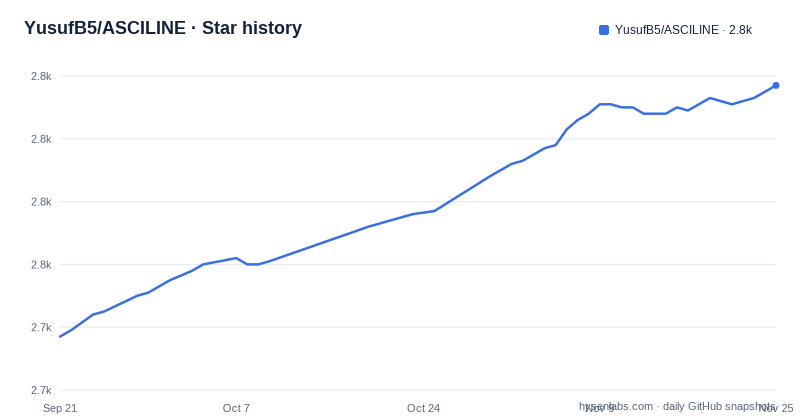
Star history
- YusufB5/ASCILINE2,817 ★ · +80
| Repository | 2026-09-21 | 2026-11-25 |
|---|---|---|
| YusufB5/ASCILINE | 2.7k | 2.8k |
80 Stars in the last 65 days, measured from the daily GitHub snapshot. Compare with other projects
Editorial analysis
Video becomes characters, then a raw binary stream
ASCILINE turns a video file into a grid of characters and streams that grid to a browser as binary data. The pipeline has three parts, and the division between them is plain. A Python backend built on FastAPI decodes video with OpenCV and maps pixels to ASCII with NumPy. A frontend in vanilla JavaScript receives frames over a WebSocket, keeps a jitter buffer, and renders to a canvas grid. Between the two sits a custom protocol: an INIT handshake negotiates resolution and FPS, and the binary frame stream follows it.
Frames arrive as raw Uint8Array and go straight to the canvas, with no intermediate container format to parse in the browser. That is the bandwidth argument in one sentence.
Timing is anchored on audio rather than on the renderer. The audio track is the absolute time reference for the master clock, which is how picture and sound are kept together. The rendering target is 24 to 30 FPS on HTML5 Canvas, tuned for stability, and a source running faster is decimated automatically rather than pushed through at its native rate. Pixel mode sits at the other end of that range: it replaces characters with coloured blocks, and the README describes the result as approaching 360p quality, while the ASCII modes run from black and white up to 16 million colours.
The bandwidth argument is a column count
The second design goal is an argument about bandwidth rather than about looks. Standard codecs, H.264 and VP9, need dedicated hardware decoders, and the README says those choke microcontrollers and weak devices. ASCILINE does the heavy lifting on the server and streams lightweight text frames instead, and the relationship is linear: fewer columns means proportionally less bandwidth. That is the knob the design turns, and it is why the stated targets are constrained networks and devices with no GPU at all, with smart appliances, retro terminals and basic microcontrollers named as examples.
The third goal is about what the browser is permitted to do. There is no video element, no codec decoding on the client, and no autoplay restriction to work around, because from the browser's side the stream is text on a canvas.
One part of the README is explicitly not a feature. A quoted block is labelled a roadmap idea, not implemented yet: since ASCII output is already a compact structured text representation, it could in principle serve as lightweight input for downstream text or LLM processing instead of feeding raw pixel streams to a vision model. The note adds that nothing in the current codebase does this. Worth knowing before you run into an ASCII to LLM claim about this project somewhere else and assume it ships.
Asking for the DCT tag silently switches you to pixel mode
Re-sending the whole character grid every frame is wasteful when most of the screen has not changed, so there is an opt in codec that picks an encoding per frame and labels it with a one byte header. Tag 0 is RAW, the framebuffer as it is, kept for incompressible frames. Tag 1 is ZLIB of the framebuffer, for general motion. Tag 2 is DELTA, sending only the cells that changed since the last frame, for static or low motion scenes. Tag 3 is RLE_FULL, a run length encoded framebuffer, for large flat colour regions. Tag 4 is DCT, the Discrete Cosine Transform.
The last entry is the one to read twice. DCT is marked as used exclusively by the static player, and it automatically enforces pixel output. An encoding choice therefore changes what you see: on the static path, asking for the adaptive codec moves the renderer to coloured blocks, the same mode that the --pixel flag selects on the command line. The codec is introduced as not changing the rendered output, and for tag 4 that does not hold.
Opting in is a query parameter. A client that asks for /ws?codec=adaptive gets the adaptive protocol; a client that omits it gets the original protocol byte for byte, so existing clients are unaffected. A keyframe is forced periodically, and that is what lets a client with dropped packets, or one that joins late, resync.
The Python and browser encoders cannot emit the same tags
The decoder and the two encoders do not have the same reach, and this is stated rather than implied. The shared JavaScript decoder, codec.js, understands all of the tags above, and it is described as the decoder used by both the live player and the test suite. What each encoder can produce is a separate question.
The Python encoder, codec.py, is used by the live server and by compiler.py, and it can emit RLE_FULL when that encoding wins the size comparison. The browser side encoder, static_player/studio/encoder.js, used by the client only Studio compiler, intentionally emits only RAW, ZLIB and DELTA. The stated reason is that it does not implement RLE run building, to keep the in browser encoder simple.
The consequence is that adaptive does not mean the same thing on both paths. The same source material can be tagged differently depending on which encoder runs, and the live path can choose tag 3 where a file produced in the browser cannot. Anything that parses the stream has to accept the superset, which is why the decoder knows all four.
The JavaScript side is also published in two forms. codec.js sits at the root of the repository next to the Python encoder, while the npm manifest ships codec.cjs in its files list, so what a consumer installs is not the file the architecture section talks about.
Three licence files, two declared licences, no recorded one
The licensing picture in this repository is genuinely unclear, and it only becomes visible when you compare files rather than read one.
The root carries three licence files: LICENSE, LICENSE-AGPL and LICENSE-MIT. The manifest for the JavaScript player declares MIT and its files list ships LICENSE-MIT. The Python project metadata declares a different licence, AGPL-3.0-or-later. The README links both LICENSE-AGPL and LICENSE-MIT in its badge row. The repository's own licence metadata, meanwhile, names no licence at all.
So there are two declared licences for two declared packages in one tree, plus a third licence file at the root that neither manifest names. Nothing visible states which parts of the engine each one covers, or whether the Python server and the browser player are meant to be read together under one set of terms.
That matters more here than licensing trivia usually does, because the deployment shape puts a server and a browser client next to each other. The compose file builds one image, maps port 8000 and mounts your videos into it, which means the FastAPI service and the web client are meant to ship as a pair. If you plan to run that combination yourself, settle the terms from the three licence texts before you build on it; the metadata will not settle it for you.
The same five dependencies are written down twice
Five dependencies appear twice with the same lower bounds. The Python project metadata requires fastapi 0.100.0 or newer, uvicorn 0.20.0 or newer, opencv-python 4.8.0 or newer, numpy 1.24.0 or newer and websockets 12.0 or newer. The requirements file lists those same five at those same floors, and opens with a comment preferring an editable install of the project over installing from that file.
Nothing in the tree keeps the two in step. There is no lock file at the root, so one file can drift from the other, and the two that matter most for what the renderer can do are opencv-python and numpy, both of them unbounded above.
The packaging is split by language rather than unified. The Python side declares one package, asciline, plus six loose modules: the video player, the codec, the compiler, the logo helper, the stream server and the downloader. It also carries an optional extra named ytdlp that pulls yt-dlp 2026.08.19 or newer, and the tree does hold a matching ytdl.py, so that extra has a purpose rather than being aspirational.
The JavaScript manifest is smaller. The package is asciline-player, type module, with two export paths: the root one and ./element for a web component. Its files list is src, codec.cjs, README.md and LICENSE-MIT, and its entire test surface is a single script, node test/test_sdk_import.js, which checks that the SDK imports rather than testing behaviour.
Docker keeps the container interactive, and skips one question
The compose file is short and explains itself in comments. It builds from the repository's own Dockerfile, maps port 8000 to the container's 8000, mounts a local videos directory to /app/videos so your own media appears inside the container, and sets PYTHONUNBUFFERED so output is not held back. It also enables stdin and a tty:
services:
  asciline:
    build: .
    ports:
      - "8000:8000"
    volumes:
      - ./videos:/app/videos
    environment:
      - PYTHONUNBUFFERED=1
    stdin_open: true
    tty: true
That last pair is commented as optional and present for /help commands. The same comment records a behaviour change: the high FPS prompt is skipped automatically in Docker. An interactive question that exists in a terminal session never appears inside the container, so anyone relying on that prompt to confirm how a source is decimated gets no confirmation from a container run.
The releases are short and pre 1.0. v0.1.3 came on 2026-09-04, v0.1.4 on 2026-09-23 and v0.1.5 on 2026-09-24, all of them alpha. Both manifests agree with the newest tag, since the JavaScript package and the Python project both read 0.1.5. The default branch took its last push on 2026-10-02, so at this stage code and releases are moving together.
The rest of the root is where a reader gets lost: the engine modules sit beside logo.py, playlist.json for the per video mode and volume settings, an asciline/ package directory next to the flat modules, directories for experiments and tests, and a CONTRIBUTING file. The engine is small enough to read, but it is split across two languages, and the codec alone exists as codec.py, codec.js and codec.cjs, with a fourth encoder inside static_player.
Editorial conclusion
ASCILINE fits a specific problem: showing video on devices that cannot decode H.264 or VP9, where a character grid over WebSocket is genuinely cheaper than a codec stream. It does not fit a project that needs a stable, documented interface, because the package is at 0.1.5 and the releases are alpha, the browser encoder and the Python encoder do not emit the same set of codec tags, and asking for the adaptive codec on the static path forces pixel mode as a side effect. Before you build on it, read LICENSE, LICENSE-AGPL and LICENSE-MIT and settle which terms apply to the Python server, the web component or both, since the repository records no licence of its own and the two manifests declare different ones. Then confirm the tag set you need from the path you plan to encode on, rather than from the table.
Frequently asked questions
What does ASCILINE actually do with a video file?
It maps the picture to characters and streams the frames to an HTML5 canvas. A Python backend built on FastAPI decodes with OpenCV and maps pixels with NumPy, a vanilla JavaScript frontend receives binary frames over a WebSocket and renders them to a canvas grid, and an INIT handshake negotiates resolution and FPS before the stream starts. Colour modes run from black and white up to 16 million colours, with a pixel mode that draws coloured blocks instead of characters.
Does ASCILINE need a GPU or a video codec in the browser?
No. The design goals state that standard codecs such as H.264 and VP9 need dedicated hardware decoders which choke microcontrollers and weak devices, so the work is done server side and lightweight text frames are streamed instead, with fewer columns meaning proportionally less bandwidth. To the browser it is text on a canvas, with no video element, no client side codec decoding and no autoplay restriction.
How is ASCILINE packaged and installed?
Two separate packages live in the repository. The Python side is a setuptools project requiring Python 3.9 or newer with fastapi, uvicorn, opencv-python, numpy and websockets, plus a ytdlp extra pulling yt-dlp 2026.08.19 or newer, and its requirements file suggests an editable install of the project. The JavaScript side is the npm package asciline-player, type module, exporting the player root and an element path for a web component. The compose file builds the project from its own Dockerfile and serves it on port 8000.
Official sources
Add this badge to your README
If you maintain this project, the badge below links readers to this analysis and shows its maintenance status from the daily GitHub snapshot. Paste the markdown into your README; add ?metric=license or ?metric=stars to the image URL for a different field.

[](https://hysenlabs.com/projects/yusufb5-asciline)Star history chart for your README
[](https://hysenlabs.com/projects/yusufb5-asciline)Was this useful?