Z88DK: a C and assembly toolchain for the Z80 family, in one tarball
The development kit for over a hundred z80 family machines - c compiler, assembler, linker, libraries.
At a glance
- What is it?
- Z88DK is a development kit for the 8080 and Z80 family of machines, with its own C compiler, assembler, linker, standard library and utilities, targeting well over a hundred machines including the ZX Spectrum, the Amstrad CPC and the Rabbit. It suits someone writing for eight bit hardware, and its reach across machine families is what distinguishes it.
- Who is it for?
- Z88DK fits a developer targeting a specific eight bit machine, whether that is a real Spectrum or a Rabbit board, because the kit ships a compiler, an assembler, a linker, a standard library and the machine specific startup code for over a hundred targets, and because the `zcc` front end hides the toolchain differences.
- Can I use it commercially?
- Check first. The repository uses a licence we do not classify automatically, so read its LICENSE file before any commercial use.
- Is it still maintained?
- Yes. The repository last received commits 1 day ago.
- What is it written in?
- Mainly Assembly, according to GitHub's language statistics.
Answers come from the project's GitHub data, last synced on November 6, 2026, and from our analysis. They are not legal advice.
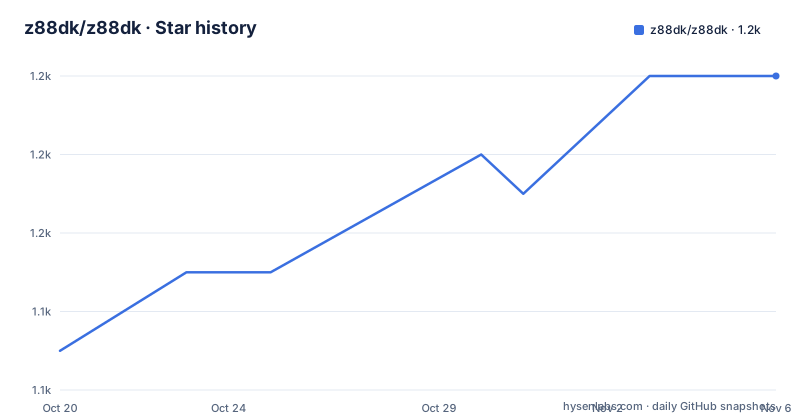
Star history
- z88dk/z88dk1,154 ★ · +7
| Repository | 2026-10-20 | 2026-11-06 |
|---|---|---|
| z88dk/z88dk | 1.1k | 1.2k |
7 Stars in the last 17 days, measured from the daily GitHub snapshot. Compare with other projects
Editorial analysis
What makes this kit different from a compiler
Z88DK is a collection of software development tools that targets the 8080 and z80 family of machines, and it allows development of programs in C, assembly language or any mixture of the two.
The documentation states plainly what makes it unique: ease of use, built-in support for many z80 machines, and an extensive set of assembly language library subroutines implementing the C standard and extensions.
That last point is the one that matters for the eight bit world. The standard library on a machine with 48KB of RAM is not the C standard library, it is whatever the machine's hardware can afford, and on these machines a lot of it is assembly. Having the C runtime, the floating point routines and the string functions written in assembly for each target is the part of the work that a general purpose compiler will never do, and it is where the performance difference on a Z80 comes from.
The reach is the other differentiator. The repository topics list the 8080, gbz80, z180, z80, rabbit2000, sccz80, sdcc and zsdcc, and the examples directory names the targets: ace, aquarius, banked, c128, cpm, cpc, dstar, eg2000, embedded, enterprise, g800, gb, graphics, micro8085, microbee, msx, nabu, and named address spaces among others. Over a hundred machines means a hundred sets of memory maps, startup code and library variants, and the toolchain has to know how to target each one.
The build system is old and the documentation is candid about that. The Makefile header calls it the impromptu compilation makefile for z88dk, and the revision line dates it to 2016. The build is driven by a set of conventional variables, `PREFIX`, `INSTALL`, `CFLAGS`, `CC` and `CROSS`, with `CROSS` documented as the prefix for executables such as z88dk-, and it wires ccache in automatically if it is on the path.
The version stamping is a nice touch for a tool that has been around that long. The version is taken from the build date, with the git revision and commit count recorded separately, so a nightly build identifies itself.
zcc is the front end, and it accepts a mixture of inputs
The front end of z88dk is called `zcc`, and the documentation is clear that a new user does not need to call the other tools directly.
It accepts C files with the `.c` extension, preprocessed C with `.i`, assembly with `.asm` or `.s`, optimised assembly with `.opt`, and object files with `.o`, mixed in any combination, and it can process an `@list` of files. Linking produces a binary for the selected target, and `-create-app` runs appmake for tapes, disks, ROMs, hex files and so on.
Accepting a mixture of C, preprocessed C, assembly and object files in one invocation is the feature that makes this kind of kit usable, because a real program for these machines is rarely pure C. A hardware routine, an interrupt handler and a floating point kernel written in assembly get linked with the C that calls them, and a build system that required separate commands for each would be unusable.
The `@list` form is the other convenience, since a project with thirty files becomes one argument.
Behind `zcc` sit the individual tools, and they are worth knowing because you will meet them in error messages and in recipes.
`z88dk-sccz80` is the native C compiler, from the Small-C lineage, near C90 with extensions, and the default for many classic and newlib recipes. `z88dk-80cc` is an alternate small-C front end, selected with `-compiler=80cc`, which shares classic-compatible library linkage with sccz80. `z88dk-zcc-multi` builds the assembly file for `-compiler=multi`, where zcc compiles each C file with both sccz80 and 80cc and then stitches the results, keeping one function body per name and one string pool, with a pool merged by C string where the bytes match. The specification is in `src/zcc-multi/zcc-compiler-multi.md`.
`z88dk-zsdcc` is a patched sdcc, and the patch integrates sdcc with the z88dk libraries and CRTs, selected with `-clib=sdcc_iy` or `-clib=sdcc_ix`.
`z88dk-z80asm` is the assembler, linker and librarian, and the documentation warns that it is not the same project as other tools named z80asm. `z88dk-z80nm` lists symbols in object and library files, `z88dk-appmake` turns linked binaries into machine images, `z88dk-ticks` is a command line CPU emulator for cycle counts, debugging and hotspot profiles, `z88dk-gdb` is a gdb client for gdbserver based debugging, and `z88dk-dis` is a multi-CPU disassembler covering 8080 and 8085, gbz80, the z80, z80n, z180 and ez80 modes, R800, the Rabbit family and kc160, and it can load z80asm map files.
Most of the tools carry the `z88dk-` prefix to avoid clashing with packages that ship tools of the same name, and the documentation often omits the prefix when referring to them.
The libraries are where the performance argument comes from
The claim that the assembly libraries give z88dk strong performance relative to many other Z80 C environments is not a marketing line, it is a consequence of how the kit is put together.
A C library for a machine like a Spectrum has to be written in assembly, because there is no other option. A Z80 has no floating point unit, so every float operation is a library call, and if that library is compiled from C by a small-C compiler the result is several times slower than a hand written routine. The same goes for the string and memory functions, and for the 16-bit multiply and divide that the hardware lacks.
So the kit ships several floating point models, and the benchmark set compares them. There is genmath, there is math48, there are mbf32 and mbf32_8085 for a custom format, IEEE math32 and math32_8085, and half precision math16 and math16_8085 where published. sccz80 covers z80 and 8085 where applicable, zsdcc is Z80-class only, and some float benchmarks also include 80cc.
That is four or more numeric models in the comparison table, and each one is a different answer to a question the hardware forces on you. IEEE 754 has a defined representation, so a program written against it is portable to any machine with the same model, and the half precision model is a different trade with a smaller range and a different rounding behaviour, and the custom mbf32 format is faster and not portable to anything else.
The tool that makes these measurable is `z88dk-ticks`, and the workflow it enables is what separates a real toolkit from a compiler distribution. You have a cycle-accurate emulator of the target CPU, you can run a program under it and count the cycles, and you can put markers in the source and get a per-region cost. On a machine where a wrong instruction choice changes the runtime by a factor of three, that is the difference between guessing and knowing.
The standard benchmark set is what every compiler for these machines is measured against. Dhrystone 2.1 is a synthetic integer benchmark from the 1980s era, Pi is mainly 32-bit integer performance, and Sieve of Eratosthenes is described as a small-compiler classic.
There is also a set of host-side compressors and decompressors, `z88dk-zx0` and `z88dk-zx7` plus the `z88dk-dzx0` and `z88dk-dzx7` variants, with matching decompressors existing in the target libraries. Those exist because the compressed formats on these machines were ZX Spectrum specific, so compressing on a modern host is a normal part of getting a finished tape or disk image.
The cycle counter is the profiling tool that matters here
On a processor running at a few megahertz, the only performance metric that matters is cycles, and `z88dk-ticks` is the tool that measures them.
`z88dk-ticks` is a command-line CPU emulator for cycle counts, debugging, and hotspot profiles. You match the CPU model with an option such as `-m8085`, and the help is bare invocation rather than `-h`, which is a small piece of toolchain folklore.
The benchmark workflow is described in the documentation and it is a nice model. Sources, recipes and cycle counts live under `support/benchmarks`, each program has a top-level `readme.txt` and toolchain notes for a directory such as `z88dk-classic/`, and the timing is typically classic `+test` plus `z88dk-ticks` between `TIMER_START` and `TIMER_STOP`.
The standard benchmark set is the one every 8 bit compiler is measured against. Dhrystone 2.1 is a synthetic integer benchmark from the 1980s era, Pi is mainly 32-bit integer performance, and Sieve of Eratosthenes is described as a small-compiler classic.
The floating point comparison is the more interesting part, because it shows how many different numeric models are in play. The set covers genmath, math48, mbf32 and mbf32_8085, IEEE math32 and math32_8085, and half precision math16 and math16_8085 where published, with sccz80 covering z80 and 8085 where applicable and zsdcc being Z80-class only. Some float benchmarks also include 80cc.
So there are at least four floating point models in the comparison, which tells you that floating point on these machines is a choice rather than a given, and that the choice changes the numbers substantially.
There is also a set of host-side compressors and decompressors, `z88dk-zx0` and `z88dk-zx7` plus the `z88dk-dzx0` and `z88dk-dzx7` variants, with matching decompressors in the target libraries. Those exist because the compressed formats on these machines were ZX Spectrum specific, and compressing on a modern host is a normal part of the workflow.
Five ways to install, and the submodule that bites
The installation section offers five routes, and the fifth one contains a trap worth reading.
The first is the most recent official release from the GitHub releases page, following the installation instructions in the wiki. The second is the nightly build, where every night complete binary packages are built for Windows and macOS and source packages are generated for everyone else. The documentation notes that using a nightly build means you can keep up with bugfixes and new features rather than waiting for a formal release, and it adds a practical note: use http for the nightly site, because HTTPS is not always available there. The third is the Snap package on Linux, the fourth is the Docker image.
The fifth is building from GitHub, and the warning is specific. The z88dk repository uses git submodules, and they are not downloaded by a plain `git clone` unless you ask for them, so the documentation recommends:
git clone --recursive https://github.com/z88dk/z88dk.gitand on an existing clone, `git submodule update --init --recursive`.
That is a real trap for anyone who clones, builds, and gets a confusing failure partway through, because the missing pieces are not obvious.
After install there are two environment settings to get right, and both matter. `PATH` has to include `z88dk/bin` so the tools are found, and `ZCCCFG` has to be set to `z88dk/lib/config`, which is where the compiler looks for its target configuration. The getting started wiki page covers a first compile.
The repository layout explains the rest of the shape. There is `src/` for the tool sources, `lib/` for the target libraries and `include/` for headers, `libsrc/` for the assembly library sources, `ext/` and `win32/` for platform pieces, `doc/` for documentation, `examples/` for the per-machine examples, `test/` and `testsuite/` for tests, `support/` for the benchmark material, `snap/` for the Snap packaging, and a `z88dk.Dockerfile` alongside a `build.sh` and a `set_environment.sh`. There is also a `z88dk_prompt.bat` and a `vsbuild.cmd` for Windows shells, an `AGENTS.md` and a `.claude` directory, and a `.devcontainer/` for containerised development.
The primary language is recorded as Assembly, which is accurate for a kit whose standard library is largely written in assembly, and the licence field is one GitHub cannot classify, so the LICENSE file is the place to look.
Editorial conclusion
Z88DK fits a developer targeting a specific eight bit machine, whether that is a real Spectrum or a Rabbit board, because the kit ships a compiler, an assembler, a linker, a standard library and the machine specific startup code for over a hundred targets, and because the `zcc` front end hides the toolchain differences. Skip it if you need a modern embedded toolchain, since the whole design is aimed at 8 bit processors with their small address spaces, and skip it if you want one compiler rather than several. Before you build, note the install step, because the repository uses git submodules that a plain clone does not fetch, so use `git clone --recursive`. The last push was on 2026-10-15 and the current release is v2.4 from 2025-10-02.
Frequently asked questions
What is Z88DK?
It is a collection of software development tools targeting the 8080 and z80 family of machines, allowing programs to be written in C, assembly or any mixture of the two, with built-in support for many z80 machines and an extensive set of assembly language library subroutines implementing the C standard and extensions.
What does zcc do and what file types does it accept?
zcc is the toolchain front end. It accepts C files, preprocessed C, assembly in .asm or .s, optimised assembly in .opt and object files in .o, mixed in any combination, and it can process an @list of files. Linking produces a binary for the target and -create-app runs appmake for tapes, disks, ROMs and hex files.
How do I build z88dk from source?
The repository uses git submodules that a plain clone does not fetch, so clone with `git clone --recursive https://github.com/z88dk/z88dk.git` or run `git submodule update --init --recursive` on an existing clone, then follow the Linux and Unix build instructions. After install, set PATH to include z88dk/bin and ZCCCFG to z88dk/lib/config.
What is z88dk-ticks for?
It is a command-line CPU emulator for cycle counts, debugging and hotspot profiles, with the CPU model selected by an option such as -m8085. Benchmarks under support/benchmarks time programs with ticks between TIMER_START and TIMER_STOP markers.
Which compilers does Z88DK include?
The native sccz80 compiler, the alternate 80cc front end, the multi compiler that builds each C file with both and stitches the results, and a patched sdcc selected with -clib=sdcc_iy or -clib=sdcc_ix, plus the z80asm assembler, linker and librarian and the z80nm symbol lister.
Official sources
Add this badge to your README
If you maintain this project, the badge below links readers to this analysis and shows its maintenance status from the daily GitHub snapshot. Paste the markdown into your README; add ?metric=license or ?metric=stars to the image URL for a different field.

[](https://hysenlabs.com/projects/z88dk-z88dk)Star history chart for your README
[](https://hysenlabs.com/projects/z88dk-z88dk)Was this useful?