FreeFlow is free, and its default backend is a Groq key you fetch
Free & fast alternative to Wispr Flow
At a glance
- What is it?
- A Swift dictation app for macOS, positioned as an open source alternative to Wispr Flow, Superwhisper and Monologue. It runs on your own machine with no server of its own, but the quick start still asks you for a hosted API key unless you point it at a local model, and its three network timeouts all sit at 20 seconds.
- Who is it for?
- FreeFlow suits a Mac user who wants voice dictation and voice editing without a subscription and is willing to hold an API key, or to run Ollama or LM Studio locally and accept slower first responses. Read the privacy paragraph as what it is: there is no FreeFlow server, so nothing is retained by the project, and the audio plus the nearby app context still go to whichever two providers you configured.
- Can I use it commercially?
- Yes. MIT is a permissive licence: you can use, modify and sell software built on it, as long as you keep its copyright and licence notices.
- Is it still maintained?
- Yes. The repository last received commits 6 days ago.
- What is it written in?
- Mainly Swift, according to GitHub's language statistics.
Answers come from the project's GitHub data, last synced on November 15, 2026, and from our analysis. They are not legal advice.
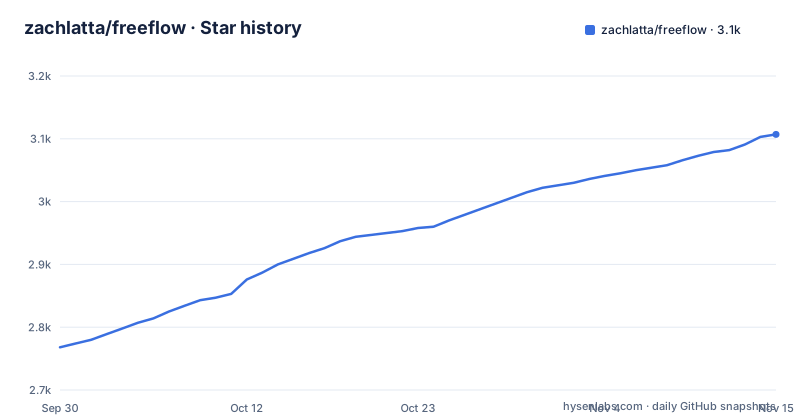
Star history
- zachlatta/freeflow3,107 ★ · +339
| Repository | 2026-09-30 | 2026-11-15 |
|---|---|---|
| zachlatta/freeflow | 2.8k | 3.1k |
339 Stars in the last 46 days, measured from the daily GitHub snapshot. Compare with other projects
Editorial analysis
Free app, but the quick start still asks for a hosted key
The positioning is a free and open source alternative to Wispr Flow, Superwhisper and Monologue, and the overview promises fast AI transcription, context-aware cleanup and voice-driven text editing without a monthly subscription. The app itself is free and MIT licensed, and the download is a single FreeFlow.dmg that works on all Macs, Apple Silicon and Intel alike.
What is not free by default is the inference. Step two of the quick start is to get a free Groq API key from groq.com, and the providers feature says Groq is the default, with a custom model and API URL available in settings. So out of the box this is a local app calling someone else's hosted API, and the subscription being avoided is the dictation app's, not the model's.
The dev channel tag is older than both numbered releases
The published releases interleave oddly. There are two numbered builds, FreeFlow 1.2.0 on 2026-07-13 and FreeFlow 1.2.1 on 2026-08-11, and one dev build whose tag is simply dev, named FreeFlow Dev ad5c827b5a32 and dated 2026-04-30. The dev build is therefore the oldest of the three by more than two months, and its name carries a commit hash while the numbered releases carry only a version.
That matters for anyone tracking which build is current: the tag list does not order the way a channel name suggests. The dev track also has its own identity inside the build system, since the Makefile defaults the app name to FreeFlow Dev and the bundle id to com.zachlatta.freeflow.dev, so a dev build is a separate application rather than a rebuild of the released one.
The test target compiles eleven named source files, not the app
The Makefile builds its test target from an explicit list rather than from everything under Sources. The variable named TEST_PRODUCTION_SOURCES names eleven files, among them AppContextService.swift, LLMAPITransport.swift, LLMCooldownManager.swift, ModelConfiguration.swift, TranscriptTextCore.swift, UpdateManager.swift and three files under Sources/ShortcutCore. Everything else in Sources/ is left out of that list, so the tests exercise a subset chosen by hand.
The rest of the build is discovered rather than enumerated. SOURCES and TEST_SOURCES come from find over Sources and Tests piped through sort, while YAML_FILES sweeps .github for yml and yaml, and SHELL_SCRIPTS sweeps both .github/scripts and .agents/skills for shell files. The declared targets are all, check, clean, run, icon, dmg, codesign-dmg, notarize, test, typecheck and validate.
Dev builds get a different bundle id, signing identity and icon
The Makefile branches on the app name to keep development and released builds apart in three ways at once. When APP_NAME is FreeFlow Dev it takes BUNDLE_ID com.zachlatta.freeflow.dev and CODESIGN_IDENTITY FreeFlow Dev, and it picks Resources/AppIcon-Dev-Source.png and Resources/AppIcon-Dev.icns. Any other value falls through to the plain icon files.
The stated reason for the separate icon is that a developer's dock should show at a glance which FreeFlow is running when both are installed side by side. All three values use ?= rather than =, so a command line can override them, and the architecture comes from uname -m through another overridable default. The entitlements file FreeFlow.entitlements sits at the repository root next to Info.plist, which is where the codesign-dmg and notarize targets would consume it.
Three timeouts, all sitting at 20 seconds
FreeFlow keeps the default network timeout at 20 seconds, and the three places that timeout applies are set separately through macOS defaults rather than through the app's settings window:
defaults write com.zachlatta.freeflow transcription_timeout_seconds -float 120
defaults write com.zachlatta.freeflow post_processing_timeout_seconds -float 120
defaults write com.zachlatta.freeflow context_request_timeout_seconds -float 120
transcription_timeout_seconds covers audio transcription requests, post_processing_timeout_seconds covers transcript cleanup and Edit Mode requests, and context_request_timeout_seconds covers nearby app context requests. Only positive values are used, so a zero or negative entry is ignored rather than treated as no timeout, and removing a key returns that one setting to 20 seconds rather than resetting the others.
No server of its own, but two providers still see the audio
The privacy claim is structural rather than a policy: there is no FreeFlow server, so the app does not store or retain your data. What leaves the computer is stated as API calls to your configured transcription and LLM provider, which is two of them for a normal dictation pass. Transcription handles the audio, and cleanup or Edit Mode handles the text and the instruction.
Context-aware cleanup reads nearby app context so that names, terms and phrases are spelled correctly when you dictate into email, a terminal or a document, and that is a third kind of payload leaving the machine, on the context_request_timeout_seconds clock of its own. A custom vocabulary of names, jargon and project-specific words is also sent for preservation during cleanup. None of this is cached on the project side, and all of it is visible to whoever runs the endpoint you configured.
Edit Mode reuses the dictation shortcut on a selection
The editing feature works by applying a spoken instruction to text you have already selected. You highlight existing text, say something like make this shorter or turn this into bullets, and the app transforms the selection instead of transcribing new dictation. It has to be enabled in settings first.
Once enabled it reuses the same gesture as dictation, or it can be made to require an extra modifier key through a Manual mode. The shortcut configuration is shared with the other half of the app: both the hold-to-talk and toggle dictation shortcuts are customisable, and if the toggle shortcut extends the hold shortcut you can start in hold mode and press the extra modifier keys to latch into tap mode without stopping the recording. One keyboard layout therefore controls dictation, toggling and editing.
The website, entitlements, agent skills and changelog share the app repository
The root of the repository carries more than an Xcode target. There is a website/ directory matching the freeflow.zachlatta.com homepage, a CHANGELOG.md, an AGENTS.md, a .agents/ directory that the Makefile treats as a source of shell scripts alongside .github/scripts, and a Makefile that builds a signed and notarized disk image rather than just a binary.
That last point is what the licenses file is doing there. Alongside LICENSE and Info.plist, the entitlements file and the codesign-dmg and notarize targets indicate the app is expected to pass Apple's distribution checks, which is a different delivery path from a plain open source build. Tests live in their own Tests/ directory and the icons in Resources/, so a reader looking for how the app is put together has to cross Sources/, Resources/, Tests/, website/ and the Makefile to get the whole picture.
Editorial conclusion
FreeFlow suits a Mac user who wants voice dictation and voice editing without a subscription and is willing to hold an API key, or to run Ollama or LM Studio locally and accept slower first responses. Read the privacy paragraph as what it is: there is no FreeFlow server, so nothing is retained by the project, and the audio plus the nearby app context still go to whichever two providers you configured. If you go local, raise the timeouts before you conclude it is broken, since the default is 20 seconds for transcription, post-processing and context alike. If you build from source, note that the test target compiles a named list of eleven production files rather than the whole app, and that dev builds use their own bundle id and icon.
Frequently asked questions
What is FreeFlow and which apps is it an alternative to?
It is a free macOS dictation app written in Swift, described as a free and open source alternative to Wispr Flow, Superwhisper and Monologue. It does AI transcription, context-aware cleanup and voice-driven text editing without a monthly subscription.
Does FreeFlow need an API key to work?
By default it does. The quick start has you get a free Groq API key from groq.com and Groq is the default provider, though settings accept a custom model and API URL, including local servers such as Ollama or LM Studio.
What are the three network timeouts in FreeFlow?
transcription_timeout_seconds for audio transcription, post_processing_timeout_seconds for transcript cleanup and Edit Mode, and context_request_timeout_seconds for nearby app context requests. The default is 20 seconds, only positive values are used, and each key is removed individually with defaults delete.
How does FreeFlow handle my data?
There is no FreeFlow server, so the app does not store or retain your data. The only information leaving your computer are API calls to the transcription and LLM providers you configured.
What does Edit Mode do in FreeFlow?
It transforms text you have already selected using a spoken instruction such as making it shorter or turning it into bullets. You enable it in settings, then use your normal dictation shortcut on the selection, or choose Manual mode to require an extra modifier key.
Official sources
Add this badge to your README
If you maintain this project, the badge below links readers to this analysis and shows its maintenance status from the daily GitHub snapshot. Paste the markdown into your README; add ?metric=license or ?metric=stars to the image URL for a different field.

[](https://hysenlabs.com/projects/zachlatta-freeflow)Star history chart for your README
[](https://hysenlabs.com/projects/zachlatta-freeflow)Was this useful?