Zapier MCP: seven clients, five other marketplaces, and no server in this repository
Official plugin distribution for the hosted Zapier MCP server. Install it in your AI client and connect to thousands of apps.
At a glance
- What is it?
- zapier/zapier-mcp is a distribution repository for the client-side half of a hosted MCP service. The capability lives at an endpoint Zapier runs, the repository ships one plugin directory, and five of the seven client paths tell you to install from somebody else's marketplace instead of from here.
- Who is it for?
- Take this repository if your client is one of the listed marketplaces and you want guided onboarding on top of a connection you would make anyway. Skip it if you need a version you can pin, a server you host, or an audit of what the plugin changes, because this repository has no releases, no build manifest, and nothing but files and a pointer to an endpoint Zapier operates.
- Can I use it commercially?
- Yes. MIT is a permissive licence: you can use, modify and sell software built on it, as long as you keep its copyright and licence notices.
- Is it still maintained?
- Yes. The repository last received commits 4 days ago.
- What is it written in?
- GitHub does not report a main language for this repository.
Answers come from the project's GitHub data, last synced on November 15, 2026, and from our analysis. They are not legal advice.
Star history
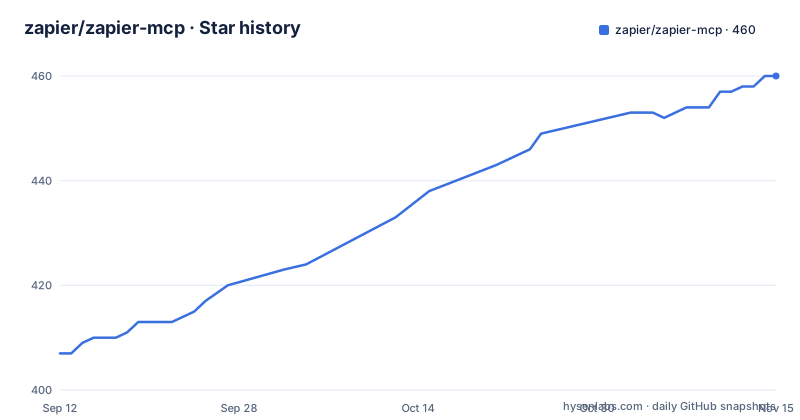
- zapier/zapier-mcp460 ★ · +53
| Repository | 2026-09-12 | 2026-11-15 |
|---|---|---|
| zapier/zapier-mcp | 407 | 460 |
53 Stars in the last 64 days, measured from the daily GitHub snapshot. Compare with other projects
Editorial analysis
The server is not in this repository, only the half that lives in your client
The repository description calls this the official plugin distribution for the hosted Zapier MCP server, and the README is more direct: this repo distributes the Zapier MCP plugin, the part that lives in your AI client. What the README calls What's in this repo is a single entry, plugins/zapier/, described as the plugin that onboards you to Zapier MCP.
The capability itself is an address, not a checkout. Connecting takes a server URL, and the endpoint named in the README is https://mcp.zapier.com/api/v1/connect, configured with type: http. Everything a user hears about, 9,000+ apps, triggering workflows, pulling data, is a property of that hosted service.
The tree confirms the split. There is no package.json, no pyproject.toml, no build script and no test directory, so there is nothing here to compile: the payload is JSON, Markdown and assets. MIT is the only licence here, and it covers those files. It says nothing about the service behind the URL, whose terms are not in this repository.
Only Gemini CLI installs from this repository, the other six point elsewhere
The Getting started section is where the fragmentation shows. Exactly one client installs from this repository's own URL, and it takes a second step afterwards:
gemini extensions install https://github.com/zapier/zapier-mcpThen the README adds a slash command, /mcp auth zapier, and points at gemini-extension.json, the manifest Gemini reads to resolve that install. No other client follows that shape.
Claude Code is told to add zapier/marketplace or anthropics/claude-plugins-official. Cursor is told to use the install badge or add cursor/mcp-servers. OpenAI Codex and GitHub Copilot CLI are both told to add zapier/marketplace. Claude Cowork is pointed at anthropics/knowledge-work-plugins. Kiro goes through kiro.dev/powers. Five destinations, none of them this repository, and in two cases a client is offered two different registries with no guidance on which to prefer.
So the plugin in plugins/zapier/ is reached by clients through marketplace manifests maintained elsewhere. A reader who clones this repository expecting to install something has the payload and none of the wiring.
VS Code is the documented exception, and it skips the plugin entirely
One client is named as not using the plugin at all. VS Code connects directly to the hosted MCP server rather than through a plugin, either through the badge or by adding the URL by hand with type: http. The same repository that exists to distribute the plugin is therefore the wrong artifact for that editor.
That sentence is also the clearest statement of what the plugin is. The base connection needs one server URL and nothing else, so the repository's payload sits on top of a connection any MCP client can make unaided. What the plugin adds, in the README's terms, is guided onboarding, a first-use demo and role-tailored skills, plus the claim that your assistant arrives knowing how to use Zapier.
None of that changes what the agent can reach. The tool surface is whatever the hosted endpoint exposes, so a plugin that improves the first ten minutes cannot add a capability, and a team that only needs the tools has a shorter path through the badge.
zapier-power/ sits in the tree with no line of the README explaining it
The top level holds .gitignore, AGENTS.md, CLAUDE.md, CONTRIBUTING.md, LICENSE, README.md, assets/, gemini-extension.json, llms.txt, plugins/ and zapier-power/. Only plugins/ appears under What's in this repo, so the other two directories arrive unexplained.
zapier-power/ is the interesting one. The Kiro line sends readers to kiro.dev/powers, and zapier-power/ is the only path in the tree that looks like a payload for that destination, but the README never joins the two, and nothing states which file a Kiro install actually fetches. A contributor reading the repository to understand its own layout would have to infer it.
The rest of the tree is written to be read by other software. AGENTS.md is a guide for AI agents working in the repository, CLAUDE.md is its Claude counterpart, and llms.txt is described as an LLM discovery index. A 267-word README next to three instruction files and a discovery index says what kind of repository this is: a payload for tools to consume, not a package for people to build.
The claims belong to the hosted service, the licence belongs to these files
The README states that Zapier MCP gives any MCP-compatible AI client governed access to 9,000+ apps, that no code and no infrastructure are needed, and that the service is SOC 2 Type II certified. All three are claims about a service running at mcp.zapier.com, and none of them can be checked from this repository, which contains no server code, no test and no configuration for the endpoint.
What the repository can be checked on is thinner. It carries no GitHub releases, no changelog, and no version number in any file the README points at, and with no packaging manifest there is nothing to pin. An install that resolves through a marketplace gets whatever the marketplace currently serves.
The one authentication step named anywhere is the /mcp auth zapier slash command in the Gemini CLI path. How the other six clients authenticate to the same endpoint is not described here, and neither is what the connection can do per minute, what it costs, or what a task consumes. Those answers live in the linked documentation, not in the files you install.
Third-party registries list the server, which is a different thing from this repository
Two outside catalogs are named under Third-party registries: Smithery and PulseMCP, where Zapier MCP is also listed. Those are registries of MCP servers, and reaching the same capability through one of them is a materially different route from installing this plugin.
A registry install resolves and runs a server as part of the client tooling, with a server entry in the client's configuration. This repository ships no server. It ships a plugin that teaches an existing client about a server somebody else hosts, and it reaches clients by being listed in marketplace manifests maintained by other projects. In one case the client fetches the capability and runs it; in the other the client is told how to talk to a capability that never leaves Zapier's infrastructure.
For a reader choosing between them, the deciding question is not features. It is who operates the endpoint, because in both cases the tool surface, the limits and the audit trail belong to whoever runs it.
What a team actually gets, and the one question to ask before installing
Nothing here is a shortcut around the connection. The connection is a URL and a type, both printed in the README, and every client on the list can be pointed at it directly, which is exactly what the VS Code note says. The plugin's value is instructional: onboarding, a demo, and skills chosen for a role.
That value is real but bounded, and it is the kind of value that ages badly. Onboarding help matters on day one and is dead weight afterwards. Skills tailored to a role are only as current as the role, and this repository offers no way to see when they were last revised, since it has no releases and no changelog to read.
The practical consequence is that the decision is cheap to make and cheap to undo. Nothing here compiles, nothing runs on your machine, and removing a plugin from a client is a different operation from uninstalling a service. The question worth asking first is what the plugin adds on top of the URL, because that is the only thing this repository installs.
Editorial conclusion
Take this repository if your client is one of the listed marketplaces and you want guided onboarding on top of a connection you would make anyway. Skip it if you need a version you can pin, a server you host, or an audit of what the plugin changes, because this repository has no releases, no build manifest, and nothing but files and a pointer to an endpoint Zapier operates. Before installing anything, open plugins/zapier/ and read what it adds to the client, since the connection itself needs only the server URL.
Frequently asked questions
What is MCP in Zapier?
MCP in Zapier is the Model Context Protocol exposed by Zapier as a hosted server. The README describes it as giving any MCP-compatible AI client governed access to 9,000+ apps, so that an assistant can send messages, pull data and trigger workflows without code or infrastructure on the user's side.
How do I use Zapier MCP?
Connecting takes a server URL, and step-by-step instructions per client live at docs.zapier.com/mcp/clients. The endpoint named in the README is https://mcp.zapier.com/api/v1/connect with type: http, and a few clients also install the plugin from this repository for onboarding and role-tailored skills.
What is the Zapier MCP server?
It is a hosted service at https://mcp.zapier.com/api/v1/connect, and no server code sits in this repository. The repository holds the client-side plugin, and MIT covers those files rather than the service behind the URL.
What does Zapier MCP do?
The README says it gives an MCP-compatible client governed access to more than 9,000 apps, covering sending messages, pulling data and triggering workflows in plain English. The plugin adds guided onboarding, a first-use demo and skills tailored to your role on top of that.
Does the Zapier MCP plugin work in VS Code?
Not through this repository. The README says VS Code connects directly to the hosted MCP server rather than through a plugin, using the install badge or the URL added by hand with type: http.
Is Zapier MCP safe to connect to an AI client?
The README states the service is SOC 2 Type II certified and that no code or infrastructure runs on your side, and the connection is an HTTP-type MCP endpoint. This repository ships the plugin files rather than server code, and the only authentication step named is the /mcp auth zapier command in the Gemini CLI path.
Official sources
Add this badge to your README
If you maintain this project, the badge below links readers to this analysis and shows its maintenance status from the daily GitHub snapshot. Paste the markdown into your README; add ?metric=license or ?metric=stars to the image URL for a different field.

[](https://hysenlabs.com/projects/zapier-zapier-mcp)Star history chart for your README
[](https://hysenlabs.com/projects/zapier-zapier-mcp)Was this useful?