markdownify-mcp: the install hook builds a Python environment, and two tools need extras the image omits
A Model Context Protocol server for converting almost anything to Markdown.
At a glance
- What is it?
- Markdownify is a server that gives an agent host ten tools, each turning one kind of input into Markdown: PDFs, office documents, images, audio, web pages, search results and video transcripts. The interesting parts are the seams. Installing it runs a script that creates a Python virtual environment, the read boundary is off unless you set one variable, and the published container quietly cannot run two of the ten tools.
- Who is it for?
- Use Markdownify when you want an agent to be able to read a PDF, a spreadsheet or a recorded meeting as text, and install it locally rather than from the container, because the local path is the only one that gets every tool. Three things to do before you wire it into a host.
- Can I use it commercially?
- Yes. MIT is a permissive licence: you can use, modify and sell software built on it, as long as you keep its copyright and licence notices.
- Is it still maintained?
- Yes. The repository last received commits 9 days ago.
- What is it written in?
- Mainly TypeScript, according to GitHub's language statistics.
Answers come from the project's GitHub data, last synced on November 14, 2026, and from our analysis. They are not legal advice.
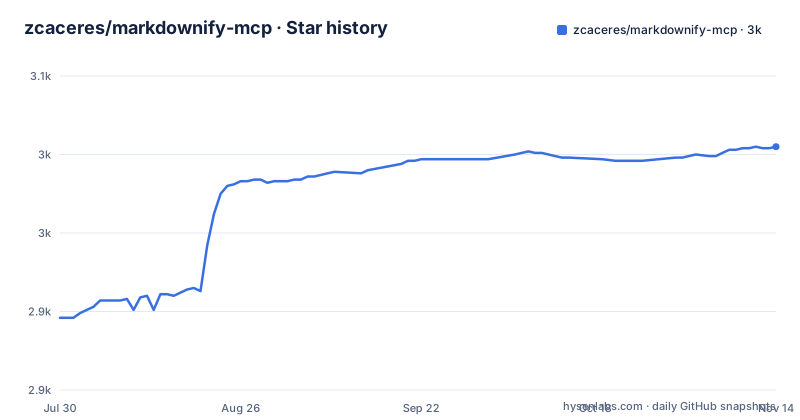
Star history
- zcaceres/markdownify-mcp3,005 ★ · +109
| Repository | 2026-07-30 | 2026-11-14 |
|---|---|---|
| zcaceres/markdownify-mcp | 2.9k | 3k |
109 Stars in the last 107 days, measured from the daily GitHub snapshot. Compare with other projects
Editorial analysis
Installing the server creates a Python virtual environment
The manifest declares an install hook that runs a script from the project root, and the page explains what that script does: it creates a Python virtual environment inside the project directory and installs a document-conversion library with all of its optional extras. So a command you would think of as installing a JavaScript package ends up creating a virtual environment and running a Python installer. The repository backs this up with more than the one hook: a Python project file declaring the interpreter floor and the Python dependency, a lock file for a Python package manager, and a file pinning the Python version for local use. Three ecosystems are involved in what the page presents as one server, and the join between them is the install hook rather than anything in the documentation. That is fine as a design, but it is worth knowing before you install this into an environment where you did not expect a virtual environment to appear.
The published package ships the install hook, and the build step assumes a Unix shell
The file list in the manifest has four entries: the built output, the install hook script, a POSIX setup script and a Windows batch script. Shipping the hook is deliberate, since it is what makes a registry install behave like a clone, but it also means the virtual environment is created wherever the package lands, including a production dependency tree. The build command ends by marking the built JavaScript files executable, which is a POSIX operation, in a package that ships a batch file specifically so Windows users have a path. So the platform support is uneven in a specific way: Windows has a setup script and a batch file, and the build still assumes a shell that adds the executable bit. There is also a naming split to be aware of, since the package name in the manifest differs from the repository name and from the directory name, and the published command has its own name again.
The host configuration says one runtime and the start script says another
The one piece of configuration a user has to get right is shown as a JSON block to paste into a desktop application's server configuration. It names the server, gives a command, and passes one argument: an absolute path to the built file, written as a placeholder in braces for you to replace. That example says the command is node. The manifest's own start script runs the same built file with a different runtime. Both can work on a compiled file, and the page never says which one is expected, so a user who copies the configuration and then wonders why their own start command behaves differently has been given two answers. The placeholder in the path is the other half of it: the example cannot be pasted as printed, so the first run always involves editing it, which is the moment people get the path subtly wrong.
Two of the ten tools cannot work in the published container
This paragraph is the most useful thing on the page and it should be the first thing in the container section. The published image installs the document converter with only its PDF extras, while a local install gets the full set, and the page states directly that audio transcription and image text extraction require the full extras and will fail in the smaller image, naming the local install as the route to every feature. So the advertised tool list is ten and the container delivers eight. The mechanism is visible in the build files: the Python project file asks for all extras, and the container deliberately installs a narrower set. That is a reasonable trade for image size, and the page is honest about the cost, but the cost is a hard failure at call time rather than a degraded result, and the tool list above it is not marked to say which two are affected.
The read boundary is unrestricted unless you set one variable
Four environment variables are documented with their defaults, and the one that matters for safety defaults to unset, which the table spells out as unrestricted. Set it to a list of directories, separated by the path delimiter of whichever system you are on, and every file-reading tool rejects paths outside that list. A deprecated single-directory alias is still honoured for backward compatibility, which is a reasonable way to migrate a name without breaking anyone. Two things are worth saying plainly. First, a server whose job is reading documents, with no directory restriction by default, will read anything its process can, so the variable is not optional hardening but part of setting it up. Second, the page gets this right: the default is stated in the table rather than buried, and the container example pairs the restriction with a read-only mount, which is exactly the right combination, since the mount stops writes and the variable stops reads.
Container paths, not host paths, and the page says so twice
The container notes exist mostly to prevent one mistake, and they state it twice in different words. Mount whichever host directories you want the server to read, then pass the paths as the container sees them, giving the difference between a path inside the image and where the same file sits on your machine. Then, as a second point, set the allowed-paths variable to the mounted directories so the server's own boundary matches the bind mount. The example run command shows all of it:
docker run --rm -i \
  -v "$HOME/Documents:/data:ro" \
  -e MD_ALLOWED_PATHS=/data \
  markdownify-mcp
The mount is attached read-only, the variable names it, and the entry point starts the server. That is the whole integration, and it is two paragraphs long because the path translation is the part people get wrong. Read it before you file an issue about the server not finding a file it can plainly see from your shell.
One documented variable belongs to a tool that is not in the tool list
The available tools section lists ten: video, PDF, search results, web pages, images, audio, three office formats, and a tool that retrieves an existing Markdown file. The environment variable table lists four, and one of them is the path to a repository-packing executable whose purpose line says it is used by a repository-to-markdown tool. That tool is not in the list of ten. So the configuration surface promises a capability the feature list does not, and the executable has a documented default and a fallback, which is more attention than the surrounding entries get. The same section does give the retrieval tool's only constraint, that the file extension must end with one of two suffixes, and repeats the path restriction with an example. Small inconsistencies like this are what a changelog normally catches, and there is no changelog in the repository root.
Editorial conclusion
Use Markdownify when you want an agent to be able to read a PDF, a spreadsheet or a recorded meeting as text, and install it locally rather than from the container, because the local path is the only one that gets every tool. Three things to do before you wire it into a host. Point the allowed-paths variable at the directories you want it to read, since the default is unrestricted and this server can otherwise open any file its process can. Fill in the absolute path in the host configuration, and expect to be told which runtime to use, because the example and the start script disagree. And check which tools you actually need against how you installed it, because the container's narrower extras remove audio transcription and image text extraction outright rather than degrading them. Nothing needs an API key and nothing is sent anywhere by the server itself; the outbound calls are the web and search tools, and their behaviour depends on the hosts they reach.
Frequently asked questions
What does an MCP actually do?
The page does not explain the protocol, it uses it. What it shows is a server that exposes tools, in this case ten of them, each converting one kind of input into Markdown: PDF, images, audio, Word, spreadsheet and presentation documents, web pages, search results, video transcripts, plus a tool that retrieves an existing Markdown file. You register it with a host application by giving that application a command and a path to the built file.
Can I convert MD to PDF?
Nothing here goes that direction. Every tool converts something into Markdown, and the one tool that reads an existing file accepts only extensions ending in two specific Markdown suffixes. So a Markdown file can be retrieved and passed to another tool, but converting Markdown into PDF or into any other output format is outside what this repository does.
Does chatgpt understand Markdown?
Not a question this page addresses, and it names no particular host application as its consumer. What it specifies is the registration shape: an entry in a server configuration map, giving a command and one argument that is an absolute path to the built output. Which application you point that at, and what that application does with the resulting text, is left to you.
What is Markdown mainly used for?
The page does not discuss the format; its scope is producing it. The one place the format appears as an input is the file-retrieval tool, which restricts what it will read to two Markdown extensions. Everything else in the list arrives as a PDF, an office document, an image, an audio file, a web page, a set of search results or a video transcript, and leaves as Markdown.
Official sources
Add this badge to your README
If you maintain this project, the badge below links readers to this analysis and shows its maintenance status from the daily GitHub snapshot. Paste the markdown into your README; add ?metric=license or ?metric=stars to the image URL for a different field.

[](https://hysenlabs.com/projects/zcaceres-markdownify-mcp)Star history chart for your README
[](https://hysenlabs.com/projects/zcaceres-markdownify-mcp)Was this useful?