Homarr 2.10: A drag-and-drop dashboard that trades YAML for a grid you can actually touch
A modern and easy to use dashboard. 40+ integrations. 20K+ icons built in. Authentication out of the box. No YAML, drag and drop configuration.
At a glance
- What is it?
- Homarr is a self-hosted dashboard for the homelab crowd: 40+ integrations, a drag-and-drop grid, and no YAML. The trade-off is that its real-time features lean on Redis and WebSockets, which adds moving parts.
- Who is it for?
- Adopt Homarr if you self-host several apps and want a dashboard that non-technical users can rearrange without touching config files. Skip it if you need a stateless, single-binary dashboard or if your deployment can't run Redis alongside the app.
- Can I use it commercially?
- Yes. Apache-2.0 is a permissive licence: you can use, modify and sell software built on it, as long as you keep its copyright and licence notices.
- Is it still maintained?
- Yes. The repository last received commits 1 day ago.
- What is it written in?
- Mainly TypeScript, according to GitHub's language statistics.
Answers come from the project's GitHub data, last synced on November 12, 2026, and from our analysis. They are not legal advice.
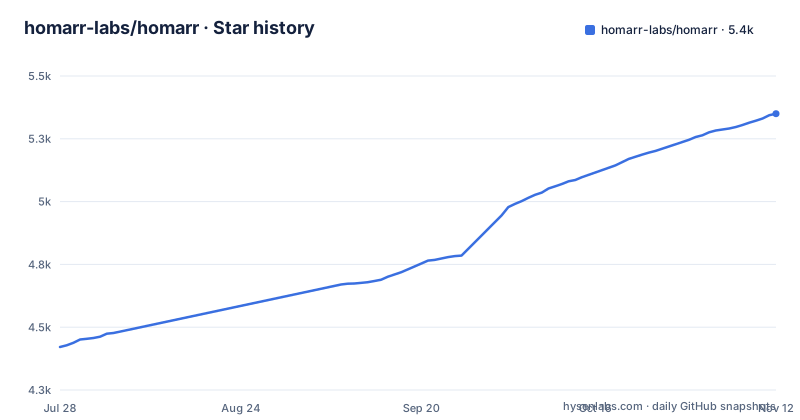
Star history
- homarr-labs/homarr5,350 ★ · +929
| Repository | 2026-07-28 | 2026-11-12 |
|---|---|---|
| homarr-labs/homarr | 4.4k | 5.4k |
929 Stars in the last 107 days, measured from the daily GitHub snapshot. Compare with other projects
Editorial analysis
What Homarr actually is and who it serves
Homarr is a self-hosted dashboard for people who run a pile of services on a home server or a small VPS. The README lists integrations for AdGuard Home, Plex, Jellyfin, Pi-hole, Home Assistant, Immich, and dozens more. If you have a NAS with a media stack plus a couple of network tools, Homarr gives you one page that links to them and shows live status. The target user is the homelab operator who wants a polished front end without writing configuration files. The project's own pitch is explicit: "no YAML involved." That sentence is the core of its identity. It competes with dashboards that treat config as code, and it deliberately walks the other way. For a family member who just wants a big button for Plex and a tile for the weather, that is the right call.
The mechanism: a grid, not a file
The configuration model is a drag-and-drop grid system. You place widgets and app icons on a canvas, resize them, and the layout is stored internally. The .env.example configures a database for the app (SQLite by default, with node-postgres as an option), not a YAML file. The absence of a config file is the defining architectural choice. The project also ships an icon picker with over 11K icons, so you do not need to hand-edit SVG paths or hunt for favicon URLs. The live data comes through a stack the README names explicitly: WebSockets, tRPC, and Redis. Real-time widget updates flow through that path. So the data model is split: the layout is in the app's own store, and the live metrics come from integrations via a realtime channel. That is a clear separation, but it means the dashboard is not a static site. It needs a backend process that maintains those connections.
Getting it running: Docker, Helm, and the hardware floor
The README points to an installation section on homarr.dev and lists compatibility with Windows, Linux, TrueNAS, and Unraid. It highlights x86, Raspberry Pi, and old laptops as supported hardware. The primary deployment path is a Docker image, built by the project's own CI workflow. For Kubernetes, there is a Helm chart, described as "extensive" and aimed at "scaling and high reliability." For the install steps, follow the docs link. The release cadence is active: v2.10.1 and v2.10.0 came out on 2026-10-30, five days after v2.9.1. That tells you the project is maintained, but it also means upgrades come frequently. The Docker image is the simplest route: pull the image, mount a volume for data, expose a port. The Helm path is for people who already run a cluster and want replicas. Budget time to read the installation docs.
Where the real-time claim gets complicated
The README says realtime widget updates use WebSockets, tRPC, and Redis. A dashboard that only shows static links would not need Redis. Homarr's live widgets justify it, but only if you actually use those widgets. If you just want a bookmark page, the Redis requirement is overhead. The README also mentions BCrypt and AES-256-CBC for encrypting "valuable data," which suggests some integrations store credentials. That encryption is a plus, but it also means there is a key management question. The .env.example covers it: SECRET_ENCRYPTION_KEY encrypts integration secrets in the database and, like AUTH_SECRET, should be generated with `openssl rand -hex 32` before starting Homarr and never reused or committed.
Authentication and user management: built-in but not trivial
Homarr ships authentication out of the box, with user management, permissions, and groups. It also supports single sign-on via OIDC and LDAP. The README lists these as features, not as configuration steps. For a single-user homelab, the built-in user system may be overkill, but it is useful if you share the dashboard with a household. The OIDC and LDAP support is the feature that matters for a homelab that already has an identity provider. Treat provider compatibility as a verification step. If you rely on Authelia or Keycloak, you need to confirm the flow works before you commit.
A real limitation: the integration list is the ceiling
Homarr's value is tied to its integration list. The README shows 40+ integrations, but that is a finite set. If your service is not on the list, you get a generic tile with a link and an icon, but no live widget. The list includes common homelab tools, but it omits many niche ones. For example, the README shows no entry for Grafana, which is a popular self-hosted tool. That means you cannot put a Grafana panel on your dashboard as a native widget. You can still link to it, but the real-time data path is closed. Check the specific docs page for your tool before you rely on a widget.
The alternative: dashboards that treat config as code
The main alternative is a dashboard like Dashy or Heimdall, which are also self-hosted but take a different approach. Dashy, for instance, uses a YAML config file for layout and widgets. That is the opposite of Homarr's drag-and-drop model. The difference is not cosmetic. A YAML-based dashboard can be versioned in git, reviewed in pull requests, and deployed from a known state. Homarr's grid is stored in its own database, so you cannot diff your layout or roll it back with git. For a homelab that treats infrastructure as code, that is a real loss. For a user who hates YAML, it is the selling point. The README even says "no YAML involved" as a bullet point, so the project knows exactly what it is trading. If you want reproducibility, pick Dashy or similar. If you want a point-and-click UI, pick Homarr. There is no middle ground here.
Maintenance and upgrade cost: frequent releases, Apache-2.0
Homarr is under active development, with three releases in a single week. That means bug fixes and features land often, but it also means you need to track updates. The project is licensed under Apache-2.0, which is permissive and allows commercial use with attribution. That is a low-license-risk choice for a homelab or a small business. Check the docs for the upgrade path. The encryption feature (AES-256-CBC) means you must be careful with your data volume during upgrades, because losing it could lose encrypted credentials. So the maintenance cost is moderate: frequent updates, a Redis dependency, and a data volume you need to back up. That is acceptable for a homelab, but it is not a set-and-forget tool.
Editorial conclusion
Adopt Homarr if you self-host several apps and want a dashboard that non-technical users can rearrange without touching config files. Skip it if you need a stateless, single-binary dashboard or if your deployment can't run Redis alongside the app. Before adopting, verify that your target integrations are in the supported list and check the Helm chart's resource requirements if you plan Kubernetes. Then test the OIDC or LDAP login path with your identity provider, because authentication is built in.
Frequently asked questions
What does Homarr do?
Homarr is a dashboard for the self-hosted applications you already run, configured by dragging widgets onto a grid rather than writing YAML. It ships 40 or more integrations, an icon picker, user management with groups and permissions, single sign on through OIDC or LDAP, and realtime widget updates over WebSockets with tRPC and Redis.
Is Homarr open source and free?
It is open source and released under the Apache-2.0 license, with the license text at the root of the repository. Development happens in the homarr-labs organisation, and the latest release is v2.10.1, published on 2026-10-30.
What is Homarr?
A modern dashboard for self-hosted applications written in TypeScript, with an extensive drag and drop grid system, an icon picker with over 11K icons, authentication out of the box, and Kubernetes support through Helm. It runs on consumer hardware and on Windows, Linux, TrueNAS and Unraid, and its default branch is dev.
How do I install Homarr?
The README points to the getting started documentation at homarr.dev/docs/getting-started/ and to a live demo at demo.homarr.dev. The repository builds a Docker image from a Dockerfile based on node:24.22.1-alpine, and a populated .env is required first, with AUTH_SECRET and SECRET_ENCRYPTION_KEY generated using openssl rand -hex 32.
Official sources
Add this badge to your README
If you maintain this project, the badge below links readers to this analysis and shows its maintenance status from the daily GitHub snapshot. Paste the markdown into your README; add ?metric=license or ?metric=stars to the image URL for a different field.

[](https://hysenlabs.com/projects/homarr-labs-homarr)Star history chart for your README
[](https://hysenlabs.com/projects/homarr-labs-homarr)Was this useful?