Zentral: a control plane for Apple fleets that treats configuration as code
Zentral is a control plane for secure, observable Apple endpoints in enterprises. Configure, observe, and enforce the desired state of every Apple endpoint. Manage that desired state as code through GitOps and Terraform.
At a glance
- What is it?
- Zentral is a Django based platform that orchestrates Apple MDM alongside Munki, osquery and Santa, normalises everything those agents report into one inventory, expresses the whole fleet as events, and lets an operator declare desired state in Terraform. It is also a commercial product with a split licence, and the open deployment is explicitly framed as the testing path.
- Who is it for?
- Adopt Zentral if you run a Mac fleet of a size where Apple MDM plus a Munki server plus osquery is becoming hard to operate, and if you want the desired state of that fleet to live in a reviewed repository. Do not adopt it on the strength of the open deployment alone, because the documentation recommends the hosted offering or a supported private cloud for real use, and the open path is for testing and for features outside the licensed set.
- Can I use it commercially?
- Check first. The repository uses a licence we do not classify automatically, so read its LICENSE file before any commercial use.
- Is it still maintained?
- Yes. The repository last received commits 2 days ago.
- What is it written in?
- Mainly Python, according to GitHub's language statistics.
Answers come from the project's GitHub data, last synced on November 7, 2026, and from our analysis. They are not legal advice.
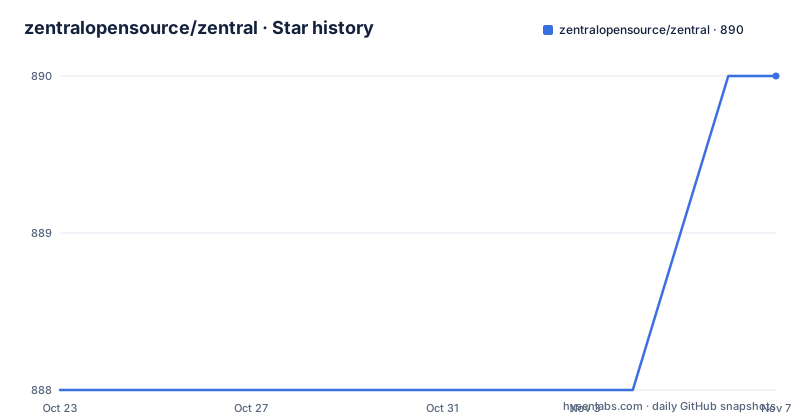
Star history
- zentralopensource/zentral890 ★ · +2
| Repository | 2026-10-23 | 2026-11-07 |
|---|---|---|
| zentralopensource/zentral | 888 | 890 |
2 Stars in the last 15 days, measured from the daily GitHub snapshot. Compare with other projects
Editorial analysis
The problem: a Mac fleet that has outgrown Apple MDM
Apple MDM is good at one thing, which is enrolling a device and pushing configuration profiles. Everything else an enterprise wants from a fleet falls outside it: knowing what software is actually running on the machines, deciding which binaries are allowed to execute, patching at scale with a canary rollout, and proving to an auditor that the fleet is compliant with a policy you wrote.
Zentral is a system to manage Apple devices under high security considerations. The project description calls it a control plane for secure, observable Apple endpoints, and says you can configure, observe and enforce the desired state of every Apple endpoint, managing that desired state as code through GitOps and Terraform.
The audience is the macOS administrator or platform team in an organisation large enough to have a compliance problem. The topics list is the honest scope: apple-mdm, endpoint-management, endpoint-security, inventory, events, gitops, config-as-code, munki, osquery, santa, terraform, elasticsearch, and the names of the systems Zentral is expected to talk to, jamf, splunk and sumologic.
The integration posture is the part that distinguishes it. Zentral orchestrates Apple MDM and popular open source agents that complement it, and the documentation is explicit that the integrations work with the agents as they are, so that if you are familiar with them you can apply your knowledge. That is a deliberate design choice: rather than replacing Munki or osquery, Zentral becomes the sync server and the control surface in front of them.
The licence is recorded as a custom one, the primary language is Python, the default branch is main, and the last push was on 2026-10-19.
The architecture: everything in Zentral is an event
The first key concept the documentation gives is an event-driven architecture, and the summary is blunt: everything in Zentral is an event.
Events are presented with the same metadata structure, and where possible they are enriched with unified inventory data. Events can be filtered and shipped to different stores. Three properties there, and each one is a design decision rather than a slogan.
The uniform metadata structure is what makes the fleet observable at all. Without it, every agent would emit its own shape and every consumer would need to know which agent produced a given record. The enrichment with inventory data is the useful half: a Munki event or a Santa event carries the device context, so a downstream consumer does not have to join back to the inventory to know who or what it was about.
And the ability to filter and ship events to different stores is what makes the platform work with what an enterprise already has. A security team that keeps its events in a SIEM, an operations team that keeps dashboards in Grafana, and a compliance team that wants the raw stream for its own archive can all be served from the same source, because the event is the unit of exchange rather than the database row.
That is also where the operational weight sits. The dependency list is long, and the compose file gives the shape of it: PostgreSQL for the relational state, Redis for caching, Elasticsearch for events, RabbitMQ for queues, Celery for the workers, Prometheus for metrics, and nginx in front. An installation of this kind has real failure modes, and a reader should expect to run it with the same care as any other distributed system.
The four integrations and the unified inventory behind them
Zentral's core capability is normalising data gathered from different inventory sources into a unified data schema. You can search for devices based on all kinds of data that Zentral collects, and you can view deeply into a device's health, its attached events and its MDM command history for troubleshooting.
On top of that inventory sit the four modules.
Apple MDM handles enrolment and the configuration that MDM is good at. Zentral can manage Apple devices via the MDM protocol, supports DDM, and handles what you would expect from an MDM, including software update enforcements, FileVault key escrow and recovery passwords. Essential settings and profiles are grouped into Blueprints, which can be scoped to devices based on tags.
The Munki module makes Zentral a Munki sync server, and the documentation is unembarrassed about why: Munki is the de facto king of patch management, and using Zentral as a sync server adds a dynamic layer for scoping. You can use sharding for progressive rollouts, and work with tags to assign sub-manifests or catalogs based on IdP group membership. The events feed into detailed visualisations in Grafana.
The osquery module turns Zentral into a remote server for osquery, handling configuration management, scheduled and ad-hoc query execution, file carving and log collection. Tags scope and shard sample queries, and queries can act as compliance checks, with compliance change events transmitted to other systems through the Shared Signals Framework.
The Santa module uses Zentral as a sync server for Santa rules, which the documentation says is much more efficient and less error prone than using config profiles. Zentral collects all Santa events for reports and alerts or to forward to a SIEM, and builds aggregates on what software runs on devices so you can make informed decisions when building an Allowlist in preparation for moving devices to Lockdown mode.
Application Allowlisting and the user portal
Allowlisting is where the platform's security claims get concrete, and the mechanism is a portal rather than a policy file.
Zentral offers Application Allowlisting with a user portal to handle authorization requests, based on user voting or admin approvals. Decisions are persistent because of stable identifiers, and Zentral presents a full audit trail for permissions. Aggregates of Santa events expose shadow IT and guide building the Allowlist.
The persistent identifiers point matters more than it first appears. In an allowlist system, the question is always whether a decision refers to the same application next week as it did today, and a decision keyed on a path or a hash breaks the moment an application updates itself. Keying on a stable identifier means an approval survives an update, and the audit trail means an auditor can reconstruct who allowed what and when.
The user portal is the other half, and it is where the design choice shows. There are two approval models in the documentation, user voting and admin approvals, and the user-facing case is spelled out: when running Santa in Lockdown mode, users may want to request exceptions for an app that has been blocked by a default-deny rule. A default-deny posture with a fast exception path is the difference between a policy people work with and a policy people route around.
The forward-looking note in the documentation is about labelling and reporting standards, and the project is careful not to overclaim: it intends for Zentral to support one of the multiple competing standards for labelling and reporting content, and says that none of these are defined well enough to be useful yet.
Tagging, sharding and the GitOps story
The second key concept is tagging and sharding, and it is the mechanism that makes the modules work as one system rather than four.
Tags can be used to scope configuration to devices across all modules in Zentral. You can tag devices based on set conditions and attributes, you can use SCIM to create tags based on IdP group membership, and you can build mass tagging automations. So the scope of a policy is a first class object that every module respects, whether the policy is an MDM blueprint, a Munki catalog, an osquery configuration or a Santa rule set.
Sharding is the rollout mechanism on top of that. You can use sharding to roll out configuration only to smaller subsets of machines, and the documented example is a 20 percent shard on the canary tag to test a new version of a software on only a sample of devices before releasing it to the whole canary group. Given that the Munki and osquery modules already know how to talk to devices, sharding is a small addition to their scoping, and it turns a fleet-wide rollout into a staged one.
The third key concept is config as code with Terraform. Almost every configuration item in Zentral can be managed as a Terraform Resource. You can keep a whole macOS client configured from a repository, with CI/CD and peer review, and you can always return to a previous known good configuration. The official Terraform provider is on the registry, and there is a starter kit repository for a macOS client that the documentation recommends as a primer.
So the three concepts form a chain: tags scope, sharding stages, Terraform records. A change to the fleet is a pull request, the review is where mistakes are caught, and the git history is the rollback mechanism.
Running it: the compose stack, and the split between the open and licensed parts
The deployment story is where the commercial shape of the project becomes visible.
The documentation is candid that there are many moving parts in the Zentral platform and not all are self-explanatory, and it recommends the Zentral SaaS offering or supported Zentral private cloud deployments for developer pairing and guidance, offering managed instances for proofs of concept. Then it says that for testing purposes, and for features not licensed under ZPEL-1.0, you can use docker compose. So the open repository is explicitly the testing path, and the licensing terms are named in the same breath.
The compose file shows what that path involves. The services are Postgres for the relational state, Redis for caching, Elasticsearch for the event store, RabbitMQ for the queues, Prometheus built from the repository configuration, and nginx in front:
  db:
    image: postgres:18
    env_file:
      - ./conf/start/docker/postgres.env
  redis:
    image: redis:7
The web service runs the Django application with a runserver command, and the workers service runs the Celery workers with a Prometheus service discovery file. The Elasticsearch service in the file is configured for a single node with security disabled and the disk watermarks turned down, with a comment marking those as extreme settings for development environments only. There are separate compose files for the docs, for a Puppet variant, for syslog and for the tests, and the repository carries an ee/ directory, a server/ directory, a zentral/ directory, a conf/ directory and a tox.ini.
The Python side is a Django application with djangorestframework and its YAML variant for the API, django-filter, Celery with kombu, elasticsearch and opensearch clients, geoip2, sqlglot for SQL parsing, jmespath for inventory compliance checks, pysaml2, webauthn, PyJWT, python-ldap and pyotp for authentication, and a Terraform provider exposed through the same API.
Maintenance, the licence and where Zentral is the wrong tool
The project is not archived and the last push was on 2026-10-19, with releases v2026.5 from 2026-08-21, v2026.4 from 2026-06-22 and v2026.2 from 2026-02-25, so it is being worked on and released on a monthly cadence.
The licence is the part to be careful about. The repository records a custom licence that GitHub cannot classify, and the documentation refers to a ZPEL-1.0 licence that determines which features are covered and which are not, since the compose path is offered for features not licensed under it. Before deploying the open build in a production setting, read the LICENSE file and establish exactly which of the platform's capabilities your plan includes. This is not legal advice, it is the practical point that the feature list in the documentation is not the same as the feature list you may use.
Where Zentral is the wrong tool is mostly about scale and about fit. If you have twenty Macs, Apple MDM plus a Munki server is simpler than a control plane with an event pipeline, a data warehouse and a Terraform provider. If your fleet is mixed and the Apple part is a minority, the events model and the inventory schema are built around Apple endpoints and you will be extending them. And if you want a deployable open source product with a community around it, the documentation's own recommendation to use the hosted offering is a signal about where the project intends to go.
What Zentral does well is narrow and real. It puts a control plane in front of four agents that already work, gives them one inventory and one event stream, and makes the result declarative. For a security conscious macOS organisation that has outgrown managing devices by hand, that is the problem it was built for.
Editorial conclusion
Adopt Zentral if you run a Mac fleet of a size where Apple MDM plus a Munki server plus osquery is becoming hard to operate, and if you want the desired state of that fleet to live in a reviewed repository. Do not adopt it on the strength of the open deployment alone, because the documentation recommends the hosted offering or a supported private cloud for real use, and the open path is for testing and for features outside the licensed set. Before you start, confirm which Zentral features your plan covers under ZPEL-1.0, and decide whether the event volume your fleet produces belongs in Elasticsearch or in a SIEM you already run.
Frequently asked questions
What is Zentral and who is it for?
It is a system to manage Apple devices under high security considerations, described as a control plane for secure, observable Apple endpoints. It orchestrates Apple MDM together with the Munki, osquery and Santa agents, integrates with identity providers, SIEMs and an entity's PKI, and manages the desired state of the fleet as code through GitOps and Terraform.
Which open source agents does Zentral work with?
Apple MDM for enrolment and configuration, including DDM, software update enforcements, FileVault key escrow and recovery passwords, plus Blueprints scoped by tags. Munki for software distribution and patching, osquery for queries, file carving and log collection, and Santa for binary authorisation and data collection. The integrations work with the agents as they are.
How do tagging and sharding work in Zentral?
Tags scope configuration to devices across all modules, and you can create them from set conditions and attributes, from IdP group membership through SCIM, or through mass tagging automations. Sharding uses those tags to roll out configuration to smaller subsets, for example a 20 percent shard on the canary tag to test a new software version on a sample of devices first.
How do I run Zentral without a hosted subscription?
For testing, and for features not licensed under ZPEL-1.0, the documentation points at a docker compose deployment. The stack includes Postgres, Redis, Elasticsearch, RabbitMQ, Prometheus and nginx in front of the Django app and its Celery workers, with separate compose files for docs, syslog, Puppet and tests. For real use the project recommends the SaaS offering or a supported private cloud.
What licence is Zentral released under?
The repository records a custom licence that GitHub cannot classify, and the documentation refers to ZPEL-1.0 as the licence that determines which features are covered, with the compose path offered for features not licensed under it. The project is not archived and the last push was on 2026-10-19, with the latest release v2026.5 from 2026-08-21.
Official sources
Add this badge to your README
If you maintain this project, the badge below links readers to this analysis and shows its maintenance status from the daily GitHub snapshot. Paste the markdown into your README; add ?metric=license or ?metric=stars to the image URL for a different field.

[](https://hysenlabs.com/projects/zentralopensource-zentral)Star history chart for your README
[](https://hysenlabs.com/projects/zentralopensource-zentral)Was this useful?