SublinkPro proxy subscription management and node routing
✨ 现代化代理订阅管理平台 | 智能分类 · 专业测速 · 链式中转 · 流量监控 · TG管理 · JS扩展 | Go+React 全新UI 🌍 Modern Proxy Subscription Manager | Smart Tags · Speed Test · Relays · Monitor · TG Bot · JS Scripts
At a glance
- What is it?
- SublinkPro is a self-hosted Go and React platform for importing proxy nodes, classifying and testing them, building subscriptions, and exposing selected traffic through relay or SOCKS5 features. It suits operators who want a web-managed workflow, but its separate database format rules out direct database reuse from the projects on which it is based.
- Who is it for?
- SublinkPro fits operators who need a browser-based control plane for proxy subscriptions, scheduled airport updates, node testing, relay routing, and traffic access management. It is a poor fit for anyone who expects an existing sublinkX or sublinkE database to move directly into it, or who wants a lightweight converter without its database and UI footprint.
- Can I use it commercially?
- Yes. MIT is a permissive licence: you can use, modify and sell software built on it, as long as you keep its copyright and licence notices.
- Is it still maintained?
- Yes. The repository last received commits 2 days ago.
- What is it written in?
- Mainly Go, according to GitHub's language statistics.
Answers come from the project's GitHub data, last synced on November 7, 2026, and from our analysis. They are not legal advice.
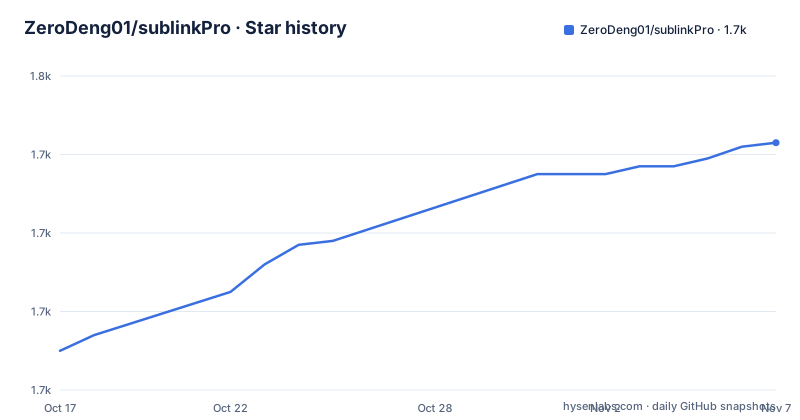
Star history
- ZeroDeng01/sublinkPro1,743 ★ · +53
| Repository | 2026-10-17 | 2026-11-07 |
|---|---|---|
| ZeroDeng01/sublinkPro | 1.7k | 1.7k |
53 Stars in the last 21 days, measured from the daily GitHub snapshot. Compare with other projects
Editorial analysis
Why SublinkPro exists for subscription operators
SublinkPro addresses the administrative work that appears after proxy nodes have been collected. A user may already have nodes in several subscription formats, but still need to classify them, check their quality, remove unwanted entries, arrange providers by priority, and publish the result as a subscription. SublinkPro turns those tasks into a web application backed by Go, Gin, and Gorm, with a React interface built on the Berry Free React Material UI Admin Template.
The intended users are individual operators, developers, and administrators who manage proxy infrastructure rather than end users who only consume a ready-made subscription link. Its scope extends beyond conversion. The README lists automatic rule-based tags, a two-stage speed test, IP quality and unlock checks, chain proxy configuration, scheduled airport updates, subscription sharing, and traffic monitoring. It also documents a SOCKS5 gateway, Telegram Bot, JavaScript processing, WebDAV backup, Cloudflare Tunnel, and notification webhooks.
That breadth creates a clear distinction between SublinkPro and a minimal format converter. The application assumes persistent configuration, generated subscription links, background updates, and operational monitoring. It is better suited to a maintained proxy collection than to a one-time subscription transformation. It also carries administrative responsibilities. The repository publishes a default `admin` account, and the README explicitly instructs users to change the default password immediately after installation.
SublinkPro's Go service, database, and React control plane
The repository layout shows a Go application at the center, with `api/`, `routers/`, `services/`, `models/`, `database/`, `settings/`, and `middlewares/` separated by responsibility. The frontend resides under `webs/` and uses React with Material UI and Vite. The Dockerfile first builds that frontend with Node, then compiles the Go backend with `CGO_ENABLED=0 go build -tags=prod`, copies the frontend output into `static`, and places both in an Alpine runtime image.
The backend dependency list provides more detail about the implementation. Gin serves HTTP routes, while Gorm supplies database access. The repository includes SQLite, MySQL, and PostgreSQL drivers. Mihomo is included for proxy handling, GeoIP2 for IP data, cron for scheduled work, and Goja for JavaScript execution. This aligns with the README's claims about node testing, scripts, scheduled airport updates, and traffic monitoring, although it does not by itself establish the accuracy or performance of each feature.
Data flow follows the product model. Airports or other sources provide imported nodes. Rules can assign tags and filtering conditions, while scripts can filter nodes or post-process content. Speed tests and quality checks supply status information used by the interface. Group ordering determines node order in generated subscriptions. Share links expose the resulting subscriptions under configured expiration and authorization policies. The SOCKS5 feature adds a separate TCP CONNECT gateway with accounts, listeners, routing profiles, and health-aware node selection.
SublinkPro is not database compatible with sublinkX or sublinkE, its stated source projects. This is an architectural boundary rather than a cosmetic difference. An operator cannot treat an old database as a drop-in deployment artifact and should not mix databases between those applications.
Docker Compose installation and the first login
The README recommends Docker Compose and states that three host directories must survive upgrades and migrations. Create a `docker-compose.yml` with the following service definition. It publishes container port 8000 on host port 8000 and persists database, configuration, GeoIP, templates, and logs through the listed mounts.
services:
  sublinkpro:
    image: zerodeng/sublink-pro
    container_name: sublinkpro
    ports:
      - "8000:8000"
    volumes:
      - "./db:/app/db"
      - "./template:/app/template"
      - "./logs:/app/logs"
    restart: unless-stopped
Start the application in the background:
docker-compose up -dAfter the service starts, open the SublinkPro interface on port 8000 in a browser. The documented initial credentials are:
admin / 123456The first operational step should be changing that password. The Dockerfile also exposes `SUBLINK_ADMIN_PASSWORD` for the initial administrator password and `SUBLINK_ADMIN_PASSWORD_REST` for resetting it. These environment variables affect startup or password operations, but the README excerpt does not document a complete password-change procedure, so operators should use the settings exposed by the running interface after login.
For a first real use, add or import an airport subscription, wait for scheduled or manual processing, inspect the resulting nodes, assign any needed tags, and create a subscription share. The README documents multi-format import, scheduled updates, traffic monitoring, group ordering, and one-click full refresh. It does not specify which import formats the current release accepts in that section, so format compatibility must be checked in the feature documentation before migrating an existing collection.
Tags, speed tests, scripts, and subscription generation
SublinkPro separates node selection from raw subscription storage. Automatic tags are based on rules and can include IP quality conditions, while the script system supports node filtering, content post-processing, and chained scripts. This gives operators more control over output than a converter that only renames or rewrites a URL.
The speed-test system is described as a two-stage process with smart latency measurement, IP quality checks, and unlock checks. The repository documentation does not provide the test targets, scoring formula, timeout behavior, or treatment of failed probes. Consequently, the feature can be evaluated as an available management mechanism, but its result should not be interpreted as a neutral measurement of global internet performance. Node behavior can vary by location, destination, protocol, and the proxy under test.
Group ordering is especially relevant to subscription output. Operators can drag airport priority within a group, allowing provider order to be reflected in generated nodes. Subscription sharing adds access controls, expiration policies, and access statistics. Chain proxy separately supports Dialer-Proxy and visual configuration, including node selection based on IP quality.
These mechanisms can also create operational complexity. Rule order, script side effects, scheduled refreshes, and chain routing all affect the final subscription. The README links to separate feature documents, but the available excerpt does not state whether every script API is stable across releases or whether transformations can be rolled back through the interface. An operator moving critical subscriptions should read `docs/features/tags.md`, `docs/script_support.md`, and `docs/features/subscription-share.md` before automating the workflow.
Relay access, SOCKS5, and alternative control paths
SublinkPro offers two different ways to put managed nodes into service. Chain proxy configures one proxy through another using native Dialer-Proxy support. The SOCKS5 gateway instead exposes a TCP CONNECT service with independent accounts, multiple listeners, routing profiles, live monitoring, and health-aware node selection. This is useful when another application needs a standard SOCKS5 endpoint rather than a subscription URL, but it adds a network-facing gateway that must be secured separately from the admin account.
The REST API is another approach to the same administration model. The repository includes an `skill-sublinkpro/` directory and documents a portable `SKILL.md` format that can drive node creation, subscription creation, airport management, and template operations through compatible AI agents. Compared with clicking through the React interface, this approach exposes the same administrative domain through an API-oriented workflow. The documentation excerpt does not describe API authentication examples, rate limits, idempotency, or audit guarantees, so it should not be treated as a drop-in automation contract without reviewing `skill-sublinkpro/README.md` and `api/`.
SublinkPro's other remote control path is the Telegram Bot, documented for remote speed tests, subscription management, and system monitoring. That interface is useful for small administrative tasks, but it does not replace the primary web interface for detailed configuration. The repository also supports webhooks to PushDeer, Bark, DingTalk, and ServerChan, which makes scheduled or background events easier to observe.
Upgrade boundaries, licensing, and operational limits
Upgrade planning starts with persistence. The README identifies `./db`, `./template`, and `./logs` as runtime directories that must be kept during upgrades and migrations. A deployment that replaces the container but discards these mounts will lose the state described by the project, including configuration, database files, GeoIP data, templates, and logs. The README excerpt does not provide a database migration command or a documented rollback procedure, so neither should be assumed.
The listed releases show recent project output: `v1.2.20` was released on 2026-10-08, `v1.2.19` on 2026-09-29, and `v1.2.18` on 2026-08-16. The repository is not archived, and the last push was on 2026-10-13. This supports calling the project recently updated, while release notes remain the place to check for migration and breaking-change details. Upgrade cost depends on whether existing scripts, templates, database contents, and gateway configurations remain compatible with a new release.
The repository is licensed under MIT. That permits broad use and modification under the license terms, but operators remain responsible for reviewing the actual `LICENSE` file and complying with its notice requirements. This review is not legal advice.
There are cases where SublinkPro is the wrong tool. A simple one-time link conversion may not justify a persistent web service, scheduled jobs, database, and browser UI. It is also unsuitable for direct migration of a sublinkX or sublinkE database because the formats are explicitly incompatible. The README also warns against use that violates applicable law or the rules of served users. Its feature set is aimed at personal development, learning, and exchange rather than prohibited activity.
Editorial conclusion
SublinkPro fits operators who need a browser-based control plane for proxy subscriptions, scheduled airport updates, node testing, relay routing, and traffic access management. It is a poor fit for anyone who expects an existing sublinkX or sublinkE database to move directly into it, or who wants a lightweight converter without its database and UI footprint. Before adoption, verify that port 8000 is suitable, replace the documented default administrator password, preserve the `db`, `template`, and `logs` directories, and confirm that the scheduled, script, backup, and gateway features fit the intended operating model.
Frequently asked questions
How do I install SublinkPro with Docker Compose?
Create the documented `docker-compose.yml`, persist `./db`, `./template`, and `./logs`, then run `docker-compose up -d`. The service is exposed on port 8000.
What is the default SublinkPro administrator account?
The README documents `admin` / `123456` as the default account. It explicitly says to change the password immediately after installation.
Can I use a sublinkX or sublinkE database with SublinkPro?
No. The README warns that SublinkPro is not database compatible with the original projects and that their databases should not be mixed.
Official sources
Add this badge to your README
If you maintain this project, the badge below links readers to this analysis and shows its maintenance status from the daily GitHub snapshot. Paste the markdown into your README; add ?metric=license or ?metric=stars to the image URL for a different field.

[](https://hysenlabs.com/projects/zerodeng01-sublinkpro)Star history chart for your README
[](https://hysenlabs.com/projects/zerodeng01-sublinkpro)Was this useful?