cc-design budgets its own skill file at 200 lines and will not build without an approved plan
High-fidelity HTML design and prototype guidance skill for AI agents
At a glance
- What is it?
- A design skill for Claude Code and Codex that turns a prompt into HTML decks, landing pages and interactive prototypes through a plan and approval gate, then verifies the result with screenshots. Everything technical is pushed out of SKILL.md into a references directory indexed by a load manifest, and the brand catalogue is loaded from an external site.
- Who is it for?
- cc-design fits a team that wants an agent to produce HTML design artefacts with a visible plan and a screenshot check before delivery, and that is willing to install Playwright and ffmpeg for the export paths. It is a poor fit for anyone expecting a component library or a framework, since the output is standalone HTML with inline JSX for prototypes and the brand designs come from an external catalogue rather than a vendored set.
- Can I use it commercially?
- Not without permission. GitHub finds no licence file in the repository, and without a licence all rights are reserved by default: you may read the code but not reuse it. Check the README, or ask the authors, before using it.
- Is it still maintained?
- Yes. The repository last received commits 134 days ago.
- What is it written in?
- Mainly JavaScript, according to GitHub's language statistics.
Answers come from the project's GitHub data, last synced on November 15, 2026, and from our analysis. They are not legal advice.
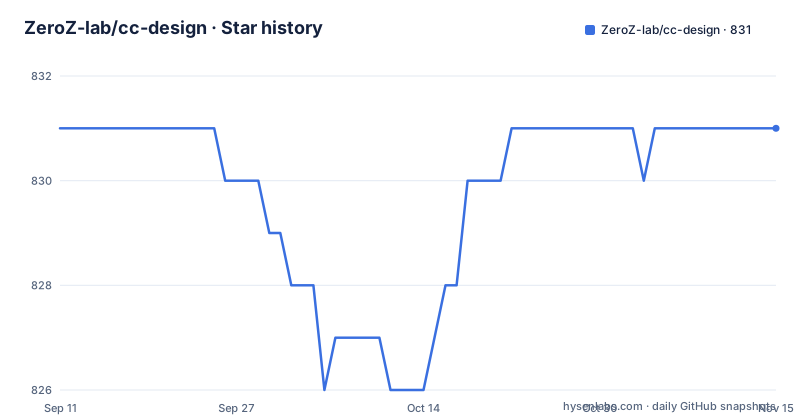
Star history
- ZeroZ-lab/cc-design831 ★ · +0
| Repository | 2026-09-11 | 2026-11-15 |
|---|---|---|
| ZeroZ-lab/cc-design | 831 | 831 |
0 Stars in the last 65 days, measured from the daily GitHub snapshot. Compare with other projects
Editorial analysis
Two activation paths, and the platform table names a different one
Installation is a three-step sequence in both host environments, and the three steps are character for character the same in each:
# 1. Add the cc-design marketplace
/plugin marketplace add ZeroZ-lab/cc-design

# 2. Install the plugin
/plugin install cc-design@cc-design

# 3. Reload plugins to activate
/reload-plugins
What differs is how you call it afterwards, and here the page contradicts itself. The quick start says Claude Code activates through a slash command written /cc-design:design, while the platform integration table lists Claude Code activation as a /design command and points at Commands plus SKILL.md as the integration. Codex is consistent between the two places, using a $cc-design reference backed by agents/openai.yaml. The repository carries parallel plugin directories for both hosts, .claude-plugin/ and .codex-plugin/, plus an agents/ directory and a skills/ directory, so both wirings exist on disk and it is the documentation that disagrees.
The flow line prints seven stages and the list describes six
How it works is shown as one arrow chain: Understand, Route, Plan, Approve, Build, Verify, Deliver. The numbered list underneath has six entries, and Route is not among them. Understand is described as cc-design asking targeted questions to lock the output type, audience and constraints. Plan presents a visible execution plan with goals, facts and assumptions. Approve is the gate: you approve before any code is written. Build works on a per-section preview pattern where you approve section by section rather than once at the end. Verify is a three-phase self-check covering structure, visuals and design excellence, and Deliver is a screenshot-verified artefact. So routing between the output types happens somewhere unnamed between the first two documented steps, which is a small gap for anyone trying to predict what the skill will do with an ambiguous request.
Three behavioural guarantees, and two of them are prohibitions
The guarantees are stated as flat negations, which is a reasonable way to describe a guardrail layer. Never builds without an approved plan. Never delivers without screenshot verification. Never uses AI slop patterns, with banned gradients, emoji spam and generic layouts named as the examples. A fourth line is a relief rather than a prohibition: follow-ups and minor edits skip the full discovery flow, so the questions-and-approval cycle is not repeated for a one-line change. The always-loaded quality layer is described as core-constraints.md, holding an Iron Law, a twelve-item anti-slop quick reference and a delivery checklist, alongside a typography system, a spacing scale and the screenshot verification requirement itself. That file is loaded on every run, which is why the contribution rules push everything technical out of SKILL.md instead.
The load manifest is the index, and two scripts police it
The repository is mostly content with a small amount of machinery, and the machinery is all in the root. load-manifest.json is the index of what can be loaded, VERSION holds the version as a file, test-prompts.json holds prompt fixtures, and SKILL.md is the entry document. The references/ directory is where technical material is supposed to live, the assets/ and templates/ directories hold what gets copied into an output, and screenshots/ holds the preview images linked from the page. Everything technical is expected to sit in a subdirectory that load-manifest.json points at, rather than inline in SKILL.md, so the index is the thing that keeps the token cost of the entry file down. The scripts directory holds the two generators named in the contribution steps, one that lints the manifest and one that builds the bundle catalogue, which means the catalogue you see in the docs is generated rather than hand-maintained.
Export needs Playwright and ffmpeg, the core install needs neither
Core installation is stated to have no extra dependencies. The optional ones are all about getting files out rather than building the page, and they arrive in one block:
# Playwright browser (for export and verification)
npx playwright install chromium

# Video and audio export
brew install ffmpeg          # macOS
sudo apt install ffmpeg      # Ubuntu/Debian
choco install ffmpeg         # Windows
That maps onto the export row in the capabilities table, which lists PDF in both multi-file and single-file form, PPTX as image and as editable, MP4 video and inline HTML. The MP4 and audio rows explain why ffmpeg is on the list: the audio capability is described as dual-track, sound effects plus background music, with a thirty-seven entry sound effect catalogue and ffmpeg doing the mixing. Playwright is needed twice over, because the same browser that takes the verification screenshots is the one that renders the export, so a headless browser is the single dependency the mandatory verification step depends on.
Changing first-turn behaviour means updating five files
The contributing section is short and prescriptive, and the fourth step is the one that constrains everything else. Fork and branch, then keep SKILL.md under two hundred lines and move technical content into references/. Add new references to load-manifest.json and to the routing table inside SKILL.md, so the entry document and the index cannot drift apart. Run the manifest linter and the bundle catalogue generator. And if the change touches first-turn behaviour specifically, update VERSION, SKILL.md, README.md and references/workflow.md, then run a behaviour contract script against a base ref you name. That last step exists because the behavioural guarantees in the documentation are the contract, so a change that alters how the skill opens a conversation has to be checked against the previous behaviour rather than only against the test prompts.
MIT is claimed in the README and no LICENSE file is in the tree
The licence is the loose end. The README ends with MIT, the recorded licence field for the repository is empty rather than an identifier, and the top-level entries, which run from .agents/, .claude-plugin/ and .codex-plugin/ through CLAUDE.md, EXAMPLES.md, SKILL.md, VERSION, load-manifest.json and test-prompts.json to the plugins/, references/, scripts/, skills/, templates/, assets/, docs/ and screenshots/ directories, contain no LICENSE file to check the wording against. There are also no GitHub releases, and the default branch is master rather than main. Two of the project's own dependencies point outward as well: the brand cloning row credits getdesign.md as the source of sixty-eight or more brand design systems, loaded progressively rather than vendored, and the preview section points at a demo deployed on Vercel. So the design content has an external upstream and the licence has no local text, both of which are worth settling before you build on it.
Editorial conclusion
cc-design fits a team that wants an agent to produce HTML design artefacts with a visible plan and a screenshot check before delivery, and that is willing to install Playwright and ffmpeg for the export paths. It is a poor fit for anyone expecting a component library or a framework, since the output is standalone HTML with inline JSX for prototypes and the brand designs come from an external catalogue rather than a vendored set. Before adopting it, resolve the activation command, since the quick start and the platform table name two different ones, read core-constraints.md, which is always loaded, and confirm you can run the lint and catalogue scripts the contribution flow depends on.
Frequently asked questions
How do I install the cc-design skill?
Three steps in either host: add the marketplace with /plugin marketplace add ZeroZ-lab/cc-design, install with /plugin install cc-design@cc-design, then run /reload-plugins. Codex is invoked with a $cc-design reference afterwards.
Does cc-design write code before I approve a plan?
No. The behavioural guarantee is that it never builds without an approved plan, and building itself works on a per-section preview pattern where you approve section by section rather than once at the end.
What does cc-design need beyond its core install?
Nothing for the core. Export and verification need npx playwright install chromium, and the video and audio exports need ffmpeg, installed by brew, apt or choco depending on the platform.
Where does cc-design keep its design styles and brand systems?
The twenty philosophy schools across five traditions live in references/design-styles.md. The brand systems, sixty-eight or more of them, are loaded progressively from getdesign.md rather than vendored into the repository.
What must change when I edit the cc-design skill behaviour?
Keep SKILL.md under two hundred lines and push technical content into references/, register new references in load-manifest.json and the SKILL.md routing table, then run the manifest linter and bundle catalogue generator. First-turn changes also touch VERSION, SKILL.md, README.md and references/workflow.md.
Official sources
Add this badge to your README
If you maintain this project, the badge below links readers to this analysis and shows its maintenance status from the daily GitHub snapshot. Paste the markdown into your README; add ?metric=license or ?metric=stars to the image URL for a different field.

[](https://hysenlabs.com/projects/zeroz-lab-cc-design)Star history chart for your README
[](https://hysenlabs.com/projects/zeroz-lab-cc-design)Was this useful?